
Windows下Nexus 5的Android 5.0以上版本官方ROM的刷机教程
博客链接:http://blog.csdn.net/qq1084283172/article/details/52334452
折腾Android逆向的时候,经常需要给Nexus 5刷机。最近给Nexus 5刷机的时候发现谷歌官方提供给Nexus 5的Android 4.X版本的官方ROM,按照官方的刷机方法能够比较顺利的刷机成功,但是Nexus 5的刷Android 5.0的官方ROM经常出现错误,后面也懒得折腾了,索性下载一些刷机助手之类的软件进行刷机,但是发现这些懒人刷机软件刷的ROM 不是不正宗就是垃圾App一堆或者已经内置了su软件,不满足我的需求。于是百度(不要鄙视额)搜了搜,也发现一些网友提供能一些解决的办法,有些还是比较有效的,下面就整理一下,方便自己查阅也方便需要的同学。
谷歌Nexus系列移动设备的官方ROM的下载地址:https://developers.google.com/android/nexus/images#hammerhead (可能需要自备梯子)
国内贴吧提供的部分Nexus系列移动设备的官方ROM的下载地址:http://tieba.baidu.com/p/4212134253
下面就以在Windows平台下Nexus 5手机刷谷歌官方Android 5.0的ROM为例,已经测试了谷歌官方的Android 5.0、Android5.10、Android5.11的ROM均能用下面的方法刷机成功。
在对Nexus 5进行线刷官方的ROM的前提:已经在电脑上为Nexus 5手机安装好手机驱动,手机设备与电脑使用USB数据线连接正常,Nexus 5手机已经被解锁(重要的前提之一)。
1.如果没有做好这些准备也比较简单,一般在手机连接电脑的时候,只需要在电脑上下载安装比如:豌豆荚之类的手机助手类应用,这些手机助手类应用就会自动根据手机设备的型号自动帮我们安装相关需要的驱动,然后将手机设备设置成开发者模式并在开发者模式下开启USB调试-允许连接USB后开启调试模式,按照提示允许电脑连接该手机设备(一般手机连接正常,豌豆荚这类应用都会有提示的)。
2.Nexus 5手机的解锁方法:手机与电脑通过USB数据线连接正常的情况下,在cmd命令环境下执行命令:adb
reboot-bootloader 进入Fast boot Mode模式,然后在cmd环境下执行命令:fastboot oem unlock按照提示界面的提示选择
Yes 对Nexus 5手机进行解锁处理。
Nexus 5的Android 5.0的官方ROM的下载地址为:https://dl.google.com/dl/android/aosp/hammerhead-lrx21o-factory-01315e08.tgz
下载之后的ROM的压缩文件的名称为:hammerhead-lrx21o-factory-01315e08.tgz,对下载的官方Android 5.0的ROM进行解压如下图,其中flash-all.bat是Windows平台的刷机脚本,flash-all.sh、flash-base.sh是Linux平台的刷机脚本,bootloader-hammerhead-hhz12d.img和radio-hammerhead-m8974a-2.0.50.2.21.img以及image-hammerhead-lrx21o.zip是刷机需要的重要文件,对这几个文件具体的不熟悉,具体不展开了。由于下面的刷机操作是在Windows平台进行的,因此我只关注的是刷脚本flash-all.bat而不去关注flash-all.sh、flash-base.sh这两个Liux平台的刷机脚本。
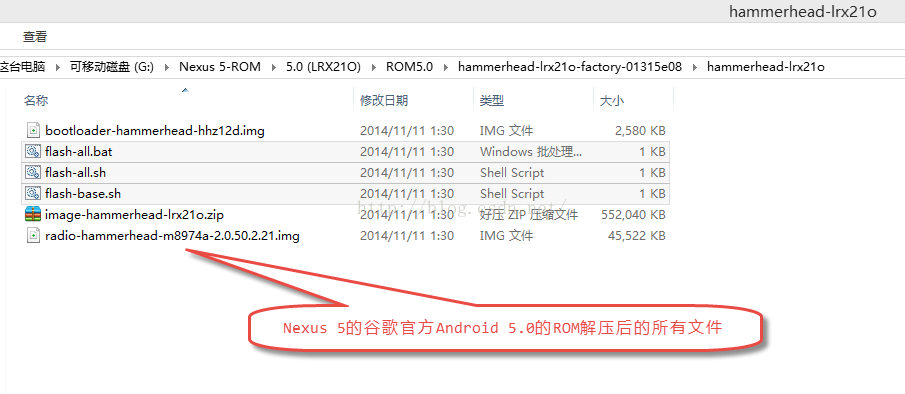
谷歌官方的提供的在Windows平台的刷机教程比较简单:手机(移动设备)与电脑以USB数据线连接正常,只需关闭手机设备,然后同时按下Nexus 5手机的电源键和音量减键(手机设备进入Fastboot Mode模式),然后在电脑上运行刷机脚本flash-all.bat就可以开始刷机之旅了,在刷机的过程中不要随意拔掉USB数据连接线,静静的等待刷机完成--提示脚本运行成功,点击任意键手机设备重启,刷机成功。
让Nexus 5进入Fastboot Mode模式的方法:
1.关闭手机,当让手机再次重启时,同时按住 音量下和电源键,直至进入bootloader;
2.手机与电脑通过USB数据线连接正常的情况下,在cmd命令环境下执行命令:adb
reboot-bootloader;
3.使用一些刷机大师等刷机软件,提供的刷机进入 Fastboot Mode模式
的功能。
当让手机设备进入Fastboot
Mode模式后,直接按照谷歌官方的刷机方法在windows平台直接运行flash-all.bat脚本进行刷机,会提示下面的错误,看样子是执行flash-all.bat脚本脚本中的 fastboot
-w update image-hammerhead-lrx21o.zip 命令出现错误。
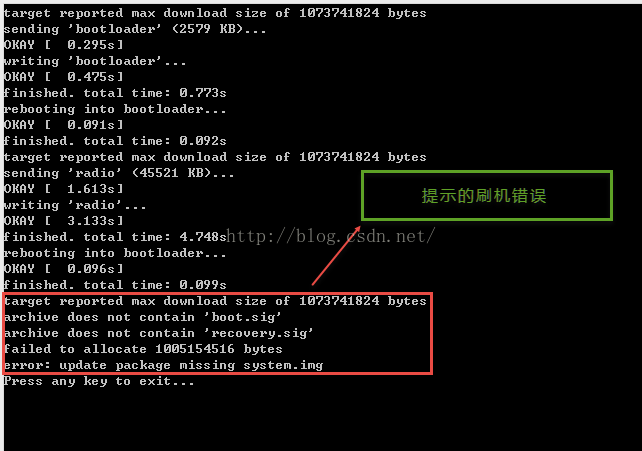
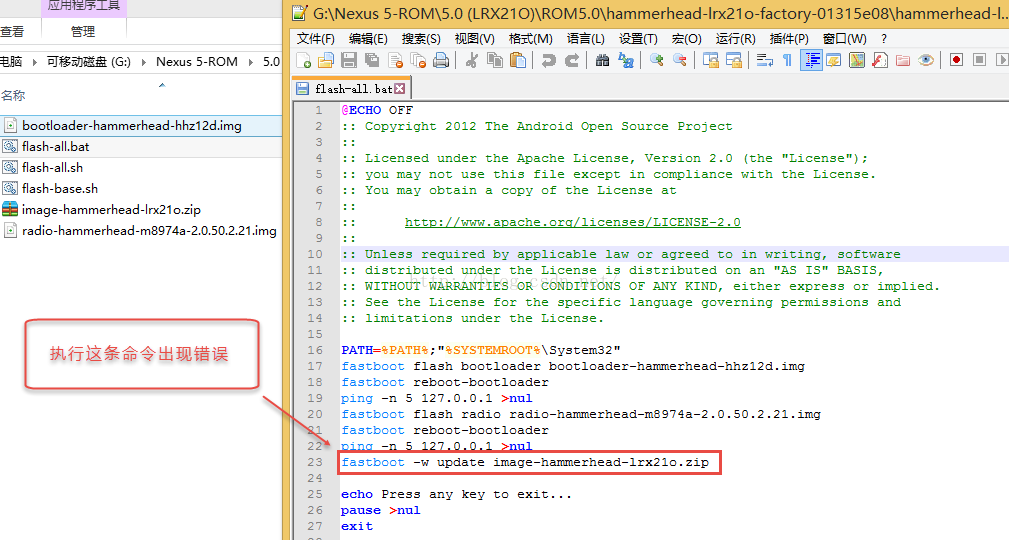
出现这类问题该怎么解决呢?需要将刷机需要的文件image-hammerhead-lrx21o.zip进行解压,然后分步骤的将相关的文件刷到Nexus
5手机上.对image-hammerhead-lrx21o.zip文件进行解压,然后将解压后的所有文件全部拷贝到刷机的根目录下如图:
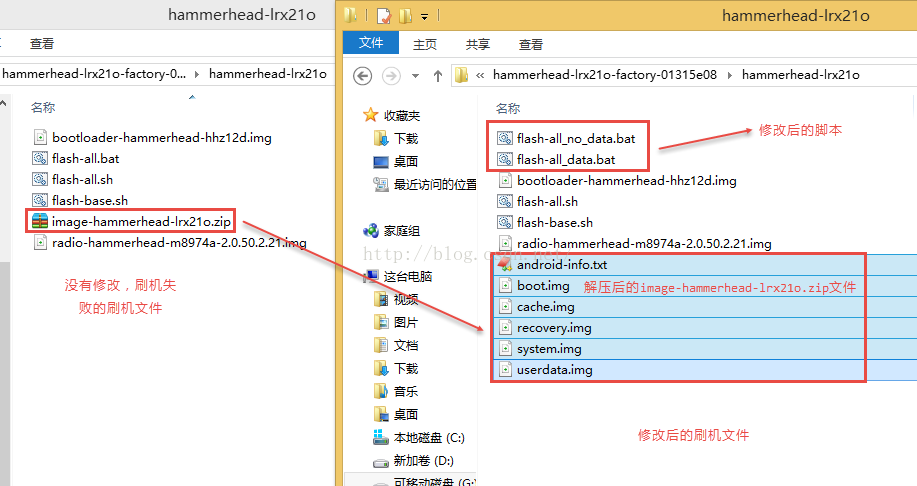
并修改刷机脚本文件flash-all.bat为flash-all_data.bat或者flash-all_no_data.bat,说明一下:flash-all_data.bat为保留用户数据方式的刷机,flash-all_no_data.bat为清除用户数据方式的刷机。flash-all.bat脚本的修改如下如图,当需要保留用户数据刷机就直接运行flash-all_data.bat脚本,当不需要保留用户数据刷机就运行flash-all_no_data.bat脚本刷机。
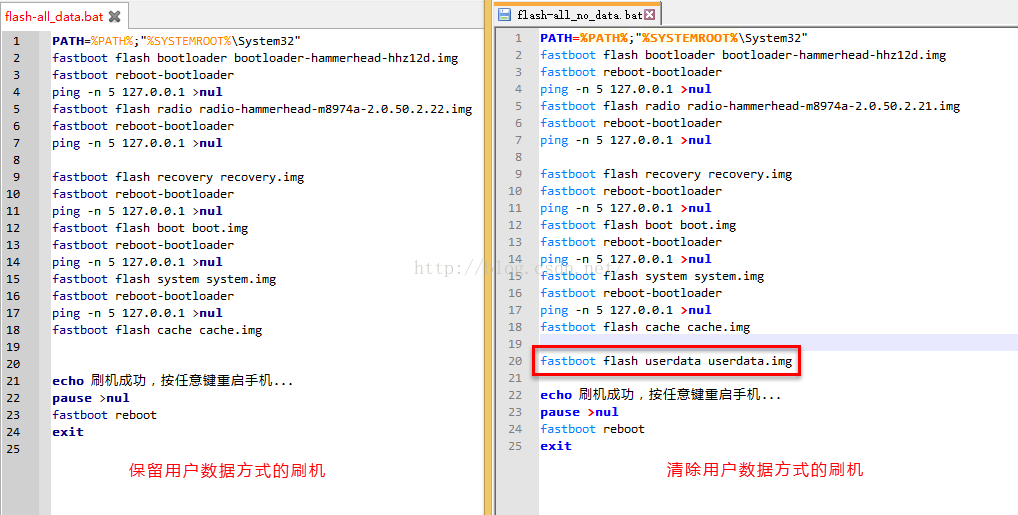
Nexus 5手机刷官方Android 5.0的ROM保留用户数据方式的刷机脚本下载地址:http://download.csdn.net/detail/qq1084283172/9614519
Nexus 5手机刷官方Android 5.0的ROM清除用户数据方式的刷机脚本下载地址:http://download.csdn.net/detail/qq1084283172/9614520
Nexus 5手机刷官方Android 5.1.1的ROM保留用户数据方式的刷机脚本下载地址:http://download.csdn.net/detail/qq1084283172/9614523
Nexus 5手机刷官方Android 5.1.1的ROM清除用户数据方式的刷机脚本下载地址:http://download.csdn.net/detail/qq1084283172/9614528
adb常见命令帮助:
</pre><pre name="code" class="java">Android Debug Bridge version 1.0.31

 -a                            - directs adb to listen on all interfaces for a connection

 -d                            - directs command to the only connected USB device

                                 returns an error if more than one USB device is present.

 -e                            - directs command to the only running emulator.

                                 returns an error if more than one emulator is running.

 -s <specific device>          - directs command to the device or emulator with the given

                                 serial number or qualifier. Overrides ANDROID_S

ERIAL

                                 environment variable.

 -p <product name or path>     - simple product name like 'sooner', or

                                 a relative/absolute path to a product

                                 out directory like 'out/target/product/sooner'.

                                 If -p is not specified, the ANDROID_PRODUCT_OUT

                                 environment variable is used, which must

                                 be an absolute path.

 -H                            - Name of adb server host (default: localhost)

 -P                            - Port of adb server (default: 5037)

 devices [-l]                  - list all connected devices

                                 ('-l' will also list device qualifiers)

 connect <host>[:<port>]       - connect to a device via TCP/IP

                                 Port 5555 is used by default if no port number is specified.

 disconnect [<host>[:<port>]]  - disconnect from a TCP/IP device.

                                 Port 5555 is used by default if no port number is specified.

                                 Using this command with no additional arguments

                                 will disconnect from all connected TCP/IP devices.

device commands:

  adb push [-p] <local> <remote>

                               - copy file/dir to device

                                 ('-p' to display the transfer progress)

  adb pull [-p] [-a] <remote> [<local>]

                               - copy file/dir from device

                                 ('-p' to display the transfer progress)

                                 ('-a' means copy timestamp and mode)

  adb sync [ <directory> ]     - copy host->device only if changed

                                 (-l means list but don't copy)

                                 (see 'adb help all')

  adb shell                    - run remote shell interactively

  adb shell <command>          - run remote shell command

  adb emu <command>            - run emulator console command

  adb logcat [ <filter-spec> ] - View device log

  adb forward --list           - list all forward socket connections.

                                 the format is a list of lines with the following format:

                                    <serial> " " <local> " " <remote> "\n"

  adb forward <local> <remote> - forward socket connections

                                 forward specs are one of:

                                   tcp:<port>

                                   localabstract:<unix domain socket name>

                                   localreserved:<unix domain socket name>

                                   localfilesystem:<unix domain socket name>

                                   dev:<character device name>

                                   jdwp:<process pid> (remote only)

  adb forward --no-rebind <local> <remote>

                               - same as 'adb forward <local> <remote>' but fails

                                 if <local> is already forwarded

  adb forward --remove <local> - remove a specific forward socket connection

  adb forward --remove-all     - remove all forward socket connections

  adb jdwp                     - list PIDs of processes hosting a JDWP transport

  adb install [-l] [-r] [-d] [-s] [--algo <algorithm name> --key <hex-encoded key> --iv <hex-encoded iv>] <file>

                               - push this package file to the device and install it

                                 ('-l' means forward-lock the app)

                                 ('-r' means reinstall the app, keeping its data)

                                 ('-d' means allow version code downgrade)

                                 ('-s' means install on SD card instead of internal storage)

                                 ('--algo', '--key', and '--iv' mean the file is encrypted already)

  adb uninstall [-k] <package> - remove this app package from the device

                                 ('-k' means keep the data and cache directories)

  adb bugreport                - return all information from the device

                                 that should be included in a bug report.

  adb backup [-f <file>] [-apk|-noapk] [-obb|-noobb] [-shared|-noshared] [-all]

[-system|-nosystem] [<packages...>]

                               - write an archive of the device's data to <file>.

                                 If no -f option is supplied then the data is written

                                 to "backup.ab" in the current directory.

                                 (-apk|-noapk enable/disable backup of the .apks themselves

                                    in the archive; the default is noapk.)

                                 (-obb|-noobb enable/disable backup of any installed apk expansion

                                    (aka .obb) files associated with each application; the default is noobb.)

                                 (-shared|-noshared enable/disable backup of the device's shared storage / SD card contents; the default is noshared.)

                                 (-all means to back up all installed applications)

                                 (-system|-nosystem toggles whether -all automatically includes

                                    system applications; the default is to include system apps)

                                 (<packages...> is the list of applications to be backed up.  If the -all or -shared flags are passed, then the package list is optional.  Applications explicitly given on the command line will be included even if -nosystem would ordinarily cause them to be omitted.)

  adb restore <file>           - restore device contents from the <file> backup archive

  adb help                     - show this help message

  adb version                  - show version num

scripting:

  adb wait-for-device          - block until device is online

  adb start-server             - ensure that there is a server running

  adb kill-server              - kill the server if it is running

  adb get-state                - prints: offline | bootloader | device

  adb get-serialno             - prints: <serial-number>

  adb get-devpath              - prints: <device-path>

  adb status-window            - continuously print device status for a specified device

  adb remount                  - remounts the /system partition on the device re

ad-write

  adb reboot [bootloader|recovery] - reboots the device, optionally into the bootloader or recovery program

  adb reboot-bootloader        - reboots the device into the bootloader

  adb root                     - restarts the adbd daemon with root permissions

  adb usb                      - restarts the adbd daemon listening on USB

  adb tcpip <port>             - restarts the adbd daemon listening on TCP on the specified port

networking:

  adb ppp <tty> [parameters]   - Run PPP over USB.

 Note: you should not automatically start a PPP connection.

 <tty> refers to the tty for PPP stream. Eg. dev:/dev/omap_csmi_tty1

 [parameters] - Eg. defaultroute debug dump local notty usepeerdns

adb sync notes: adb sync [ <directory> ]

  <localdir> can be interpreted in several ways:

  - If <directory> is not specified, both /system and /data partitions will be u

pdated.

  - If it is "system" or "data", only the corresponding partition

    is updated.

environmental variables:

  ADB_TRACE                    - Print debug information. A comma separated list of the following values

                                 1 or all, adb, sockets, packets, rwx, usb, sync, sysdeps, transport, jdwp

  ANDROID_SERIAL               - The serial number to connect to. -s takes prior

ity over this if given.

  ANDROID_LOG_TAGS             - When used with the logcat option, only these debug tags are printed.
感谢链接:
http://bbs.gfan.com/android-7776199-1-1.html
http://blog.csdn.net/lincyang/article/details/47836835
http://www.anruan.com/news/7128.html
Windows下Nexus 5的Android 5.0以上版本官方ROM的刷机教程的更多相关文章
- Windows下MySQL安装流程,8.0以上版本ROOT密码报错及修改
官网下载MySQL安装后,解压,添加环境变量,以管理员方式运行cmd,运行以下命令 mysqld --initialize --console mysqld -install net start my ...
- Windows下Nexus 5 改user模式为debug模式
博客链接:http://blog.csdn.net/qq1084283172/article/details/52337241 在学习Android软件安全的过程中,经常要用到Android的动态调试 ...
- react-native —— 在Windows下搭建React Native Android开发环境
在Windows下搭建React Native Android开发环境 前段时间在开发者头条收藏了 @天地之灵_邓鋆 分享的<在Windows下搭建React Native Android开发环 ...
- 继《在Windows下编译扩展OpenCV 3.1.0 + opencv_contrib》修订
在之前的<在Windows下编译扩展OpenCV 3.1.0 + opencv_contrib>中有些问题,后来由于时间不是很充足,故现在对其中的问题进行完善,如下所示对红色框框中的相应的 ...
- WINDOWS下好用的MongoDB 3.0以上客户端工具: NoSql Manager
WINDOWS下好用的MongoDB 3.0以上客户端工具: NoSql Manager https://www.mongodbmanager.com/download
- AOSP ON MAKO(在NEXUS 4上刷ANDROID 4.4 源代码包-下载/配置/编译/刷机)
AOSP ON MAKO(在NEXUS 4上刷ANDROID 4.4 源代码包-下载/配置/编译/刷机) 特别感谢google官方文档及AOSP源代码开放 參考链接: https://source.a ...
- 对Android 8.0以上版本通知点击无效的一次分析
版权声明:本文为xing_star原创文章,转载请注明出处! 本文同步自http://javaexception.com/archives/178 对Android 8.0以上版本通知点击无效的一次分 ...
- 快速解决设置Android 23.0以上版本对SD卡的读写权限无效的问题
快速解决设置Android 23.0以上版本对SD卡的读写权限无效的问题 转 https://www.jb51.net/article/144939.htm 今天小编就为大家分享一篇快速解决设置And ...
- 小米刷机教程和GAE for android
小米上的刷机教程:http://www.miui.com/getrom.php?r=2gae for android :https://github.com/madeye/gaeproxy/wiki
随机推荐
- 聊聊Dotnet的垃圾回收
最近在做一个项目,用到了大量的非托管技术,所以垃圾回收变得很重要. 在说垃圾回收之前,先说说两个概念: 托管代码,是由CLR管理的代码 非托管代码,是由操作系统直接执行的代码 在早期C++的时候, ...
- rabbitmq如何保证消息可靠性不丢失
目录 生产者丢失消息 代码模拟 事务 confirm模式确实 数据退回监听 MQ事务相关软文推荐 MQ丢失信息 消费者丢失信息 之前我们简单介绍了rabbitmq的功能.他的作用就是方便我们的消息解耦 ...
- POJ-3259(最短路+Bellman-Ford算法判负圈)
Wormholes POJ-3259 这题是最短路问题中判断是否存在负圈的模板题. 判断负圈的一个关键就是理解:如果在图中不存在从s可达的负圈,最短路径不会经过一个顶点两次.while循环最多执行v- ...
- 基于云原生DevOps服务自动化部署前端项目学习总结
本文主要以部署前端Vue项目为例,讲述了如何基于云原生DevOps服务自动化部署前端项目~从开发完成到线上环境,我们只需提交代码即可~ 一.引言 作为一名开发人员,日常工作中我们除了需要负责代码的开发 ...
- Thinkphp3分析与审计
0x00 前言: 这篇是去年组内分享的时候给小伙伴写的0基础快速审计tp3系列的文章,主要是对架构做个分析以及审计一些sql注入漏洞~ 现在想想打算放出来,过了一年了,可能里面有一些问题,望看到的大佬 ...
- 从零学脚手架(三)---webpack属性详解
如果此篇对您有所帮助,在此求一个star.项目地址: OrcasTeam/my-cli 在上一篇中,介绍了webpack的entry.output.plugins属性. 在这一篇,接着介绍其它配置属性 ...
- java实现下载器(以及创建一个URL对象)
java实现下载器(以及创建一个URL对象) 1.思路讲解: (1)注意路径:是网络路径噢 (2)创建创建网路协议对象(远程对象):HttpURLConnection urlConnection (3 ...
- java实现所有排序算法
package sort;public class Sort { public static void BubbleSort(int[] arr) { //TODO 冒泡排序 for(int i=ar ...
- P2261 [CQOI2007]余数求和 【整除分块】
一.题面 P2261 [CQOI2007]余数求和 二.分析 参考文章:click here 对于整除分块,最重要的是弄清楚怎样求的分得的每个块的范围. 假设$ n = 10 ,k = 5 $ $$ ...
- Spring笔记(四)
Spring JdbcTemplate 一.JdbcTemplate概念及使用 1. 什么是JdbcTemplate: Spring框架对JDBC进行封装,使用JdbcTemplate方便实现对数据库 ...