
jenkins内置变量的使用
参考链接: https://www.cnblogs.com/puresoul/p/4828913.html
一、查看Jenkins有哪些环境变量
1、新建任意一个job
2、增加构建步骤:Execute shell 或 Execute Windows batch command
3、点击输入框下方的“可用环境变量”
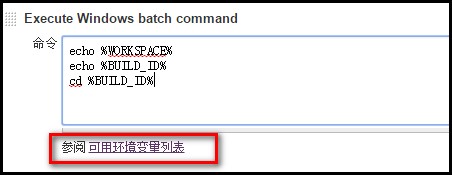
4、可以看到有如下变量供使用:
| 变量名 | 解释 |
| BUILD_NUMBER | The current build number, such as "153" |
| BUILD_ID | The current build ID, identical to BUILD_NUMBER for builds created in 1.597+, but a YYYY-MM-DD_hh-mm-ss timestamp for older builds |
| BUILD_DISPLAY_NAME | The display name of the current build, which is something like "#153" by default. |
| JOB_NAME | Name of the project of this build, such as "foo" or "foo/bar". (To strip off folder paths from a Bourne shell script, try: ${JOB_NAME##*/}) |
| BUILD_TAG | String of "jenkins-${JOB_NAME}-${BUILD_NUMBER}". Convenient to put into a resource file, a jar file, etc for easier identification. |
| EXECUTOR_NUMBER | The unique number that identifies the current executor (among executors of the same machine) that’s carrying out this build. This is the number you see in the "build executor status", except that the number starts from 0, not 1. |
| NODE_NAME | Name of the slave if the build is on a slave, or "master" if run on master |
| NODE_LABELS | Whitespace-separated list of labels that the node is assigned. |
| WORKSPACE | The absolute path of the directory assigned to the build as a workspace. |
| JENKINS_HOME | The absolute path of the directory assigned on the master node for Jenkins to store data. |
| JENKINS_URL | Full URL of Jenkins, like http://server:port/jenkins/ (note: only available if Jenkins URL set in system configuration) |
| BUILD_URL | Full URL of this build, like http://server:port/jenkins/job/foo/15/ (Jenkins URL must be set) |
| SVN_REVISION | Subversion revision number that's currently checked out to the workspace, such as "12345" |
| SVN_URL | Subversion URL that's currently checked out to the workspace. |
| JOB_URL | Full URL of this job, like http://server:port/jenkins/job/foo/ (Jenkins URL must be set) |
二、使用Jenkins的内置变量
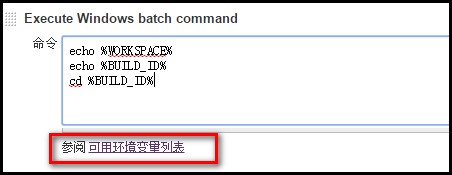
1、在Execute shell 或 Execute Windows batch command文本框中使用,使用方法:%变量名%,如下图
2、结合Ant,在build.xml文件中使用:
1、添加如下第4行代码:<property environment="env"/>
2、使用方法:${env.WORKSPACE}

 1 <?xml version="1.0" encoding="UTF-8"?>

 2

 3 <project name="ant-test" default="run" basedir=".">

 4     <property environment="env"/>

 5

 6     <target name="clean">

 7         <mkdir dir="${env.WORKSPACE}/results/${env.BUILD_ID}" />

 8     </target>

 9

10 </project>
jenkins内置变量的使用的更多相关文章
- [原]Jenkins(十八) jenkins再出发之jenkins 内置变量
1.选择一个project的config选项: 2.选择build选项卡,选择Execute Windows batch command 3.会出现一个内置变量的list 连接按钮: 4.list表内 ...
- jenkins 内置变量
Jenkins 有一些内置的变量可以使用.主要是: 邮件的配置变量,可以在发送邮件的时候使用. 环境变量 1. 邮件的配置变量 ${GIT_BRANCH} - build 的 Git 分支 ${FIL ...
- Jenkins内置环境变量的使用
一.查看Jenkins有哪些环境变量 1.新建任意一个job 2.增加构建步骤:Execute shell 或 Execute Windows batch command 3.点击输入框下方的“可用环 ...
- Maven系列三Maven内置变量
Maven内置变量说明: ${basedir} 项目根目录(即pom.xml文件所在目录) ${project.build.directory} 构建目录,缺省为target目录 ${project. ...
- Maven的内置变量
Maven内置变量说明: ${basedir} 项目根目录(即pom.xml文件所在目录) ${project.build.directory} 构建目录,缺省为target目录 ${project. ...
- nginx的那些内置变量
nginx在配置文件nginx.conf中可以使用很多内置变量,配置如下: location /info { add_header 'Content-Type' 'text/html'; echo & ...
- Maven内置变量说明
Maven内置变量说明: ${basedir} 项目根目录 ${project.build.directory} 构建目录,缺省为target ${project.build.outputDirect ...
- 学习笔记——Maven 内置变量
Maven内置变量说明: ${basedir} 项目根目录(即pom.xml文件所在目录) ${project.build.directory} 构建目录,缺省为target目录 ${project. ...
- makefile 分析 -- 内置变量及自动变量
makefile 分析1 -p 选项,可以打印出make过程中的数据库, 下面研究一下内置的变量和规则. -n 选项, 只运行,不执行, -d 选项,相当于--debug=a, b(basic), ...
随机推荐
- 用SpringBoot实现策略模式
问题的提出 阅读别人代码的时候最讨厌遇到的就是大段大段的if-else分支语句,一般来说读到下面的时候就忘了上面在判断什么了.很多资料上都会讲到使用策略模式来改进这种代码逻辑. 策略模式的类图如下: ...
- 从单体迈向 Serverless 的避坑指南
作者 | 不瞋 导读:用户需求和云的发展两条线推动了云原生技术的兴起.发展和大规模应用.本文将主要讨论什么是云原生应用,构成云原生应用的要素是什么,什么是 Serverless 计算,以及 Serve ...
- ShardingSphere 知识库更新 | 官方样例集助你快速上手
Apache ShardingSphere 作为 Apache 顶级项目,是数据库领域最受欢迎的开源项目之一.经过 5 年多的发展,ShardingSphere 已获得超 14K Stars 的关注, ...
- MSSQL还原数据库,更改用户登陆权限
有的时候还原完数据库后,使用账号登陆不进去,报告没有这个用户的时候,可以使用以下sql解决: sp_change_users_login 'update_one','username','userna ...
- 沟谷网络的提取及沟壑密度的计算(ArcPy实现)
一.背景 沟壑密度是描述地面被水道切割破碎程度的一个指标.沟壑密度是气候.地形.岩性.植被等因素综合影响的反映.沟壑密度越大,地面越破碎,平均坡度增大,地表物质稳定性降低,且易形成地表径流,土壤侵蚀加 ...
- 洛谷3163 CQOI2014危桥 (最大流)
一开始想了一发费用流做法然后直接出负环了 首先,比较显然的思路就是对于原图中没有限制的边,对应的流量就是\(inf\),如果是危桥,那么流量就应该是\(2\). 由于存在两个起始点,我们考虑直接\(s ...
- 多项式(polynomial)
多项式(polynomial) 题目大意: 给出一个 n 次多项式 \(f(x)=\sum_{i=0}^na_ix^i\) 对于\(k ≤ x ≤ k + l − 1\) 的\(l\) 个\(x\), ...
- python中dump与dumps实现序列化
前言 使用中如果我们想把python可识别对象的dict类型的数据通过str类型写入文件或者存入变量中就需要用到dump与dumps 详解 dump 1.新建个dict文件,然后将dict文件存入一个 ...
- vue 2.0源码学习笔记—new Vue ( Vue 初始化过程 )
new Vue(Vue 初始化) 一个vue实例化到底经历了什么?已下是博主自己的总结,不正确的地方请指出,谢谢~ 一.简述 从使用角度来看,挂载的顺序如下 1. $slots 2. $scopedS ...
- airtext初始化(一)