
Jenkins内置环境变量的使用
一、查看Jenkins有哪些环境变量
1、新建任意一个job
2、增加构建步骤:Execute shell 或 Execute Windows batch command
3、点击输入框下方的“可用环境变量”
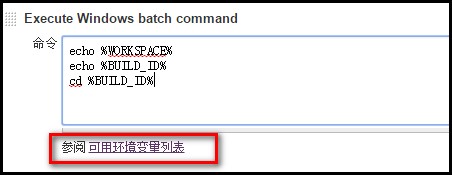
4、可以看到有如下变量供使用:
| 变量名 | 解释 |
| BUILD_NUMBER | The current build number, such as "153" |
| BUILD_ID | The current build ID, identical to BUILD_NUMBER for builds created in 1.597+, but a YYYY-MM-DD_hh-mm-ss timestamp for older builds |
| BUILD_DISPLAY_NAME | The display name of the current build, which is something like "#153" by default. |
| JOB_NAME | Name of the project of this build, such as "foo" or "foo/bar". (To strip off folder paths from a Bourne shell script, try: ${JOB_NAME##*/}) |
| BUILD_TAG | String of "jenkins-${JOB_NAME}-${BUILD_NUMBER}". Convenient to put into a resource file, a jar file, etc for easier identification. |
| EXECUTOR_NUMBER | The unique number that identifies the current executor (among executors of the same machine) that’s carrying out this build. This is the number you see in the "build executor status", except that the number starts from 0, not 1. |
| NODE_NAME | Name of the slave if the build is on a slave, or "master" if run on master |
| NODE_LABELS | Whitespace-separated list of labels that the node is assigned. |
| WORKSPACE | The absolute path of the directory assigned to the build as a workspace. |
| JENKINS_HOME | The absolute path of the directory assigned on the master node for Jenkins to store data. |
| JENKINS_URL | Full URL of Jenkins, like http://server:port/jenkins/ (note: only available if Jenkins URL set in system configuration) |
| BUILD_URL | Full URL of this build, like http://server:port/jenkins/job/foo/15/ (Jenkins URL must be set) |
| SVN_REVISION | Subversion revision number that's currently checked out to the workspace, such as "12345" |
| SVN_URL | Subversion URL that's currently checked out to the workspace. |
| JOB_URL | Full URL of this job, like http://server:port/jenkins/job/foo/ (Jenkins URL must be set) |
二、使用Jenkins的内置变量
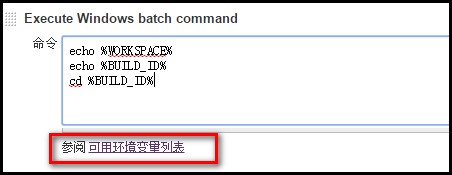
1、在Execute shell 或 Execute Windows batch command文本框中使用,使用方法:%变量名%,如下图
2、结合Ant,在build.xml文件中使用:
1、添加如下第4行代码:<property environment="env"/>
2、使用方法:${env.WORKSPACE}
 <?xml version="1.0" encoding="UTF-8"?>

 <project name="ant-test" default="run" basedir=".">

     <property environment="env"/>

     <target name="clean">

         <mkdir dir="${env.WORKSPACE}/results/${env.BUILD_ID}" />

     </target>

 </project>
Jenkins内置环境变量的使用的更多相关文章
- shell里的IFS内置环境变量
IFS 的全称是 Interal Field Separator ,即“内部区域分隔符”,它也是一个内置环境变量,存储着默认的文本分隔符,默认下这分隔符是空格符(space character),制表 ...
- jenkins 内置变量
Jenkins 有一些内置的变量可以使用.主要是: 邮件的配置变量,可以在发送邮件的时候使用. 环境变量 1. 邮件的配置变量 ${GIT_BRANCH} - build 的 Git 分支 ${FIL ...
- jenkins内置变量的使用
参考链接: https://www.cnblogs.com/puresoul/p/4828913.html 一.查看Jenkins有哪些环境变量 1.新建任意一个job 2.增加构建步骤:Execu ...
- GLSL语言内置的变量详解
GLSL语言内置的变量,包括内置的顶点属性(attribute).一致变量(uniform).易变变量(varying)以及常量(const),一方面加深印象,另一方面今天的文章可以为以后的编程做查询 ...
- Flask内置URL变量转换器
Flask内置URL变量转换器: 转换器通过特定的规则执行,”<转换器: 变量名>”.<int: year>把year的值转换为证书,因此我们可以在视图函数中直接对year变量 ...
- MySQL-配置环境变量及修改密码(附-mysql安装教程)
MySQL-配置环境变量和修改密码 mysql的安装教程:链接:https://pan.baidu.com/s/1rrPT2X0yRF58kN8jZZx-Mg 密码:55dh 一. 闪退问题 1.1. ...
- [原]Jenkins(十八) jenkins再出发之jenkins 内置变量
1.选择一个project的config选项: 2.选择build选项卡,选择Execute Windows batch command 3.会出现一个内置变量的list 连接按钮: 4.list表内 ...
- [Jenkins] 如何修改jenkins上的环境变量
现象 当本地的环境变量发生变化时,在jenkins 构建时里面访问的环境变量仍是之前旧的(未更新的)导致构建出现错误,比如我以我所遇到的问题进行简单写下,下面例子中我是涉及到修改 PYTHONPATH ...
- osg内置shader变量
uniform int osg_FrameNumber:当前OSG程序运行的帧数: uniform float osg_FrameTime:当前OSG程序的运行总时间: uniform float o ...
随机推荐
- shareSdk分享图片
/** * 只分享图片 * * @param bitmap bitmap */ private void sharedImage(Bitmap bitmap) { RxPermissions rxPe ...
- session and cookie简析
无状态应用程序(cookies.session等机制出现的背景) Web应用程序服务器通常是“无状态的”: 每个HTTP请求都是独立的; 服务器无法判断2个请求是来自同一个浏览器还是用户. Web服务 ...
- Linux命令:read
在shell中,内建(builtin)命令read,格式如下: read [-ers] [-a aname] [-d delim] [-i text] [-n nchars] [-N nchars] ...
- Linux-vim文本编辑器
[Vim文本编辑器] vim的三种模式:一般模式.编辑模式.命令模式. * 一般模式: 当你vim filename 编辑一个文件时,一进入该文件就是一般模式了.在这个模式下,你可以做的操作有,上下移 ...
- oracle sql developer怎么创建用户
学习数据库的时候,用管理员账户,会有会有很多系统自创的表,很麻烦.所以要自己创建普通用户. create user 用户名 identified by 密码;--创建用户 grant connect, ...
- python的条件语句
Python程序语言指定任何非0和非空(null)值为true,0 或者 null为false. Python 编程中 if 语句用于控制程序的执行,基本形式为: if 判断条件: 执行语句…… el ...
- AltiumDesigner PCB中栅格与格点的切换
PCB中通过快捷键Ctrl+G,进入设置界面. 在弹出的对话框中,在Display,Coarse选择Lines为栅格,Dots为格点,Do Not Draw为无任何显示.
- 高级编程T-SQL函数
--字符串函数--1.LEN:返回一个字符串的字符数select LEN('中国'),LEN('abc123!')select LEN('abc '+'1'),LEN(' abc')--2.DataL ...
- 一个JAVA程序员经常访问的网站
综合技术网站: CSDN http://www.csdn.net/ 51CTO http://www.51cto.com/ 开源中国社区 http:/ ...
- Android抓取log日志过滤
前提:Android SDK已安装并配置环境变量 1.手机USB调试模式打开,连接PC 2.cmd窗口,执行adb logcat >log.log // 输出日志到一个log文件 或者执行a ...