
taro安装使用 Node Sass does not yet support your current environment: Windows 64-bit with Unsupported runtime (64)错误
1、 安装node.js
官网下载:https://nodejs.org/en/ 下载推荐版本;
2、 Npm安装慢,可以使用cnpm,安装淘宝镜像:
npm install -g cnpm --registry=https://registry.npm.taobao.org
3、 全局安装 Taro 开发工具 @tarojs/cli
cnpm install -g @tarojs/cli
4、 进入项目目录,使用命令创建模板项目
taro init myApp
根据提示选择自己需要的安装
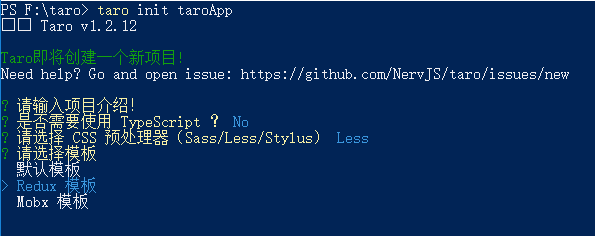
5、 以h5为例,创建项目完毕,运行项目
cd myApp
npm run dev:h5
运行项目报错:
./node_modules/@tarojs/components/src/components/text/style/index.scss)
Module build failed (from ./node_modules/sass-loader/lib/loader.js):
Error: Node Sass does not yet support your current environment: Windows 64-bit with Unsupported runtime (64)
For more information on which environments are supported please see:
https://github.com/sass/node-sass/releases/tag/v4.8.3
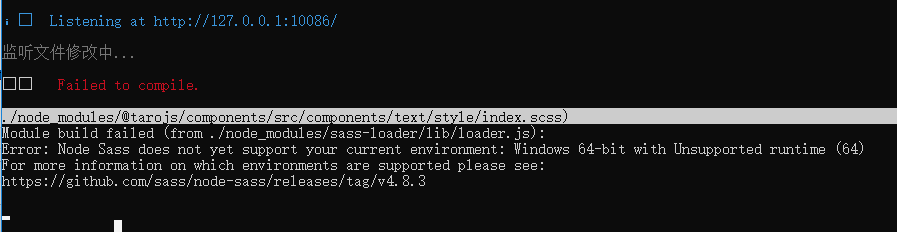
需在当前项目重新安装sass:
cnpm install node-sass

到此,项目便可正常运行。
6、taro不仅支持微信小程序还支持百度小程序,支付宝小程序,H5,react native等等,具体可进入官网了解更多,官网地址:
https://nervjs.github.io/taro/docs/GETTING-STARTED.html
taro安装使用 Node Sass does not yet support your current environment: Windows 64-bit with Unsupported runtime (64)错误的更多相关文章
- Error: Node Sass does not yet support your current environment: Windows 64-bit with Unsupported runtime (64)
错误提示: Error: Node Sass does not yet support your current environment: Windows 64-bit with Unsupporte ...
- Node Sass does not yet support your current environment: Windows 64-bit然如何解决,cnpm此问题解决方法
这里直接说了node sass不支持当前环境,所以可以直接删掉原来不支持本机的node sass,再重新安装就行了 删除: npm uninstall --save node-sass 安装: npm ...
- ERROR in Node Sass does not yet support your current environment: Windows 64-bit with Unsupported runtime (64)
该问题说的是当前环境不支持node-sass,网上说了一下是要安装node 7一下版本才支持. 这里改使用less-loader,及less
- 打开前端工程 Node Sass does not yet support your current environment: Windows 64-bit
卸载当前sass版本,重新安装sass 打开cmd进入工程文件夹: 删除 npm uninstall --save node-sass 安装 npm install --save node-sass ...
- 启动项目时出现Error: Node Sass does not yet support your current environment: Windows 64-bit with Unsupported runtime (72)
前几天趁假期重新装了一次系统,重新安装各种配置之后再启动项目的时候就报这个错误 第一反应就是去搜这个错误怎么解决,搜来搜去基本上都是让我重新安装node-sass,但我重装node-sass的时候又出 ...
- npm run dev运行Vue项目报错:Node Sass does not yet support your current environment
导入Vue项目后,#npm run dev 报错: error in ./src/pages/hello.vue Module build failed: Error: Node Sass does ...
- vue项目运行报错:Module bulid failed: Error: Node Sass does not yet support your current environment
出错起因: 从GitLab clone项目 --> 用 npm install 命令下载依赖包 --> #npm run dev,报错 错误截图: 解决方法: 思路:单独 i ...
- Node Sass does not yet support your current environment解决办法
在React项目中,使用了sass.之前运行的好好的,今天突然报错,提示当前环境不支持sass模块,然后就百度了下,发现有相同问题的.原来问题是之前开发时node是6.x的版本,几天前更新到最新10. ...
- Node Sass does not yet support your current environment: Linux 64-bit with Unsupported runtime
环境: ubuntu18 webstorm vue项目 报错原因: 缺少相关依赖 解决方法: npm rebuild node-sass 还未解决: npm uninstall --save node ...
随机推荐
- C# 字符串转为DateTime类型
方法一:Convert.ToDateTime(string) string格式有要求,必须是yyyy-MM-dd hh:mm:ss ================================== ...
- python初识,变量,条件判断语句,基本数据类型,while循环语句
python文件后缀可以是任意,但是导入模块时不用.py后缀时会报错 python文件的两种执行方式: python解释器 python文件路径 进入python解释权,事实获取执行结果 在Linux ...
- Android学习笔记一之第一个Android程序
/** *Title:总结昨天下午至今天上午的学习成果 *Author:zsg *Date:2017-8-13 / 一.了解Android 1.Android架构 Android大致可分为四层架构:L ...
- Vue 封装可向左向右查看图片列表的组件
<template> <div class="content-container"> <div class="content-contain ...
- NFS服务器工作原理
一.NFS简介 NFS是Network File System的缩写,中文称为网络文件系统,它的主要功能是通过网络(一个局域网)让不同的主机系统之间可以共享文件或目录,NFS的客户端(一般为应用服务器 ...
- 学会使用box-sizing布局
盒子模型 关于CSS重要的一个概念就是CSS盒子模型.它控制着页面这些元素的高度和宽度.盒子模型多少会让人产生一些困惑,尤其当涉及到高度和宽度计算的时候.真正盒子的宽度(在页面呈现出来的宽度)和高度, ...
- 目标检测faster rcnn error == cudaSuccess (2 vs. 0) out of memory
想尝试 更深更强的网络,或者自己写了一个费显存的层,发现1080 ti的11G显存不够用了,老师报显存不够怎么办? Check failed: error == cudaSuccess (2 vs. ...
- 面试常问MySQL性能优化问题
知识综述: [1] MySQL中锁的种类: 常见的表锁和行锁,也有Metadata Lock等等,表锁是对一整张表加锁,分为读锁和写锁,因为是锁住整张表,所以会导致并发能力下降,一般是做ddl处理时使 ...
- eclipse与idea快捷键对比以及idea debug、git快捷键
eclipse与idea快捷键 表格中的空格都是忘记了~ 功能 eclipse idea 生成返回值对象 alt+shift+L ctrl+alt+V 找到启动类 ctrl+alt+Home 类的 ...
- k8s 代码生成
https://blog.openshift.com/kubernetes-deep-dive-code-generation-customresources/ # 代码生成的工作目录,也就是我们的项 ...