
启动项目时出现Error: Node Sass does not yet support your current environment: Windows 64-bit with Unsupported runtime (72)
前几天趁假期重新装了一次系统,重新安装各种配置之后再启动项目的时候就报这个错误

第一反应就是去搜这个错误怎么解决,搜来搜去基本上都是让我重新安装node-sass,但我重装node-sass的时候又出现了新的错误,整了半天还是没整好
然后静下心来仔细看了一下错误提示,查看了下面那个github网址https://github.com/sass/node-sass/releases/tag/v4.9.3看到了这个
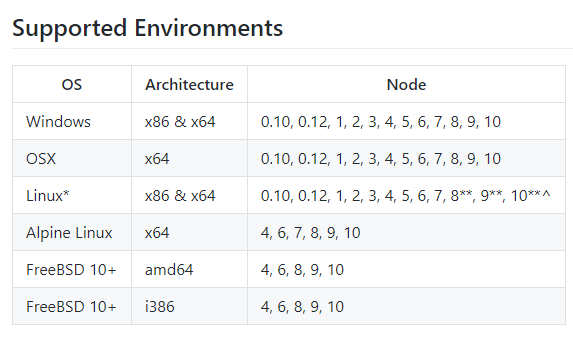
然后就知道是node版本的问题了,我的是v12.x,换了一个10.5的版本就好了
启动项目时出现Error: Node Sass does not yet support your current environment: Windows 64-bit with Unsupported runtime (72)的更多相关文章
- Error: Node Sass does not yet support your current environment: Windows 64-bit with Unsupported runtime (64)
错误提示: Error: Node Sass does not yet support your current environment: Windows 64-bit with Unsupporte ...
- taro安装使用 Node Sass does not yet support your current environment: Windows 64-bit with Unsupported runtime (64)错误
1. 安装node.js 官网下载:https://nodejs.org/en/ 下载推荐版本: 2. Npm安装慢,可以使用cnpm,安装淘宝镜像: npm install -g cnpm - ...
- npm run dev运行Vue项目报错:Node Sass does not yet support your current environment
导入Vue项目后,#npm run dev 报错: error in ./src/pages/hello.vue Module build failed: Error: Node Sass does ...
- Node Sass does not yet support your current environment: Windows 64-bit然如何解决,cnpm此问题解决方法
这里直接说了node sass不支持当前环境,所以可以直接删掉原来不支持本机的node sass,再重新安装就行了 删除: npm uninstall --save node-sass 安装: npm ...
- ERROR in Node Sass does not yet support your current environment: Windows 64-bit with Unsupported runtime (64)
该问题说的是当前环境不支持node-sass,网上说了一下是要安装node 7一下版本才支持. 这里改使用less-loader,及less
- 打开前端工程 Node Sass does not yet support your current environment: Windows 64-bit
卸载当前sass版本,重新安装sass 打开cmd进入工程文件夹: 删除 npm uninstall --save node-sass 安装 npm install --save node-sass ...
- 【Problem】前端项目运行:Module build failed:Error Node Sass does not yet support my current environmen
我在运行renren-fast-vue前端项目时,安装完依赖cnpm install 启动服务npm run dev 出现问题. Module build failed: Error: Node Sa ...
- vue项目运行报错:Module bulid failed: Error: Node Sass does not yet support your current environment
出错起因: 从GitLab clone项目 --> 用 npm install 命令下载依赖包 --> #npm run dev,报错 错误截图: 解决方法: 思路:单独 i ...
- Node Sass does not yet support your current environment解决办法
在React项目中,使用了sass.之前运行的好好的,今天突然报错,提示当前环境不支持sass模块,然后就百度了下,发现有相同问题的.原来问题是之前开发时node是6.x的版本,几天前更新到最新10. ...
随机推荐
- 提交代码到github
1. 下载git 点击download下载即可.下载地址:https://gitforwindows.org/ 2. 注册github github地址:https://github.com/ 一定要 ...
- 两台centos,用yum install 安装,一台成功,一台失败
记录一下问题: 两台centos,用yum install 安装软件,一台成功,一台失败 第一步:查看yum源 yum repolist enabled 疑问:centos安装的方法一致,但yum源 ...
- Django Rest Framewoek
1 什么是RESTful REST 指的是一种软件架构风格.设计风格,而不是标准,只是提供了一组设计原则和约束条件.满足这些约束条件和原则的应用程序或设计就是 RESTful. 2 RESTful设计 ...
- BUUCTF--刮开有奖
文件链接:https://buuoj.cn/files/abe6e2152471e1e1cbd9e5c0cae95d29/8f80610b-8701-4c7f-ad60-63861a558a5b.ex ...
- redis学习(二)
简单了解一下 1.build.gradle中添加 依赖 org.springframework.boot:spring-boot-starter-data-redis //定义依赖:声明项目中需要哪 ...
- 有关css的兼容问题
兼容性 1 页面在不同浏览器中可能显示不同 在IE6下 子级的宽度会撑开父级设置好的宽度 温馨提示:和模型的计算一定要精确,IE浏览器可能显示不同 兼容性 2 在IE6中,元素浮 ...
- linux系统部署war包,查看tomcat日志
1.部署war包app/tomcat/bin在tomcat/bin 目录下启动 .startup.sh,在启动过程中tomcat会对war包进行解压,形成相应的项目目录 执行命令:./startup. ...
- 源码分析--HashSet(JDK1.8)
HashSet为无序不可重复集合.底层几乎全部借助HashMap实现,比较简单.本篇简要分析一下HashSet源码. 首先是成员变量: 1.真正保存数据的HashMap实例 private trans ...
- Sass-unitless()函数
unitless() 函数相对来说简单明了些,只是用来判断一个值是否带有单位,如果不带单位返回的值为 true,带单位返回的值为 false: >> unitless(100) true ...
- Ubuntu查找软件命令
查找软件: apt-cache search <your search item>