
第六篇-以隐式意图(Implicit Intent)呼叫系统服务
一、新建一个layout5.xml,同样换为constriant模式。
二、拖动两个Button到预览界面,第一个按钮名字改为DISPLAY WEBPAGE,第二个按钮名字改为MAKE A CALL。第一个按钮连接上左右。width改为match。第二个按钮连接左右,上方连第一个按钮的下方。width改为match,与第一个按钮的距离改为16。切换到text模式,在第一个按钮下添加android:onClick="openWebpage";第二个按钮下添加android:onClick=makecall";alt+enter就在.java文件下建了这两个函数。
三、切换到main.java:
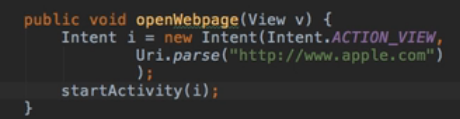
效果就是,点击DISPLAY WEBPAGE按钮会跳到苹果界面。
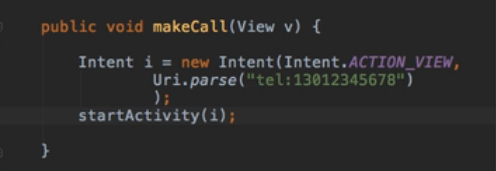
效果就是点击按钮,会出现以下界面

layout5.xml:
<?xml version="1.0" encoding="utf-8"?>

<android.support.constraint.ConstraintLayout xmlns:android="http://schemas.android.com/apk/res/android"

    xmlns:app="http://schemas.android.com/apk/res-auto"

    xmlns:tools="http://schemas.android.com/tools"

    android:id="@+id/linearLayout3"

    android:layout_width="match_parent"

    android:layout_height="match_parent">

    <Button

        android:id="@+id/button11"

        android:onClick="openWebpage"

        android:layout_width="0dp"

        android:layout_height="wrap_content"

        android:layout_marginStart="8dp"

        android:layout_marginTop="8dp"

        android:layout_marginEnd="8dp"

        android:text="DISPLAY WEBPAGE"

        app:layout_constraintEnd_toEndOf="parent"

        app:layout_constraintStart_toStartOf="parent"

        app:layout_constraintTop_toTopOf="parent" />

    <Button

        android:id="@+id/button12"

        android:onClick="makecall"

        android:layout_width="0dp"

        android:layout_height="wrap_content"

        android:layout_marginStart="8dp"

        android:layout_marginTop="16dp"

        android:layout_marginEnd="8dp"

        android:text="MAKE A CALL"

        app:layout_constraintEnd_toEndOf="parent"

        app:layout_constraintStart_toStartOf="parent"

        app:layout_constraintTop_toBottomOf="@+id/button11" />

</android.support.constraint.ConstraintLayout>
main.xml:
package com.example.aimee.aimeetest1;

import android.content.Intent;

import android.net.Uri;

import android.support.v7.app.AppCompatActivity;

import android.os.Bundle;

import android.view.View;

public class MainActivity extends AppCompatActivity {

    @Override

    protected void onCreate(Bundle savedInstanceState) {

        super.onCreate(savedInstanceState);

//        setContentView(R.layout.layout);

        setContentView(R.layout.layout5);

    }

    public void JumpToScreen2(View view) {

        Intent i=new Intent(this,Layout4Activity.class);

        startActivity(i);

    }

    public void openWebpage(View view) {

        Intent i=new Intent(Intent.ACTION_VIEW, Uri.parse("http://www.baidu.com"));

        startActivity(i);

    }

    public void makecall(View view) {

        Intent i=new Intent(Intent.ACTION_VIEW,Uri.parse("tel:***********"));

        startActivity(i);

    }

}
第六篇-以隐式意图(Implicit Intent)呼叫系统服务的更多相关文章
- 第五篇-以显式意图(Explicit Intent)跳往其它Activity
此项目基于第四篇. Intent(意图) Explicit Intent(显式意图): 清楚指明需要前往的Activity的名称 用于APP内部的连接 Inplicit Intent(隐式意图): 不 ...
- 显示转换explicit和隐式转换implicit
用户自定义的显示转换和隐式转换 显式转换implicit关键字告诉编译器,在源代码中不必做显示的转型就可以产生调用转换操作符方法的代码. 隐式转换implicit关键字告诉编译器只有当源代码中指定了显 ...
- 隐式意图启动一个Activity
隐式意图是通过指定一组动作或者属性实现,主要用于跨应用使用. 1.创建一个意图对象 Intent intent = new Intent(); 2.设置意图过滤器 intent.setAction(& ...
- Android 隐式意图和显示意图的使用场景
本文实现一个隐式意图的应用,激活短信应用 public void click4(View view) { Intent intent = new Intent(); intent.setAction( ...
- Android 隐式意图的配置
本文地址:http://www.cnblogs.com/wuyudong/p/5677473.html,转载请注明源地址. <Android 显示意图激活另外一个Actitity>一文介绍 ...
- Android 隐式意图激活另外一个Actitity
上篇文章<Android 显示意图激活另外一个Actitity>最后谈到显示意图激活另外一个Actitity会有一些局限性和弊端 本文介绍另一种方法:隐式意图激活另外一个Actitity ...
- 无废话Android之smartimageview使用、android多线程下载、显式意图激活另外一个activity,检查网络是否可用定位到网络的位置、隐式意图激活另外一个activity、隐式意图的配置,自定义隐式意图、在不同activity之间数据传递(5)
1.smartimageview使用 <LinearLayout xmlns:android="http://schemas.android.com/apk/res/android&q ...
- 隐式意图Intent
在我们想往下一个页面传递数据时,要想到显式意图和隐式意图,显示意图用于内部活动跳转时比较方便,而隐式意图用于应用程序中外部活动的跳转时较为方便,在使用隐式意图时我们要想到清单文件 代码如下: < ...
- 支付SDK的安全问题——隐式意图可导致钓鱼攻击
该漏洞涉及到app所使用的intent和intent filter. intent是一个可用于从一个app组件请求动作或处理事件的“消息对象”.Intent负责对应用中一次操作的动作.动作涉及数据. ...
随机推荐
- CentOS6.8 安装配置Mysql
1.下载mysql的repo源 wget http://repo.mysql.com/mysql-community-release-el7-5.noarch.rpm 2.安装mysql-commun ...
- Springmvc架构
框架结构如下图: 架构流程: 1.用户发送请求至前端控制器DispatcherServlet 2.DispatcherServlet收到请求调用HandlerMapping处理器映射器. 3.处理器映 ...
- C# 将当前应用程序写入到注册表开机启动项中
在使用C#进行应用程序的开发过程中,经常有一个需求就是让应用程序开机后自动启动,这个是一个很常见的需求,最常规的做法(这里以Win7操作系统为例),打开:开始=>所有程序=>启动文件夹(路 ...
- python设计模式第二十二天【备忘录模式】
1.应用场景 (1)能保存对象的状态,并能够恢复到之前的状态 2.代码实现 #!/usr/bin/env python #! _*_ coding:UTF-8 _*_ class Originator ...
- qtp 自动化测试--点滴 自定义显示工具菜单 trzedit
tools-customize-toolbars-勾选后关闭 2 trzedit 使用winobject 方法取值 Window("驷惠WIN系列[汽车4S连锁管理软件] 6.") ...
- ABP 番外篇-容器
一. @using YD.CloudTimetable.Web.Areas.AppAreaName.Startup @{ ViewBag.CurrentPageName = AppAreaNamePa ...
- css的特性
一.继承性: 继承是一种规则,它允许样式不仅应用于某个特定html标签元素,而且应用于其后代. /* 不具有继承性的css样式: */p{border:1px solid red;} 二.特殊性(优先 ...
- Django中Form组件的使用
Form介绍 HTML页面中利用form表单向后端提交数据时,都会写一些获取用户输入的标签并且用form标签把它们包起来. 与此同时我们在好多场景下都需要对用户的输入做校验,比如校验用户是否输入,输入 ...
- Android Studio导入jar包
使用开源框架是,可以直接复制源代码到自己的项目(本人在Android Studio中操作报R程序包不存在),也可以使用jar包,下面记录一下今天使用SmartImageView.jar的过程,不记录S ...
- CH2101 可达性统计(算竞进阶习题)
拓扑排序+状态压缩 考虑每一个点能够到达的所有点都是与该店相邻的点的后继节点,可知: 令f[u]表示u点可到达的节点个数,f[u]={u}与f[v](u, v)的并集 于是可以利用状态压缩,能够到达的 ...