
第六篇-以隐式意图(Implicit Intent)呼叫系统服务
一、新建一个layout5.xml,同样换为constriant模式。
二、拖动两个Button到预览界面,第一个按钮名字改为DISPLAY WEBPAGE,第二个按钮名字改为MAKE A CALL。第一个按钮连接上左右。width改为match。第二个按钮连接左右,上方连第一个按钮的下方。width改为match,与第一个按钮的距离改为16。切换到text模式,在第一个按钮下添加android:onClick="openWebpage";第二个按钮下添加android:onClick=makecall";alt+enter就在.java文件下建了这两个函数。
三、切换到main.java:
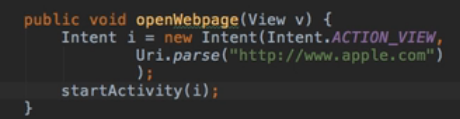
效果就是,点击DISPLAY WEBPAGE按钮会跳到苹果界面。
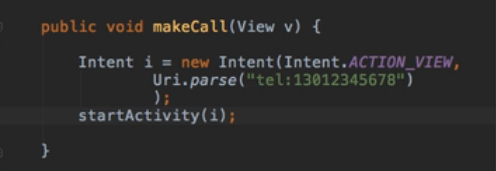
效果就是点击按钮,会出现以下界面

layout5.xml:
<?xml version="1.0" encoding="utf-8"?>

<android.support.constraint.ConstraintLayout xmlns:android="http://schemas.android.com/apk/res/android"

    xmlns:app="http://schemas.android.com/apk/res-auto"

    xmlns:tools="http://schemas.android.com/tools"

    android:id="@+id/linearLayout3"

    android:layout_width="match_parent"

    android:layout_height="match_parent">

    <Button

        android:id="@+id/button11"

        android:onClick="openWebpage"

        android:layout_width="0dp"

        android:layout_height="wrap_content"

        android:layout_marginStart="8dp"

        android:layout_marginTop="8dp"

        android:layout_marginEnd="8dp"

        android:text="DISPLAY WEBPAGE"

        app:layout_constraintEnd_toEndOf="parent"

        app:layout_constraintStart_toStartOf="parent"

        app:layout_constraintTop_toTopOf="parent" />

    <Button

        android:id="@+id/button12"

        android:onClick="makecall"

        android:layout_width="0dp"

        android:layout_height="wrap_content"

        android:layout_marginStart="8dp"

        android:layout_marginTop="16dp"

        android:layout_marginEnd="8dp"

        android:text="MAKE A CALL"

        app:layout_constraintEnd_toEndOf="parent"

        app:layout_constraintStart_toStartOf="parent"

        app:layout_constraintTop_toBottomOf="@+id/button11" />

</android.support.constraint.ConstraintLayout>
main.xml:
package com.example.aimee.aimeetest1;

import android.content.Intent;

import android.net.Uri;

import android.support.v7.app.AppCompatActivity;

import android.os.Bundle;

import android.view.View;

public class MainActivity extends AppCompatActivity {

    @Override

    protected void onCreate(Bundle savedInstanceState) {

        super.onCreate(savedInstanceState);

//        setContentView(R.layout.layout);

        setContentView(R.layout.layout5);

    }

    public void JumpToScreen2(View view) {

        Intent i=new Intent(this,Layout4Activity.class);

        startActivity(i);

    }

    public void openWebpage(View view) {

        Intent i=new Intent(Intent.ACTION_VIEW, Uri.parse("http://www.baidu.com"));

        startActivity(i);

    }

    public void makecall(View view) {

        Intent i=new Intent(Intent.ACTION_VIEW,Uri.parse("tel:***********"));

        startActivity(i);

    }

}
第六篇-以隐式意图(Implicit Intent)呼叫系统服务的更多相关文章
- 第五篇-以显式意图(Explicit Intent)跳往其它Activity
此项目基于第四篇. Intent(意图) Explicit Intent(显式意图): 清楚指明需要前往的Activity的名称 用于APP内部的连接 Inplicit Intent(隐式意图): 不 ...
- 显示转换explicit和隐式转换implicit
用户自定义的显示转换和隐式转换 显式转换implicit关键字告诉编译器,在源代码中不必做显示的转型就可以产生调用转换操作符方法的代码. 隐式转换implicit关键字告诉编译器只有当源代码中指定了显 ...
- 隐式意图启动一个Activity
隐式意图是通过指定一组动作或者属性实现,主要用于跨应用使用. 1.创建一个意图对象 Intent intent = new Intent(); 2.设置意图过滤器 intent.setAction(& ...
- Android 隐式意图和显示意图的使用场景
本文实现一个隐式意图的应用,激活短信应用 public void click4(View view) { Intent intent = new Intent(); intent.setAction( ...
- Android 隐式意图的配置
本文地址:http://www.cnblogs.com/wuyudong/p/5677473.html,转载请注明源地址. <Android 显示意图激活另外一个Actitity>一文介绍 ...
- Android 隐式意图激活另外一个Actitity
上篇文章<Android 显示意图激活另外一个Actitity>最后谈到显示意图激活另外一个Actitity会有一些局限性和弊端 本文介绍另一种方法:隐式意图激活另外一个Actitity ...
- 无废话Android之smartimageview使用、android多线程下载、显式意图激活另外一个activity,检查网络是否可用定位到网络的位置、隐式意图激活另外一个activity、隐式意图的配置,自定义隐式意图、在不同activity之间数据传递(5)
1.smartimageview使用 <LinearLayout xmlns:android="http://schemas.android.com/apk/res/android&q ...
- 隐式意图Intent
在我们想往下一个页面传递数据时,要想到显式意图和隐式意图,显示意图用于内部活动跳转时比较方便,而隐式意图用于应用程序中外部活动的跳转时较为方便,在使用隐式意图时我们要想到清单文件 代码如下: < ...
- 支付SDK的安全问题——隐式意图可导致钓鱼攻击
该漏洞涉及到app所使用的intent和intent filter. intent是一个可用于从一个app组件请求动作或处理事件的“消息对象”.Intent负责对应用中一次操作的动作.动作涉及数据. ...
随机推荐
- DTW动态时间规整
参考: https://blog.csdn.net/raym0ndkwan/article/details/45614813
- Json dump
json 模块提供了一种很简单的方式来编码和解码JSON数据. 其中两个主要的函数是 json.dumps() 和 json.loads() , 要比其他序列化函数库如pickle的接口少得多. 下面 ...
- snv的使用
1.搭建SVN服务器 (1)直接安装 (2)创建工号,分组,分配权限(图形化界面的直接操作,非图形界面的需要改配置文件conf文件夹下) (3)创建仓库,D:\Repositories\OA:cmd命 ...
- linux操作命令 开发人员需要掌握的一些命令
1.man 查看帮助 2.命令 --help 简单帮助 3.help cd 查看一些Linux 命令行的一些内置命令 4.cp 粘贴复制命令 eg:cp yum.log /root/ 5.find ...
- 使用IWMS的网站打开显示“未能加载文件或程序集”,解决方案
首先,会出现这样的问题原因是: 1.应用程序集里面有些事互相引用的,所以 问题有多种情况,第一.这个应用程序集出问题了: 2.它所依赖的那个程序集出问题了: 3.在项目生成的时候,代码里面有逻辑错误: ...
- linux下更改MySQL数据库存储路径
参考地址:1.https://blog.csdn.net/ArnoBM/article/details/83008212 2.http://www.cnblogs.com/lyongde/p/3725 ...
- 转载:实现MATLAB2016a和M文件关联
转载自http://blog.csdn.net/qq_22186119 新安装MATLAB2016a之后,发现MATLAB没有和m文件关联 每次打开m文件后都会重新打开一次MATLAB主程序 后来发现 ...
- spring 自己创建配置类
- React 学习(七) ---- create-react-app
现在react 基础知识已经算是学完了,知道了React是做什么的,以及怎么使用,是时候学习一个webpack, babel 等现代化前端开发了,真正做项目的时候,我们不可能再使用babel 的线上编 ...
- Vue获取dom和数据监听
Vue获取dom对象 在js和jq中我们都能获取dom对象例如 // 获取id=1的div标签 <div id=d1>dom对象</div> // js语法 let ele = ...