
ThemeableBrowser在IOS中按钮图片的使用
1. 首先确保图片的名称为 ***@1x.png, ***@2x.png 或 ***@3x.png
| iPhone —— iPhone3GS | ***@1x.png |
| iPhone —— iPhone6 | ***@2x.png |
| iPhone 6 Plus and above | ***@3x.png |
2. 复制图片到以下目录
<cordova_project_root>/platforms/ios/<project_name>/Resources
Resources文件夹不存在的话,请自行创建。
3. 复制图片到XCode的Resources文件夹下
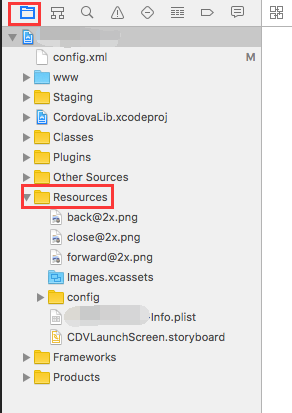
大功告成!!!下来就可以在项目中正常使用了

To import image resources for iOS, it is slightly trickier, because you have to register your file in Xcode project file with help from Xcode, and there are two ways of doing this. Let's start with the old school way. iOS also shares similar concept with Android in terms of pixel density. iPhone to iPhone 3GS uses 1x the resolution, iPhone 4 to iPhone 6 uses 2x the resolution while iPhone 6 Plus and above uses 3x the resolution (even though it's actually down scaled, but that's a different discussion). In the old school way, you have to name your images with @1x, @2x, and @3x suffix with respect to their target density. eg. icon@2x.png. Here is a documentation that explains this concept. You then have to move it under
<cordova_project_root>/platforms/ios/<project_name>/Resources
Then open your native iOS project with Xcode by double clicking on
<cordova_project_root>/platforms/ios/<project_name>.xcodeproj
In the left hand side panel, make sure you are in Project navigator tab. Then you can see a list of directories under your project. One of them being Resources, but you don't see your newly added images there. Now you need to drag your images fron Finder to Xcode and drop it under Resource folder. In your JavaScript config, you can then reference to them without suffix or extension. eg. With the previous example, simply icon will suffice.
ThemeableBrowser在IOS中按钮图片的使用的更多相关文章
- 解决iOS中tabBarItem图片默认颜色的问题(指定代码渲染模式为以原样模式的方式显示出来)
解决iOS中tabBarItem图片默认颜色的问题(指定代码渲染模式为以原样模式的方式显示出来) 解决办法:指定图片的渲染模式(imageWithRenderingMode为:UIImageRende ...
- iOS中按钮点击事件处理方式
写在前面 在iOS开发中,时常会用到按钮,通过按钮的点击来完成界面的跳转等功能.按钮事件的实现方式有多种,其中 较为常用的是目标-动作对模式.但这种方式使得view与controller之间的耦合程度 ...
- JS 解决 IOS 中拍照图片预览旋转 90度 BUG
上篇博文[ Js利用Canvas实现图片压缩 ]中做了图片压缩上传,但是在IOS真机测试的时候,发现图片预览的时候自动逆时针旋转了90度.对于这个bug,我完全不知道问题出在哪里,接下来就是面向百度编 ...
- iOS中拉伸图片的几种方式
假如下面的一张图片,是用来做按钮的背景图片的,原始尺寸是(128 * 112) 按钮背景图片.png 我们通过代码将这张图片设置为按钮的背景图片,假如我们将创建好的按钮的宽高设置为:(W=200, H ...
- IOS中修改图片的大小:修改分辨率和裁剪
在IOS开发中,经常有限制图片文件大小的,有的用户图片很大,导致上传时间慢,造成问题. 如:微信分享中,如果图片的大小好像大于50kbytes,就分享失败,而且没有任何提示. 所以,我添加了两个函数: ...
- iOS中 按钮和标题完美各种排列/完美教程 韩俊强的博客
每日更新关注:http://weibo.com/hanjunqiang 新浪微博! 前言:最近常常用到按钮和相应标题的组合,当按钮设置图片加标题时,触发范围较小,不易触发,最重要的是还要调试偏移量, ...
- 微信中使用popup等弹窗组件时点击输入框input键盘弹起导致IOS中按钮无效处理办法
因为在IOS微信中在弹窗中使用input使键盘弹起,使弹窗的位置上移,当键盘关闭时页面还在上面,弹窗位移量也在上面,只有下拉才能回到原位,这样弹窗也消失了.我的处理办法就是在键盘弹起和消失的时候,让页 ...
- IOS中实现图片点击全屏预览
//// ViewController.m// XWZoomImageView//// Created by xiao on 15/11/13.// Copyright © 2015年 xiao. A ...
- 设置ios中imageView图片自适应,
UIIimageView *imageView = [UIImageView alloc]init]; [imageView setContentScaleFactor:[[UIScreen mai ...
随机推荐
- <TCP/IP>地址解析协议ARP
从前两章中有学到,网络层地址和链路层地址是由不同的,一个是物理地址,一个是IP地址.物理地址固定存储在网卡中,不会改变,而IP地址是可以网络管理员和用户自己分配的 在传统的IPv4网络中,一台A主机要 ...
- Chromium Embedded Framework (CEF)_3.2171.2069_v20170606_x86.tar.xz
CEF 为观看各个直播平台而特此修改的浏览器 可以单独提取 Flash 视频, 并可以修改视频的大小等功能 [增加了960x90% 和 1280x90%] 这次修改是主要针对 YY web 直播平台 ...
- 【转】RESTful Webservice创建
RESTful Web Services with Java REST stands for REpresentational State Transfer, was first introduc ...
- 007_Chrome的Waterfall详解
一. 浏览器根据html中外连资源出现的顺序,依次放入队列(Queue),然后根据优先级确定向服务器获取资源的顺序.同优先级的资源根据html中出现的先后顺序来向服务器获取资源 Queueing. 出 ...
- 本地项目提交到github和提交更新(转)
一:首先当然是去github注册账号了. 二:注册完毕登录后,在自己的首页上面点击右上角“+”号,然后选择New repository,或者直接点击下面的绿色按钮,创建一个新仓库.如图: 然后填入仓库 ...
- oracle里面用sql做报表并带小计合计常用到的函数
1-- DECODE函数是Oracle PL/SQL是功能强大的函数之一,假设我们想给职员加工资,其标准是:工资在8000元以下的将加20%:工资在8000元以上的加15%,通常的做法是,先选出记录 ...
- sql 的是四个排名函数
四个排名函数的用法: http://www.cnblogs.com/xhyang110/archive/2009/10/27/1590448.html 字符串分割:http://www.cnblogs ...
- 深入Golang调度器之GMP模型
前言 随着服务器硬件迭代升级,配置也越来越高.为充分利用服务器资源,并发编程也变的越来越重要.在开始之前,需要了解一下并发(concurrency)和并行(parallesim)的区别. 并发: 逻 ...
- oracle 11g完全彻底的卸载
1.关闭oracle所有的服务.可以在windows的服务管理器中关闭: 2.打开注册表:regedit 打开路径: <找注册表 :开始->运行->regedit> HKEY ...
- Confluence 6 恢复一个站点问题解决
如果你在导入的时候遇到了问题,检查下面的一些提示. 你的文件太大而不能上传?这个是非常常见的错误.出现的原因是备份文件不能在规定的时间内上传到服务器上.为了避免这个错误,放置你的导出文件到 < ...