
007_Chrome的Waterfall详解
一、
浏览器根据html中外连资源出现的顺序,依次放入队列(Queue),然后根据优先级确定向服务器获取资源的顺序。同优先级的资源根据html中出现的先后顺序来向服务器获取资源
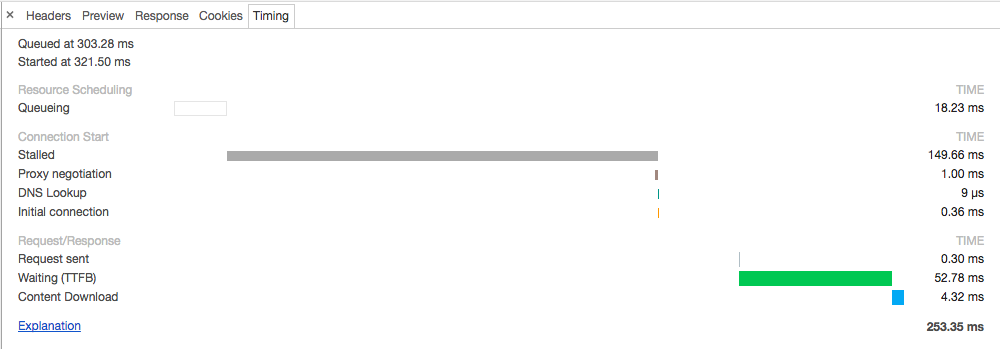
- Queueing. 出现下面的情况时,浏览器会把当前请求放入队列中进行排队
- 有更高优先级的请求时.
- 和目标服务器已经建立了6个TCP连接(最多6个,适用于HTTP/1.0和HTTP/1.1)
- 浏览器正在硬盘缓存上简单的分配空间
- Stalled. 请求会因为上面的任一个原因而阻塞
- DNS Lookup. 浏览器起正在解析IP地址.
- Proxy negotiation. The browser is negotiating the request with a proxy server.
- Request sent. The request is being sent.
- ServiceWorker Preparation. The browser is starting up the service worker.
- Request to ServiceWorker. The request is being sent to the service worker.
- Waiting (TTFB). 浏览器等待响应第一个字节到达的时间. 包含来回的延迟时间和服务器准备响应的时间.
- Content Download. The browser is receiving the response.
- Receiving Push. The browser is receiving data for this response via HTTP/2 Server Push.
- Reading Push. The browser is reading the local data previously received.
DNS Lookup - 在浏览器和服务器进行通信之前, 必须经过DNS查询, 将域名转换成IP地址. 在这个阶段, 你可以处理的东西很少. 但幸运的是, 并非所有的请求都需要经过这一阶段.
Initial Connection - 在浏览器发送请求之前, 必须建立TCP连接. 这个过程仅仅发生在瀑布图中的开头几行, 否则这就是个性能问题(后边细说).
SSL/TLS Negotiation - 如果你的页面是通过SSL/TLS这类安全协议加载资源, 这段时间就是浏览器建立安全连接的过程. 目前Google将HTTPS作为其 搜索排名因素 之一, SSL/TLS 协商的使用变得越来越普遍了.
Time To First Byte (TTFB) - TTFB 是浏览器请求发送到服务器的时间+服务器处理请求时间+响应报文的第一字节到达浏览器的时间. 我们用这个指标来判断你的web服务器是否性能不够, 或者说你是否需要使用CDN.
Downloading - 这是浏览器用来下载资源所用的时间. 这段时间越长, 说明资源越大. 理想情况下, 你可以通过控制资源的大小来控制这段时间的长度.
根据瀑布图进行性能优化
那么我们如何是一个web页面加载的更快并且创造更好的用户体验呢? 瀑布图提供是三个直观的玩意儿来协助我们达成这一目标:
首先, 减少所有资源的加载时间. 亦即减小瀑布图的宽度. 瀑布图越窄, 网站的访问速度越快.
其次, 减少请求数量 也就是降低瀑布图的高度. 瀑布图越矮越好.
最后, 通过优化资源请求顺序来加快渲染时间. 从图上看, 就是将绿色的"开始渲染"线向左移. 这条线向左移动的越远越好.
如图所示,select2_metro.css在位置上要比avatar1_small.png和index.js靠后,但是优先级确实最高(Higthest-->High-->Medium-->Low),所以这个下载顺序是:select2_metro.css-->index.js-->avatar1_small.png
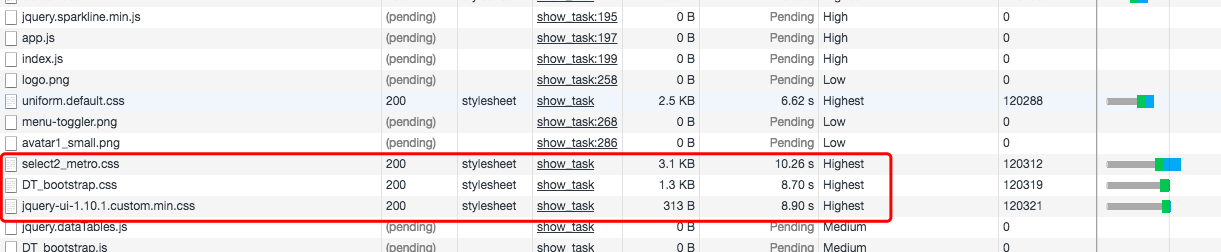
Connection ID:可以看到总共有6个值--166718、166774、166775、166776、166777、166778,因为浏览器并发数limit是6;如果两个url相同,就表示两个资源的下载共用的同一个tcp长连接

二、filter详解
(1)
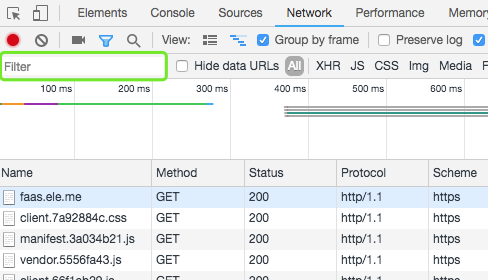
Below is a complete list of supported properties. DevTools populates the dropdown with all of the HTTP methods it has encountered. 即写完下面的key+":"后,chrome会自动的弹出后面的值.
domain. eg: domain:*.baidu.com会过滤出只有百度的域名.has-response-header. 过滤response的指定header. eg: has-response-header:ETag过滤出所有使用ETag协商缓存的网页。强缓存和协商缓存区别经典讲解:https://www.cnblogs.com/lyzg/p/5125934.htmlis. Useis:runningto findWebSocketresources. is:running 过滤是通过websocket的网页larger-than. Setting a value of1000is equivalent to setting a value of1k. eg:larger-than:28000 过滤大于28KB的网页method. method过滤有多少请求方法,method:OPTIONS指定过滤某个方法mime-type. 展示是json的资源,eg: mime-type:application/jsonmixed-content. Show all mixed content resources (mixed-content:all) or just the ones that are currently displayed (mixed-content:displayed).scheme. Show resources retrieved over unprotected HTTP (scheme:http) or protected HTTPS (scheme:https).set-cookie-domain. Show the resources that have aSet-Cookieheader with aDomainattribute that matches the specified value.set-cookie-name. Show the resources that have aSet-Cookieheader with a name that matches the specified value.set-cookie-value. Show the resources that have aSet-Cookieheader with a value that matches the specified value.status-code. Only show resources whose HTTP status code match the specified code.
三、同时显示多个按住command键盘+鼠标单选即可

四、请求时间分析
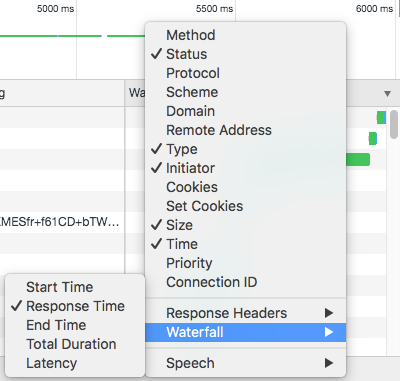
(1)在瀑布流根据"Response Time"、"Total Duration"等进行排序
(2)
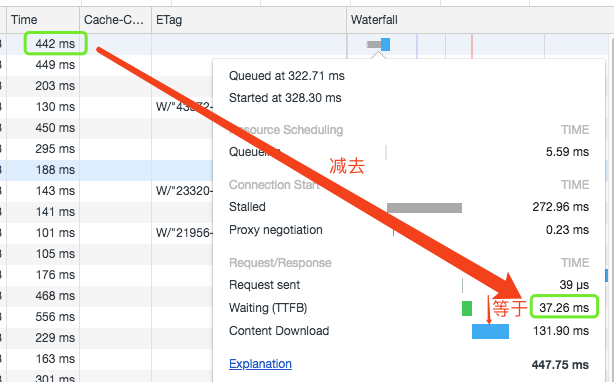
Time. The total duration, from the start of the request to the receipt of the final byte in the response.
Waiting (TTFB). The browser is waiting for the first byte of a response. TTFB stands for Time To First Byte. This timing includes 1 round trip of latency and the time the server took to prepare the response.
Content Download. The browser is receiving the response.
"Content Download"的时间大于等于Time - Waiting (TTFB)的时间
五、查看请求依赖
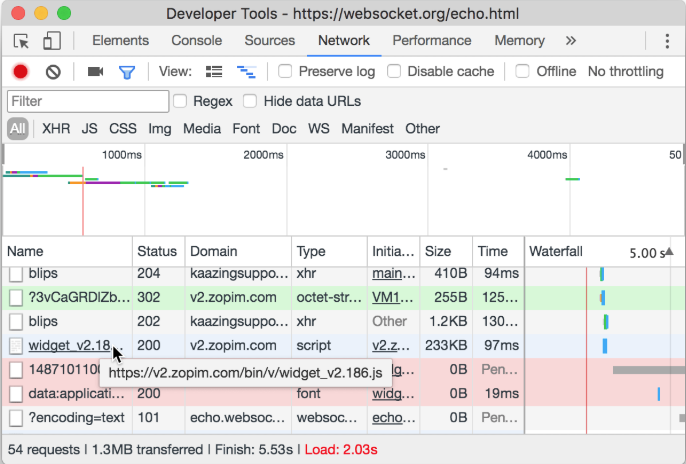
To view the initiators and dependencies of a request, hold Shift and hover over the request in the Requests table.
DevTools colors initiators green, and dependencies red.
Reference:
1、https://developers.google.com/web/tools/chrome-devtools/network-performance/reference#timing
2、http://www.mamicode.com/info-detail-1015625.html
007_Chrome的Waterfall详解的更多相关文章
- CSS3之多列布局columns详解
CSS3之多列布局columns详解 CSS3提供了个新属性columns用于多列布局.基本属性如下: 1. columns: <'column-width'> || <'colum ...
- Linq之旅:Linq入门详解(Linq to Objects)
示例代码下载:Linq之旅:Linq入门详解(Linq to Objects) 本博文详细介绍 .NET 3.5 中引入的重要功能:Language Integrated Query(LINQ,语言集 ...
- 架构设计:远程调用服务架构设计及zookeeper技术详解(下篇)
一.下篇开头的废话 终于开写下篇了,这也是我写远程调用框架的第三篇文章,前两篇都被博客园作为[编辑推荐]的文章,很兴奋哦,嘿嘿~~~~,本人是个很臭美的人,一定得要截图为证: 今天是2014年的第一天 ...
- EntityFramework Core 1.1 Add、Attach、Update、Remove方法如何高效使用详解
前言 我比较喜欢安静,大概和我喜欢研究和琢磨技术原因相关吧,刚好到了元旦节,这几天可以好好学习下EF Core,同时在项目当中用到EF Core,借此机会给予比较深入的理解,这里我们只讲解和EF 6. ...
- Java 字符串格式化详解
Java 字符串格式化详解 版权声明:本文为博主原创文章,未经博主允许不得转载. 微博:厉圣杰 文中如有纰漏,欢迎大家留言指出. 在 Java 的 String 类中,可以使用 format() 方法 ...
- Android Notification 详解(一)——基本操作
Android Notification 详解(一)--基本操作 版权声明:本文为博主原创文章,未经博主允许不得转载. 微博:厉圣杰 源码:AndroidDemo/Notification 文中如有纰 ...
- Android Notification 详解——基本操作
Android Notification 详解 版权声明:本文为博主原创文章,未经博主允许不得转载. 前几天项目中有用到 Android 通知相关的内容,索性把 Android Notificatio ...
- Git初探--笔记整理和Git命令详解
几个重要的概念 首先先明确几个概念: WorkPlace : 工作区 Index: 暂存区 Repository: 本地仓库/版本库 Remote: 远程仓库 当在Remote(如Github)上面c ...
- Drawable实战解析:Android XML shape 标签使用详解(apk瘦身,减少内存好帮手)
Android XML shape 标签使用详解 一个android开发者肯定懂得使用 xml 定义一个 Drawable,比如定义一个 rect 或者 circle 作为一个 View 的背景. ...
随机推荐
- elasticsearch基本概念与查询语法
序言 后面有大量类似于mysql的sum, group by查询 elk === elk总体架构 https://www.elastic.co/cn/products Beat 基于go语言写的轻量型 ...
- 在Java中如何高效的判断数组中是否包含某个元素
原文出处: hollischuang(@Hollis_Chuang) 如何检查一个数组(无序)是否包含一个特定的值?这是一个在Java中经常用到的并且非常有用的操作.同时,这个问题在Stack Ove ...
- elasticsearch 通过HTTP RESTful API 操作数据
1.索引样例数据 下载样例数据集链接 下载后解压到ES的bin目录,然后加载到elasticsearch集群 curl -XPOST 127.0.0.1:9200/bank/account/_bulk ...
- PHP7 学习笔记(十五)Repository 模式实现业务逻辑和数据访问的分离
参考: 1.http://laravelacademy.org/post/3063.html
- mysql引擎,完整的见表语句,数据库模式, 常用数据类型,约束条件
引擎 show engines : 查看引擎 innodb(默认引擎):支持事务,行级锁,外键 myisam:查询效率由于innodb,不需要支持事务,行级锁,外键,可以选用myisam来优化数据库 ...
- [Android] Android 异步定时任务实现的三种方法(以SeekBar的进度自动实现为例)
[Android] Android 定时异步任务实现的三种方法(以SeekBar的进度自动实现为例) 一.采用Handler与线程的sleep(long)方法 二.采用Handler与timer及Ti ...
- Visual Studio 产品密钥
1. Visual Studio 2013 1) Visual Studio Ultimate 2013 KEY(密钥):BWG7X-J98B3-W34RT-33B3R-JVYW9 2) ...
- 经典文摘:饿了么的 PWA 升级实践(结合Vue.js)
自 Vue.js 官方推特第一次公开到现在,我们就一直在进行着将饿了么移动端网站升级为 Progressive Web App 的工作.直到近日在 Google I/O 2017 上登台亮相,才终于算 ...
- (5)top k大的数目
一.问题 在一个很长的数组中,求出top k大小的数目 二.办法 用优先队列 时间复杂度O(nlog(k)),应该是最差的情况下是这个 三.Code package algorithm; import ...
- VUE项目安装
连接转载:https://www.cnblogs.com/Colwill-Blog/p/6682091.html 刚刚开始学习Vue.js.今天分享一下我的Vue项目安装过程. 我是windows系统 ...