
springboot学习随笔(三):Controller参数映射
接上章内容,我们看看浏览器参数如何映射到我们的Controller层
我们新建UserController和User实

User.java
package com.example.main;

import java.io.Serializable;

public class User implements Serializable {

    /**

     *

     */

    private static final long serialVersionUID = -7359143284242091031L;

    private Long id;

    private String name;

    private Integer age;

    public Long getId() {

        return id;

    }

    public void setId(Long id) {

        this.id = id;

    }

    public String getName() {

        return name;

    }

    public void setName(String name) {

        this.name = name;

    }

    public Integer getAge() {

        return age;

    }

    public void setAge(Integer age) {

        this.age = age;

    }

}
UserController.java
package com.example.demo.controller;

import org.springframework.web.bind.annotation.RequestMapping;

import org.springframework.web.bind.annotation.RestController;

import com.example.main.User;

@RestController

public class UserController {

    @RequestMapping("/user")

    public User user(Long id,String name,int age){

        User user = new User();

        user.setId(id);

        user.setName(name);

        user.setAge(18);

        return user;

    }

}
参数映射的方式有三种:
第一种:参数映射
@RestController

public class UserController {

    @RequestMapping("/user")

    public User user(Long id,String name,int age){

        User user = new User();

        user.setId(id);

        user.setName(name);

        user.setAge(age);

        return user;

    }

}
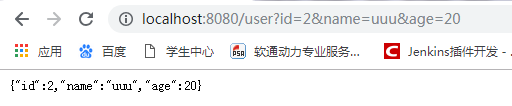
在浏览器访问,携带参数

第二种:对象映射
@RequestMapping("/user")

    public User user(User user){

        return user;

    }
在浏览器访问,携带参数

第三种:通过ServletRequest对象
@RequestMapping("/user")

    public User user(ServletRequest request){

        Long id=Long.valueOf(request.getParameter("id"));

        String name =request.getParameter("name");

        int age =Integer.parseInt(request.getParameter("age")) ;

        User user = new User();

        user.setId(id);

        user.setName(name);

        user.setAge(age);

        return user;

    }
springboot学习随笔(三):Controller参数映射的更多相关文章
- Springboot学习02-webjars和静态资源映射规则
Springboot学习01-webjars和静态资源映射规则 前言 1-以前我们在IDEA中创建一个项目,添加web依赖包,我们现在是一个web应用,应该在man目录下面有一个webapp文件夹,将 ...
- springboot学习(三)——http序列化/反序列化之HttpMessageConverter
以下内容,如有问题,烦请指出,谢谢! 上一篇说掉了点内容,这里补上,那就是springmvc的http的序列化/反序列化,这里简单说下如何在springboot中使用这个功能. 使用过原生netty ...
- SpringMVC学习总结(三)——Controller接口详解(2)
4.5.ServletForwardingController 将接收到的请求转发到一个命名的servlet,具体示例如下: package cn.javass.chapter4.web.servle ...
- springboot学习(三)————使用HttpMessageConverter进行http序列化和反序列化
以下内容,如有问题,烦请指出,谢谢! 对象的序列化/反序列化大家应该都比较熟悉:序列化就是将object转化为可以传输的二进制,反序列化就是将二进制转化为程序内部的对象.序列化/反序列化主要体现在程序 ...
- springboot学习随笔(四):Springboot整合mybatis(含generator自动生成代码)
这章我们将通过springboot整合mybatis来操作数据库 以下内容分为两部分,一部分主要介绍generator自动生成代码,生成model.dao层接口.dao接口对应的sql配置文件 第一部 ...
- SpringBoot学习(三)
一.单个 controller 范围的异常处理 package com.xxx.secondboot.web; import org.springframework.web.bind.annotati ...
- springboot学习(三)——使用HttpMessageConverter进行http序列化和反序列化
以下内容,如有问题,烦请指出,谢谢! 对象的序列化/反序列化大家应该都比较熟悉:序列化就是将object转化为可以传输的二进制,反序列化就是将二进制转化为程序内部的对象.序列化/反序列化主要体现在程序 ...
- springboot学习(三) springboot文件配置
1.简介 springboot没有了原来自己整合Spring应用时繁多的XML配置内容,替代它的是在pom.xml中引入模块化的Starter POMs,其中各个模块都有自己的默认配置,所以如果不是特 ...
- SpringBoot学习(三)—— springboot快速整合swagger文档
目录 MyBatis 简介 引入mybatis组件 代码实战 MyBatis @ 简介 优点 最大的优点是SQL语句灵活,适合调优情景,业务复杂情景 劣势 最大的劣势是不同数据库之间的迁移 引入myb ...
随机推荐
- 让Entity Framework不再私闯sys.databases
这里的“私闯sys.databases”是指Entity Framework默认发起的查询:SELECT Count(*) FROM sys.databases WHERE [name]=N'数据库名 ...
- js判断页面在pc端打开还是移动端打开
js判断页面在pc端打开还是移动端打开,分别跳转不同的index.html window.addEventListener('load', function() { // true为手机,false为 ...
- 由strcat函数引发的C语言中数组和指针问题的思考
问题一 首先,来看一下下面这段代码: #include <stdio.h> #include <string.h> int main() { char *str = " ...
- MVC Model验证
[Required(ErrorMessage = "证件号不能为空!")] [RegularExpression(@"(^\d{18}$)|(^\d{15}$)|(^\d ...
- P4168 [Violet]蒲公英
神仙分块题?其实还是很简单的,res[i][j]表示第i块到第j块的众数,然后再用sum[i][j]表示前i块中j这个种类出现的次数,然后分块瞎搞就行了,感觉我写的十分简洁,好评( //author ...
- LeetCode - Implement Magic Dictionary
Implement a magic directory with buildDict, and search methods. For the method buildDict, you'll be ...
- 创建一个dynamics 365 CRM online plugin (十一) - Handling Configuration data
Config data 可以在registering step 的时候来配置 配置好的config data 可以使用 constructor 来获取 Secure Config 和 UnSecure ...
- 005-docker启动设置环境变量
https://blog.csdn.net/wsbgmofo/article/details/79173920
- 斐讯N1折腾记
斐讯N1折腾记:运行 Linux 及优化 2018-06-23 37条评论 4,445次阅读 11人点赞 最后更新时间:2019年03月10日 咳咳咳,上篇教程教大家给斐讯 N1 降级并且刷了 ...
- squid 3.5 window x64
下载1: https://download.csdn.net/download/runliuv/11131620 下载2: 链接: https://pan.baidu.com/s/1A_o_Xvg1y ...