
用jQuery写的轮播图
效果图:
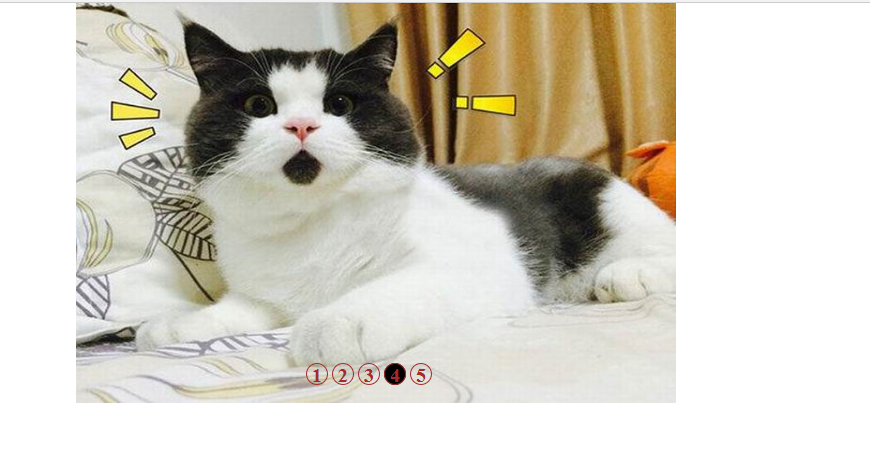
GitHub地址:https://github.com/123456abcdefg/Javascript
大家可以下载源码查看。
与前一篇写的轮播图实现的效果一致,这个是用jQuery写的,相对简单一点的吧。
js代码:
    <script src="../jquery-3.3.1.min.js"></script>

    <script>

        var index = 1;

        var newLeft = 0;

        var interval;

        var buttSpan = $(".butt").children();

        function nextPage(next){

            $(buttSpan[index-1]).removeClass("on");

            if(next){

                if(index == 5){

                    index = 1;

                    newLeft = 0;

                }

                else{

                    index ++;

                    newLeft = -600*(index-1);

                }

            }

            else{

                if(index == 1){

                    index = 5;

                    newLeft = -2400;

                }

                else{

                    index --;

                    newLeft = -600*(index-1);

                }

            }

            $(".list").css("left",newLeft + 'px');

            $(buttSpan[index-1]).addClass("on");

        }

        function autoNextPage(){

            interval = setInterval(function(){

                nextPage(true);

            },"3000");

        }

        autoNextPage();

        $(".container").mouseover(function(){

            clearInterval(interval);

            $(".arrow").css("display","block");

        });

        $(".container").mouseout(function(){

            autoNextPage();

            $(".arrow").css("display","none");

        });

        $(".left").click(function(){

            nextPage(false);

        });

        $(".right").click(function(){

            nextPage(true);

        });

        function clickButt(){

            for(var i = 0;i<5;i++){

                $(buttSpan[i]).click(function(){

                    $(buttSpan[index-1]).removeClass("on");

                    index = $(this).attr("index")-1;

                    nextPage(true);

                });

            }

        }

        clickButt();

    </script>
主要包括一下几个部分:
1.一个轮播的方法(left):nextPage(next);
index , newLeft , left
2.自动轮播:autoNextPage();
3.鼠标放到container上图片及按钮不再播放
4.鼠标点击左右方向,可以向左/向右轮播。(调用nextPage()方法)
5.点击下面几个按钮,可以切换到相应的图片(index),并且按钮样式也相应改变。

这个是相对于上面较简单的另一种写法:
点击相应的按钮,按钮样式改变,其同胞元素恢复之前。
获取到当前index值,调用play(true)方法,按钮对应的图片改变。
完整代码:
<html>
<head>
<meta charset="utf-8" />
<title>1</title>
<style>
*{
padding:0;
margin:0;
}
.container{
width:600px;
height:400px;
overflow:hidden;
position:relative;
margin:0 auto;
}
.list{
width:3000px;
height:400px;
position:absolute; }
.list img{
width:600px;
height:400px;
float:left;
}
.butt{
width:300px;
height:20px;
position:absolute;
left:230px;
bottom:20px;
cursor:pointer;
}
.butt span{
width:20px;
height:20px;
display:inline-block;
border:1px solid brown;
border-radius:50%;
color:brown;
z-index:1;
font-size:20px;
font-weight:bold;
text-align:center;
}
.arrow{
width:30px;
height:30px;
position:absolute;
top:200px;
color:black;
background-color:white;
z-index:1;
font-size:30px;
font-weight:bold;
text-align:center;
text-decoration:none;
display:none;
}
.left{
left:10px;
}
.right{
right:10px;
}
.on{
background-color:black;
} </style>
</head> <body>
<div class="container">
<div class="list" style="left:0px;">
<img src="../img/1.jpg"></img>
<img src="../img/2.jpg"></img>
<img src="../img/3.jpg"></img>
<img src="../img/4.jpg"></img>
<img src="../img/5.jpg"></img>
</div> <div class="butt">
<span index="1" class="on">1</span>
<span index="2">2</span>
<span index="3">3</span>
<span index="4">4</span>
<span index="5">5</span>
</div> <a href="#" class="arrow left"><</a>
<a href="#" class="arrow right">></a> </div> <script src="../jquery-3.3.1.min.js"></script>
<script>
var index = 1;
var newLeft = 0;
var interval;
var buttSpan = $(".butt").children();
function nextPage(next){
$(buttSpan[index-1]).removeClass("on");
if(next){
if(index == 5){
index = 1;
newLeft = 0;
}
else{
index ++;
newLeft = -600*(index-1);
}
}
else{
if(index == 1){
index = 5;
newLeft = -2400;
}
else{
index --;
newLeft = -600*(index-1);
} }
$(".list").css("left",newLeft + 'px');
$(buttSpan[index-1]).addClass("on");
}
function autoNextPage(){
interval = setInterval(function(){
nextPage(true);
},"3000");
}
autoNextPage(); $(".container").mouseover(function(){
clearInterval(interval);
$(".arrow").css("display","block");
});
$(".container").mouseout(function(){
autoNextPage();
$(".arrow").css("display","none");
}); $(".left").click(function(){ nextPage(false);
});
$(".right").click(function(){ nextPage(true);
}); function clickButt(){ for(var i = 0;i<5;i++){
$(buttSpan[i]).click(function(){
$(buttSpan[index-1]).removeClass("on");
index = $(this).attr("index")-1;
nextPage(true);
});
}
}
clickButt(); </script> </body> </html>
参考博客:https://www.cnblogs.com/lihuijuan/p/9486051.html
用jQuery写的轮播图的更多相关文章
- 记录一下自己用jQuery写的轮播图
<!DOCTYPE html> <html> <head> <meta charset="utf-8"> <title> ...
- jQuery淡入淡出轮播图实现
大家好我是 只是个单纯的小白,这是人生第一次写博客,准备写的内容是Jquery淡入淡出轮播图实现,在此之前学习JS写的轮播图效果都感觉不怎么好,学习了jQuery里的淡入淡出效果后又写了一次轮播图效果 ...
- 自己用原生JS写的轮播图,支持移动端触摸滑动,分页器圆点可以支持mouseover鼠标移入和click点击,高手看了勿喷哈
自己用原生JavaScript写的轮播图,分页器圆点按钮可支持click点击,也可支持mouseover鼠标悬浮触发,同时支持移动端触摸滑动,有兴趣的友友可以试试哈,菜鸟一枚,高手看了勿喷,请多多指正 ...
- 自己用原生JS写的轮播图,支持移动端触屏滑动,面向对象思路。分页器圆点支持click和mouseover。
自己用原生javascript写的轮播图,面向对象思路,支持移动端手指触屏滑动.分页器圆点可以选择click点击或mouseover鼠标移入时触发.图片滚动用的setInterval,感觉setInt ...
- jquery手写焦点轮播图-------解决最后一张无缝跳转第一张的问题
<!DOCTYPE html> <html lang="en"> <head> <meta charset="UTF-8&quo ...
- jQuery实现简易轮播图的效果
(图片素材取自于小米官网) 刚开始接触jQuery的学习,个人觉得如果为了实现多数的动态效果,jQuery的确很简易方便. 下面简易的轮播图效果,还请前辈多多指教~ (努力学习react vue an ...
- 原生js写简单轮播图方式1-从左向右滑动
轮播图就是让图片每隔几秒自动滑动,达到图片轮流播放的效果.轮播图从效果来说有滑动式的也有渐入式的,滑动式的轮播图就是图片从左向右滑入的效果,渐入式的轮播图就是图片根据透明度渐渐显示的效果,这里说的是实 ...
- 用纯css、JavaScript、jQuery简单的轮播图
完成一个可以自动切换或点击数字的轮播图 HTML代码只需要一个div 包含着一个图片和一个列表,我们主要的思路就是通过点击相应的数字,改变图片的 路径. 有4张图片都在img文件夹里,名称为 img ...
- 用 JS 写 (轮播图 / 选项卡 / 滑动门)
页面中经常会用到各式各样的轮播图,今天贺贺为大家介绍一种常用的方法,对于JS我们需要举一反三,一种方法可以对多个轮播样式进行渲染. <head> <meta charset=&quo ...
随机推荐
- [西安交大附中集训] d6 删边(cip)
B. 删边(cip.cpp/in/out 1S/256M) 题面 给出一个没有重边和自环的无向图,现在要求删除其中两条边,使得图仍然保持连通. 你的任务是计算有多少组不合法的选边方案.注意方案是无序二 ...
- Mac下安装MySQL(Mac 10.12)
系统:Mac OS 10.12 MySQL:5.7.15 前言: 安装mysql有两种方式:1为官方下载dmg安装包.2为使用brew进行安装. 安装步骤: 一.官方下载dmg安装包进行安装 1.登陆 ...
- P1567 气温统计
P1567 题目描述 炎热的夏日,KC 非常的不爽.他宁可忍受北极的寒冷,也不愿忍受厦门的夏天.最近,他开始研究天气的变化.他希望用研究的结果预测未来的天气. 经历千辛万苦,他收集了连续 N(1≤N≤ ...
- Yahoo Programming Contest 2019 补题记录(DEF)
D - Ears 题目链接:D - Ears 大意:你在一个\(0-L\)的数轴上行走,从整数格出发,在整数格结束,可以在整数格转弯.每当你经过坐标为\(i-0.5\)的位置时(\(i\)是整数),在 ...
- 【BZOJ2655】calc DP 数学 拉格朗日插值
题目大意 一个序列\(a_1,\ldots,a_n\)是合法的,当且仅当: 长度为给定的\(n\). \(a_1,\ldots,a_n\)都是\([1,m]\)中的整数. \(a_1, ...
- Hdoj 1050.Moving Tables 题解
Problem Description The famous ACM (Advanced Computer Maker) Company has rented a floor of a buildin ...
- 跨SQL注入
概念 SQL Injection按照字面意思来翻译就是"SQL注射",常被叫做"SQL注入",它的含义就是利用某些数据库的外部接口把用户数据插入到实际数据库操作 ...
- CSS之FLex布局介绍
网页布局(layout)是CSS的一个重点应用. img 布局的传统解决方案,基于盒状模型,依赖 display属性 + position属性 + float属性.它对于那些特殊布局非常不方便,比如, ...
- hex文件格式
hex文件格式是可以烧写到单片机中,被单片机执行的一种文件格式,生成Hex文件的方式有很多种,可以通过不同的编译器将C程序或者汇编程序编译生成hex. Hex文件格式解析 Hex文件如果用特殊的程 ...
- 选做题:设计并实现一个Book类
目录 题目分析 设计思路 具体代码 测试代码 运行截图 参考资料 题目分析 题目内容 0.设计并实现一个Book类,定义义成Book.java,Book 包含书名,作者,出版社和出版日期 1.这些数据 ...