
datagrid在MVC中的运用08-实现Master-Detail(使用子datagrid)
本文主要通过一个子datagrid来实现主次表。谢谢Kevin的博文。
代码部分与http://www.cnblogs.com/darrenji/p/3576258.html相似,这里只列出不一样的地方。
最终效果:
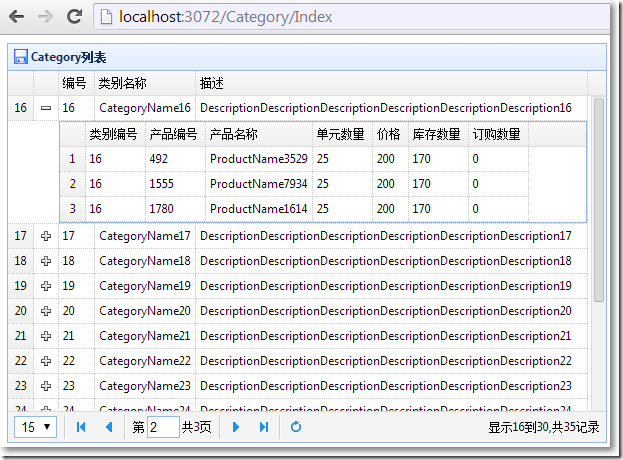
ProductController 让子表Product返回json字符串
public ActionResult GetJsonByCategory(int? categoryId = null)
{
if (!categoryId.HasValue)
{
return new EmptyResult();
}
var service = new Service();
var products = service.LoadProductsByCategory((int)categoryId);
//把Products集合对象实例序列化成json字符串
string str = JsonSerializeHelper.SerializeToJson(products);
return Content(str);
}
/Category/Index视图
展开@{

    ViewBag.Title = "Index";

    Layout = "~/Views/Shared/_Layout.cshtml";

}

<link href="~/Content/themes/default/easyui.css" rel="stylesheet" />

<link href="~/Content/themes/icon.css" rel="stylesheet" />

<table id="tt"></table>

@section scripts

{

    <script src="~/Scripts/jquery.easyui.min.js"></script>

    <script src="~/Scripts/datagrid-detailview.js"></script>

    <script src="~/Scripts/easyui-lang-zh_CN.js"></script>

    <script type="text/javascript">

        $(function() {

            initData();

        });

        function initData(params) {

            $('#tt').datagrid({

                url: '@Url.Action("GetData","Category")',

                width: 600,

                height: 400,

                title: 'Category列表',

                iconCls: 'icon-save',

                fitColumns: true,

                rownumbers: true, //是否加行号

                pagination: true, //是否显式分页

                pageSize: 15, //页容量,必须和pageList对应起来,否则会报错

                pageNumber: 2, //默认显示第几页

                pageList: [15, 30, 45],//分页中下拉选项的数值

                columns: [[

                    //book.ItemId, book.ProductId, book.ListPrice, book.UnitCost, book.Status, book.Attr1

                    { field: 'ID', title: '编号'},

                    { field: 'Name', title: '类别名称'},

                    { field: 'Description', title: '描述', width: 600 }

                ]],

                queryParams: params, //搜索json对象

                view: detailview,

                detailFormatter: function(index, row) {

                    return '<div id="ddv-' + index + '" style="padding:5px;"></div>';

                },

                onExpandRow: function(index, row) {

                    $('#ddv-' + index).datagrid({

                        url: '@Url.Action("GetJsonByCategory","Product", new {categoryId = "_id_"})'.replace("_id_", row.ID),

                        fitColumns: true,

                        singleSelect: true,

                        rownumbers: true,

                        loadMsg: '',

                        height: 'auto',

                        columns: [[

                            { field: 'CategoryID', title: '类别编号' },

                            { field: 'ProductID', title: '产品编号' },

                            { field: 'ProductName', title: '产品名称' },

                            { field: 'QuantityPerUnit', title: '单元数量' },

                            { field: 'UnitPrice', title: '价格' },

                            { field: 'UnitsInStock', title: '库存数量' },

                            { field: 'UnitOnOrder', title: '订购数量' }

                        ]],

                        onResize: function() {

                            $('#DataGrid').datagrid('fixDetailRowHeight', index);

                        },

                        onLoadSuccess: function() {

                            setTimeout(function() {

                                $('#DataGrid').datagrid('fixDetailRowHeight', index);

                            },0);

                        }

                    });

                    $('#DataGrid').datagrid('fixDetailRowHeight', index);

                }

            });

        }

    </script>

}
datagrid在MVC中的运用08-实现Master-Detail(使用子datagrid)的更多相关文章
- datagrid在MVC中的运用01-基本属性并实现分页
本文体验jQuery EasyUI的datagrid在MVC中的应用.主要涉及到: ※ datagrid的基本属性和方法 ※ datagrid分页在前后台的实现 最终效果: 与视图显示对应的view ...
- datagrid在MVC中的运用05-加入时间搜索条件,枚举填充下拉框
本文主要来体验在搜索区域增加更多的搜索条件,主要包括: ※ 使用jQuery ui的datepicker显示时间,设置显示格式.样式. ※ 设置jQuery ui的onClose事件,使开始和结束时间 ...
- datagrid在MVC中的运用07-实现Master-Detail(使用PartialView)
本文主要体验用jQuery Easyui的datagrid来实现Master-Detail主次表.谢谢Kevin的博文,助我打开了思路. 主表显示所有的Category,当点击主表的展开按钮,显示该C ...
- datagrid在MVC中的运用03-选择单行或多行
本文体验datagrid显示单行或多行内容.分别用到了datagrid的getSelected,getSelections方法. Html部分 <a href="#" cla ...
- jQuery EasyUI DataGrid在MVC中的运用-基本属性并实现分页
※ datagrid的基本属性和方法 ※ datagrid分页在前后台的实现 最终效果: 与视图显示对应的view model public class Book public strin ...
- datagrid在MVC中的运用10-勾选
本文体验与勾选有关的特性. 需要加载的books.json 展开{ "total": 4, "rows": [ { "productid": ...
- datagrid在MVC中的运用09-实现排序
本文体验datagrid的排序. □ 思路 当点击datagrid的标题,视图传递给Controller的Form Data类似这样:page=1&rows=10&sort=Custo ...
- datagrid在MVC中的运用06-固定连续列
本文主要体验datagrid的frozenColumns属性. □ frozenColumns效果: 在frozenColumns的列将保持不动,而其他列横向滚动. □ frozenColumns效果 ...
- datagrid在MVC中的运用02-结合搜索
本文接着上一篇,来体验给datagrid加上搜索功能.主要涉及到: ※ 把一个div与datagrid相关起来 ※ datagrid接收查询参数 ※ 查询参数的封装 效果图: 查询参数封装 分页相关的 ...
随机推荐
- Luogu P1535 【游荡的奶牛】
搜索不知道为什么没有人写bfs觉得挺像是标准个bfs的 状态因为要统计次数,不能简单地跳过一个被经过的点这样的话,状态量会爆炸采用记忆化设dp[i][j][k]表示在第k分钟到达点(i,j)的方案数以 ...
- Ubuntu 搭建ELK
一.简介 官网地址:https://www.elastic.co/cn/ 官网权威指南:https://www.elastic.co/guide/cn/elasticsearch/guide/curr ...
- Shell学习笔记:#*、%*字符串掐头去尾方法
一.语法 在shell中可以通过#.%对字符串进行掐头去尾操作,使用方法如下: # 表示掐头 % 表示去尾 单个#或%表示最小匹配 双个$或%表示最大匹配 二.例子1 假设我们定义一个变量为: fi ...
- Redis数据类型之Set(四)
前言:set类似于数学上面的集合概念,包含的元素无序,不能重复,能进行交.并.差操作. 一.内部原理 set数据结构,也是随着元素数目的多少而变化.当set中添加 ...
- mongo 运维管理学习
1 如何在线修改chunk大小 https://docs.mongodb.com/manual/tutorial/modify-chunk-size-in-sharded-cluster/ 2 chu ...
- 【LOJ】#2291. 「THUSC 2016」补退选
题解 在trie树上开vector记录一下这个前缀出现次数第一次达到某个值的下标,以及记录一下现在这个前缀有多少个 为什么thusc有那么水的题--是为了防我这种cai ji爆零么= = 代码 #in ...
- 【LOJ】#2127. 「HAOI2015」按位或
题解 听说这是一道论文题orz \(\sum_{k = 1}^{\infty} k(p^{k} - p^{k - 1})\) 答案是这个多项式的第\(2^N - 1\)项的系数 我们反演一下,卷积变点 ...
- HP电脑的增霸卡功能操作详解
机房管理中HP电脑的增霸卡功能操作详解 一.软件去除保护 1).电脑开机后等待进入增霸卡选择系统界面: 2).按F1帮助,F10进入增霸卡BIOS界面: 3).光标切换到>>>系统还 ...
- 大型系统中使用JMS优化技巧–Sun OpenMQ
我们先来看看在Sun OpenMQ系统中 一个持久.可靠的方式传送消息的步骤是怎么样的,如图所示: 查看大图请点击这里 在传送过程中,系统处理JMS消息分为以下两类: ■ 有效负荷消息,由生成方发 ...
- BZOJ2111 ZJOI2010排列计数
根据Pi>Pi/2可以看出来这是一个二叉树 所以我们可以用树形DP的思想 f[i]=f[i<<1]*f[i<<1|1]*C(s[i]-1,s[i<<1]),s ...