
[翻译] CBStoreHouseRefreshControl
CBStoreHouseRefreshControl
What is it?
A fully customizable pull-to-refresh control for iOS inspired by Storehouse iOS app
这是一个完全可定制的下拉刷新控件,灵感来自于应用Storehouse

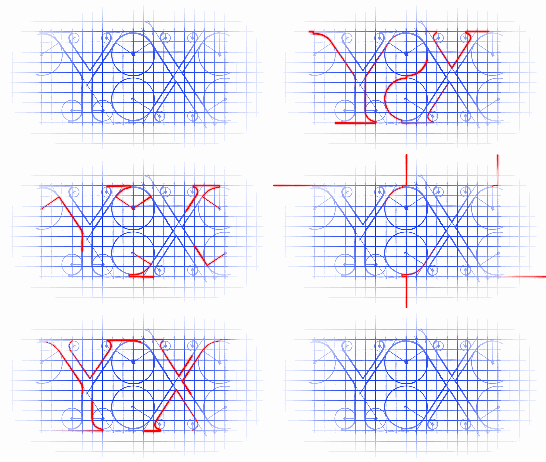
You can use any shape through a plist file, like this one which is my company's logo:
你可以使用一个plist文件来存储图形样式,就像如下的我的公司的loga样式:

Which files are needed?
CBStoreHouseRefreshControl is available through CocoaPods, to install it simply add the following line to your Podfile:
CBStoreHouseRefreshControl支持 CocoaPods, 添加以下一行代码到Podfile中即可:
pod "CBStoreHouseRefreshControl"
Alternatively, you can just drag CBStoreHouseRefreshControl (.h .m) and BarItem (.h .m) into your own project.
另一种方式就是:你把 CBStoreHouseRefreshControl (.h .m) 和 BarItem (.h .m) 文件拖到你的项目中就可以了。
How to use it
You can attach it to any UIScrollView like UITableView or UICollectionView using following simple static method:
你可以将它添加到UIScrollView的任何子类当中,用如下的一个方法:
+ (CBStoreHouseRefreshControl*)attachToScrollView:(UIScrollView *)scrollView

                                           target:(id)target

                                    refreshAction:(SEL)refreshAction

                                            plist:(NSString *)plist;
self.storeHouseRefreshControl = [CBStoreHouseRefreshControl attachToScrollView:self.tableView target:self refreshAction:@selector(refreshTriggered:) plist:@"storehouse"];
Or, using this method for more configurable options:
或者用下面的一个方法进行更多的设置:
+ (CBStoreHouseRefreshControl*)attachToScrollView:(UIScrollView *)scrollView

                                           target:(id)target

                                    refreshAction:(SEL)refreshAction

                                            plist:(NSString *)plist

                                            color:(UIColor *)color

                                        lineWidth:(CGFloat)lineWidth

                                       dropHeight:(CGFloat)dropHeight

                                            scale:(CGFloat)scale

                             horizontalRandomness:(CGFloat)horizontalRandomness

                          reverseLoadingAnimation:(BOOL)reverseLoadingAnimation

                          internalAnimationFactor:(CGFloat)internalAnimationFactor;
self.storeHouseRefreshControl = [CBStoreHouseRefreshControl attachToScrollView:self.tableView target:self refreshAction:@selector(refreshTriggered:) plist:@"storehouse" color:[UIColor whiteColor] lineWidth:1.5 dropHeight:80 scale:1 horizontalRandomness:150 reverseLoadingAnimation:YES internalAnimationFactor:0.5];
Then, implement UIScrollViewDelegate in your UIViewController if you haven't already, and pass the calls through to the refresh control:
然后,在你的控制器中实现你的UIScrollViewDelegate的一些方法,你将那些代理方法的值传进去即可:
- (void)scrollViewDidScroll:(UIScrollView *)scrollView

{

    [self.storeHouseRefreshControl scrollViewDidScroll];

}

- (void)scrollViewDidEndDragging:(UIScrollView *)scrollView willDecelerate:(BOOL)decelerate

{

    [self.storeHouseRefreshControl scrollViewDidEndDragging];

}
Lastly, make sure you've implemented the refreshAction you passed it earlier to listen for refresh triggers:
最后,确保你实现了刷新的操作:
- (void)refreshTriggered

{

    //call your loading method here

    //Finshed loading the data, reset the refresh control

    [self.storeHouseRefreshControl finishingLoading];

}
For more details, please check out the demo app's code.
更多细节,请查阅示例代码。
How to use your own shape
The CBStoreHouseRefreshControl's shape contains bunch of BarItem for animation, each BarItemis running its own animation, you need to provide startPoint and endPoint through a plist file.
All BarItem will share one coordinate system whose origin is at the top-left corner. For example if you want to draw a square, the plist will look like this:
CBStoreHouseRefreshControl的形状包含了一系列的BarItem用于动画,每一个BarItem都执行他自身的动画,你需要给他们在plist文件里面提供一个起始值和结束值。
所有的BarItem会分享同一个坐标系统,这个坐标系统的原始顶点在左上角。如果你是要绘制一个正方形,那么,plist文件中就应该是如下的样子。
The result will look like this:
结果看起来会是这样子的哦:

Notes:
- Make sure you put the right key which are
startPointsandendPoints. 确保你的key值是在正确的起始点与结束点那里 - Make sure you are using the right format (
{x,y}) for coordinates. 确保你是使用了正确的坐标系统 - The highlight/loading animation will highlight each bar item in the same order you declare them in plist, use
reverseLoadingAnimationto reverse the animation. 这个高亮效果会根据你的plist文件中列表的顺序而依次高亮,你可以使用reverseLoadingAnimation来反转动画效果

Easy way to generate startPoint and endPoint?
@isaced mentions that it's easier to use PaintCode to generate startPoint and endPoint:
你可以使用PaintCode来生成起始点与结束点

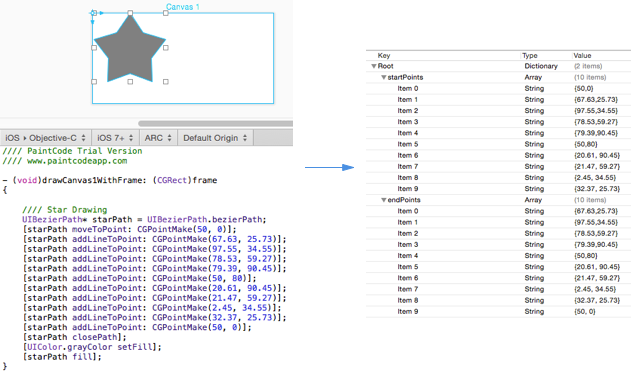
Result:

You can get more info here.
Configuration
Play with following parameters to configure CBStoreHouseRefreshControl's view and animation:
你可以根据如下的一些参数来配置CBStoreHouseRefreshControl的动画效果:
- Set the bar color with the
colorparameter 设置bar的颜色 - Set the bar width with the
lineWidthparameter 设置bar的宽度以及线宽 - Set the height of control with the
dropHeightparameter 设置控制器的垂直高度??? - Set the scale of control with the
scaleparameter 设置缩放参数 - Adjust how disperse the bar items appear/disappear by changing the
horizontalRandomnessparameter 调整bar是怎么消失的 - Set if reversing the loading animation with the
reverseLoadingAnimationparameter, if set toYES, the last bar item will be highlighted firstly. 反转动画的顺序 - Adjust the time offset of the appear/disappear animation by changing the
internalAnimationFactorparameter, for example ifinternalAnimationFactoris 1 all bar items will appear/disappear all together. 调整动画时间的偏移量
Who's using it?
We've a wiki page for that, feel free to add your projects there!
Author
Suyu Zhang
suyu_zhang@hotmail.com
suyuzhang.com
[翻译] CBStoreHouseRefreshControl的更多相关文章
- 《Django By Example》第五章 中文 翻译 (个人学习,渣翻)
书籍出处:https://www.packtpub.com/web-development/django-example 原作者:Antonio Melé (译者@ucag注:大家好,我是新来的翻译, ...
- 《Django By Example》第四章 中文 翻译 (个人学习,渣翻)
书籍出处:https://www.packtpub.com/web-development/django-example 原作者:Antonio Melé (译者注:祝大家新年快乐,这次带来<D ...
- [翻译]开发文档:android Bitmap的高效使用
内容概述 本文内容来自开发文档"Traning > Displaying Bitmaps Efficiently",包括大尺寸Bitmap的高效加载,图片的异步加载和数据缓存 ...
- 【探索】机器指令翻译成 JavaScript
前言 前些时候研究脚本混淆时,打算先学一些「程序流程」相关的概念.为了不因太枯燥而放弃,决定想一个有趣的案例,可以边探索边学. 于是想了一个话题:尝试将机器指令 1:1 翻译 成 JavaScript ...
- 《Django By Example》第三章 中文 翻译 (个人学习,渣翻)
书籍出处:https://www.packtpub.com/web-development/django-example 原作者:Antonio Melé (译者注:第三章滚烫出炉,大家请不要吐槽文中 ...
- 《Django By Example》第二章 中文 翻译 (个人学习,渣翻)
书籍出处:https://www.packtpub.com/web-development/django-example 原作者:Antonio Melé (译者注:翻译完第一章后,发现翻译第二章的速 ...
- 《Django By Example》第一章 中文 翻译 (个人学习,渣翻)
书籍出处:https://www.packtpub.com/web-development/django-example 原作者:Antonio Melé (译者注:本人目前在杭州某家互联网公司工作, ...
- 【翻译】Awesome R资源大全中文版来了,全球最火的R工具包一网打尽,超过300+工具,还在等什么?
0.前言 虽然很早就知道R被微软收购,也很早知道R在统计分析处理方面很强大,开始一直没有行动过...直到 直到12月初在微软技术大会,看到我软的工程师演示R的使用,我就震惊了,然后最近在网上到处了解和 ...
- ASP.NET MVC with Entity Framework and CSS一书翻译系列文章之第一章:创建基本的MVC Web站点
在这一章中,我们将学习如何使用基架快速搭建和运行一个简单的Microsoft ASP.NET MVC Web站点.在我们马上投入学习和编码之前,我们首先了解一些有关ASP.NET MVC和Entity ...
随机推荐
- centos6 free 和 centos 7的free 的差异与对比
目录 一 centos6 free 常用参数和含义 centos6 free 命令示例 free 值讲解 计算公式 二 centos7 free 常用的参数 centos7 free 命令示例 计算公 ...
- 外网访问不了Xampp(本地访问不了虚拟机的Xampp)
安装好了Xampp,在虚拟机是可以访问的, 浏览器中输入localhost 嘛 不过在本地就是访问不了,ping是能通过的 然后网上查了一些资料,并结合Xampp的提示: 特别注意:如果连上面这 ...
- UIKit 框架之UIAlertController
IOS8之后增加了UIAlertController类,它可以表示UIAlertView和UIActionSheet.它继承自UIViewController. - (BOOL)application ...
- [转]How to tell NLog to log exceptions?
本文转自:https://stackoverflow.com/questions/9199073/how-to-tell-nlog-to-log-exceptions 问: Target: <t ...
- 通过set赋值,与select赋值的区别
---通过set赋值,与select赋值的区别.declare @a int--set @a=(select count(*) from TblStudent)select @a=count(*) f ...
- Golang 模板
最近又尝试了一下 Golang 的 Template,发现一般功能都满足了,而且语法也相对比较简单,所以稍作总结.在 Go语言中,模板有 text/template 和 html/template 两 ...
- 【学习笔记】--- 老男孩学Python,day18 面向对象------ 属性,类方法,静态方法
属性 属性: 将方法伪装成一个属性,代码上没有什么提升,只是更合理. 应用场景: 类中 要用名词时候可以用@property 比如,求面积,周长,平方,体脂 等运算时候 例如: bmi是名词,最 ...
- node.js(http协议)
七层网络协议 应用层:浏览器(http,FTP,DNS,SMTP,TeInet)(邓哥)表示层:加密,格式转换(怕别人偷看,加密摩斯电码)会话层:解除或者建立和其他节点的联系(邓哥在想追这个女孩,不再 ...
- js中var、let、const区别
javascript中有三种声明变量的方式:var.let.const 1.var 作用域:全局或局部 var的作用域可以是全局或是局部,以下分四种情况说明: (1).当var关键字声明于函数内时是局 ...
- 为样式找到应用目标-CSS选择器
1,常用选择器:元素(标签/简单)选择器.ID选择器.类选择器.后代选择器(可以将类或者ID应用于它们的祖先,然后使用后代选择器来定位) 2,伪类:有时候,我们需要根据文档结构之外的其他条件对元素应用 ...