
产生渐变色的view
产生渐变色的view
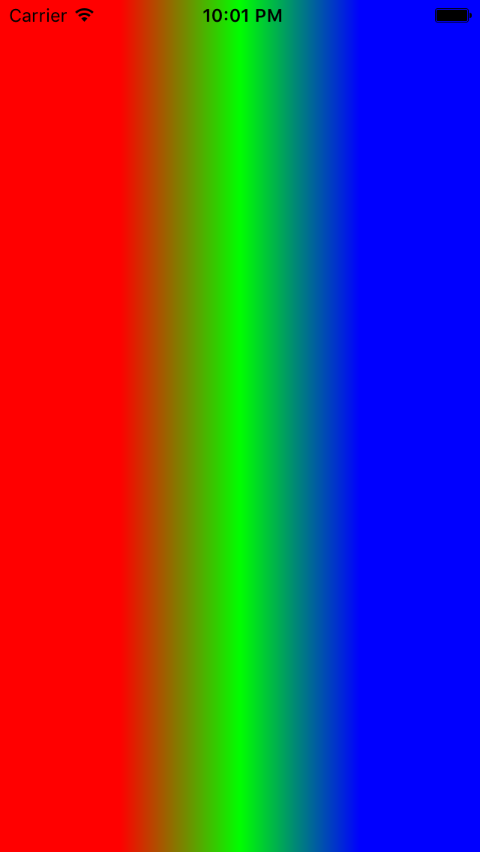
效果
源码
https://github.com/YouXianMing/UI-Component-Collection
//

//  GradientColorView.h

//  GradientColorView

//

//  Created by YouXianMing on 15/12/15.

//  Copyright © 2015年 YouXianMing. All rights reserved.

//

#import <UIKit/UIKit.h>

@interface GradientColorView : UIView

/**

 *  CGColor's array.

 */

@property (nonatomic, strong) NSArray   *colors;

/**

 *  CGColor's location.

 */

@property (nonatomic, strong) NSArray   *locations;

/**

 *  Start point.

 */

@property (nonatomic) CGPoint startPoint;

/**

 *  End point.

 */

@property (nonatomic) CGPoint endPoint;

/**

 *  After you have set all the properties, you should run this method to make effective.

 */

- (void)becomeEffective;

@end
//

//  GradientColorView.m

//  GradientColorView

//

//  Created by YouXianMing on 15/12/15.

//  Copyright © 2015年 YouXianMing. All rights reserved.

//

#import "GradientColorView.h"

@interface GradientColorView ()

@property (nonatomic, strong) CAGradientLayer  *gradientLayer;

@end

@implementation GradientColorView

+ (Class)layerClass {

    return [CAGradientLayer class];

}

- (instancetype)initWithFrame:(CGRect)frame {

    if (self = [super initWithFrame:frame]) {

        _gradientLayer  = (CAGradientLayer *)self.layer;

        self.startPoint = CGPointMake(, );

        self.endPoint   = CGPointMake(, );

        self.locations  = @[@(0.25), @(0.5), @(0.75)];

        self.colors     = @[(__bridge id)[UIColor redColor].CGColor,

                            (__bridge id)[UIColor greenColor].CGColor,

                            (__bridge id)[UIColor blueColor].CGColor];

    }

    return self;

}

- (void)becomeEffective {

    self.gradientLayer.startPoint = self.startPoint;

    self.gradientLayer.endPoint   = self.endPoint;

    self.gradientLayer.colors     = self.colors;

    self.gradientLayer.locations  = self.locations;

}

@end
细节

产生渐变色的view的更多相关文章
- [控件] AngleGradientView
AngleGradientView 效果 说明 1. 用源码产生带环形渐变色的view 2. 可以配合maskView一起使用 (上图中的右下角图片的效果) 源码 https://github.com ...
- cocos2D(六)----CCLayer
一个游戏中能够有非常多个场景,每一个场景里面又可能包括有多个图层,这里的图层一般就是CCLayer对象.CCLayer本身差点儿没什么功能.对照CCNode,CCLayer可用于接收触摸和加速计输入. ...
- 自定义进度条渐变色View
package com.jianke.stepCounter.Activity; import android.annotation.SuppressLint; import android.cont ...
- view渐变色,透明度渐变
1 功能描述 开发中经常遇到这样的需求:view2显示在view1上面,透过view2可以渐渐的看到view1.效果如图1所示:view1是一个imageView,view2是一个普通view.vie ...
- 通过CAGradientLayer制作渐变色效果(转)
转载自:http://blog.it985.com/7986.html 看了极客学院的视频之后写的一篇博客,觉得不错,还是作为笔记使用. 简单介绍一下CAGradientLayer吧. Gradien ...
- Android custom View AirConditionerView hacking
package com.example.arc.view; import android.content.Context; import android.graphics.Canvas; import ...
- 自定义View(1)简单流程及示例模板
1,继承View , ViewGroup,或TextView等等 2,绘制相关的api, canvas 画布, paint 画笔 2,重写重要的函数(注意这个顺序) onMeasure 属于View的 ...
- 转载爱哥自定义View系列--Paint详解
上图是paint中的各种set方法 这些属性大多我们都可以见名知意,很好理解,即便如此,哥还是带大家过一遍逐个剖析其用法,其中会不定穿插各种绘图类比如Canvas.Xfermode.ColorFilt ...
- android shape的使用详解以及常用效果(渐变色、分割线、边框、半透明阴影效果等)
shape使用.渐变色.分割线.边框.半透明.半透明阴影效果. 首先简单了解一下shape中常见的属性.(详细介绍参看 api文档 ) 转载请注明:Rflyee_大飞: http://blog.cs ...
随机推荐
- onsubmit解惑
1.onsubmit的位置: onsubmit只存在于html <form>中,js的form中 2.submit与onsubmit的区别 发生顺序:onsubmit -> subm ...
- CSS选择器详解(一)常用选择器
目录 类型选择器 类选择器 ID选择器 伪类 伪元素 类型选择器 通过类型选择器可以选择某一类型的html标签,并对其使用样式. 语法: selector {property1: value; pro ...
- 在PHP中使用MySQL Mysqli操作数据库 ,以及类操作方法
先来操作函数部分,普遍的MySQL 函数方法,但随着PHP5的发展,有些函数使用的要求加重了,有些则将废弃不用,有些则参数必填... ================================= ...
- [转]Using TRY...CATCH in Transact-SQL
本文转自:https://technet.microsoft.com/en-us/library/ms179296(v=sql.105).aspx Using TRY...CATCH in Trans ...
- Vertica使用Database Designer创建完整的设计
Vertica Database Designer 分析逻辑架构,示例数据库可以分析实力查询. 创建可自动部署或手动部署的物理架构设计(一组投射) 任何不具备数据库专业知识的人员均可使用 可以随时运行 ...
- sql基础语法大全 转载过来的,出处忘了!
一.基础 1.说明:创建数据库CREATE DATABASE database-name 2.说明:删除数据库drop database dbname3.说明:备份sql server--- 创建 备 ...
- xmpp实现的即时通讯聊天(二)
参考网址:http://www.jianshu.com/p/8894a5a71b70 借图描述原理: 三.注册.登陆.聊天功能的实现 故事板如下: 四个类如下: 不喜多言,直接上Demo: Login ...
- java性能监控工具jstat
jstat Monitors Java Virtual Machine (JVM) statistics. This command is experimental and unsupported. ...
- BIO、NIO和AIO的区别
一:事件分离器 在IO读写时,把 IO请求 与 读写操作 分离调配进行,需要用到事件分离器.根据处理机制的不同,事件分离器又分为:同步的Reactor和异步的Proactor. Reactor模型: ...
- 地址解析协议ARP,网络层协议IP、ICMP协议
分析所用软件下载:Wireshark-win32-1.10.2.exe 阅读导览 1. 分析并且应用ARP协议 2.分析IP协议 3.分析ICMP协议 1.分析arp报文的格式与内容 (1)ping ...