
The Go scheduler
转载自:http://morsmachine.dk/go-scheduler
Introduction
One of the big features for Go 1.1 is the new scheduler, contributed by Dmitry Vyukov. The new scheduler has given a dramatic increase in performance for parallel Go programs and with nothing better to do, I figured I'd write something about it.
Most of what's written in this blog post is already described in the original design doc. It's a fairly comprehensive document, but pretty technical.
All you need to know about the new scheduler is in that design document but this post has pictures, so it's clearly superior.
What does the Go runtime need with a scheduler?
But before we look at the new scheduler, we need to understand why it's needed. Why create a userspace scheduler when the operating system can schedule threads for you?
The POSIX thread API is very much a logical extension to the existing Unix process model and as such, threads get a lot of the same controls as processes. Threads have their own signal mask, can be assigned CPU affinity, can be put into cgroups and can be queried for which resources they use. All these controls add overhead for features that are simply not needed for how Go programs use goroutines and they quickly add up when you have 100,000 threads in your program.
Another problem is that the OS can't make informed scheduling decisions, based on the Go model. For example, the Go garbage collector requires that all threads are stopped when running a collection and that memory must be in a consistent state. This involves waiting for running threads to reach a point where we know that the memory is consistent.
When you have many threads scheduled out at random points, chances are that you're going to have to wait for a lot of them to reach a consistent state. The Go scheduler can make the decision of only scheduling at points where it knows that memory is consistent. This means that when we stop for garbage collection, we only have to wait for the threads that are being actively run on a CPU core.
Our Cast of Characters
There are 3 usual models for threading. One is N:1 where several userspace threads are run on one OS thread. This has the advantage of being very quick to context switch but cannot take advantage of multi-core systems. Another is 1:1 where one thread of execution matches one OS thread. It takes advantage of all of the cores on the machine, but context switching is slow because it has to trap through the OS.
Go tries to get the best of both worlds by using a M:N scheduler. It schedules an arbitrary number of goroutines onto an arbitrary number of OS threads. You get quick context switches and you take advantage of all the cores in your system. The main disadvantage of this approach is the complexity it adds to the scheduler.
To acomplish the task of scheduling, the Go Scheduler uses 3 main entities:
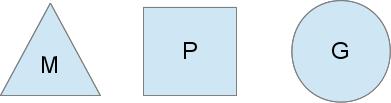
The triangle represents an OS thread. It's the thread of execution managed by the OS and works pretty much like your standard POSIX thread. In the runtime code, it's called M for machine.
The circle represents a goroutine. It includes the stack, the instruction pointer and other information important for scheduling goroutines, like any channel it might be blocked on. In the runtime code, it's called a G.
The rectangle represents a context for scheduling. You can look at it as a localized version of the scheduler which runs Go code on a single thread. It's the important part that lets us go from a N:1 scheduler to a M:N scheduler. In the runtime code, it's called P for processor. More on this part in a bit.
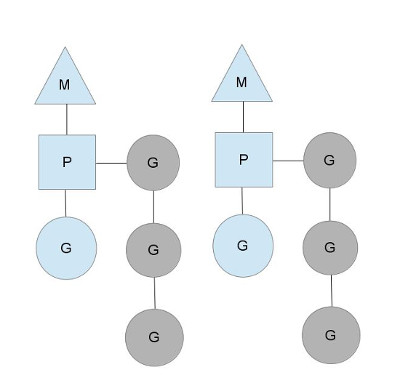
Here we see 2 threads (M), each holding a context (P), each running a goroutine (G). In order to run goroutines, a thread must hold a context.
The number of contexts is set on startup to the value of the GOMAXPROCS environment variable or through the runtime function GOMAXPROCS(). Normally this doesn't change during execution of your program. The fact that the number of contexts is fixed means that only GOMAXPROCS are running Go code at any point. We can use that to tune the invocation of the Go process to the individual computer, such at a 4 core PC is running Go code on 4 threads.
The greyed out goroutines are not running, but ready to be scheduled. They're arranged in lists called runqueues. Goroutines are added to the end of a runqueue whenever a goroutine executes a go statement. Once a context has run a goroutine until a scheduling point, it pops a goroutine off its runqueue, sets stack and instruction pointer and begins running the goroutine.
To bring down mutex contention, each context has its own local runqueue. A previous version of the Go scheduler only had a global runqueue with a mutex protecting it. Threads were often blocked waiting for the mutex to unlocked. This got really bad when you had 32 core machines that you wanted to squeeze as much performance out of as possible.
The scheduler keeps on scheduling in this steady state as long as all contexts have goroutines to run. However, there are a couple of scenarios that can change that.
Who you gonna (sys)call?
You might wonder now, why have contexts at all? Can't we just put the runqueues on the threads and get rid of contexts? Not really. The reason we have contexts is so that we can hand them off to other threads if the running thread needs to block for some reason.
An example of when we need to block, is when we call into a syscall. Since a thread cannot both be executing code and be blocked on a syscall, we need to hand off the context so it can keep scheduling.
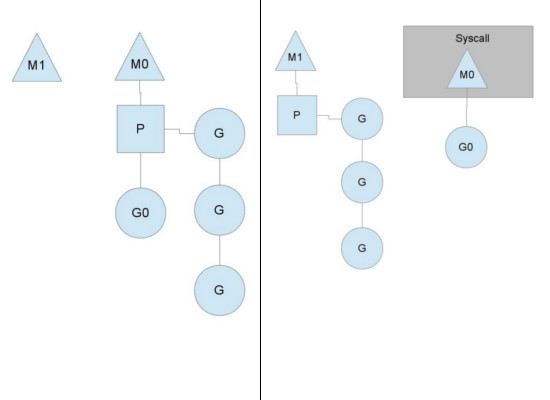
Here we see a thread giving up its context so that another thread can run it. The scheduler makes sure there are enough threads to run all contexts. M1 in the illustration above might be created just for the purpose of handling this syscall or it could come from a thread cache. The syscalling thread will hold on to the goroutine that made the syscall since it's technically still executing, albeit blocked in the OS.
When the syscall returns, the thread must try and get a context in order to run the returning goroutine. The normal mode of operation is to steal a context from one of the other threads. If it can't steal one, it will put the goroutine on a global runqueue, put itself on the thread cache and go to sleep.
The global runqueue is a runqueue that contexts pull from when they run out of their local runqueue. Contexts also periodically check the global runqueue for goroutines. Otherwise the goroutines on global runqueue could end up never running because of starvation.
This handling of syscalls is why Go programs run with multiple threads, even when GOMAXPROCSis 1. The runtime uses goroutines that call syscalls, leaving threads behind.
Stealing work
Another way that the steady state of the system can change is when a context runs out of goroutines to schedule to. This can happen if the amount of work on the contexts' runqueues is unbalanced. This can cause a context to end up exhausting it's runqueue while there is still work to be done in the system. To keep running Go code, a context can take goroutines out of the global runqueue but if there are no goroutines in it, it'll have to get them from somewhere else.
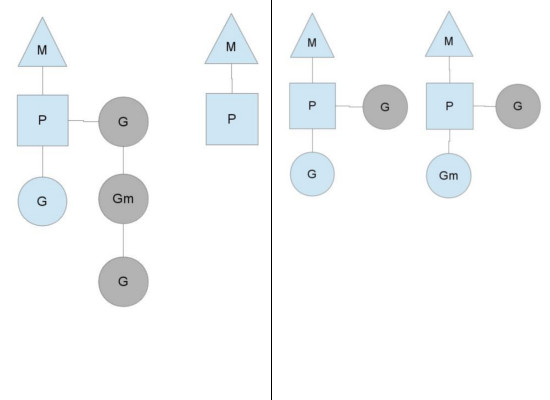
That somewhere is the other contexts. When a context runs out, it will try to steal about half of the runqueue from another context. This makes sure there is always work to do on each of the contexts, which in turn makes sure that all threads are working at their maximum capacity.
Where to go?
There are many more details to the scheduler, like cgo threads, the LockOSThread() function and integration with the network poller. These are outside the scope of this post, but still merit study. I might write about these later. There are certainly plenty of interesting constructions to be found in the Go runtime library.
By Daniel Morsing
The Go scheduler的更多相关文章
- AndroidStudio3.0无法打开Android Device Monitor的解决办法(An error has occurred on Android Device Monitor)
---恢复内容开始--- 打开monitor时出现 An error has occurred. See the log file... ------------------------------- ...
- 从scheduler is shutted down看程序员的英文水平
我有个windows服务程序,今天重点在测试系统逻辑.部署后,在看系统日志时,不经意看到一行:scheduler is shutted down. 2016-12-29 09:40:24.175 {& ...
- Spring 4 + Quartz 2.2.1 Scheduler Integration Example
In this post we will see how to schedule Jobs using Quartz Scheduler with Spring. Spring provides co ...
- VMware中CPU分配不合理以及License限制引起的SQL Scheduler不能用于查询处理
有一台SQL Server(SQL Server 2014 标准版)服务器中的scheduler_count与cpu_count不一致,如下截图所示: SELECT cpu_count , ...
- Windows Task Scheduler Fails With Error Code 2147943785
Problem: Windows Task Scheduler Fails With Error Code 2147943785 Solution: This is usually due to a ...
- Fair Scheduler 队列设置经验总结
Fair Scheduler 队列设置经验总结 由于公司的hadoop集群的计算资源不是很充足,需要开启yarn资源队列的资源抢占.在使用过程中,才明白资源抢占的一些特点.在这里总结一下. 只有一个队 ...
- Fair Scheduler中的Delay Schedule分析
延迟调度的主要目的是提高数据本地性(data locality),减少数据在网络中的传输.对于那些输入数据不在本地的MapTask,调度器将会延迟调度他们,而把slot分配给那些具备本地性的MapTa ...
- 【Cocos2d-x 3.x】 调度器Scheduler类源码分析
非个人的全部理解,部分摘自cocos官网教程,感谢cocos官网. 在<CCScheduler.h>头文件中,定义了关于调度器的五个类:Timer,TimerTargetSelector, ...
- Linux IO Scheduler(Linux IO 调度器)
每个块设备或者块设备的分区,都对应有自身的请求队列(request_queue),而每个请求队列都可以选择一个I/O调度器来协调所递交的request.I/O调度器的基本目的是将请求按照它们对应在块设 ...
- Pair Project: Elevator Scheduler [电梯调度算法的实现和测试]
作业提交时间:10月9日上课前. Design and implement an Elevator Scheduler to aim for both correctness and performa ...
随机推荐
- 【数组】Remove Duplicates from Sorted Array II
题目: Follow up for "Remove Duplicates":What if duplicates are allowed at most twice? For ex ...
- Web自动化 - 选择操作元素 2
文章转自 白月黑羽教Python 前面我们看到了根据 id.class属性.tag名 选择元素. 如果我们要选择的 元素 没有id.class 属性, 这时候我们通常可以通过 CSS selector ...
- prometheus安装、使用
本文主要参考https://songjiayang.gitbooks.io/prometheus/introduction/what.html 二进制包安装 我们可以到 Prometheus 二进制下 ...
- win7下如何解决对方可以ping通我,但我ping不通对方问题
以下是在百度经验里面找到的文章:http://jingyan.baidu.com/article/6b97984da3ac851ca2b0bfe1.html 当我在虚拟机的linux系统中ping本机 ...
- 简单的node爬虫练手,循环中的异步转同步
简单的node爬虫练手,循环中的异步转同步 转载:https://blog.csdn.net/qq_24504525/article/details/77856989 看到网上一些基于node做的爬虫 ...
- Springboot --- Spring Security (一)
文章部分图片来自参考资料 问题 : Spring Security 内部实现的原理是什么 概述 Spring Security 是个安全框架,可以提供认证,防止网络功能等功能,可以结合 sprin ...
- Servlet 网页重定向
当文档移动到新的位置,我们需要向客户端发送这个新位置时,我们需要用到网页重定向.当然,也可能是为了负载均衡,或者只是为了简单的随机,这些情况都有可能用到网页重定向. 重定向请求到另一个网页的最简单的方 ...
- POJ Georgia and Bob-----阶梯博弈变形。
Georgia and Bob Time Limit: 1000MS Memory Limit: 10000K Total Submissions: 6622 Accepted: 1932 D ...
- 郭霖 - MVVM开源项目学习
https://blog.csdn.net/guolin_blog/article/details/87900605 https://medium.com/androiddevelopers/view ...
- 获取本地内网和外网IP地址
public class IPUtil { /// <summary> /// 获取本地内网IP /// </summary> /// <returns></ ...