
【SpringBoot】SpringBoot与Thymeleaf模版(六)
---恢复内容开始---
模板引擎的思想
模板是为了将显示与数据分离,模板技术多种多样,但其本质都是将模板文件和数据通过模板引擎生成最终的HTML代码。

Thymeleaf介绍
Thymeleaf是适用于Web和独立环境的现代服务器端Java模板引擎。
Thymeleaf的主要目标是为您的开发工作流程带来优雅的自然模板 -HTML可以在浏览器中正确显示,也可以作为静态原型工作,从而可以在开发团队中加强协作。
Thymeleaf拥有适用于Spring Framework的模块,与您喜欢的工具的大量集成以及插入您自己的功能的能力,对于现代HTML5 JVM Web开发而言,Thymeleaf是理想的选择-尽管它还有很多工作要做。
Thymeleaf使用
1、新建一个SpringBoot项目,并且引入thymeleaf依赖
 <dependency>

     <groupId>org.springframework.boot</groupId>

     <artifactId>spring-boot-starter-thymeleaf</artifactId>

 </dependency>
最终pom文件如下:
 <?xml version="1.0" encoding="UTF-8"?>

 <project xmlns="http://maven.apache.org/POM/4.0.0"

          xmlns:xsi="http://www.w3.org/2001/XMLSchema-instance"

          xsi:schemaLocation="http://maven.apache.org/POM/4.0.0 http://maven.apache.org/xsd/maven-4.0.0.xsd">

     <modelVersion>4.0.0</modelVersion>

     <groupId>com.test</groupId>

     <artifactId>test-springboot-web</artifactId>

     <version>1.0-SNAPSHOT</version>

     <parent>

         <groupId>org.springframework.boot</groupId>

         <artifactId>spring-boot-starter-parent</artifactId>

         <version>2.1.8.RELEASE</version>

     </parent>

     <properties>

         <project.build.sourceEncoding>UTF-8</project.build.sourceEncoding>

         <project.reporting.outputEncoding>UTF-8</project.reporting.outputEncoding>

         <java.version>1.8</java.version>

     </properties>

     <dependencies>

         <dependency>

             <groupId>org.springframework.boot</groupId>

             <artifactId>spring-boot-starter-web</artifactId>

         </dependency>

         <dependency>

             <groupId>org.springframework.boot</groupId>

             <artifactId>spring-boot-starter-thymeleaf</artifactId>

         </dependency>

         <dependency>

             <groupId>org.springframework.boot</groupId>

             <artifactId>spring-boot-starter-test</artifactId>

             <scope>test</scope>

         </dependency>

     </dependencies>

     <!-- SpringBoot打包插件,可以将代码打包成一个可执行的jar包 -->

     <build>

         <plugins>

             <plugin>

                 <groupId>org.springframework.boot</groupId>

                 <artifactId>spring-boot-maven-plugin</artifactId>

             </plugin>

         </plugins>

     </build>

 </project>
2、编写controller,在controller中将数据绑定到页面(success.html)
 package com.test.springboot.web.controller;

 import org.springframework.stereotype.Controller;

 import org.springframework.web.bind.annotation.RequestMapping;

 import org.springframework.web.bind.annotation.ResponseBody;

 import java.util.Arrays;

 import java.util.Map;

 @Controller

 public class HelloController {

     @RequestMapping("/success")

     public String success(Map<String, Object> map){

         map.put("hello", "<span style=\"color: red;\">hello!</span>");

         map.put("users", Arrays.asList("张三", "李四", "王五"));

         return "success";

     }

 }
3、编辑页面resources/templates/success.html,在页面上获取数据
 <!DOCTYPE html>

 <!--

  xmlns:th="http://www.thymeleaf.org" 的作用是增加thymeleaf的语法提示

 -->

 <html lang="en" xmlns:th="http://www.thymeleaf.org">

 <head>

     <meta charset="UTF-8">

     <title>Title</title>

 </head>

 <body>

     test page

     <h4 th:text="${hello}"></h4>

     <h4 th:utext="${hello}"></h4>

     <h4 th:each="user:${users}" > [[${user}]] </h4>

 </body>

 </html>
4、重启项目,在浏览器中使用地址 :http://localhost:8080/success,进行访问,效果如下

小技巧:springboot上修改thymeleaf页面,想要不重启项目就生效,需要做2点
1、关闭thymeleaf的缓存 ,在属性文件中设置:spring.thymeleaf.cache=false ,默认是开启的
2、ctrl + F9 重新编译界面
Thymeleaf语法
1、获取变量值
a、行内表达式 [[...]] or [(...)]
在Thymeleaf中,[[...]]或之间的表达式[(...)]被认为是内联表达式,在它们内部,我们可以使用在th:text 或 th:utext属性中也有效的任何类型的表达式。
[[...]]:表示th:text,会转义特殊字符
[(...)]:表示th:utext,不会转义特殊字符
1 Hello, [[${session.user.name}]]!
b、变量表达式 ${…}
使用方法:直接使用th:xx="${}" 获取对象属性,通过${…}进行取值,这点和ONGL表达式语法一致!
<p>Today is: <span th:text="${today}">13 february 2011</span>.</p>
c、选择变量表达式 *{...}
使用方法:首先通过 th:object 获取对象,然后使用th:xx = "*{}"获取对象属性
 <div th:object="${session.user}">

     <p>Name: <span th:text="*{firstName}">Sebastian</span>.</p>

     <p>Surname: <span th:text="*{lastName}">Pepper</span>.</p>

     <p>Nationality: <span th:text="*{nationality}">Saturn</span>.</p>

 </div>
d、消息表达
即通常的国际化属性:#{msg} 用于获取国际化语言翻译值
<title th:text="#{user.title}"></title>
e、链接表达式
使用方法:通过链接表达式@{}直接拿到应用路径,然后拼接静态资源路径。
 <script th:src="@{/webjars/jquery/jquery.js}"></script>

 <link th:href="@{/webjars/bootstrap/css/bootstrap.css}" rel="stylesheet" type="text/css">
f、片段表达式
片段表达式是Thymeleaf的特色之一,细粒度可以达到标签级别,这是JSP无法做到的。片段表达式拥有三种语法
~{ viewName } 表示引入完整页面~{ viewName ::selector} 表示在指定页面寻找片段 其中selector可为片段名、jquery选择器等~{ ::selector} 表示在当前页寻找
<div th:insert="~{commons :: main}">...</div>
g、其他表达式
在基础语法中,默认支持字符串连接、数学运算、布尔逻辑和三目运算等。
<input name="name" th:value="${'I am '+(user.name!=null?user.name:'NoBody')}"/>
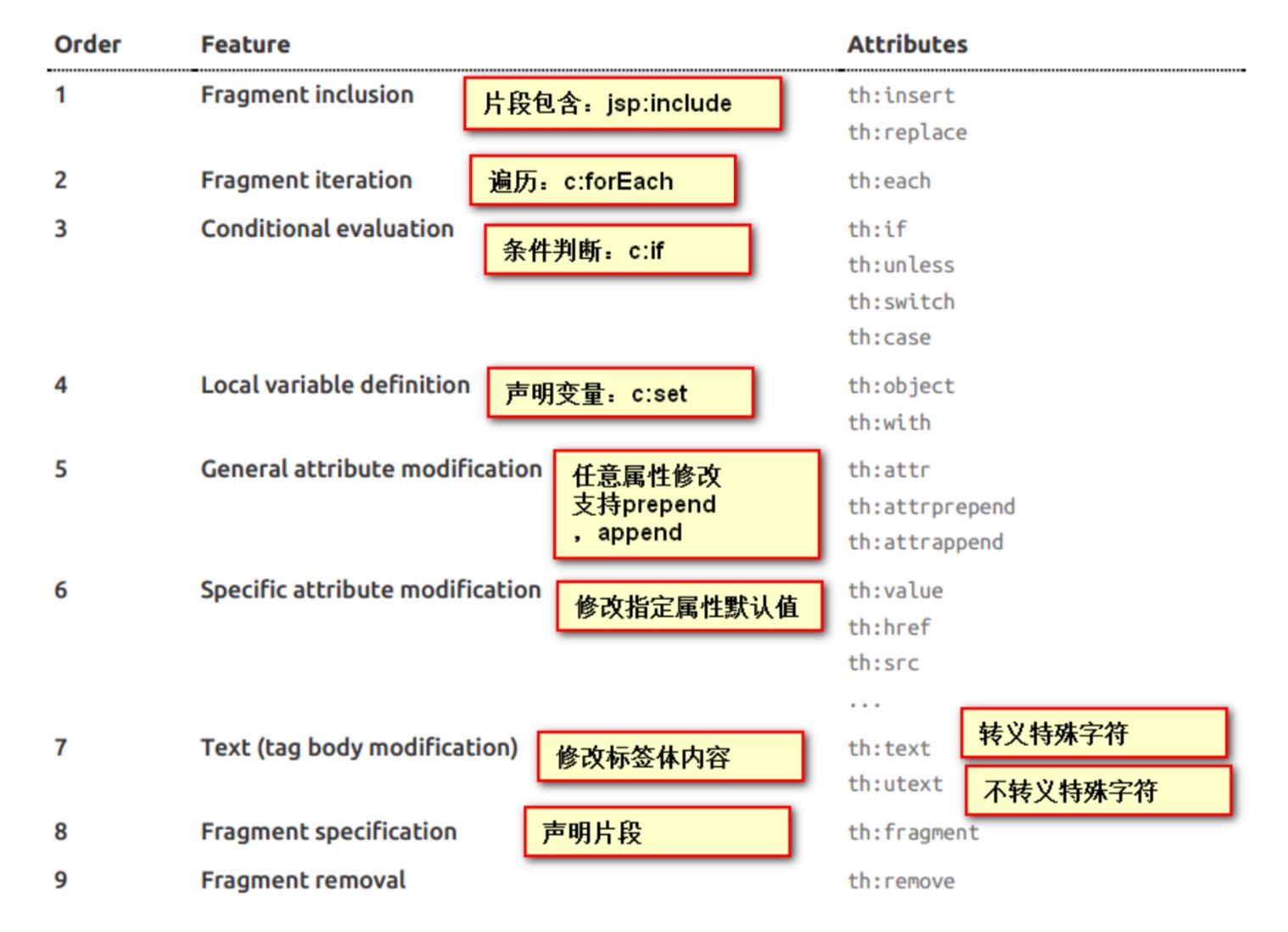
2、设置标签属性
th:text;改变当前元素里面的文本内容;
th:任意html属性;来替换原生属性的值
3、常用的内置对象
一、ctx :上下文对象。
二、vars :上下文变量。
三、locale:上下文的语言环境。
四、request:(仅在web上下文)的 HttpServletRequest 对象。
五、response:(仅在web上下文)的 HttpServletResponse 对象。
六、session:(仅在web上下文)的 HttpSession 对象。
七、servletContext:(仅在web上下文)的 ServletContext 对象
4、常用的内置方法
一、strings:字符串格式化方法,常用的Java方法它都有。比如:equals,equalsIgnoreCase,length,trim,toUpperCase,toLowerCase,indexOf,substring,replace,startsWith,endsWith,contains,containsIgnoreCase等
二、numbers:数值格式化方法,常用的方法有:formatDecimal等
三、bools:布尔方法,常用的方法有:isTrue,isFalse等
四、arrays:数组方法,常用的方法有:toArray,length,isEmpty,contains,containsAll等
五、lists,sets:集合方法,常用的方法有:toList,size,isEmpty,contains,containsAll,sort等
六、maps:对象方法,常用的方法有:size,isEmpty,containsKey,containsValue等
七、dates:日期方法,常用的方法有:format,year,month,hour,createNow等
5、迭代循环
想要遍历List集合很简单,配合th:each 即可快速完成迭代。例如遍历用户列表:
 <div th:each="user:${userList}">

     账号:<input th:value="${user.username}"/>

     密码:<input th:value="${user.password}"/>

 </div>
集合的迭代过程还可以获取状态变量,只需在变量后面指定状态变量名即可,状态变量可用于获取集合的下标/序号、总数、是否为单数/偶数行、是否为第一个/最后一个。
 <div th:each="user,stat:${userList}" th:class="${stat.even}?'even':'odd'">

     下标:<input th:value="${stat.index}"/>

     序号:<input th:value="${stat.count}"/>

     账号:<input th:value="${user.username}"/>

     密码:<input th:value="${user.password}"/>

 </div>
xxStat, 例如:
 <div th:each="user:${userList}" th:class="${userStat.even}?'even':'odd'">

     下标:<input th:value="${userStat.index}"/>

     序号:<input th:value="${userStat.count}"/>

     账号:<input th:value="${user.username}"/>

     密码:<input th:value="${user.password}"/>

 </div>
【SpringBoot】SpringBoot与Thymeleaf模版(六)的更多相关文章
- SpringBoot 同时整合thymeleaf html、vue html和jsp
问题描述 SpringBoot如何同时访问html和jsp SpringBoot访问html页面可以,访问jsp页面报错 SpringBoot如何同时整合thymeleaf html.vue html ...
- 8.SpringBoot 模板引擎 Thymeleaf
1.模板引擎原理 JSP.Velocity.Freemarker.Thymeleaf 都是模板引擎.SpringBoot推荐的Thymeleaf:语法更简单,功能更强大: Thymeleaf模板引擎 ...
- SpringBoot启动流程分析(六):IoC容器依赖注入
SpringBoot系列文章简介 SpringBoot源码阅读辅助篇: Spring IoC容器与应用上下文的设计与实现 SpringBoot启动流程源码分析: SpringBoot启动流程分析(一) ...
- SpringBoot框架 之 Thymeleaf
目录 Thymeleaf 添加启动器 创建模板文件夹 基本使用 综合使用 Thymeleaf 介绍 SpringBoot并不推荐使用jsp Thymeleaf 是一个跟 Velocity.FreeMa ...
- 【SpringBoot】SpringBoot/MyBatis/MySql/thymeleaf/Log4j整合工程
工程下载地址:https://files.cnblogs.com/files/xiandedanteng/MMSpringWeb20191027-1.rar 工程目录结构如图: 1.创建工程 有些网文 ...
- 7 — 简单了解springboot中的thymeleaf
1.官网学习地址 https://www.thymeleaf.org/doc/tutorials/3.0/usingthymeleaf.html 2.什么是thymeleaf? 一张图看明白: 解读: ...
- Thymeleaf模版--子页面单独引入CSS、JS文件
https://blog.csdn.net/u010392801/article/details/80465800 ****************************************** ...
- Spring Boot 集成 thymeleaf 模版引擎
Spring Boot 建议使用 HTML 来完成动态页面.Spring Boot 提供了大量的模版引擎,包括 Thymeleaf.FreeMarker.Velocity等. Spring Boot ...
- springboot(四):thymeleaf使用详解
在上篇文章springboot(二):web综合开发中简单介绍了一下thymeleaf,这篇文章将更加全面详细的介绍thymeleaf的使用.thymeleaf 是新一代的模板引擎,在spring4. ...
随机推荐
- JVM存储位置分配——java中局部变量、实例变量和静态变量在方法区、栈内存、堆内存中的分配
Java中的变量根据不同的标准可以分为两类,以其引用的数据类型的不同来划分可分为“原始数据类型变量和引用数据类型变量”,以其作用范围的不同来区分可分为“局部变量,实例变量和静态变量”. 根据“Java ...
- ThinkCMF_X1.6.0-X2.2.3框架任意内容包含漏洞的简单分析复现(附自动化验证脚本)
1.漏洞概述 攻击者可利用此漏洞构造恶意的url,向服务器写入任意内容的文件,达到远程代码执行的目的 2.影响版本 ThinkCMF X1.6.0 ThinkCMF X2.1.0 ThinkCMF X ...
- 【转】tf.train.MonitoredTrainingSession()解析
原文地址:https://blog.csdn.net/mrr1ght/article/details/81006343. 本文有删减. MonitoredTrainingSession定义 首先,tf ...
- P1092 虫食算[搜索]
这个式子是是由\(A\sim A+N\)组成的,那么\(A\sim A+N\)就只能等于\(0\sim N-1\),因此我们每次对\(A\sim A+N\)的取值做一个新的排列,然后judge一下当前 ...
- JPA 报错:Page 2 of 1 containing UNKNOWN instances
JPA 中,page是从0开始,不是从1开始: 因此,将用户输入的从1开始的page页码减1: PageRequest pageRequest = PageRequest.of(page - 1, p ...
- 关于ArrayList
List概述 List是一个列表结构抽象定义,有序的,可对其中每个元素的插入位置进行精确地控制,可以通过索引来访问元素,遍历元素.包括函数的有:添加元素,删除元素,判断是否包含元素等等重要函数. ...
- 第6章 初识MyBatis
6.1 什么是MyBatis Mybatis(前身是iBatis)是一个支持普通SQL查询.存储过程以及高级映射的持久层框架.MyBatis框架也被称为ORM(Object/Relational Ma ...
- 基于链表的栈(Java)
package com.rao.linkList; /** * @author Srao * @className LinkedStack * @date 2019/12/3 13:59 * @pac ...
- RabbitMQ六种队列模式-路由模式
前言 RabbitMQ六种队列模式-简单队列RabbitMQ六种队列模式-工作队列RabbitMQ六种队列模式-发布订阅RabbitMQ六种队列模式-路由模式 [本文]RabbitMQ六种队列模式-主 ...
- 树莓派项目(三) 数字识别树莓派3+python3.5+opencv3.3+tensorflow1.7+keras
https://blog.csdn.net/weixin_40707450/article/details/80290705