
Java批量下载文件并zip打包
客户需求:列表勾选需要的信息,点击批量下载文件的功能。这里分享下我们系统的解决方案:先生成要下载的文件,然后将其进行压缩,生成zip压缩文件,然后使用浏览器的下载功能即可完成批量下载的需求。以下是zip工具类:
package test;

import java.io.BufferedInputStream;

import java.io.BufferedOutputStream;

import java.io.ByteArrayInputStream;

import java.io.ByteArrayOutputStream;

import java.io.File;

import java.io.FileInputStream;

import java.io.FileOutputStream;

import java.io.InputStream;

import java.util.ArrayList;

import java.util.Enumeration;

import java.util.List;

import org.apache.commons.codec.binary.Base64;

import org.apache.commons.collections.CollectionUtils;

import org.apache.tools.zip.ZipEntry;

import org.apache.tools.zip.ZipFile;

import org.apache.tools.zip.ZipOutputStream;

import org.slf4j.Logger;

import org.slf4j.LoggerFactory;

/**

 *

 * 描述: ZipUtils.java

 * @author 小当家

 * @created 2017年10月27日

 */

public class ZipUtils {

    private static Logger logger = LoggerFactory.getLogger(ZipUtils.class);

    // 目录标识判断符

    private static final String PATCH = "/";

    // 基目录

    private static final String BASE_DIR = "";

    // 缓冲区大小

    private static final int BUFFER = 2048;

    // 字符集

    private static final String CHAR_SET = "GBK";

    /**

     *

     * 描述: 压缩文件

     * @author 小当家

     * @created 2017年10月27日

     * @param fileOutName

     * @param files

     * @throws Exception

     */

    public static void compress(String fileOutName, List<File> files) throws Exception {

        try {

            FileOutputStream fileOutputStream = new FileOutputStream(fileOutName);

            ZipOutputStream zipOutputStream = new ZipOutputStream(fileOutputStream);

            zipOutputStream.setEncoding(CHAR_SET);

            if (files != null && files.size() > 0) {

                for (int i = 0,size = files.size(); i < size; i++) {

                    compress(files.get(i), zipOutputStream, BASE_DIR);

                }

            }

            // 冲刷输出流

            zipOutputStream.flush();

            // 关闭输出流

            zipOutputStream.close();

        } catch (Exception e) {

            throw new Exception(e.getMessage(),e);

        }

    }

    /**

     *

     * 描述:压缩文件并进行Base64加密

     * @author 小当家

     * @created 2017年10月27日

     * @param files

     * @return

     * @throws Exception

     */

    public static String compressToBase64(List<File> files) throws Exception {

        try {

            ByteArrayOutputStream bos = new ByteArrayOutputStream();

            ZipOutputStream zipOutputStream = new ZipOutputStream(bos);

            zipOutputStream.setEncoding(CHAR_SET);

            if (files != null && files.size() > 0) {

                for (int i = 0,size = files.size(); i < size; i++) {

                    compress(files.get(i), zipOutputStream, BASE_DIR);

                }

            }

            // 冲刷输出流

            zipOutputStream.flush();

            // 关闭输出流

            zipOutputStream.close();

            byte[] data = bos.toByteArray();

            return new String(Base64.encodeBase64(data));

        } catch (Exception e) {

            throw new Exception(e.getMessage(),e);

        }

    }

   /**

    *

    * 描述: 压缩

    * @author 小当家

    * @created 2017年10月27日

    * @param srcFile

    * @param zipOutputStream

    * @param basePath

    * @throws Exception

    */

    public static void compress(File srcFile, ZipOutputStream zipOutputStream, String basePath) throws Exception {

        if (srcFile.isDirectory()) {

            compressDir(srcFile, zipOutputStream, basePath);

        } else {

            compressFile(srcFile, zipOutputStream, basePath);

        }

    }

    /**

     *

     * 描述:压缩目录下的所有文件

     * @author 小当家

     * @created 2017年10月27日

     * @param dir

     * @param zipOutputStream

     * @param basePath

     * @throws Exception

     */

    private static void compressDir(File dir, ZipOutputStream zipOutputStream, String basePath) throws Exception {

        try {

            // 获取文件列表

            File[] files = dir.listFiles();

            if (files.length < 1) {

                ZipEntry zipEntry = new ZipEntry(basePath + dir.getName() + PATCH);

                zipOutputStream.putNextEntry(zipEntry);

                zipOutputStream.closeEntry();

            }

            for (int i = 0,size = files.length; i < size; i++) {

                compress(files[i], zipOutputStream, basePath + dir.getName() + PATCH);

            }

        } catch (Exception e) {

            throw new Exception(e.getMessage(), e);

        }

    }

   /**

    *

    * 描述:压缩文件

    * @author 小当家

    * @created 2017年10月27日

    * @param file

    * @param zipOutputStream

    * @param dir

    * @throws Exception

    */

    private static void compressFile(File file, ZipOutputStream zipOutputStream, String dir) throws Exception {

        try {

            // 压缩文件

            ZipEntry zipEntry = new ZipEntry(dir + file.getName());

            zipOutputStream.putNextEntry(zipEntry);

            // 读取文件

            BufferedInputStream bis = new BufferedInputStream(new FileInputStream(file));

            int count = 0;

            byte data[] = new byte[BUFFER];

            while ((count = bis.read(data, 0, BUFFER)) != -1) {

                zipOutputStream.write(data, 0, count);

            }

            bis.close();

            zipOutputStream.closeEntry();

        } catch (Exception e) {

            throw new Exception(e.getMessage(),e);

        }

    }

    /**

     *

     * 描述: 文件Base64加密

     * @author 小当家

     * @created 2017年10月27日 上午9:27:38

     * @param srcFile

     * @return

     * @throws Exception

     */

    public static String encodeToBASE64(File srcFile) throws Exception {

        try {

            ByteArrayOutputStream bos = new ByteArrayOutputStream();

            // 读取文件

            BufferedInputStream bis = new BufferedInputStream(new FileInputStream(srcFile));

            int count = 0;

            byte data[] = new byte[BUFFER];

            while ((count = bis.read(data, 0, BUFFER)) != -1) {

                bos.write(data, 0, count);

            }

            bis.close();

            byte[] base64Data = Base64.encodeBase64(bos.toByteArray());

            if (null == base64Data) {

                bos.close();

                return null;

            }

            bos.close();

            return new String(base64Data, CHAR_SET);

        } catch (Exception e) {

            throw new Exception(e.getMessage(),e);

        }

    }

    /**

     *

     * 描述: 文件Base64解密

     * @author 小当家

     * @created 2017年10月27日

     * @param destFile

     * @param encodeStr

     * @throws Exception

     */

    public static void decodeToBase64(File destFile, String encodeStr) throws Exception {

        try {

            byte[] decodeBytes = Base64.decodeBase64(encodeStr.getBytes());

            ByteArrayInputStream bis = new ByteArrayInputStream(decodeBytes);

            // 读取文件

            FileOutputStream fileOutputStream = new FileOutputStream(destFile);

            int count = 0;

            byte data[] = new byte[BUFFER];

            while ((count = bis.read(data, 0, BUFFER)) != -1) {

                fileOutputStream.write(data, 0, count);

            }

            fileOutputStream.close();

            bis.close();

        } catch (Exception e) {

            throw new Exception(e.getMessage(),e);

        }

    }

    /**

     *

     * 描述: 解压缩

     * @author 小当家

     * @created 2017年10月27日

     * @param srcFileName

     * @param destFileName

     * @throws Exception

     */

    @SuppressWarnings("unchecked")

    public static void decompress(String srcFileName, String destFileName)  throws Exception {

        try {

            ZipFile zipFile = new ZipFile(srcFileName);

            Enumeration<ZipEntry> entries = zipFile.getEntries();

            File destFile = new File(destFileName);

            InputStream inputStream = null;

            while(entries.hasMoreElements()) {

                ZipEntry zipEntry = (ZipEntry)entries.nextElement();

                String dir = destFile.getPath() + File.separator + zipEntry.getName();

                File dirFile = new File(dir);

                if (zipEntry.isDirectory()) {

                    dirFile.mkdirs();

                } else {

                    fileProber(dirFile);

                    inputStream = zipFile.getInputStream(zipEntry);

                    decompressFile(dirFile, inputStream);

                }

            }

            zipFile.close();

        } catch (Exception e) {

            throw new Exception(e.getMessage(),e);

        }

    }

    /**

     *

     * 描述: 解压文件

     * @author 小当家

     * @created 2017年10月27日

     * @param destFile

     * @param inputStream

     * @throws Exception

     */

    private static void decompressFile(File destFile, InputStream inputStream) throws Exception {

        try {

            // 文件输入流

            BufferedOutputStream bos = new BufferedOutputStream(new FileOutputStream(destFile));

            int count = 0;

            byte data[] = new byte[BUFFER];

            while ((count = inputStream.read(data, 0, BUFFER)) != -1) {

                bos.write(data, 0, count);

            }

            bos.close();

            inputStream.close();

        } catch (Exception e) {

            throw new Exception(e.getMessage(), e);

        }

    }

    /**

     *

     * 描述:文件探测

     * @author 小当家

     * @created 2017年10月27日

     * @param dirFile

     */

    private static void fileProber(File dirFile) {

        File parentFile = dirFile.getParentFile();

        if (!parentFile.exists()) {

            // 递归寻找上级目录

            fileProber(parentFile);

            parentFile.mkdir();

        }

    }

    public static void main(String[] args) {

        try {

            ZipOutputStream zipOutputStream = new ZipOutputStream(new FileOutputStream(new File("D:/a/a.zip")));

            zipOutputStream.setEncoding(CHAR_SET);

            List<File> files = new ArrayList<File>();

            files.add(new File("D:/a/1.xls"));

            files.add(new File("D:/a/2.xls"));

            files.add(new File("D:/a/1.java"));

            if (CollectionUtils.isEmpty(files) == false) {

                for (int i = 0,size = files.size(); i < size; i++) {

                    compress(files.get(i), zipOutputStream, BASE_DIR);

                }

            }

            // 冲刷输出流

            zipOutputStream.flush();

            // 关闭输出流

            zipOutputStream.close();

        } catch (Exception e) {

            e.printStackTrace();

        }

    }

}
所需要的jar包:
ant-1.9.4.jar

commons-codec-1.10.jar

commons-collections-3.2.2.jar

log4j-1.2.17.jar

slf4j-api-1.7.21.jar

slf4j-log4j12-1.7.21.jar
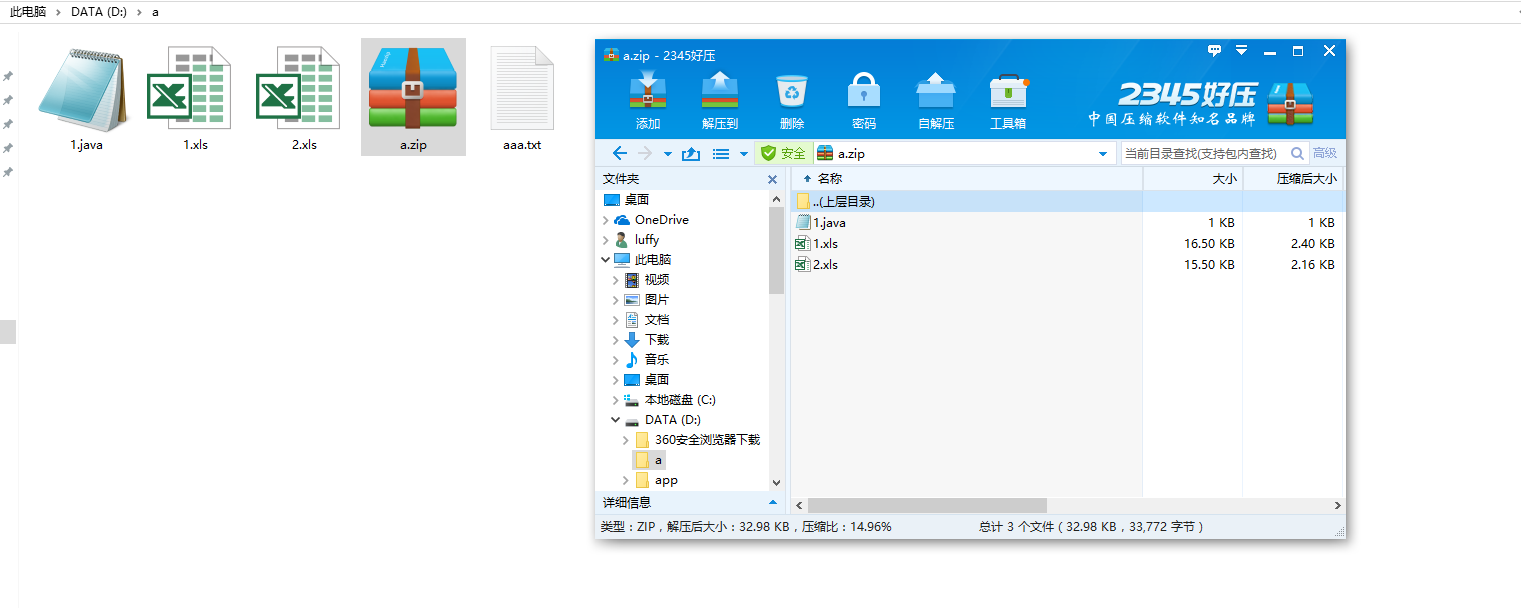
例子中最后会压缩成一个a.zip如图:
Java批量下载文件并zip打包的更多相关文章
- java批量下载文件为zip包
批量下载文件为zip包的工具类 package com.meeno.trainsys.util; import javax.servlet.http.HttpServletRequest; impor ...
- asp.net怎样实现批量下载文件(非打包形式下载)
问题: 我想实现的是一个一个的下载. 比如我有一个文件列表.通过checkbox选择.通过单击下载按钮下载选中文件. 百度到都是用打包形式实现批量下载. 这是我自己写的代码,但是点击下载后只能下载一个 ...
- java+批量下载文件到指定文件夹
需求 导出文件后存留在了服务器中,需要提供下载按钮,点击后可下载到本地:(因为涉及多个文件,下载前先将文件进行压缩,提供下载压缩文件) 效果预览 代码 主要方法 /** * 下载生成的所有在线 ...
- 批量下载文件web
最近需要这个所以写了一个例子一般批量下载由以下步骤组成: 1.确定下载的源文件位置 2.对文件进行打包成临时文件,这里会用到递归调用,需要的嵌套的文件夹进行处理,并返回文件保存位置 3.将打包好的文件 ...
- C#异步批量下载文件
C#异步批量下载文件 实现原理:采用WebClient进行批量下载任务,简单的模拟迅雷下载效果! 废话不多说,先看掩饰效果: 具体实现步骤如下: 1.新建项目:WinBatchDownload 2.先 ...
- java批量下载,将多文件打包成zip格式下载
现在的需求的: 根据产品族.产品类型,下载该产品族.产品类型下面的pic包: pic包是zip压缩文件: t_product表: 这些包以blob形式存在另一张表中: t_imagefile表: 现在 ...
- java多线程批量下载文件
多线程下载文件 平时开发中有时会用到文件下载,为了提高文件的下载速率,采用多线程下载能够达到事半功倍的效果: package test; /** * 文件下载类 * @author luweichen ...
- java+根据多个url批量下载文件
1.基本流程 当我们想要下载网站上的某个资源时,我们会获取一个url,它是服务器定位资源的一个描述,下载的过程有如下几步: (1)客户端发起一个url请求,获取连接对象. (2)服务器解析url,并且 ...
- java+web+批量下载文件
JavaWeb 文件下载功能 文件下载的实质就是文件拷贝,将文件从服务器端拷贝到浏览器端,所以文件下载需要IO技术将服务器端的文件读取到,然后写到response缓冲区中,然后再下载到个人客户端. 1 ...
随机推荐
- c# .net 使用Confluent.Kafka针对kafka进行生产和消费
首先说明一点,像Confluent.Kafka这种开源的组件,三天两头的更新.在搜索引擎搜索到的结果往往用不了,浪费时间.建议以后遇到类似的情况直接看官网给的Demo. 因为搜索引擎搜到的文章,作者基 ...
- prometheus使用postgresql-adapter连接postgresql
概述 Prometheus使用postgresql需要使用postgresql-adapter进行数据转换.在安装postgresql-adapter之前需要安装2个扩展:pg_prometheus和 ...
- 前端编程的核心问题是数据与UI的绑定
1.静态页面---静态绑定 2.js dom强修改--js重置绑定: 3.chymeleaf--预处理html+特殊语言绑定: 4.react--组建化UI.js与其他语言形式绑定
- Spring Boot 整合 MyBatis 实现乐观锁和悲观锁
本文以转账操作为例,实现并测试乐观锁和悲观锁. 完整代码:https://github.com/imcloudfloating/Lock_Demo GitHub Page:http://blog.cl ...
- python matplotlib 设置x轴文本间隔显示(数字的话可以转为字符之后处理)
一个国际友人绘图遇到的问题,查了一手资料.主要参考的是这个老哥的做法(https://blog.csdn.net/wyquin/article/details/80508260) #totalSeed ...
- Linux学习笔记之CentOS 7系统使用firewalld管理防火墙端口
0x00 firewalld的基本使用 # 启动: systemctl start firewalld # 查看状态: systemctl status firewalld # 停止: systemc ...
- Winows上简单配置使用kafka(.net使用)
一.kafka环境配置 1.jdk安装 安装文件:http://www.oracle.com/technetwork/java/javase/downloads/index.html 下载JDK安装完 ...
- Angular复习笔记7-路由(下)
Angular复习笔记7-路由(下) 这是angular路由的第二篇,也是最后一篇.继续上一章的内容 路由跳转 Web应用中的页面跳转,指的是应用响应某个事件,从一个页面跳转到另一个页面的行为.对于使 ...
- Spring Security OAuth2.0 - AuthorizationServer和ResourceServer分离
<Spring Security实现OAuth2.0授权服务 - 基础版>和<Spring Security实现OAuth2.0授权服务 - 进阶版>两篇文章中介绍如何搭建OA ...
- axios + vue导出excel文件
(使用到了elementUI框架) <template> <el-button type="primary" size="mini" @cli ...