
SpringBoot访问不了JSP但却能进入后台
博主在使用sring-boot跳转HTML页面后,由于好奇心就想跳转到JSP页面,就在网上搜相关信息,结果不是跳转500错误就是下载JSP文件。各种坑啊,在博主跳了N多坑后,终于跳转JSP页面成功。故写此文章便于使用到的小伙伴不再进坑。
1、新建spring-boot项目 目录结构如下
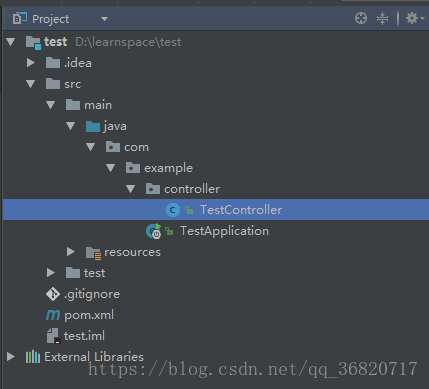
2、新建TestController.java文件,内容如下
package com.example.controller;

import org.springframework.stereotype.Controller;

import org.springframework.web.bind.annotation.RequestMapping;

@Controller

public class TestController {

    @RequestMapping("/index")

    public String index(){

        return "index";

    }

}
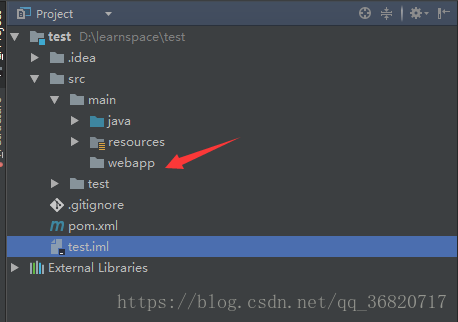
3、新建webapp文件夹,与resources同级。
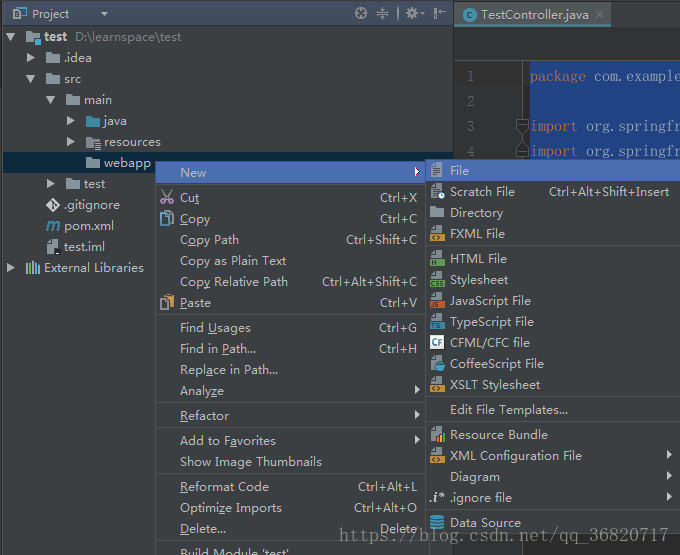
4、新建JSP页面,此时发现New里面没有JSP页面。需要设置一下才会出现哟。
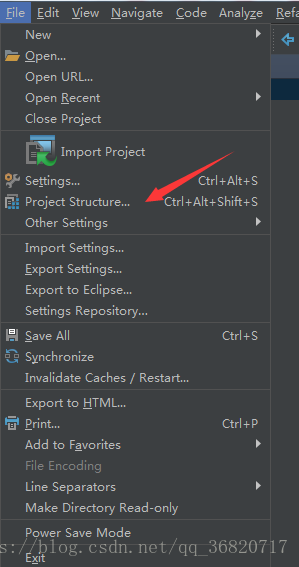
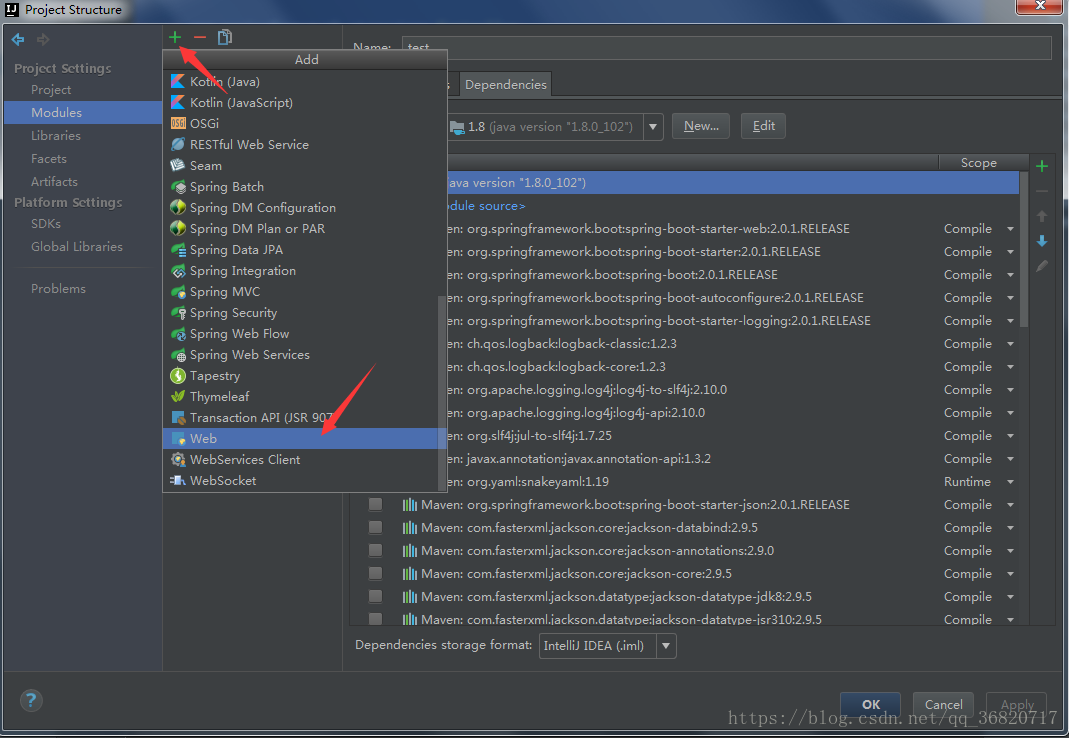
5、点击File->Project Structure...
6、点击Modules->绿色加号->Web
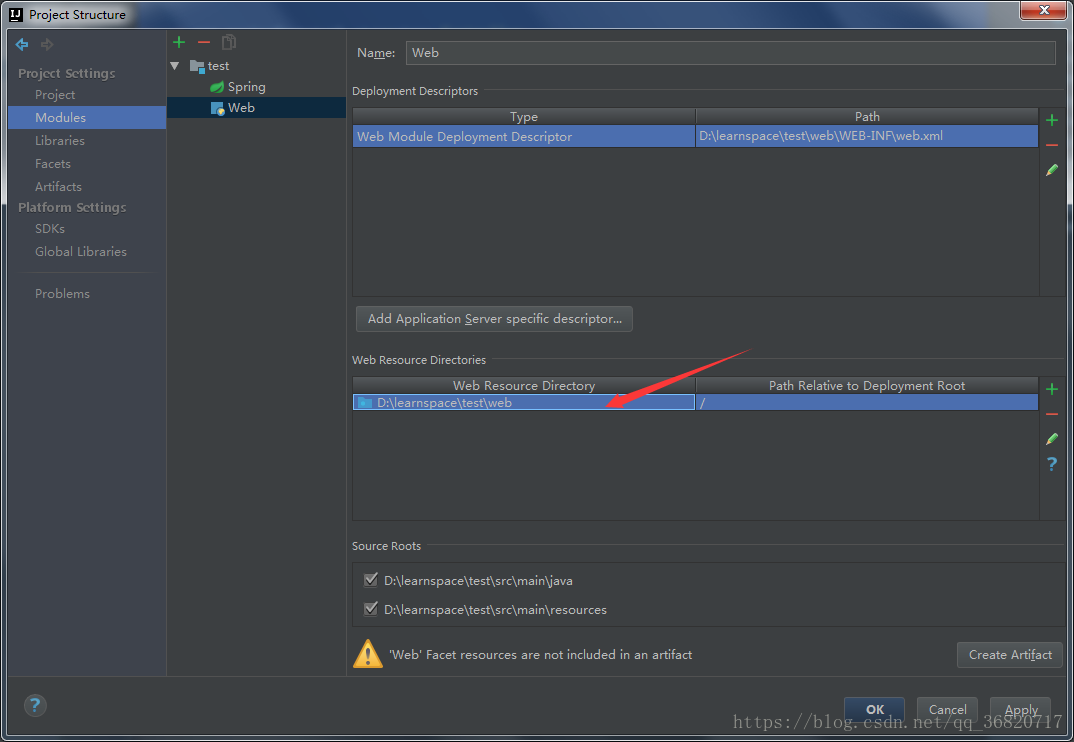
7、双击此处
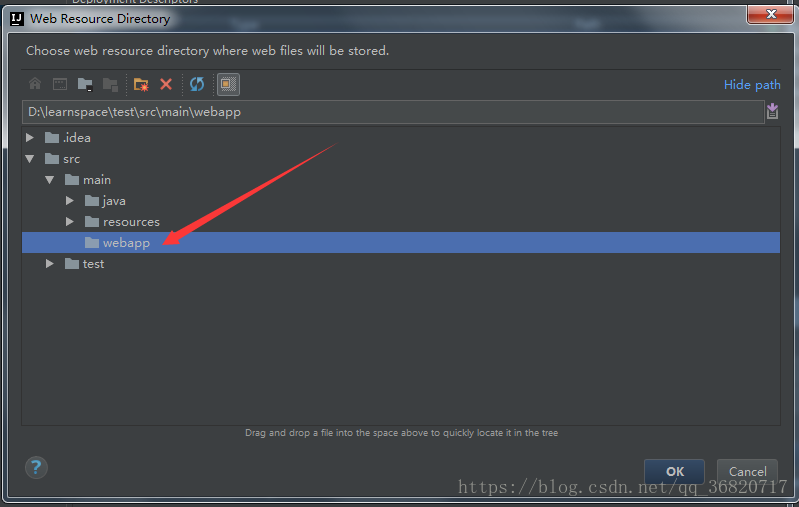
8、选择刚刚新建的webapp,点击OK,继续OK。
9、此时webapp上有个蓝色圆点表示设置成功。

10、在webapp上单击右键New,此时出现JSP文件。
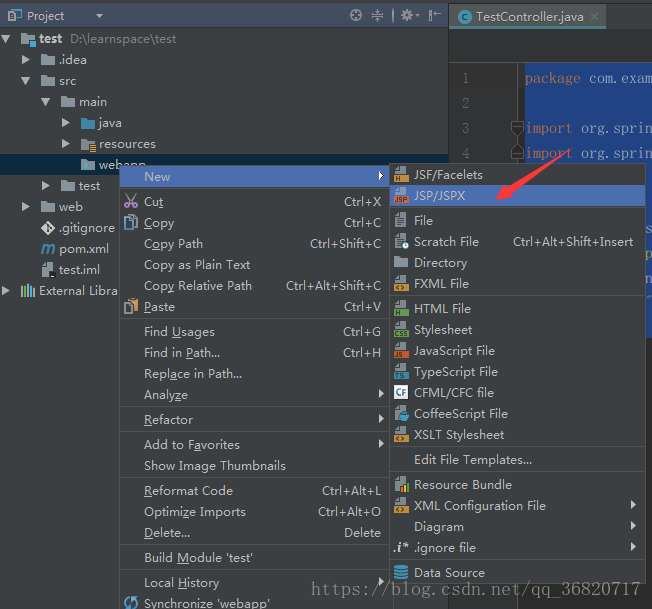
11、新建index.jsp
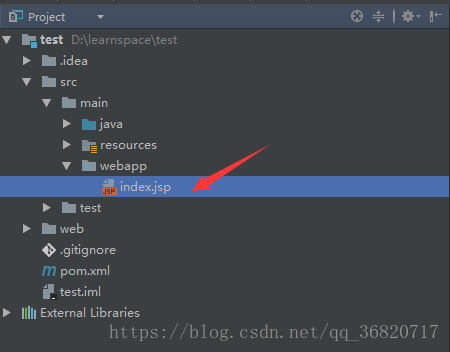
12、index.jsp内容
<%@ page contentType="text/html;charset=UTF-8" language="java" %>

<html>

<head>

    <title>Title</title>

</head>

<body>

<h1 style="color: red">Hello World</h1>

</body>

</html>
13、新建MyWebAppConfigurer类
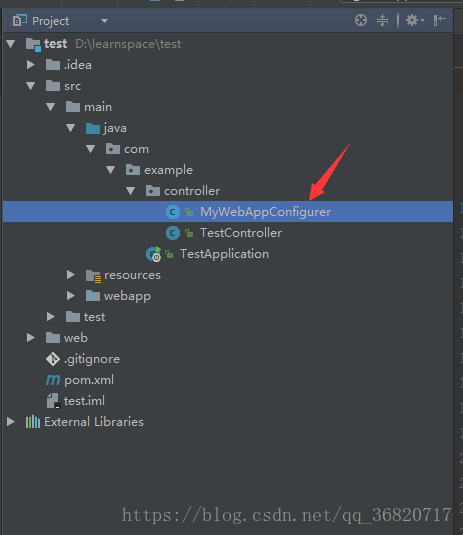
14、MyWebAppConfigurer内容
package com.example.controller;

import org.springframework.context.annotation.Bean;

import org.springframework.context.annotation.Configuration;

import org.springframework.web.servlet.config.annotation.WebMvcConfigurerAdapter;

import org.springframework.web.servlet.view.InternalResourceViewResolver;

import org.springframework.web.servlet.view.JstlView;

@Configuration

public class MyWebAppConfigurer extends WebMvcConfigurerAdapter {

    @Bean

    public InternalResourceViewResolver viewResolver() {

        InternalResourceViewResolver viewResolver = new InternalResourceViewResolver();

        viewResolver.setPrefix("/");

        viewResolver.setSuffix(".jsp");

        viewResolver.setViewClass(JstlView.class);

        return viewResolver;

    }

}
15、在pom.xml中加入依赖JAR包
<dependency>

   <groupId>org.apache.tomcat.embed</groupId>

   <artifactId>tomcat-embed-jasper</artifactId>

   <version>7.0.59</version>

</dependency>

<dependency>

   <groupId>javax.servlet</groupId>

   <artifactId>jstl</artifactId>

</dependency>
16、启动Application,访问127.0.0.1:8080/index
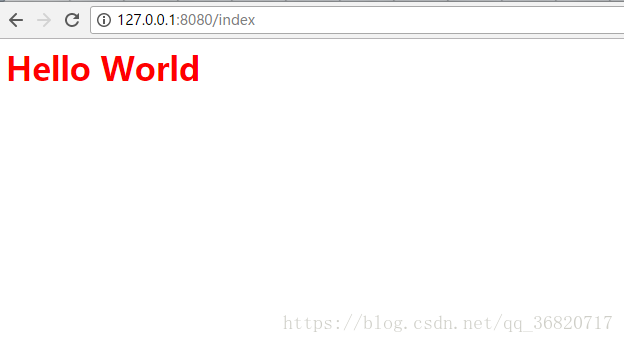
17、跳转完成。
以上就是spring-boot跳转JSP页面的过程,下面说说跳转遇到的坑。
一、缺少依赖JAR包
<dependency>

   <groupId>javax.servlet</groupId>

   <artifactId>jstl</artifactId>

</dependency>
跳转失败
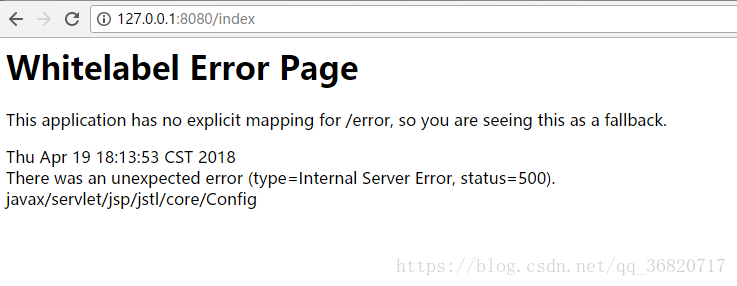
提示还算明确,缺少jstl标签
二、使用provided版本JSP解析器JAR包,
<dependency>

   <groupId>org.apache.tomcat.embed</groupId>

   <artifactId>tomcat-embed-jasper</artifactId>

   <scope>provided</scope>

</dependency>
下载JSP文件
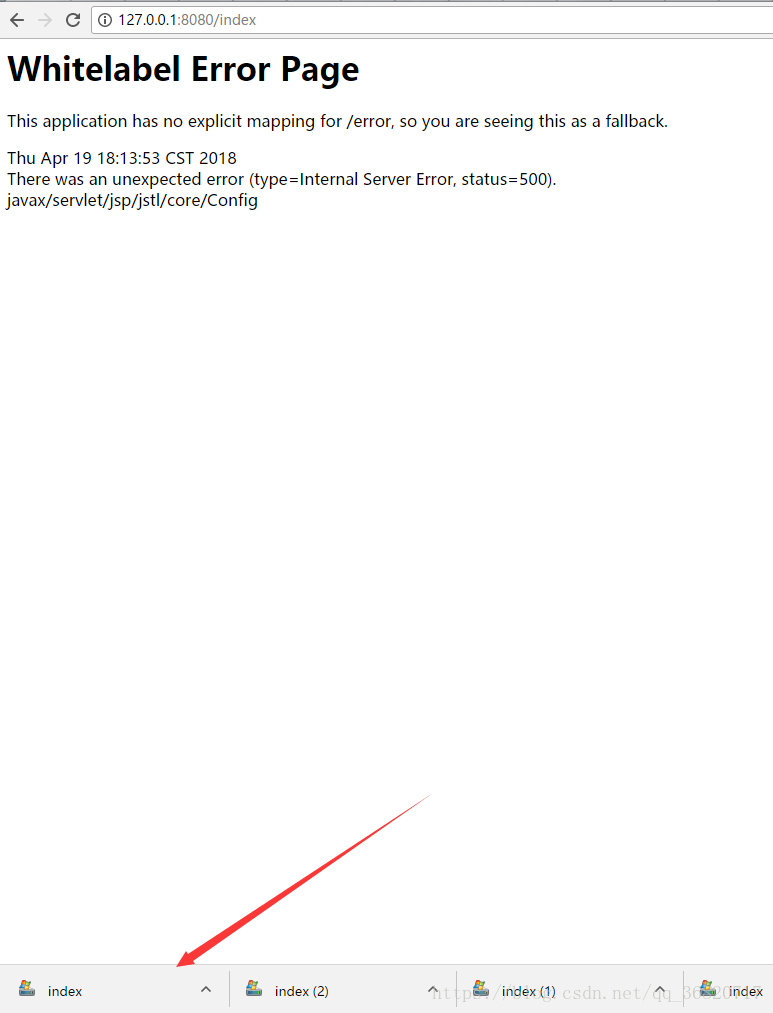
改为
<dependency>

   <groupId>org.apache.tomcat.embed</groupId>

   <artifactId>tomcat-embed-jasper</artifactId>

   <version>7.0.59</version>

</dependency>
问题解决,至于为什么provided版本的不行,感兴趣的小伙伴可以深究下,留言给我。
SpringBoot访问不了JSP但却能进入后台的更多相关文章
- springboot同时支持访问html5和jsp时,导致后台ResponseBody返回中文乱码
背景:原系统是由springboot jsp,所有访问都是jsp 现在需要做HTML5定位,要同时支持访问HTML5和JSP 在application.yml的spring标签下配置 mvc: #vi ...
- SpringBoot学习笔记(二):SpringBoot访问静态文件、捕获全局异常、集成Thymeleaf、集成JSP
SpringBoot访问静态文件 什么是静态文件? 不需要通过web容器去得到的文件,直接通过路径就能得到的文件,比如项目的css,js,img等文件. 所有的资源文件都应该在src/main/res ...
- SpringBoot 访问jsp文件报错Path with "WEB-INF" or "META-INF": [WEB-INF/jsp/welcome.jsp]的解决办法
由于SpringBoot不在支持jsp,所以想使用jsp的情况下需要在pom.xml配置servlet依赖,jstl标签库和tomcat依赖.以下是我的pom.xml的配置: (ps:标记红色处为重点 ...
- springBoot整合mybatis、jsp 或 HTML
springBoot整合mybatis.jsp Spring Boot的主要优点: 1: 为所有Spring开发者更快的入门: 2: 开箱即用,提供各种默认配置来简化项目配置: 3: 内嵌式容器 ...
- SpringBoot访问NoSQL和简单的Thymeleaf-Spring-Spring-boot整合
SpringBoot访问NoSQL SpringBoot访问Redis 在pom.xml添加boot-data-redis定义 <parent> <groupId>org.sp ...
- 玩转 SpringBoot 2 快速整合 | JSP 篇
前言 JavaServer Pages(JSP)技术使Web开发人员和设计人员能够快速开发和轻松维护利用现有业务系统的信息丰富的动态Web页面. 作为Java技术系列的一部分,JSP技术可以快速开发独 ...
- idea环境下SpringBoot Web应用引入JSP
1. 环境 开发环境:idea2019.3 jkd版本:1.8 springboot版本:2.6.2 2. 引入JSP的步骤 2.1 新建工程,引入依赖 这里只是解析jsp,因此只需要引入spring ...
- SpringMVC 无法访问到指定jsp页面可能的原因
当出现你的程序可以访问到对应的controller层.但是却无法访问对应的jsp文件时.你首先做的不是检查web.xml等配置文件,而是打开的服务器根文件检查对应路径下的文件是否存在.命名是否正确.命 ...
- 访问WEB-INF下JSP资源的几种方式(转)
访问WEB-INF下JSP资源的几种方式 方法一: 本来WEB-INF中的jsp就是无法通过地址栏访问的,所以安全. 如果说你要访问这个文件夹中的jsp文件需要在项目的web.xml文件中去配置ser ...
随机推荐
- Delphi INI 文件读写
delphi中,配置文件的相关操作. () INI文件的结构: ;这是关于INI文件的注释部分 [节点] 关键字=值 ... INI文件允许有多个节点,每个节点又允许有多个关键字, “=”后面是该关键 ...
- 【MySql】Explain笔记
Explain -- 使用 Explain + SQL 分析执行计划: id:表示此表的执行优先级 id相同,表的执行顺序依次从上往下: id不同,并且递增,id值越大执 ...
- ubuntu-网络配置文件
vim /etc/NetworkManager/system-connections/Wired connectione 1
- wampserver环境配置局域网访问
安装好wamp后,想用手机通过局域访问电脑上wamp下的网页,结果出现如下提示403错误: 第一步:找到 conf 这个文件: 找到下图中红色方框中的onlineoffline tag - don’t ...
- jQuery和bootstrap
1. jQuery学习,搜索开发者网络: js学习: https://www.apeland.con/web/20/568 https://www.apeland.con/web/21 vue饿了么 ...
- C++(三十九) — 主函数中增加调试信息
程序调试技术: (1)阅读程序,静态代码复查: (2)“cout大法” (3)使用开发工具,断点 int main() { TShape s(lu, lu); cout << __ ...
- Kotlin使用处协变的意义与用法
在上一次https://www.cnblogs.com/webor2006/p/11294849.html中对于Java的协变和Kotlin的协变提到了它们的区别,回忆一下: 其实在Kotlin中也有 ...
- Django之路——6 Django的模型层(二)
多表操作 创建模型 实例:我们来假定下面这些概念,字段和关系 作者模型:一个作者有姓名和年龄. 作者详细模型:把作者的详情放到详情表,包含生日,手机号,家庭住址等信息.作者详情模型和作者模型之间是一对 ...
- Oracle数据库的分页
Oracle的分页 ORACLE支持一个关键字ROWNUM,ROWNUM是一个伪列,该列不存在于任何一张表中,但是每张表都可以查询该列. 而该列在结果集的中值是结果集中每条记录的"行号&qu ...
- 关于Bigdecimal的问题
Java在java.math包中提供的API类BigDecimal,用来对超过16位有效位的数进行精确的运算.双精度浮点型变量double可以处理16位有效数.在实际应用中,需要对更大或者更小的数进行 ...