
SpringBoot整合Spring Data Elasticsearch
Spring Data Elasticsearch提供了ElasticsearchTemplate工具类,实现了POJO与elasticsearch文档之间的映射
elasticsearch本质也是存储数据,它不支持事物,但是它的速度远比数据库快得多,
可以这样来对比elasticsearch和数据库
索引(indices)--------数据库(databases)

类型(type)------------数据表(table)

文档(Document)---------------- 行(row)

字段(Field)-------------------列(Columns )
整合:
1.在SprinBoot工程中引入jar包
<dependency>

            <groupId>org.springframework.boot</groupId>

            <artifactId>spring-boot-starter-data-elasticsearch</artifactId>

</dependency>
2.配置文件
spring.data.elasticsearch.cluster-name=elasticsearch  //名字必须和elasticsearch.yml里面的cluster.name相同

spring.data.elasticsearch.cluster-nodes=127.0.0.1:9300

spring.data.elasticsearch.repositories.enabled=true
3.创建实体,并对类和属性进行标注
@Document(indexName = "item",type = "docs", shards = 1, replicas = 0)//标记为文档类型,ndexName:对应索引库名称
type:对应在索引库中的类型,shards:分片数量,默认5,replicas:副本数量,默认1

public class Item {

    @Id //主键

    private Long id;

    @Field(type = FieldType.Text, analyzer = "ik_max_word") //标记为成员变量
  FieldType,可以是text、long、short、date、integer等
  text:存储数据时候,会自动分词,并生成索引
  keyword:存储数据时候,不会分词建立索引
  analyzer:分词器名称

    private String title; //标题

    @Field(type = FieldType.Keyword)

    private String category;// 分类

    @Field(type = FieldType.Keyword)

    private String brand; // 品牌

    @Field(type = FieldType.Double)

    private Double price; // 价格

    @Field(index = false, type = FieldType.Keyword)//index:是否索引

    private String images; // 图片地址
4.引入模板ElasticsearchTemplate
   @Autowired

    private ElasticsearchTemplate elasticsearchTemplate;
5.创建一个索引
     //添加索引

    @Test

    public void addIndex() {

        elasticsearchTemplate.createIndex(Item.class);

    }
6.删除索引
    //删除索引

    @Test

    public void delete(){

        elasticsearchTemplate.deleteIndex("item");

    }
7.新增对象
继承Repository提供的一些子接口,就能具备各种基本的CRUD功能,这里继承ElasticsearchCrudRepository
首先定义一个对象的接口
public interface ItemRepository extends ElasticsearchCrudRepository<Item,Long> {

}
然后注入ItemRepository
   @Autowired

    private ItemRepository itemRepository;
新增对象
    //新增一个对象

    @Test

    public void insert(){

        Item item = new Item(2L,"坚果R1","手机","锤子",2500.00,"http://image.baidu.com/13123.jpg");

        //Order order = new Order(20180020,"菜单");

        itemRepository.save(item);

    }
批量新增
    //批量新增

    @Test

    public void insertList(){

        List<Item> list = new LinkedList<>();

        list.add(new Item(9L,"华为p20","手机","华为",3500.00,"http://image.baidu.com/13123.jpg"));

        list.add(new Item(10L,"华为p30","手机","华为",5450.00,"http://image.baidu.com/13123.jpg"));

        list.add(new Item(11L,"华为p30 pro","手机","华为",6980.00,"http://image.baidu.com/13123.jpg"));

        itemRepository.saveAll(list);

    }
8.查询
    //根据字段查询所有

    @Test

    public void queryAll(){

        //升序,相应降序为dscending

        Iterable<Item> items = this.itemRepository.findAll(Sort.by("price").ascending());

        for (Item item : items){

            System.out.println(item);

        }

    }
9.自定义查询方法
Spring Data 的另一个强大功能,是根据方法名称自动实现功能,你的方法名叫做:findByTitle,那么它就知道你是根据title查询,然后自动帮你完成,无需写实现类。当然,方法名称要符合一定的约定:
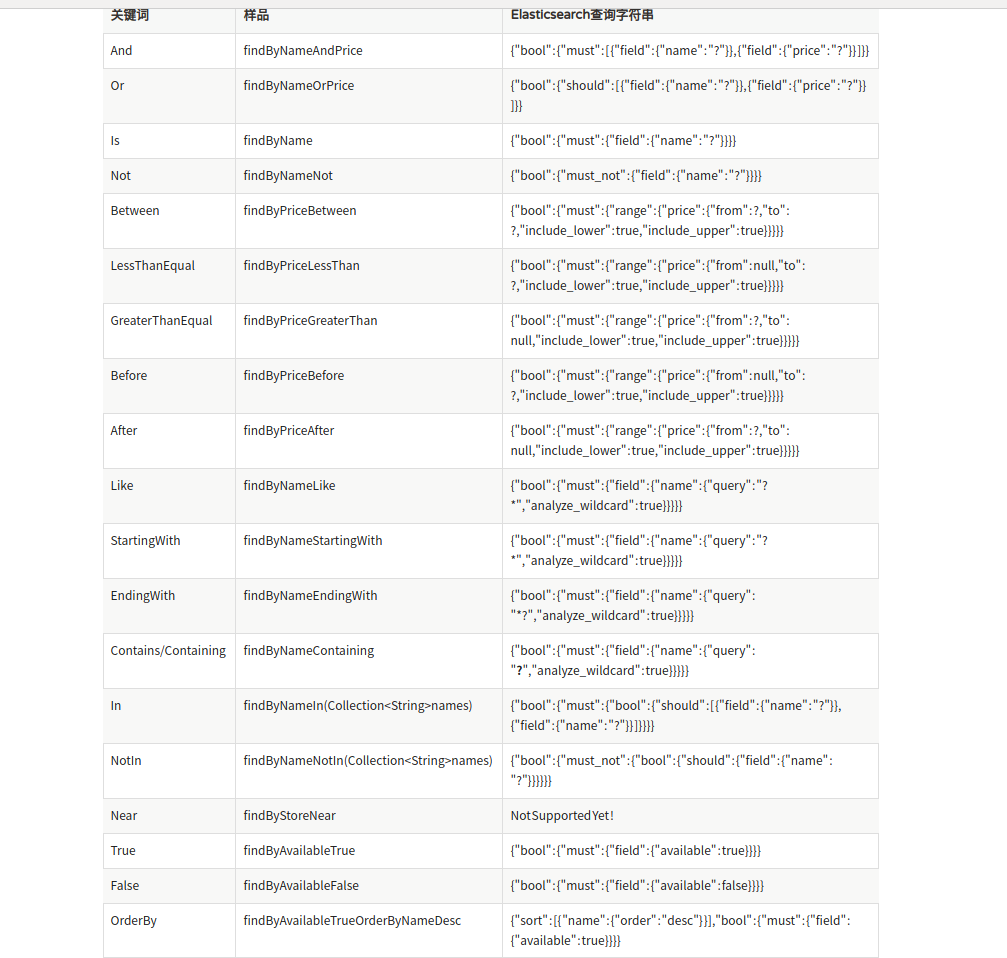
根据手机名查找手机
    //自定义方法,根据Title查询

    @Test

    public void findByTitle(){

        Item item = this.itemRepository.findByTitle("坚果pro");

        System.out.println(item);

    }
区间查询
    //根据区间查询

    @Test

    public void queryByPriceBetween(){

        List<Item> list = this.itemRepository.findByPriceBetween(2000.00, 3500.00);

        for (Item item : list) {

            System.out.println("item = " + item);

        }

    }
模糊查询
     //模糊查询

    @Test

    public void queryLikeTitle(){

        List<Item> list = this.itemRepository.findByTitleLike("R2");

        for (Item item : list){

            System.out.println(item);

        }

    }
使用自定义方法需要在接口里面申明方法
public interface ItemRepository extends ElasticsearchCrudRepository<Item,Long> {

    Item findByTitle(String title);

    List<Item> findByPriceBetween(double price1, double price2);

    List<Item> findByTitleLike(String title);

}
10.自定义查询
    //自定义查询,查询数目等

    @Test

    public void matchQuery(){

        // 构建查询条件

        NativeSearchQueryBuilder queryBuilder = new NativeSearchQueryBuilder();

        // 添加基本分词查询

        queryBuilder.withQuery(QueryBuilders.matchQuery("title","坚果"));

        //获取结果

        Page<Item> items = (Page<Item>) this.itemRepository.findAll();

        //条数

        long total = items.getTotalElements();

        System.out.println("total = "+total);

        for (Item item : items){

            System.out.println(item);

        }

    }

关键的是NativeSearchQueryBuilder这个类
分页查询
    //分页查询

    @Test

    public void queryByPage(){

        NativeSearchQueryBuilder nativeSearchQueryBuilder = new NativeSearchQueryBuilder();

        nativeSearchQueryBuilder.withQuery(QueryBuilders.termQuery("category","手机"));

        int page = 0;

        int size = 2;

        nativeSearchQueryBuilder.withPageable(PageRequest.of(page,size));

        Page<Item> items = (Page<Item>) this.itemRepository.findAll();

        long total = items.getTotalElements();

        int totalPage = items.getTotalPages();

        int nowPage = items.getNumber();

        int pageSize = items.getSize();

        System.out.println("总条数 = "+total);

        System.out.println("总页数 = "+totalPage);

        System.out.println("当前页 = "+nowPage);

        System.out.println("每页大小 = "+pageSize);

        for (Item item : items){

            System.out.println(item);

        }

    }
还有很多,就不意义列举
在elasticsearch-head上查看数据
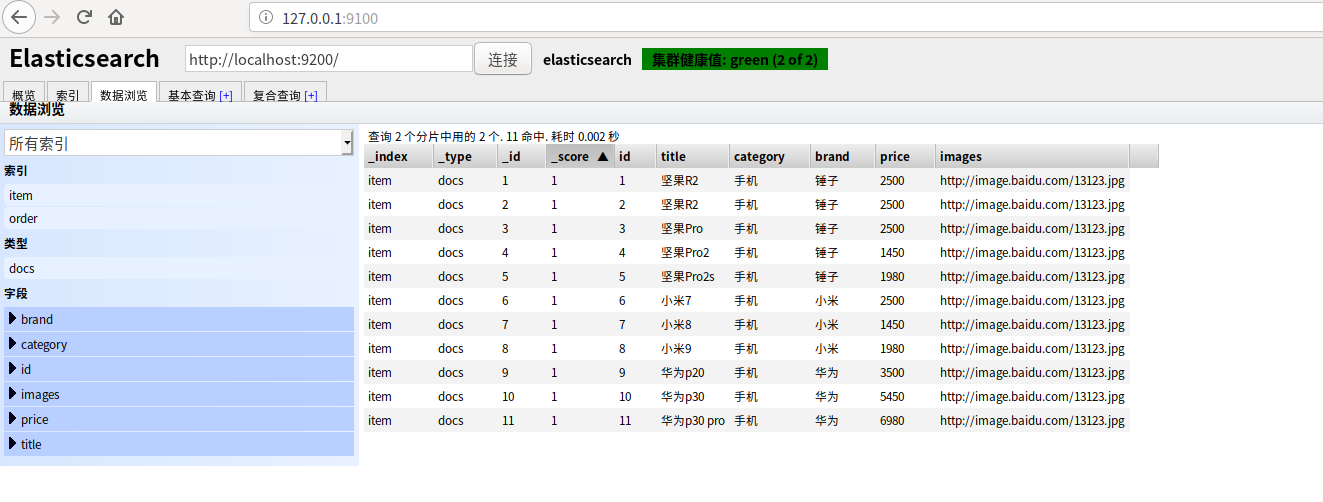
关于安装elasticsearch-head,参考:https://www.cnblogs.com/xuwenjin/p/8792919.html,
Spring Data Elasticsearch文档:https://docs.spring.io/spring-data/elasticsearch/docs/3.1.10.RELEASE/reference/html/
SpringBoot整合Spring Data Elasticsearch的更多相关文章
- springboot整合spring Data JPA
今天敲代码,一连串的错误,我也是服气~果然,我们不是在出bug,就是在找bug的路上…… 今天完成的是springboot整合spring data JPA ,出了一连串的错,真是头大 java.sq ...
- SprignBoot整合Spring Data Elasticsearch
一.原生java整合elasticsearch的API地址 https://www.elastic.co/guide/en/elasticsearch/client/java-api/6.2/java ...
- springboot集成spring data ElasticSearch
ES支持SpringBoot使用类似于Spring Data Jpa的方式查询,使得查询更加方便. 1.依赖引入 compile “org.springframework.boot:spring-bo ...
- 3.4_springboot2.x整合spring Data Elasticsearch
Spring Data Elasticsearch 是spring data对elasticsearch进行的封装. 这里有两种方式操作elasticsearch: 1.使用Elasticsearch ...
- springboot整合spring data jpa 动态查询
Spring Data JPA虽然大大的简化了持久层的开发,但是在实际开发中,很多地方都需要高级动态查询,在实现动态查询时我们需要用到Criteria API,主要是以下三个: 1.Criteria ...
- SpringBoot整合Spring Data Solr
此文不讲solr相关,只讲整合,内容清单如下 1. maven依赖坐标 2. application.properties配置 3. Java Config配置 1. maven坐标 <depe ...
- Spring Boot + Spring Data + Elasticsearch实例
Spring Boot + Spring Data + Elasticsearch实例 学习了:https://blog.csdn.net/huangshulang1234/article/detai ...
- spring-boot (三) spring data jpa
学习文章来自:http://www.ityouknow.com/spring-boot.html spring data jpa介绍 首先了解JPA是什么? JPA(Java Persistence ...
- 031 Spring Data Elasticsearch学习笔记---重点掌握第5节高级查询和第6节聚合部分
Elasticsearch提供的Java客户端有一些不太方便的地方: 很多地方需要拼接Json字符串,在java中拼接字符串有多恐怖你应该懂的 需要自己把对象序列化为json存储 查询到结果也需要自己 ...
随机推荐
- SpringBoot:4.SpringBoot整合Mybatis实现数据库访问
在公司项目开发中,使用Mybatis居多.在 SpringBoot:3.SpringBoot使用Spring-data-jpa实现数据库访问 中,这种jpa风格的把sql语句和java代码放到一起,总 ...
- [SOJ #696]染色(2019-11-10考试)/[Atcoder MUJIN Programming Challenge C]Orange Graph
题目大意 有一个\(n\)个点\(m\)条边的简单无向连通图,初始为白色,可以执行操作让一些边变黑,要求使得操作后的图不存在黑色的奇环,且不能使得其他的任何变黑而还符合要求.问最后有多少可能结果.\( ...
- Replication:The transaction log for database 'tempdb' is full due to 'ACTIVE_TRANSACTION'
今天早上,Dev跟我说,执行query statement时出现一个error,detail info是: “The transaction log for database 'tempdb' is ...
- PTA 甲级 1139
https://pintia.cn/problem-sets/994805342720868352/problems/994805344776077312 其实这道题目不难,但是有很多坑点! 首先数据 ...
- UserAgentUtils 获取浏览器信息
<dependency> <groupId>eu.bitwalker</groupId> <artifactId>UserAgentUtils</ ...
- centos lnmp一键安装
安装 系统需求: 需要2 GB硬盘剩余空间 128M以上内存,OpenVZ的建议192MB以上(小内存请勿使用64位系统) Linux下区分大小写,输入命令时请注意! 安装步骤: 1.使用putty或 ...
- powershell程序
powershell是一个命令行解释器.它输出一个字符,等待命令行的输入,然后执行这个命令.下面是powershell非常重要的命令:
- Java链表操作代码
/** * */ package com.cherish.SwordRefersToOffer; /** * @author acer * */ public class test_22链表中倒数第k ...
- java 枚举示例
public enum YNEnum { N(0,"否"), Y(1,"是"); private int code; private String name; ...
- div不换行的三种方法
原文:https://www.cnblogs.com/zouwangblog/p/11149621.html float <div class="div1">123&l ...