
spring.profiles.active=@profiles.active@的含义
spring.profiles.active=@profiles.active@ ,其实是配合 maven profile进行选择不同配置文件进行启动。
当执行
mvn clean package -P test 命令时, @profiles.active@ 会替换成 test

打开 jar包,即可看到:
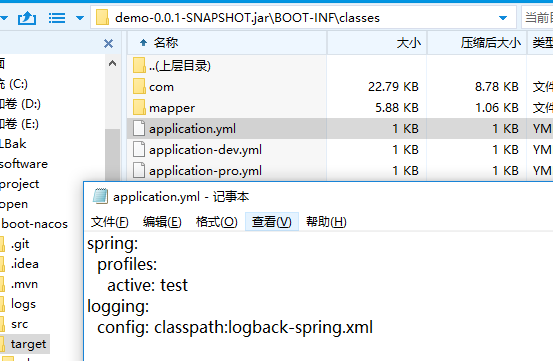
实战
1.构建一个springboot 项目
这里使用idea进行构建的,这个过程省略
2.pom文件配置
<profiles>

        <profile>

            <!-- 生产环境 -->

            <id>prod</id>

            <properties>

                <profiles.active>prod</profiles.active>

            </properties>

        </profile>

        <profile>

            <!-- 本地开发环境 -->

            <id>dev</id>

            <properties>

                <profiles.active>dev</profiles.active>

            </properties>

            <activation>

                <activeByDefault>true</activeByDefault>

            </activation>

        </profile>

        <profile>

            <!-- 测试环境 -->

            <id>test</id>

            <properties>

                <profiles.active>test</profiles.active>

            </properties>

        </profile>

</profiles>- 这里默认dev配置
3.配置多个配置文件
application.properties
注意这里的profiles.active 要和pom文件的对应上
spring.profiles.active=@profiles.active@
application-dev.properties
name = "dev"application-prod.properties
name = "prod"application-test.properties
name = "test"4.编写个测试的controller
/**

 * @author kevin

 * @date 2019/6/28 16:12

 */

@RestController

public class HelloController {

    @Value("${name}")

    private String name;

    @RequestMapping(value = {"/hello"},method = RequestMethod.GET)

    public String say(){

        return name;

    }

}
5.启动测试
使用idea工具启动开发
默认是dev,假如想要使用prod配置文件,如上图选择prod,注意下面的导入,重启项目
D:\dev_code\profiles-demo\target>curl http://localhost:8080/hello

"prod"
6 打包
这里使用idea打包不再介绍,如果你使用命令
mvn clean package -P dev
则是使用dev配置
spring.profiles.active=@profiles.active@的含义的更多相关文章
- How to set spring boot active profiles with maven profiles
In the previous post you could read about separate Spring Boot builds for a local development machin ...
- SpringBoot(十九)_spring.profiles.active=@profiles.active@ 的使用
现在在的公司用spring.profiles.active=@profiles.active@ 当我看到这个的时候,一脸蒙蔽,这个@ 是啥意思. 这里其实是配合 maven profile进行选择不同 ...
- java.lang.IllegalStateException: Active Spring transaction synchronization or active JTA transaction with specified [javax.transaction.TransactionManager] required
错误信息: java.lang.IllegalStateException: Active Spring transaction synchronization or active JTA trans ...
- spring boot配置项profiles active
结论:通用项配置在applicaton.yml,区别环境配置在application-{profile}.yml中 一直不知道这个参数要不要配,配了有什么用,今天搭一个工程来检验 此项作用:用来区分不 ...
- spring boot maven profiles,打包不同的配置文件
1. 在pom.xml添加 <profiles> <profile> <id>dev</id> <properties> <envir ...
- Spring Boot features - Profiles
https://docs.spring.io/spring-boot/docs/current/reference/html/boot-features-profiles.html https://w ...
- Spring Boot常用的注解以及含义<持续更新>
1.@RestController和@RequestMapping注解 @RestController 和 @RequestMapping 注解是Spring MVC注解(它们不是Spring Boo ...
- Spring学习之-各注解的含义总结
注解配置 @ComponentScan("spittr.web"):/在加载Spring上下文时,会扫描spittr.web包查找组件 @ComponentScan注解扫描的组件有 ...
- Spring 各种注解(@)的含义与认识
依赖注入,从字面上理解,即是:以注入的方式实现依赖: Spring 容器负责创建应用程序中的 bean,并通过 DI(依赖注入)来协调这些对象之间的关系.当描述 bean 如何进行装配(autowir ...
随机推荐
- @Async源码探究
1. @Async源码探究 1.1. 上代码 @SpringBootApplication @EnableAsync public class SpringbootLearnApplication { ...
- FCC-学习笔记 DNA Pairing
FCC-学习笔记 DNA Pairing 1>最近在学习和练习FCC的题目.这个真的比较的好,推荐给大家. 2>中文版的地址:https://www.freecodecamp.cn/;英 ...
- 5G:为人工智能与智能制造赋能
近几年,全球有两大科技领域越来越热:一个是人工智能,另一个是5G.两者都是能够改变时代.改变社会.改变经济的颠覆性技术.目前,我国已经发放了四张5G牌照,5G产业处在爆发前夜的阶段:人工智能方面,业界 ...
- 微信小程序到底把什么定义为风险内容?
目录 起因 经过和结果 附录: 起因 之前做一个群相册的小程序,因为涉及到图片和评论等内容的发布分享.因此,微信后台要求有一定的内容安全检测能力. 但是,我用别家的内容检测用的好好的,在国庆前被微信警 ...
- 豆瓣读书isbn 查询
最近学习微信小程序,做一个类似"书库"的小demo,大致流程使用摄像头获取书本后面的isbn,通过豆瓣读书API得到书本介绍.豆瓣评分.图书评论等信息,然鹅https://api. ...
- java中的this关键字三种作用
1.表示类中的属性和调用方法2.调用本类中的构造方法3.表示当前对象
- Python 模块A
模块的四种形式 自定义模块,例如自己定义的common.py就叫common模块 内置模块:python解释器自带的,不需要安装 第三方模块:需要自己安装,13万个库,无所不能,写库(弄得更简单) 包 ...
- ActiveMQ消息可靠性-签收
非事务模式下消费者签收 动签收就像快递到达时,快递寄送点给你签收了,不用你自己去签收,而手动签收就是必须我本人签收, 自动签收(默认为自动签收) 手动签收:能够避免消息的重复消费 当设置为手动签收时, ...
- java.lang.IllegalArgumentException: Invalid character found in the request target. The valid charact
线上环境中部署的 Tomcat 项目,出现部分页面无法打开的情况,但本地环境是好的.经过排查发现,本地 Tomcat版本为 7.0.77,而线上版本为 7.0.88.报错的具体描述为java.lang ...
- 2019 Nowcoder Multi-University Training Contest 4 E Explorer
线段树分治. 把size看成时间,相当于时间 $l$ 加入这条边,时间 $r+1$ 删除这条边. 注意把左右端点的关系. #include <bits/stdc++.h> ; int X[ ...