
KSQL: Streaming SQL for Apache Kafka
Few weeks back, while I was enjoying my holidays in the south of Italy, I started receiving notifications about an imminent announcement by Confluent. Reading the highlights almost (...I said almost) made me willing to go immediately back to work and check all the details about it.
The announcement regarded KSQL: a streaming SQL engine for Apache Kafka!
My office today... not bad! #sea pic.twitter.com/A7skHIcplS
— Francesco Tisiot (@FTisiot) August 7, 2017
Before going in detail, lets try to clarify the basics: what is KSQL? Why was it introduced and how does it complement Kafka?
What is KSQL?
We have been writing about Kafka several times, including my recent blogs were I was using it as data hub to capture Game of Thrones tweets and store them in BigQuery in order to do sentiment analysis with Tableau. In all our examples Kafka has been used just for data transportation with any necessary transformation happening in the target datastore like BigQuery, with the usage of languages like Python and engines like Spark Streaming or directly in the querying tool like Presto.
KSQL enables something really effective: reading, writing and transforming data in real-time and a scale using a semantic already known by the majority of the community working in the data space, the SQL!
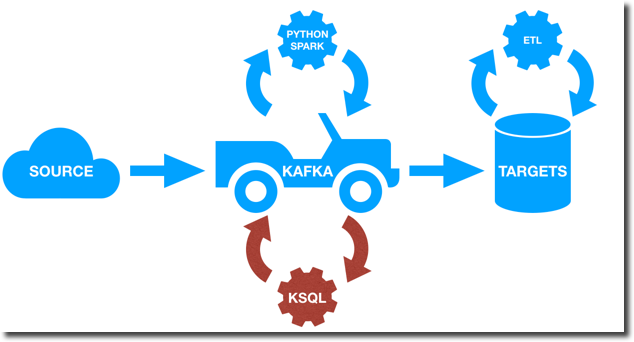
KSQL is now available as developer preview, but the basic operations like joins, aggregations and event-time windowing are already covered.
What Problem is KSQL Solving?
As anticipated before, KSQL solve the main problem of providing a SQL interface over Kafka, without the need of using external languages like Python or Java.
However one could argue that the same problem was solved before by the ETL operations made on the target datastores like Oracle Database or BigQuery. What is the difference then in KSQL approach? What are the benefits?
The main difference in my opinion is the concept of continuous queries: with KSQL transformations are done continuously as new data arrives in the Kafka topic. On the other side transformations done in a database (or big data platforms like BigQuery) are one off and if new data arrives the same transformation has to be executed again.
So what is KSQL good for? Confluent's KSQL introduction blog post provides some use cases like real time analytics, security and anomaly detection, online data integration or general application development. From a generic point of view KSQL is what you should use when transformations, integrations and analytics need to happen on the fly during the data stream. KSQL provides a way of keeping Kafka as unique datahub: no need of taking out data, transforming and re-inserting in Kafka. Every transformation can be done Kafka using SQL!
As mentioned before KSQL is now available on developer preview and the feature/function list is somehow limited compared to more mature SQL products. However in cases where very complex transformations need to happen those can still be solved either via another language like Java or a dedicated ETL (or view) once the data is landed in the destination datastore.
How does KSQL work?
So how does KSQL work under the hood? There are two concepts to keep in mind: streams and tables. A Stream is a sequence of structured data, once an event was introduced into a stream it is immutable, meaning that it can't be updated or deleted. Imagine the number of items pushed or pulled from a storage: "e.g. 200 pieces of ProductA were stocked today, while 100 pieces of ProductB were taken out".
A Table on the other hand represents the current situation based on the events coming from a stream. E.g. what's the overall quantity of stocks for ProductA? Facts in a table are mutable, the quantity of ProductA can be updated or deleted if ProductA is not anymore in stock.
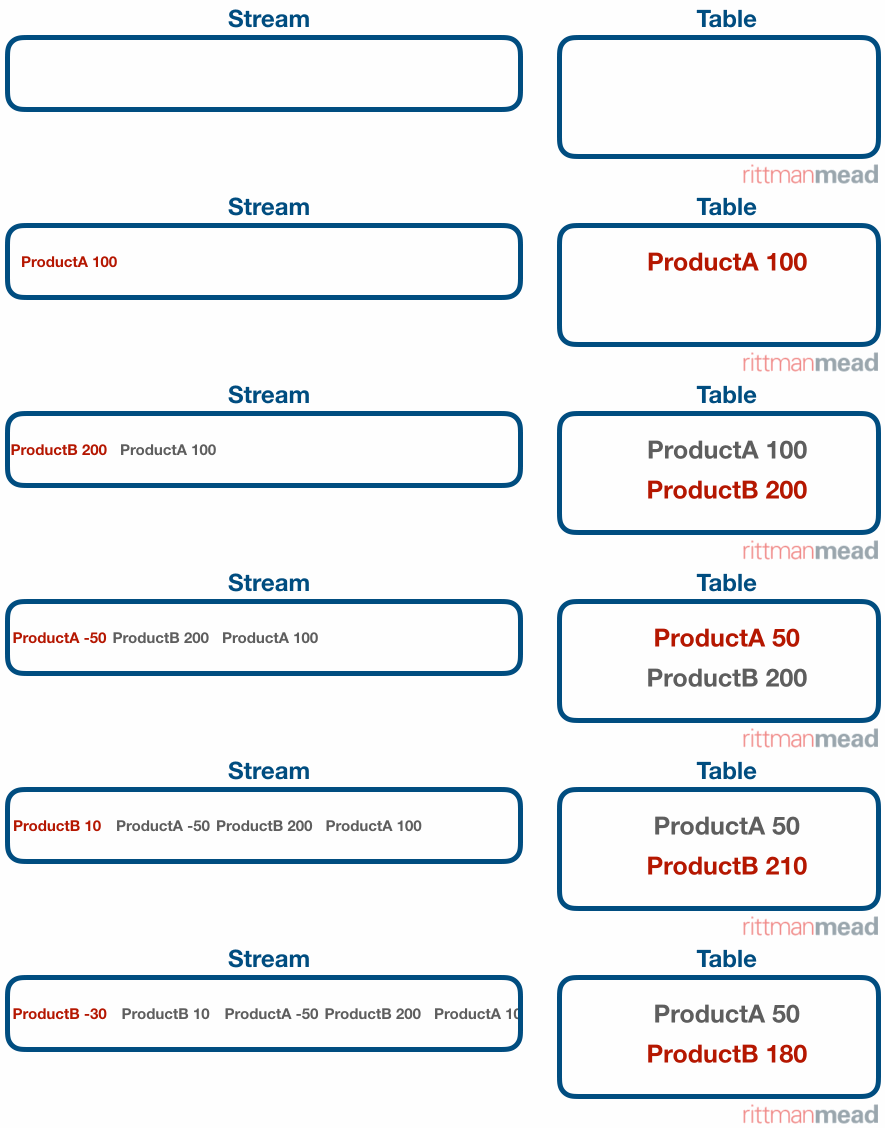
KSQL enables the definition of streams and tables via a simple SQL dialect. Various streams and tables coming from different sources can be joined directly in KSQL enabling data combination and transformation on the fly.
Each stream or table created in KSQL will be stored in a separate topic, allowing the usage of the usual connectors or scripts to extract the informations from it.
KSQL in Action
Starting KSQL
KSQL can work both in standalone and client-server mode with the first one aimed at development and testing scenarios while the second supporting production environments.
With the standalone mode KSQL client and server are hosted on the same machine, in the same JVM. On the other side, in client-server mode, a pool of KSQL server are running on remote machine and the client connects to them over HTTP.
For my test purposes I decided to use the standalone mode, the procedure is well explained in confluent documentation and consist in three steps:
- Clone the KSQL repository
- Compile the code
- Start KSQL using
localparameter
./bin/ksql-cli local
Analysing OOW Tweets
I'll use for my example the same Twitter producer created for my Wimbledon post. If you notice I'm not using the Kafka Connect, this is due to KSQL not supporting AVRO formats as of now (remember is still in dev phase?). I had then to rely on the old producer which stored the tweet in JSON format.
For my tests I've been filtering the tweets containing OOW17 and OOW (Oracle Open World 2017), and as mentioned before, those are coming in JSON format and stored in a Kafka topic named rm.oow. The first step is then to create a Stream on top of the topic in order to structure the data before doing any transformation.
The guidelines for the stream definition can be found here, the following is a cutdown version of the code used
CREATE STREAM twitter_raw ( \

  Created_At VARCHAR, \

  Id BIGINT, \

  Text VARCHAR, \

  Source VARCHAR, \

  Truncated VARCHAR, \

  ...

  User VARCHAR, \

  Retweet VARCHAR, \

  Contributors VARCHAR, \

  ...) \

WITH ( \

  kafka_topic='rm.oow', \

  value_format='JSON' \

  );
Few things to notice:
Created_At VARCHAR: Created_At is atimestamp, however in the first stream definition I can't apply any date/timestamp conversion. I keep it asVARCHARwhich is one of the allowed types (others areBOOLEAN,INTEGER,BIGINT,DOUBLE,VARCHAR,ARRAY<ArrayType>andMAP<VARCHAR, ValueType>).User VARCHAR: theUserfield is a JSON nested structure, for the basic stream definition we'll leave it asVARCHARwith further transformations happening later on.kafka_topic='rm.oow': source declarationvalue_format='JSON': data format
Once created the first stream we can then query it in SQL like
select Created_at, text from twitter_raw
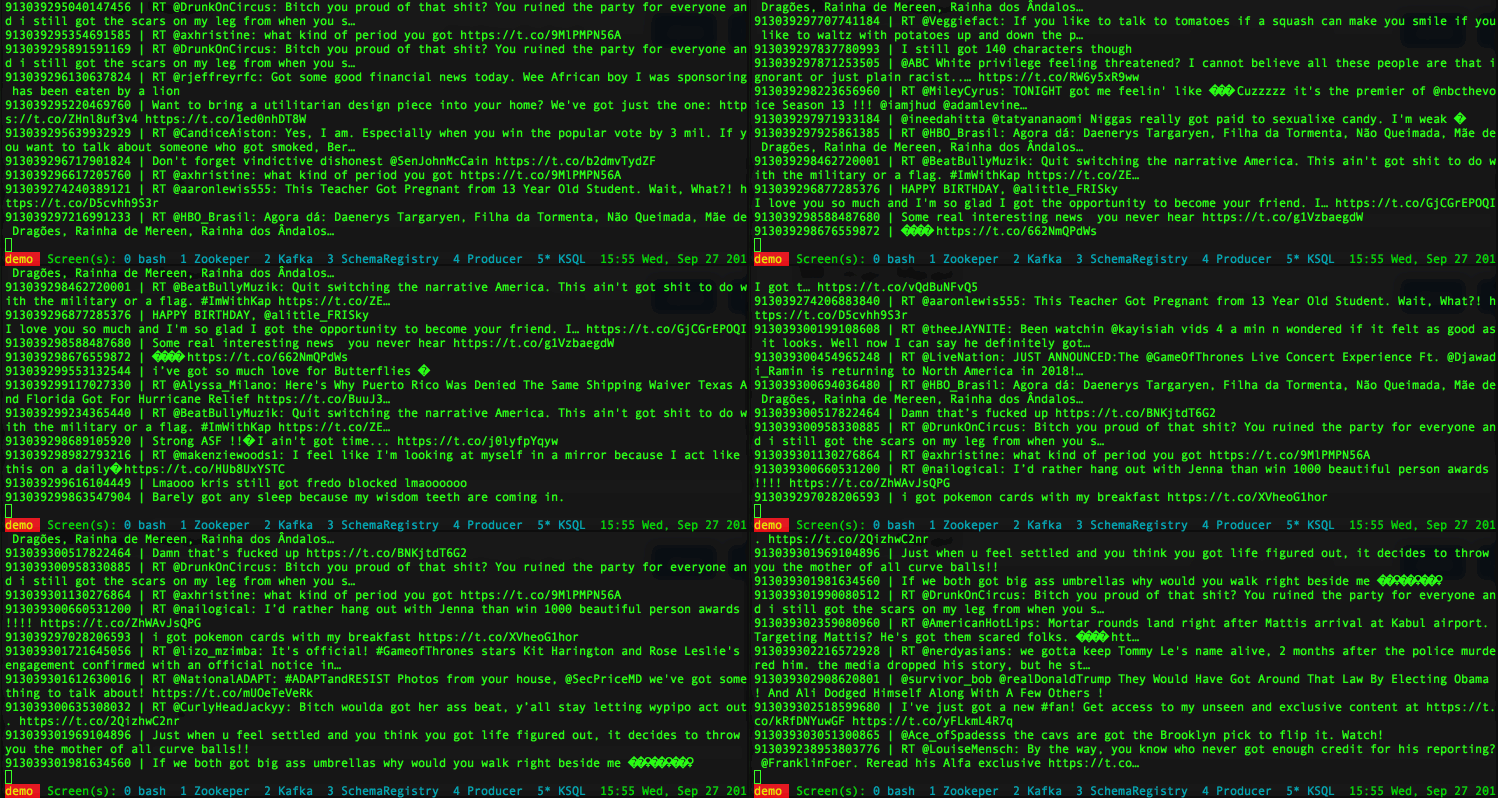
with the output being in the form of a continuous flow: as soon as a new tweet arrives its visualized in the console.
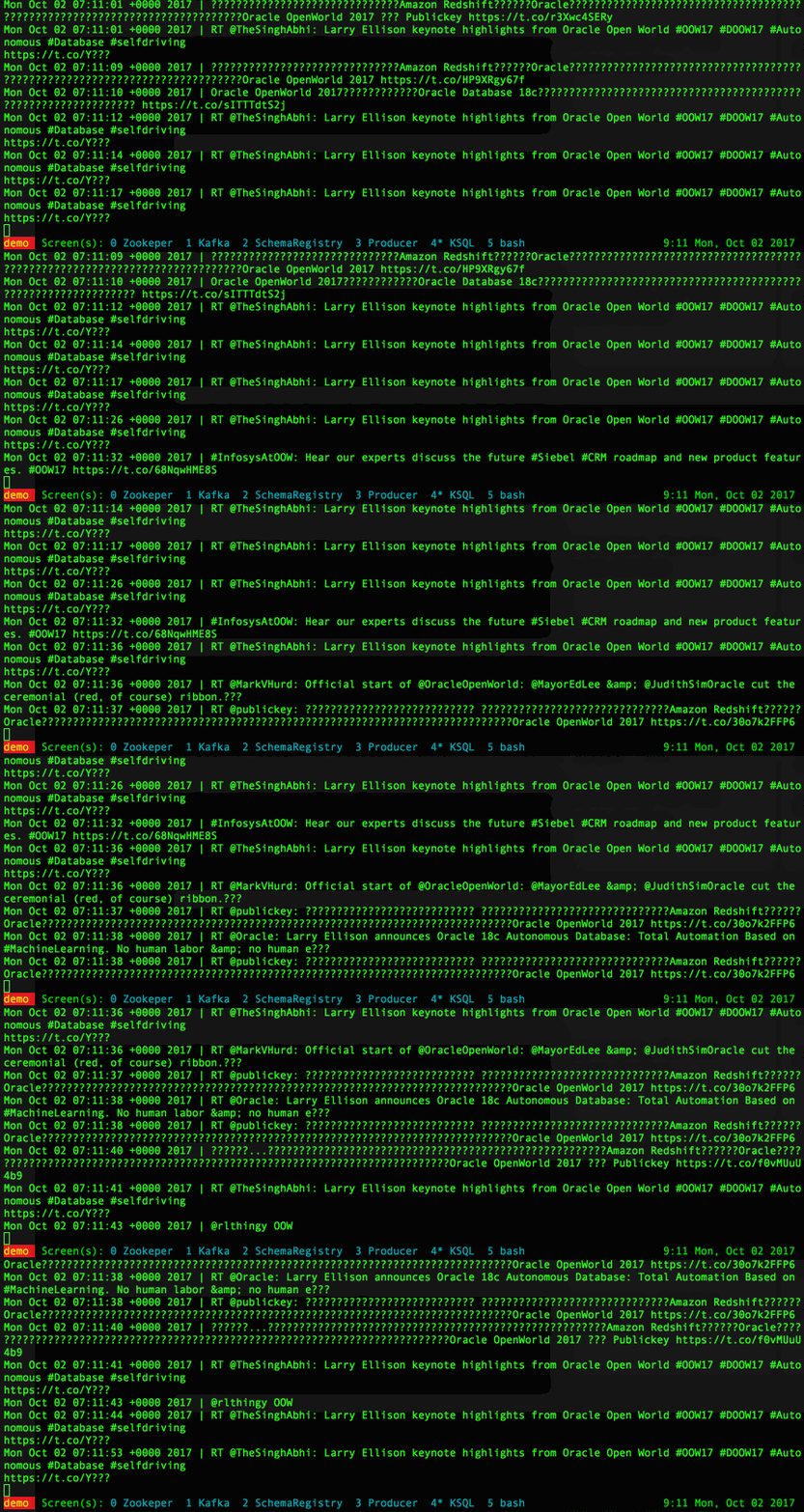
The first part I want to fix now is the Created_At field, which was declared as VARCHAR but needs to be mutated into timestamp. I can do it using the function STRINGTOTIMESTAMP with the mask being EEE MMM dd HH:mm:ss ZZZZZ yyyy. This function converts the string to a BIGINTwhich is the datatype used by Kafka to store timestamps.
Another section of the tweet that needs further parsing is the User, that as per the previous definition returns the whole nested JSON object.
{

"id":575384370,

"id_str":"575384370",

"name":"Francesco Tisiot",

"screen_name":"FTisiot",

"location":"Verona, Italy","url":"http://it.linkedin.com/in/francescotisiot",

"description":"ABC"

...

}
Fortunately KSQL provides the EXTRACTJSONFIELD function that we can then use to parse the JSON and retrieve the required fields
I can now define a new twitter_fixed stream with the following code
create stream twitter_fixed as

  select STRINGTOTIMESTAMP(Created_At, 'EEE MMM dd HH:mm:ss ZZZZZ yyyy') AS  Created_At, \

    Id, \

    Text, \

    Source, \

    ..., \

    EXTRACTJSONFIELD(User, '$.name') as User_name, \

    EXTRACTJSONFIELD(User, '$.screen_name') as User_screen_name, \

    EXTRACTJSONFIELD(User, '$.id') as User_id, \

    EXTRACTJSONFIELD(User, '$.location') as User_location, \

    EXTRACTJSONFIELD(User, '$.description') as description \

  from twitter_raw
An important thing to notice is that the Created_At is not encoded as BigInt, thus if I execute select Created_At from twitter_fixed I get only the raw number. To translate it to a readable date I can use the STRINGTOTIMESTAMP function passing the column and the data format.
The last part of the stream definition I wanted to fix is the settings of KEY and TIMESTAMP: a KEY is the unique identifier of a message and, if not declared, is auto-generated by Kafka. However the tweet JSON contains the Id which is Twitter's unique identifier, so we should to use it. TIMESTAMP associates the message timestamp with a column in the stream: Created_At should be used. I can defined the two above in the WITH clause of the stream declaration.
create stream twitter_with_key_and_timestamp \

as \

select * from twitter_fixed \

with \

(KEY='Id', TIMESTAMP='Created_At');
When doing a select * from twitter_with_key_and_timestamp we can clearly see that KSQL adds two columns before the others containing TIMESTAMP and KEY and the two are equal to Created_At and Id.

Now I have all the fields correctly parsed as KSQL stream, nice but in my previous blog post I had almost the same for free using Kafka Connect. Now It's time to discover the next step of KSQL: tables!
Let's first create a simple table containing the number of tweets by User_name.
create table tweets_by_users as \

select user_screen_name, count(Id) nr_of_tweets \

from twitter_with_key_and_timestamp \

group by user_screen_name
When then executing a simple select * from table we can see the expected result.
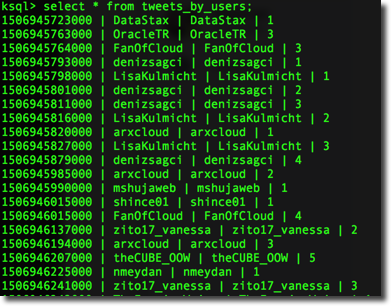
Two things to notice:
- We see a new row in the console every time there is a new record inserted in the
oowtopic, the new row contains the updated count of tweets for thescreen_nameselected - The
KEYis automatically generated by KSQL and contains thescreen_name
I can retrieve the list of tables define with the show tables command.
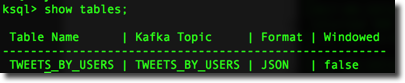
It's interesting to notice that the format is automatically set as JSON. The format property, configured via the VALUE_FORMAT parameter, defines how the message is stored in the topic and can either be JSON or DELIMITED.
Windowing
When grouping, KSQL provides three different windowing functions:
- Tumbling: Fixed size, non overlapping. The
SIZEof the window needs to be specified. - Hopping: Fixed size, possibly overlapping. The
SIZEandADVANCEparameters need to be specified. - Session: Fixed size, starting from the first entry for a particular Key, it remains active until a new message with the same key happens within the
INACTIVITY_GAPwhich is the parameter to be specified.
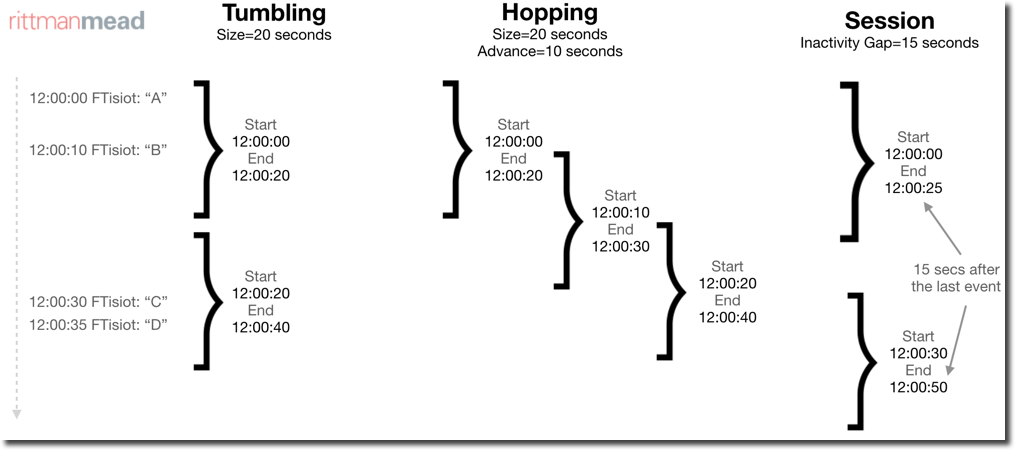
I can create simple table definition like the number of tweets by location for each tumbling session with
create table rm.tweets_by_location \

as \

select user_location, \

count(Id) nr_of_tweets \

from twitter_with_key_and_timestamp \

WINDOW TUMBLING (SIZE 30 SECONDS) \

group by user_location
the output looks like

As you can see the KEY of the table contains both the user_location and the window Timestamp (e.g Colombes : Window{start=1507016760000 end=-})
An example of hopping can be created with a similar query
create table rm.tweets_by_location_hopping \

as \

select user_location, \

count(Id) nr_of_tweets \

from twitter_with_key_and_timestamp \

WINDOW HOPPING (SIZE 30 SECONDS, ADVANCE BY 10 SECONDS) \

group by user_location;
With the output being like
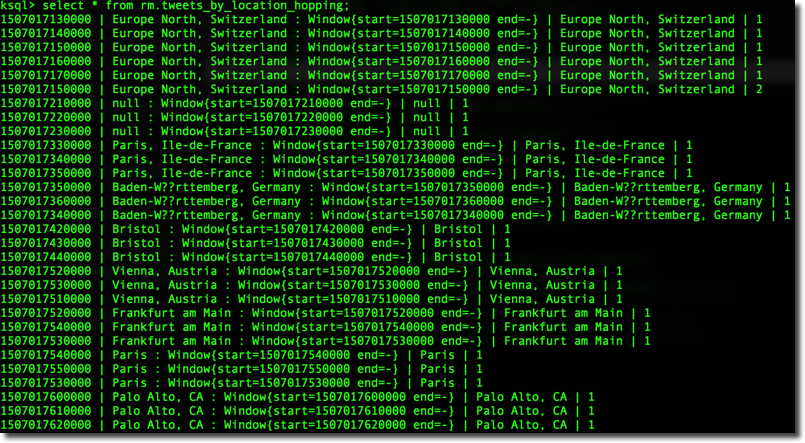
It's interesting to notice that each entry (e.g. Europe North, Switzerland) is listed at least three times. This is due to the fact that in any point in time there are three overlapping windows (SIZE is 30 seconds and ADVANCE is 10 seconds). The same example can be turn into the session windows by just defining WINDOW SESSION (30 SECONDS).
The windowing is an useful option, especially when combined with HAVING clauses since it gives the option to define metrics for real time analysis.
E.g. I may be interested only items that have been ordered more than 100 times in the last hour, or, in my twitter example in user_locations having a nr_of_tweets greater than 5 in the last 30 minutes.
Joining
So far so good, a nice set of SQL functions on top of data coming from a source (in my case twitter). In the real word however we'll need to mix information coming from disparate sources.... what if I tell you that you can achieve that in a single KSQL statement?

To show an integration example I created a simple topic known_twitters using the kafka-console-producer.
./bin/kafka-console-producer --topic known_twitters --broker-list myserver:9092
Once started I can type in messages and those will be stored in the known_twitters topic. For this example I'll insert the twitter handle and real name of known people that are talking about OOW. The format will be:
username,real_name
like
FTisiot,Francesco Tisiot

Nephentur,Christian Berg
Once inserted the rows with the producer I'm then able to create a KSQL stream on top of it with the following syntax (note the VALUE_FORMAT='DELIMITED')
create stream people_known_stream (\

screen_name VARCHAR, \

real_name VARCHAR) \

WITH (\

KAFKA_TOPIC='known_twitters', \

VALUE_FORMAT='DELIMITED');
I can now join this stream with the others streams or tables built previously. However when trying the following statement
select user_screen_name from rm.tweets_by_users a join PEOPLE_KNOWN_STREAM b on a.user_screen_name=b.screen_name;
I get a nice error
Unsupported join logical node: Left: io.confluent.ksql.planner.plan.StructuredDataSourceNode@6ceba9de , Right: io.confluent.ksql.planner.plan.StructuredDataSourceNode@69518572
This is due to the fact that as of now KSQL supports only joins between a stream and a table, and the stream needs to be specified first in the KSQL query. If I then just swap the two sources in the select statement above:
select user_screen_name from PEOPLE_KNOWN_STREAM a join rm.tweets_by_users b on a.screen_name=b.user_screen_name;
...I get another error
Join type is not supportd yet: INNER
We have to remember that KSQL is still in developer beta phase, a lot of new features will be included before the official release.
adding a LEFT JOIN clause (see bug related) solves the issue and I should be able to see the combined data. However when running
select * from PEOPLE_KNOWN_STREAM left join TWEETS_BY_USERS on screen_name=user_screen_name;
Didn't retrieve any rows. After adding a proper KEY to the stream definition
create stream PEOPLE_KNOWN_STREAM_PARTITIONED \

as select screen_name , \

real_name from  people_known_stream \

PARTITION BY screen_name;
I was able to retrieve the correct rowset! Again, we are in early stages of KSQL, those fixes will be enhanced or better documented in future releases!
Conclusion
As we saw in this small example, all transformations, summaries and data enrichments were done directly in Kafka with a dialect very easy to learn for anyone already familiar with SQL. All the created streams/tables are stored as Kafka topics thus the standard connectors can be used for sink integration.
As mentioned above KSQL is still in developer preview but the overall idea is very simple and at the same time powerful. If you want to learn more check out the Confluent page and the KSQL github repository!
Subscribe to Rittman Mea
KSQL: Streaming SQL for Apache Kafka的更多相关文章
- Introducing KSQL: Streaming SQL for Apache Kafka
Update: KSQL is now available as a component of the Confluent Platform. I’m really excited to announ ...
- Streaming SQL for Apache Kafka
KSQL是基于Kafka的Streams API进行构建的流式SQL引擎,KSQL降低了进入流处理的门槛,提供了一个简单的.完全交互式的SQL接口,用于处理Kafka的数据. KSQL是一套基于Apa ...
- 重磅开源 KSQL:用于 Apache Kafka 的流数据 SQL 引擎 2017.8.29
Kafka 的作者 Neha Narkhede 在 Confluent 上发表了一篇博文,介绍了Kafka 新引入的KSQL 引擎——一个基于流的SQL.推出KSQL 是为了降低流式处理的门槛,为处理 ...
- How Cigna Tuned Its Spark Streaming App for Real-time Processing with Apache Kafka
Explore the configuration changes that Cigna’s Big Data Analytics team has made to optimize the perf ...
- Offset Management For Apache Kafka With Apache Spark Streaming
An ingest pattern that we commonly see being adopted at Cloudera customers is Apache Spark Streaming ...
- 1.1 Introduction中 Apache Kafka™ is a distributed streaming platform. What exactly does that mean?(官网剖析)(博主推荐)
不多说,直接上干货! 一切来源于官网 http://kafka.apache.org/documentation/ Apache Kafka™ is a distributed streaming p ...
- Apache Kafka® is a distributed streaming platform
Kafka Connect简介 我们知道过去对于Kafka的定义是分布式,分区化的,带备份机制的日志提交服务.也就是一个分布式的消息队列,这也是他最常见的用法.但是Kafka不止于此,打开最新的官网. ...
- Apache Kafka + Spark Streaming Integration
1.目标 为了构建实时应用程序,Apache Kafka - Spark Streaming Integration是最佳组合.因此,在本文中,我们将详细了解Kafka中Spark Streamin ...
- Stream Processing 101: From SQL to Streaming SQL in 10 Minutes
转自:https://wso2.com/library/articles/2018/02/stream-processing-101-from-sql-to-streaming-sql-in-ten- ...
随机推荐
- 6.redis 的持久化有哪几种方式?不同的持久化机制都有什么优缺点?持久化机制具体底层是如何实现的?
作者:中华石杉 面试题 redis 的持久化有哪几种方式?不同的持久化机制都有什么优缺点?持久化机制具体底层是如何实现的? 面试官心理分析 redis 如果仅仅只是将数据缓存在内存里面,如果 redi ...
- php导出数据到多个csv并打包压缩
1.不压缩直接下载 // 测试php导出大量数据到csv public function actionExportData() { // 设置不超时 set_time_limit(0); // 设置最 ...
- Linux文本编辑器Vim使用
1. 插入 o 在光标下插入新行 a 在光标后插入 i 在光标前插入 O 在光标上一行插入新行 A 在光标行尾插入 I 在光标行首插入 2.光标定位 gg 到第一行行首 G 到最后一行 ...
- linux函数深入探索——open函数打开文件是否将文件内容加载到内存空间
转自:https://blog.csdn.net/qq_17019203/article/details/85051627 问题:open(2)函数打开文件是否将文件内容加载到内存空间 首先,文件打开 ...
- linux部署docker镜像
安装git yum install git 生成ssh秘钥 cat ~/.ssh/id_rsa.pub //查看是否有秘钥 ssh-keygen -t rsa -C "" //生成 ...
- shell脚本启动所有集群节点
#profile变量追加到.bashrc中 cat /etc/profile >> ~/.bashrc #start-all-cluster.sh 启动脚本 #!/bin/bash ec ...
- 防御流类型的xss攻击
1.建立一个工具类 package im.lsn.oss.exhibition.utils; import org.apache.commons.lang3.StringUtils; import j ...
- C# Cef winform 脚本的执行 踩过的坑
先从后端代码 如何执行js 代码谈起; 一个简单的需求: 在winform上点击一个按钮,实现登录信息的填入 流程: 就是让C#去运行一段脚本,. 运行的方式有两种, 异步与同步, 因为CEF是一帧一 ...
- 洛谷 P2023 [AHOI2009]维护序列 题解
P2023 [AHOI2009]维护序列 题目描述 老师交给小可可一个维护数列的任务,现在小可可希望你来帮他完成. 有长为N的数列,不妨设为a1,a2,-,aN .有如下三种操作形式: (1)把数列中 ...
- shell脚本显示字体颜色
shell脚本中echo显示内容带颜色显示,echo显示带颜色,需要使用参数-e 格式如下: echo -e "\033[字背景颜色:文字颜色m字符串\033[0m" 例如: ec ...