
vue报错[Vue warn]: Unknown custom element: <router-Link> - did you register the component correctly? For recursive components, make sure to provide the "name" option.
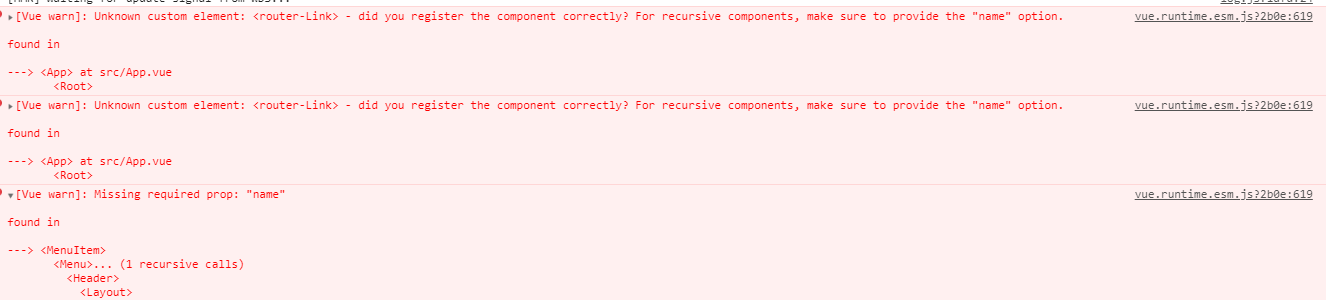
vue浏览器报错,如下
vue.runtime.esm.js?2b0e:619 [Vue warn]: Unknown custom element: <router-Link> - did you register the component correctly? For recursive components, make sure to provide the "name" option.

found in

---> <App> at src/App.vue

<Root>
原因:
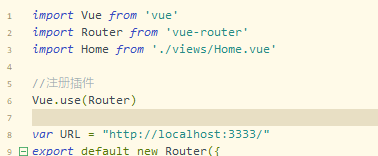
没有注册插件router
//注册插件

Vue.use(VueRouter)
vue报错[Vue warn]: Unknown custom element: <router-Link> - did you register the component correctly? For recursive components, make sure to provide the "name" option.的更多相关文章
- Vue报错之" [Vue warn]: Unknown custom element: <wzwzihello> - did you register the component correctly? For recursive components, make sure to provide the "name" option."
一.报错截图 [Vue warn]: Unknown custom element: <wzwzihello> - did you register the component corre ...
- [Vue warn]: Unknown custom element: <sapn> - did you register the component correctly? For recursive components, make sure to provide the "name" option. found in ---> <Evaluate> at src/views/index/
关于vue报错: [Vue warn]: Unknown custom element: <sapn> - did you register the component correctly ...
- 使用Vue自定义组件时,报did you register the component correctly? For recursive components, make sure to provide the "name" option.(未注册组件)的原因之一
错误信息: [Vue warn]: Unknown custom element: <list> - did you register the component correctly? F ...
- [Vue warn]: Unknown custom element: <terminal-process> - did you register the component correctly? For recursive components, make sure to provide the "name" option.
Vue组件注册报错问题 import 不要加{},排查出如果页面引用单个组件的时候不要加上{}中括号,引入多个组件时才能派上用场,中括号去除问题即可解决.
- Vue报错 [Vue warn]: Cannot find element
在前端开发全面进入前端的时代 作为一个合格的前端开发工作者 框架是不可或缺的Vue React Anguar 作为前端小白,追随大佬的脚步来到来到博客园,更新现在正在学习的Vue 注 : 相信学习Vu ...
- vue报错[Vue warn]: The data property "record" is already declared as a prop. Use prop default value instead.
当我写了一个子组件,点击打开子组件那个方法时报了一个错 这句话说明意思呢?谷歌翻译一下↓ 数据属性“record”已声明为prop. 请改用prop默认值. 感觉翻译的有点怪,通过最后修改代码后大概意 ...
- vue报错 [Vue warn]: Avoid mutating a prop directly since the value will be overwritten whenever the parent component re-renders. Instead, use a data or computed property based on the prop's
[Vue warn]: Avoid mutating a prop directly since the value will be overwritten whenever the parent c ...
- Vue 报错[Vue warn]: Avoid mutating a prop directly since the value will be overwritten whenever the parent component re-renders
场景:父组件向子组件传递数据,子组件去试图改变父组件数据的时候. 解决:子组件通过事件向父组件传递信息,让父组件来完成数据的更改. 比如:我的父组件是普通页面,子组件是弹窗的登录界面,父组件传递的数据 ...
- 关于执行webdriver.Chrome; 报错WebDriverException: Message: unknown error: Element is not clickable at point (1085, 103)
from selenium import webdriverfrom time import sleep dr = webdriver.Chrome() dr.get("http://pj1 ...
随机推荐
- win10系统2分钟睡眠
https://blog.csdn.net/widenstage/article/details/78982722 HKEY_LOCAL_MACHINE\SYSTEM\CurrentControlSe ...
- Mac上安装Python3虚拟环境(VirtualEnv)教程
如果已经安装好pip3,那么执行命令安装virtualenv环境 pip3 install virtualenv 安装完成检测版本是否安装成功 virtualenv --version 创建新目录 M ...
- CSS Blur() 将高斯模糊应用于输出图片
一.Css Blur() blur() CSS 方法将高斯模糊应用于输出图片. 结果为 <filter-function>. blur(radius) radius模糊的半径,值为< ...
- Postman 插件安装和使用
1.google商店 搜索“谷歌访问助手” 2.在商店搜索Postman 3.安装Postman 4.访问chrome://apps/ 5.点击postman
- Spring Boot Controller单元测试
一.创建Controller 一个方法是用传统IO来下载文件,一个是NIO下载文件 @Controller public class FileController { private Logger l ...
- Densely semantically aligned person re-identification
Densely semantically aligned person re-identification https://arxiv.org/abs/1812.08967
- spring的multipartResolver和java后端获取的MultipartHttpServletRequest方法对比
这两天在用spring进行上传上遇到问题,今天进行了问题的排查,这个过程也增加了我看spring源码的兴趣!还是很有收获的! 首先先给A组提供了上传接口,并没有在spring的配置文件进行multip ...
- mysql插入数据报错IntegrityError: (1062, "Duplicate entry 'xx' for key 'xxxxx'")
1.问题描述 MySQL插入数据的时候报错,提示如下: IntegrityError: (1062, "Duplicate entry 'xx' for key 'xxxxx'") ...
- macOS 10.15 Catalina xxx.app已损坏,无法打开,你应该将它移到废纸篓解决方法
原文连接:https://www.macwk.com/article/mac-catalina-1015-file-damage 更新macOS 10.15 Catalina后,很多在10.14上可以 ...
- 【转载】 TensorFlow学习——tf.GPUOptions和tf.ConfigProto用法解析
原文地址: https://blog.csdn.net/c20081052/article/details/82345454 ------------------------------------- ...