
Vue报错之" [Vue warn]: Unknown custom element: <wzwzihello> - did you register the component correctly? For recursive components, make sure to provide the "name" option."
一.报错截图
[Vue warn]: Unknown custom element: <wzwzihello> - did you register the component correctly? For recursive components, make sure to provide the "name" option.
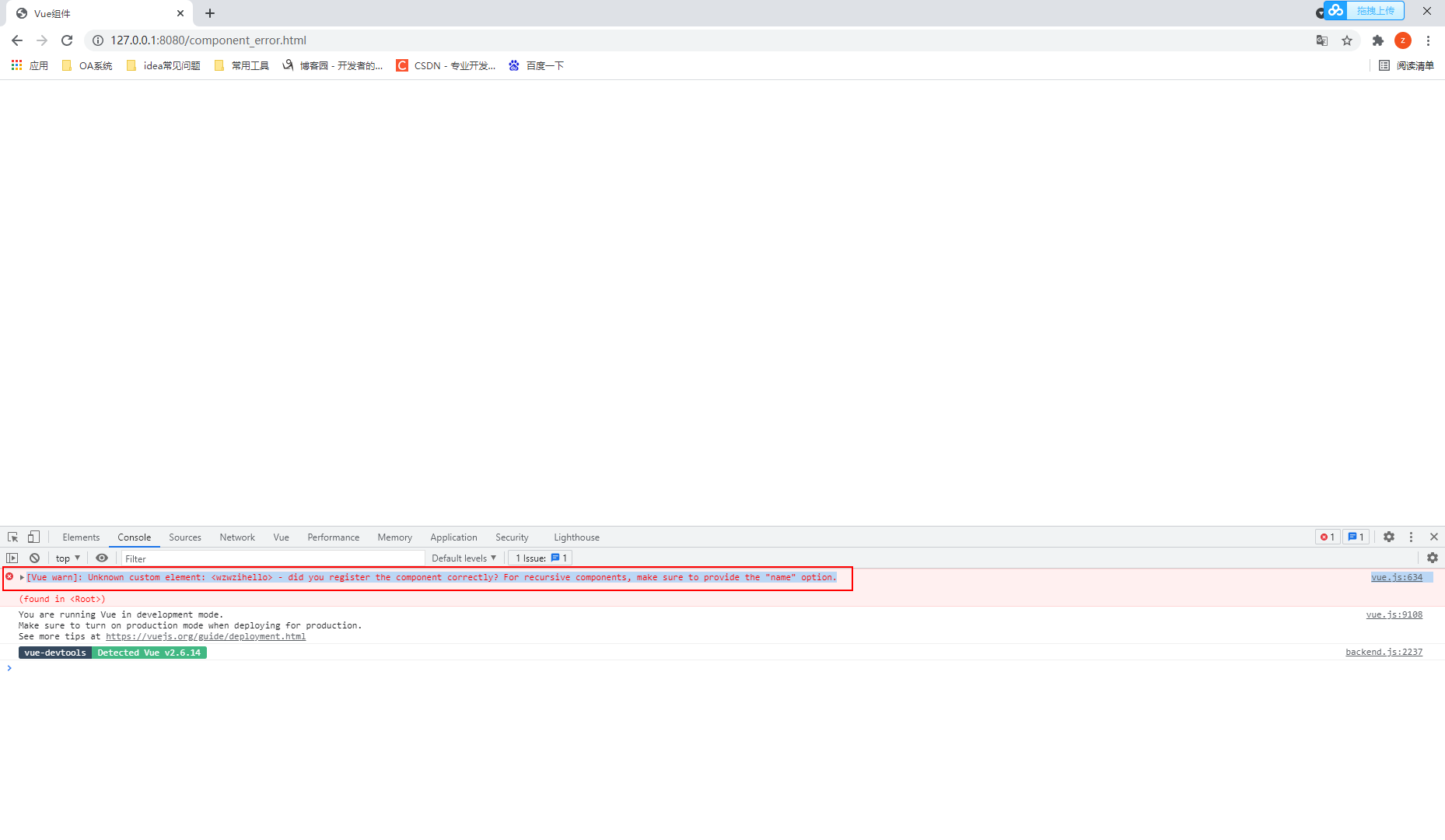
错误代码
<!DOCTYPE html>

<html lang="en">

<head>

    <meta charset="UTF-8">

    <meta http-equiv="X-UA-Compatible" content="IE=edge">

    <meta name="viewport" content="width=device-width, initial-scale=1.0">

    <title>Vue组件</title>

</head>

<body>

    <div id="app">

        <wzwZihello></wzwZihello>

    </div>

</body>

<script src="node_modules/vue/dist/vue.js"></script>

<script>

    // 自定义局部组件:临时使用

    const wzwHello = {

        template:"<div>大哥你好,我叫{{name}}</div>",

        data(){

            return {

                name:"wzw"

            }

        }

    }

    // 父组件:新建Vue

    const app = new Vue({

        el:"#app",

        components:{

            wzwZihello:wzwHello

        }

    })

</script>

</html>
二.分析可能的原因
import语句导入组件时from后面的路径写错
注册组件时括号内的组件名称写错,与import声明的不一致
注册组件关键字components写错导致无法使用
使用组件时名称写错,与注册组件的名字不一致
使用组件时没有使用 / 反斜杠结尾
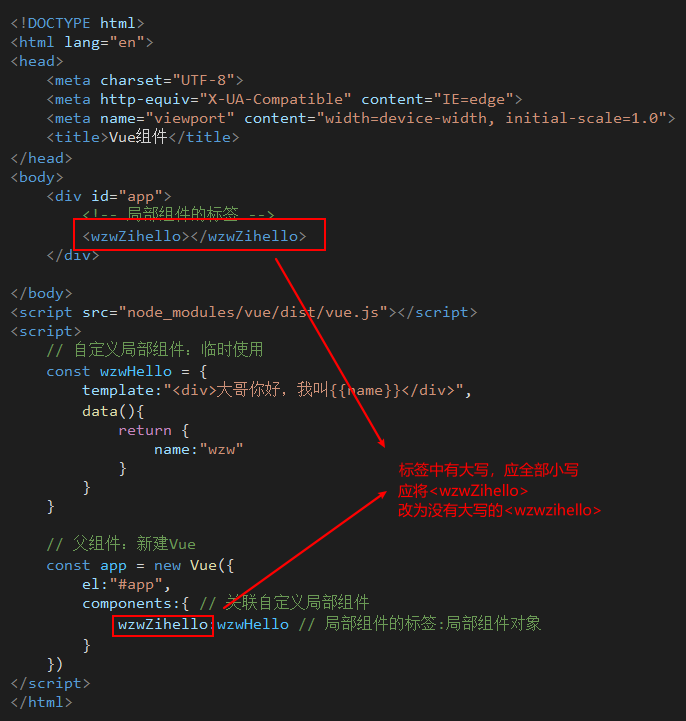
标签中包含大写
三.解决方案(我的问题代码)
标签中包含大写
Vue报错之" [Vue warn]: Unknown custom element: <wzwzihello> - did you register the component correctly? For recursive components, make sure to provide the "name" option."的更多相关文章
- vue报错[Vue warn]: Unknown custom element: <router-Link> - did you register the component correctly? For recursive components, make sure to provide the "name" option.
vue浏览器报错,如下 vue.runtime.esm.js?2b0e:619 [Vue warn]: Unknown custom element: <router-Link> - di ...
- [Vue warn]: Unknown custom element: <sapn> - did you register the component correctly? For recursive components, make sure to provide the "name" option. found in ---> <Evaluate> at src/views/index/
关于vue报错: [Vue warn]: Unknown custom element: <sapn> - did you register the component correctly ...
- [Vue warn]: Unknown custom element: <terminal-process> - did you register the component correctly? For recursive components, make sure to provide the "name" option.
Vue组件注册报错问题 import 不要加{},排查出如果页面引用单个组件的时候不要加上{}中括号,引入多个组件时才能派上用场,中括号去除问题即可解决.
- 使用Vue自定义组件时,报did you register the component correctly? For recursive components, make sure to provide the "name" option.(未注册组件)的原因之一
错误信息: [Vue warn]: Unknown custom element: <list> - did you register the component correctly? F ...
- Vue报错——Unknown custom element: <shop-slide> - did you register the component correctly?
参考: https://blog.csdn.net/jiangyu1013/article/details/85676292 解决:除了import组件外,还要在components中添加 <t ...
- 使用el-dialog时,报错“Unknown custom element:<el-dialog> did you register the component correctly?...make sure to provide the 'name' option”
初学vue时,曾遇到一个无语的问题,在用el-dialog时一直显示没有导入,结果发现是因为没有把element ui引入到项目里. 需进行以下步骤: 1.执行: npm install elemen ...
- Unknown custom element: <componentName> - did you register the component correct?
最近开发的时候遇见一个头疼的事情,之前用过的组件没有出现过任何问题,但偏偏在其他目录下引用就出问题了. 组件的名称.import的路径都没任何问题,看了其他人遇到的问题和官方文档关于组件name属性的 ...
- Vue报错之"[Vue warn]: Invalid prop: type check failed for prop "jingzinum". Expected Number with value NaN, got String with value "fuNum"."
一.报错截图 [Vue warn]: Invalid prop: type check failed for prop "jingzinum". Expected Number w ...
- Vue报错之"[Vue warn]: Avoid mutating a prop directly since the value will be overwritten whenever the parent component re-renders. Instead......"
一.报错截图 [Vue warn]: Avoid mutating a prop directly since the value will be overwritten whenever the p ...
随机推荐
- linux centos7下 c++编程
在Linux下与在windos下编程没啥区别,可以在windos上实现后,然后更改一些,移植到linux中 yum install gcc yum install gcc-c++ vi main.cp ...
- centos7 配置nginx
安装是需要的环境 一. gcc 安装安装 nginx 需要先将官网下载的源码进行编译,编译依赖 gcc 环境,如果没有 gcc 环境,则需要安装: yum install gcc-c++ 二. PCR ...
- 哈工大 计算机系统 实验一 Linux下C工具应用
所有实验文件可见github 计算机系统实验整理 实验报告 实 验(一) 题 目 Linux下C工具应用 专 业 计算机学院 学 号 班 级 学 生 指 导 教 师 实 验 地 点 实 验 日 期 计 ...
- 『德不孤』Pytest框架 — 9、Pytest测试报告
目录 1.pytest-html插件 2.Allure测试报告 (1)Allure框架说明 (2)Allure框架的使用 1.pytest-html插件 Pytest可以通过命令行方式,生成xml/h ...
- 查询 docker 主机的 IP 地址
在 Windows 下查询docker 主机的 IP 地址需要直接去网络中心查找虚拟机的 IP 地址,具体步骤: 进入网络中心 进入适配器更改选项 进入虚拟机 WSL 点击 属性 选中 IPv4 协议 ...
- centos网卡配置修改
centos网卡配置文件一般位于:/etc/sysconfig/network-scripts/ 文件名一般为:ifcfg-eno或者ifcfg-eth0类似的文件,可以先用ip addr 命令或者是 ...
- 【数据结构与算法】Trie(前缀树)模板和例题
Trie 树的模板 Trie 树的简介 Trie树,又称字典树,单词查找树或者前缀树,是一种用于快速检索的多叉树结构,如英文字母的字典树是一个26叉树,数字的字典树是一个10叉树.他的核心思想是空间换 ...
- mavan的安装与配置
1.下载mavan 下载路径:http://maven.apache.org/download.cgi 2.安装mavan 将下载好的压缩包解压到指定位置 3.配置系统环境变量 添加一个MAVAN_H ...
- python 绘图介绍
1. python 绘图介绍 2. 函数 import numpy as np import matplotlib.pyplot as plt t = np.arange(0.0, 3.0, 0.01 ...
- 1357:车厢调度(train) ybt
1357:车厢调度(train) [题目描述] 有一个火车站,铁路如图所示,每辆火车从A驶入,再从B方向驶出,同时它的车厢可以重新组合.假设从A方向驶来的火车有nn节(n≤1000n≤1000),分别 ...