
SSM 前后端分离 这里controll层的返回值和之前那个不一样
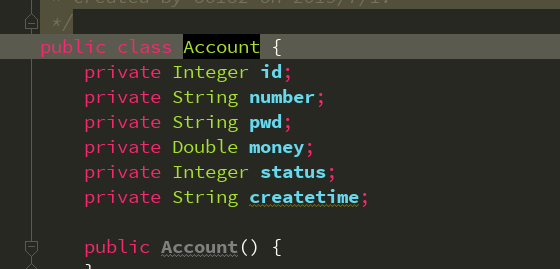
1.先创建实体类:
2.创建mapper层
package cn.kgc.mapper;

import cn.kgc.Account;
import org.apache.ibatis.annotations.Delete;
import org.apache.ibatis.annotations.Insert;
import org.apache.ibatis.annotations.Select;
import org.apache.ibatis.annotations.Update;

import java.util.List;

/**
 * Created by 86182 on 2019/7/1.
 */
public interface AccountMapper {
    //查询所有
    @Select("select * from account")
    List<Account> selectAccount();
    //查询单条
    @Select("select * from account where id=#{id}")
    Account selectByid(Integer id);
    //添加
    @Insert("insert into account(id,number,pwd,money,status,createtime) values(#{id},#{number},#{pwd},#{money},#{status},now())")
    Integer insertAccount(Account account);
    //修改
    @Update("update account set number =#{number},pwd=#{pwd},money=#{money},status=#{status} WHERE id =#{id}")
    Integer updateAccount(Account account);
    //删除
    @Delete("delete from account where id=#{id}")
    Integer deleteAccount(Integer id);
}
3.创建service层
3.1接口层:
package cn.kgc.service;

import cn.kgc.Account;

import java.util.List;

/**
 * Created by 86182 on 2019/7/1.
 */
public interface AccountService {
    //页面展示
    List<Account> showData();
    //查询单条
    Account findByData(Integer id);
    //添加
    Integer add(Account account);
    //修改
    Integer edit(Account account);
    //删除
    Integer del(Integer id);
}
3.2实现类
package cn.kgc.service;

import cn.kgc.mapper.AccountMapper;
import cn.kgc.Account;
import org.springframework.beans.factory.annotation.Autowired;
import org.springframework.stereotype.Service;
import org.springframework.transaction.annotation.Transactional;

import java.util.List;

/**
 * Created by 86182 on 2019/7/1.
 */
@Service
@Transactional
public class AccountServiceImpl implements AccountService {
    @Autowired
    private AccountMapper accountMapper;
    @Override
    public List<Account> showData() {
        return accountMapper.selectAccount();
    }

    @Override
    public Account findByData(Integer id) {
        return accountMapper.selectByid(id);
    }

    @Override
    public Integer add(Account account) {
        return accountMapper.insertAccount(account);
    }

    @Override
    public Integer edit(Account account) {
        return accountMapper.updateAccount(account);
    }

    @Override
    public Integer del(Integer id) {
        return accountMapper.deleteAccount(id);
    }
}
4.controller层
package cn.kgc.controller;

import cn.kgc.service.AccountService;
import cn.kgc.Account;
import org.springframework.beans.factory.annotation.Autowired;
import org.springframework.web.bind.annotation.RequestMapping;
import org.springframework.web.bind.annotation.RestController;

import java.util.List;

/**
 * Created by 86182 on 2019/7/1.
 */
@RestController
public class AccountController {
    @Autowired
    private AccountService accountService;

    //查询全部
    @RequestMapping("/init.do")
    public List<Account> showData(){
        return accountService.showData();
    }
    //添加
    @RequestMapping("/add.do")
    public int addData(Account account){
        return accountService.add(account);
    }
    //查询单条
    @RequestMapping("/info.do")
    public Account getInfo(Integer id){
        return accountService.findByData(id);
    }
    //修改
    @RequestMapping("/edit.do")
    public  int editData(Account account){
        return accountService.edit(account);
    }
    //删除
    @RequestMapping("/del.do")
    public int deleteData(Integer id){
        return accountService.del(id);
    }
}
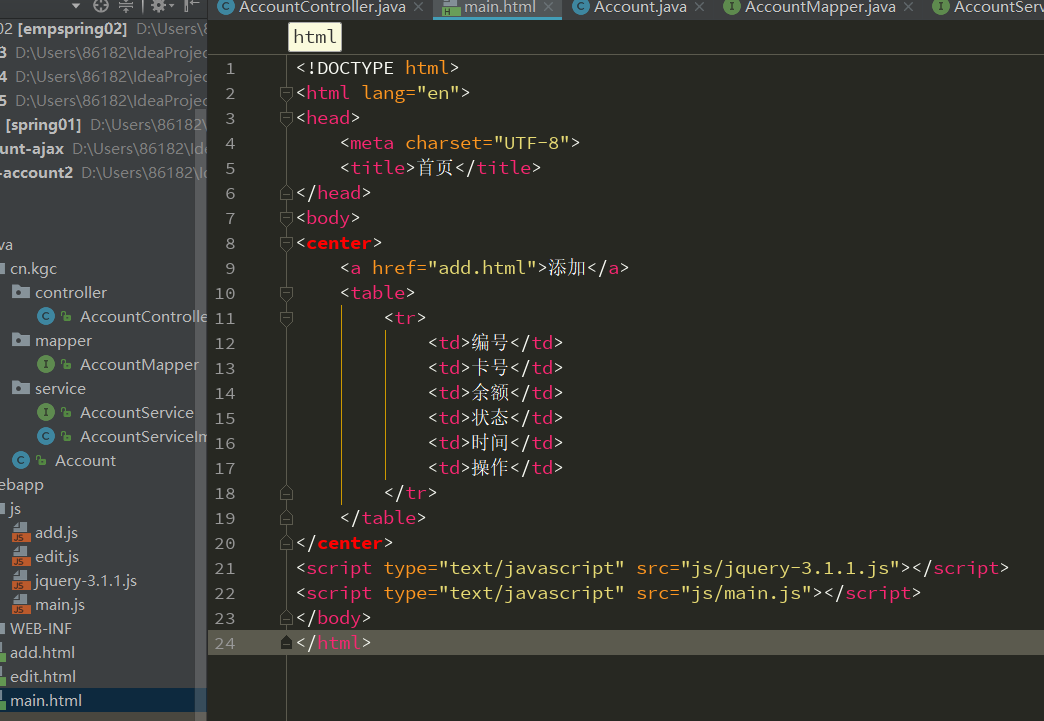
前台页面html
js页面
$(function () {
    initData();
})
function initData() {
    $.ajax({
      url:"init.do",
        type:"post",     //post的方式提交
        dataType:"json",   //数据类型是json格式
        data:{},
        async:true,
        success:function (obj) {
            // alert("success");
            console.log(obj);
            var str="";
            $.each(obj,function(i) {
                str+="<tr>";
                str+="    <td>"+obj[i].id+"</td>";
                str+="    <td>"+obj[i].number+"</td>";
                str+="    <td>"+obj[i].money+"</td>";
                str+="    <td>"+obj[i].status+"</td>";
                str+="    <td>"+obj[i].createtime+"</td>";
                str+="    <td>" +
                          "<a href='edit.html?id="+obj[i].id+"'>修改</a>" +
                          "|<a href='javascript:void(0);' onclick='delFun("+obj[i].id+")'>删除</a>" +
                          "</td>";
                str+="</tr>";
            });
            $("table").append(str);
        },
        error:function () {
            alert("error")
        }
    });
}
function delFun(id) {
    $.ajax({
        url:"del.do",
        type:"post",
        dataType:"json",
        data:{"id":id},
        async:true,
        success:function (obj) {
            location.href="main.html";
        },
        error:function () {
            alert("del error")
        }
    });
}
SSM 前后端分离 这里controll层的返回值和之前那个不一样的更多相关文章
- SSM前后端分离 ssm+html+js(ajax) 这种controll层的返回值是结合或者网址
提示: 1.单表查询多条数据用 list<实体类名字> mapper层 1.1单表查询单条数据用 对象 2.两表关联查多条 list<map<String,Object> ...
- SSM前后端分离/不分离对比Demo
之前某些原因,整理了一个小的Demo,用于演示.个人认为在SSM前后端不分离的基础上在前端处理上比较麻烦一点之后就是注解的使用.总结一些对比,仅是自己掌握的,不够严谨,不足之处请大佬批评指正. 路由控 ...
- SSM框架中的前后端分离
认识前后端分离 在传统的web应用开发中,大多数的程序员会将浏览器作为前后端的分界线.将浏览器中为用户进行页面展示的部分称之为前端,而将运行在服务器,为前端提供业务逻辑和数据准备的所有代码统称为后端. ...
- 从MVC到Ajax再到前后端分离的思考
前言 一位小妹去面试前端,前端leader问了"什么是ajax?",答:"接收后台的数据,然后然后自己填充和渲染样式":一位小哥去面试后台,技术经理问了&quo ...
- REST风格框架实战:从MVC到前后端分离(附完整Demo)
既然MVC模式这么好,难道它就没有不足的地方吗?我认为MVC至少有以下三点不足:(1)每次请求必须经过“控制器->模型->视图”这个流程,用户才能看到最终的展现的界面,这个过程似乎有些复杂 ...
- REST风格框架:从MVC到前后端分离***
摘要: 本人在前辈<从MVC到前后端分离(REST-个人也认为是目前比较流行和比较好的方式)>一文的基础上,实现了一个基于Spring的符合REST风格的完整Demo,具有MVC分层结构并 ...
- 【转】REST风格框架实战:从MVC到前后端分离(附完整Demo)
版权声明:欢迎转载,注明作者和出处就好!如果不喜欢或文章存在明显的谬误,请留言说明原因再踩哦,谢谢,我也可以知道原因,不断进步! https://blog.csdn.net/justloveyou_/ ...
- 浅谈WEB前后端分离
重审业务逻辑 用过MVC的童鞋都知道业务逻辑(Bussiness Logic),但是大多对这概念又是模棱两可,业务逻辑从来都是这样难以理解,谈论前后端分离之前这个概念非常有必要探讨一下! 在简单的CR ...
- 架构设计:前后端分离之Web前端架构设计
在前面的文章里我谈到了前后端分离的一些看法,这个看法是从宏观的角度来思考的,没有具体的落地实现,今天我将延续上篇文章的主题,从纯前端的架构设计角度谈谈前后端分离的一种具体实现方案,该方案和我原来设想有 ...
随机推荐
- SpringSecurity匿名用户访问权限
在SpringSecurity中定义一个匿名访问权限,实现未登录用户可以访问默写页面 <http use-expressions="false" entry-point-re ...
- TypeScript 真香系列——接口篇
接口带来了什么好处 好处One —— 过去我们写 JavaScript JavaScript 中定义一个函数,用来获取一个用户的姓名和年龄的字符串: const getUserInfo = funct ...
- leetcode 128. 最长连续子序列
题目描述: 给定一个未排序的整数数组,找出最长连续序列的长度. 要求算法的时间复杂度为 O(n). 示例: 输入:[100, 4, 200, 1, 3, 2] 输出:4 即最长的连续序列为 [1,2, ...
- DNA replication timing数据库 - Replication Domain
DNA Replication Timing ReplicationDomain: a visualization tool and comparative database for genome-w ...
- PHP系列 | Thinkphp3.2 上传七牛 bad token 问题 [ layui.upload 图片/文件上传]
前端代码 <div class="logo_out" id="upload-logo"></div> JS代码 /** * 上传图片 * ...
- UDP用于保持大量终端的在线与控制,应用与业务则通过TCP去实现。这个和FTP服务控制与数据分离,采取不同的连接,有异曲同工之处 端口映射老化时间
移动端IM/推送系统的协议选型:UDP还是TCP? http://www.52im.net/thread-33-1-1.html
- Set JAVA_HOME in windows cmd(在windows 命令行中修改JAVA_HOME)
set JAVA_HOME=jrepathset PATH=%JAVA_HOME%\bin;%PATH%注意这里没有引号.这样就不需要在我的电脑属性中修改java_home了,以及重启命令行了.对于程 ...
- mysql 添加时间自动添加更新时间自动更新
在数据库使用中经常使用到时间字段.常用的有创建时间和更新时间.然而在使用中想要创建时间在创建的时候自动设置为当前时间,更新时间在更新时自动更新为当前时间. 创建表 stu CREATE TABLE ` ...
- Flume监控指标项
配置监控 1.修改flume-env.sh export JAVA_OPTS="-Dcom.sun.management.jmxremote -Dcom.sun.management.jmx ...
- 爬虫框架Scrapy的安装
Scrapy框架官方网址:http://doc.scrapy.org/en/latest Scrapy中文维护站点:http://scrapy-chs.readthedocs.io/zh_CN/lat ...