
Display PowerPoint slide show within a VB form or control window
The example below shows how to use VB form/control as a container application to display a PowerPoint slideshow. It as shows how to make use of an undocumented slide show setting to run the slideshow in a window of it's own without any PowerPoint toolbars.
System requirements:
Visual Basic 6.0 to compile the code
PowerPoint installed on the target system
Click here  to download the VB project
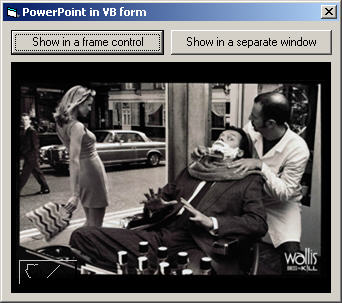 |
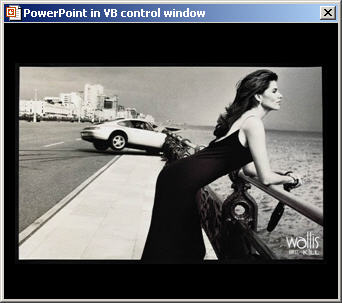 |
|
|
' ------------------------------------------------------------------------
' Copyright ©1999-2011, Shyam Pillai, All Rights Reserved.
' ------------------------------------------------------------------------
' You are free to use this code within your own applications, add-ins,
' documents etc but you are expressly forbidden from selling or
' otherwise distributing this source code without prior consent.
' This includes both posting free demo projects made from this
' code as well as reproducing the code in text or html format.
' ------------------------------------------------------------------------
Option Explicit Const APP_NAME = "PowerPoint in VB window" Const SHOW_FILE = "C:\PowerPoint\Sample.ppt" ' PowerPoint Constants Const ppShowTypeSpeaker = 1 ' Undocument constant used to display show in a window ' without PowerPoint command bars. Const ppShowTypeInWindow = 1000 Public oPPTApp As Object Public oPPTPres As Object ' API's used: Private Declare Function FindWindow Lib "user32" _ Alias "FindWindowA" (ByVal lpClassName As String, _ ByVal lpWindowName As Long) As Long ' To set fram control as the parent of the slide show window Private Declare Function SetParent Lib "user32" _ (ByVal hWndChild As Long, _ ByVal hWndNewParent As Long) As Long ' To set the caption of the window Private Declare Function SetWindowText Lib "user32" _ Alias "SetWindowTextA" (ByVal hwnd As Long, _ ByVal lpString As String) As Long Private Sub cmdShow_Click(Index As Integer) Dim screenClasshWnd As Long On Error Resume Next Set oPPTApp = CreateObject("PowerPoint.Application")
If Not oPPTApp Is Nothing Then Set oPPTPres = oPPTApp.Presentations.Open(SHOW_FILE, , , False) If Not oPPTPres Is Nothing Then With oPPTPres Select Case Index Case Is = 0 With .SlideShowSettings .ShowType = ppShowTypeSpeaker With .Run .Width = frmSS.Width .Height = frmSS.Height End With End With screenClasshWnd = FindWindow("screenClass", 0&)
SetParent screenClasshWnd, frmSS.hwnd With Me .Height = 4545 .SetFocus End With Case Is = 1 With .SlideShowSettings .ShowType = ppShowTypeInWindow .Run End With Call SetWindowText(FindWindow("screenClass", 0&), APP_NAME)
End Select End With Else MsgBox "Could not open the presentation.", vbCritical, APP_NAME End If Else MsgBox "Could not instantiate PowerPoint.", vbCritical, APP_NAME End If End Sub Private Sub Form_Initialize() With Me .ScaleMode = vbPoints .Caption = APP_NAME End With End Sub Private Sub Form_QueryUnload(Cancel As Integer, UnloadMode As Integer) On Error Resume Next lblMessage.Visible = True DoEvents If Not oPPTPres Is Nothing Then oPPTPres.Close End If Set oPPTPres = Nothing If Not oPPTApp Is Nothing Then oPPTApp.Quit End If Set oPPTApp = Nothing lblMessage.Visible = False End Sub |
url: http://skp.mvps.org/vb/pptvbwnd.htm
Display PowerPoint slide show within a VB form or control window的更多相关文章
- vb.net WPF webbrowser window.close 关闭后不触发 WindowClosing 事件 WNDPROC解决方式
vb.net WPF webbrowser window.close 关闭后不触发 WindowClosing 事件 WNDPROC解决方式 #Region "WPF 当浏览器窗体关闭 ...
- How to: Specify a Display Member (for a Lookup Editor, Detail Form Caption, etc.)如何:指定显示成员(用于查找编辑器、详细信息表单标题等)
Each business object used in an XAF application should have a default property. The default property ...
- [WPF自定义控件库]为Form和自定义Window添加FunctionBar
1. 前言 我常常看到同一个应用程序中的表单的按钮----也就是"确定"."取消"那两个按钮----实现得千奇百怪,其实只要使用统一的Style起码就可以统一按 ...
- VSTO PowerPoint 代码删除Shape后再恢复出现无法再次获取的问题
做PowerPoint的VSTO插件项目,遇到个很奇怪的问题,当代码执行删除某些Shape时,没问题,但是操作Undo也就是恢复后,无法再次获取到之前删除的对象,这种情况只在Office2007中出现 ...
- html代码中的form参数是基本一致的
由于pear的大多数模块仍处于开发当中,因此,这里列举的是随着php4.05一起发布的pear中的模块,需要注意的是,一些抽象类或者是基类(如mail.php,log.php,cache.php)没有 ...
- js实现无刷新表单提交文件,将ajax请求转换为form请求方法
最近在做项目的时候遇到一个需要上传文件的需求,因为ajax请求是无法上传二进制文件流的,所以只能用form表单提交,而form提交有一个问题就是会使页面刷新,本文解决了form表单提交文件时页面刷新的 ...
- 项目回顾1-图片上传-form表单还是base64-前端图片压缩
第一个项目终于上线了,是一个叫亲青筹的公益众筹平台,微信端,电脑端还有后台界面大部分都是我完成的,几个月过来,感觉收获了很多,觉得要总结一下. 首先想到的是图片上传的问题.在通常表单数据都是ajax上 ...
- css form 表单组对齐
2014年7月1日 15:31:17 第一次写css,见谅 css: .form-box .form-group .form-label {text-align: right; width: 200p ...
- 用Autohotkey让powerpoint幻灯片一直播放
有台电脑专门接了个大电视循环播放一个幻灯片,但是有时候会弹出一些对话框,比如windows要更新之类的,这样的话powerpoint就不是active的进城了,这样幻灯片就会停下来,还需要人去手动点一 ...
随机推荐
- J20170602-ts
アソシエーション association n. 联想; 协会,社团; 联合,联系; アンケート 英文是questionnaire
- 网络连接详细信息出现两个自动配置ipv4地址的解决办法
问题描述:网络连接详细信息出现两个自动配置ipv4地址,一个是有效地址,一个是无效地址. 解决办法: 先将本地连接ip设置成自动获取 点击开始——>运行——>输入cmd,回车,进入命令行界 ...
- 洛谷 P3378 【模板】堆(小根堆)
题目描述 如题,初始小根堆为空,我们需要支持以下3种操作: 操作1: 1 x 表示将x插入到堆中 操作2: 2 输出该小根堆内的最小数 操作3: 3 删除该小根堆内的最小数 输入输出格式 输入格式: ...
- Bryce1010 Acm模板
目录 STL标准模板库 STL简介 STL pair STL set STL vector STL string STL stack STL queue STL map upper_bound和low ...
- 二分图最大匹配(匈牙利算法) UVA 10080 Gopher II
题目传送门 /* 匈牙利算法:这题比UVA_670简单,注意是要被吃的鼠的最少个数,套模板 */ #include <cstdio> #include <algorithm> ...
- 403 Frog Jump 青蛙过河
一只青蛙想要过河. 假定河流被等分为 x 个单元格,并且在每一个单元格内都有可能放有一石子(也有可能没有). 青蛙可以跳上石头,但是不可以跳入水中.给定石子的位置列表(用单元格序号升序表示), 请判定 ...
- 转发:吐血总结,彻底明白 python3 编码原理
吐血总结,彻底明白 python3 编码原理 写的不错,转发学习一下,侵删.. 原文地址https://zhuanlan.zhihu.com/p/40834093 防止原文看不到了 这里粘贴复制一下: ...
- 238 Product of Array Except Self 除自身以外数组的乘积
一个长度为 n 的整形数组nums,其中 n > 1,返回一个数组 output ,其中 output[i] 等于nums中除nums[i]以外所有元素的乘积.不用除法 且在O(n)内解决这个问 ...
- es6之iterator,for...of
遍历器(Iterator)是一种统一的接口机制,来处理所有不同的数据结构. JavaScript 原有的表示“集合”的数据结构,主要是数组(Array)和对象(Object),ES6 又添加了Map和 ...
- 动态调用链接库(dll) 续
20141118 最近一周做了一个关于仓库管理,拣货任务分配的模块,其中涉及到刷卡自动打印领取任务的功能点. 技术点: C#调用C++.delphi的动态链接库.动态链接库的调用方法不同.效果也不相同 ...