
纵横填字map版(初始数据结构)
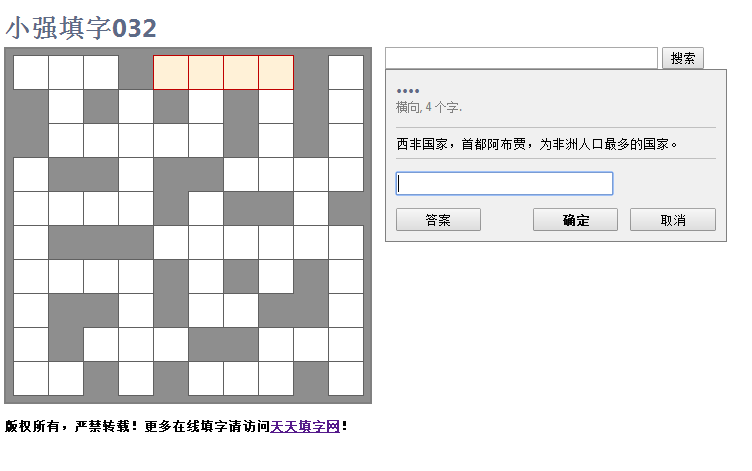
新数据结构设计:
定义一个map:
key是横纵坐标字符串,比如“0,4”
value是一个json,包含以下属性:字,横向的词(若 有的话,无的话,空串),纵向的词(若有的话,无的话,空串)。
另有一个map,key是答案词语,value是,提示描述。
map版
<!DOCTYPE HTML PUBLIC "-//W3C//DTD HTML 4.01 Transitional//EN" "http://www.w3.org/TR/html4/loose.dtd">
<html><head>
<title>天天填字012</title>
<meta name="Keywords" content="天天填字网 填字游戏 填字制作 在线填字游戏" />
<meta http-equiv="Content-Type" content="text/html" charset="utf-8">
<style type="text/css"><!-- body, h1, h2, h3, h4, h5, h6
{
font-family: Segoe UI, Franklin Gothic Medium, Arial, sans-serif;
} h1, h2, h3, h4, h5, h6
{
color: #5d6a86;
} body
{
cursor: default;
font-size: small;
} .ecw-answerbox
{
color: black;
background-color: #F0F0F0;
border-color: #808080;
border-style: solid;
border-width: 1px;
display: block;
padding: .75em;
width: 240pt;
} .ecw-box
{
border-style: solid;
border-width: 1pt;
cursor: pointer;
font-size: .24in;
font-weight: bold;
height: .35in;
overflow: hidden;
text-align: center;
width: .35in;
} .ecw-boxcheated_sel
{
background-color: #FFF1D7;
border-color: #C00000;
color: #2080D0;
} .ecw-boxcheated_unsel
{
background-color: #ffffff;
border-color: #606060;
color: #2080D0;
} .ecw-boxerror_sel
{
background-color: #FFF1D7;
border-color: #C00000;
color: #BF0000;
} .ecw-boxerror_unsel
{
background-color: #FFF0F0;
border-color: #606060;
color: #BF0000;
} .ecw-boxnormal_sel
{
background-color: #FFF1D7;
border-color: #C00000;
color: #000000;
} .ecw-boxnormal_unsel
{
background-color: #ffffff;
border-color: #606060;
color: #000000;
} .ecw-button
{
width: 64pt;
} /*.ecw-cluebox*/
/*{*/
/*border-bottom-width: 1px;*/
/*border-color: #c0c0c0;*/
/*border-left-width: 0px;*/
/*border-right-width: 0px;*/
/*border-style: solid;*/
/*border-top-width: 1px;*/
/*margin-top: 1em;*/
/*padding-bottom: .5em;*/
/*padding-left: 0pt;*/
/*padding-right: 0pt;*/
/*padding-top: .5em;*/
/*}*/ .ecw-crosswordarea
{
background-color: #8E8E8E;
border-color: #808080;
border-style: solid;
border-width: 2px;
padding: .5em;
font-family: Segoe UI, Verdana, Arial, sans-serif;
font-size: small;
} .ecw-copyright
{
margin-bottom: 1em;
font-size: x-small;
font-family: Segoe UI, Franklin Gothic Medium, Arial, sans-serif;
} .ecw-input
{
font-family: Segoe UI, Franklin Gothic Medium, Arial, sans-serif;
} .ecw-wordlabel
{
text-transform: uppercase;
margin: 0;
} .ecw-wordinfo
{
font-size: 8pt;
color: #808080;
} .ecw-worderror
{
color: #c00000;
font-weight: bold;
display: none;
margin-top: 1em;
} --></style> </head><body> <h1>天天填字012</h1>
<h3 style="margin-top: -1em;"></h3> <div id="waitmessage" class="ecw-answerbox">
本填字游戏,需要您的浏览器支持JavaScript。
</div> <table cellpadding="0" cellspacing="0" border="0"><tr> <td class="ecw-crosswordarea"><table id="crossword" cellpadding="0" cellspacing="0" style="display: none; border-collapse: collapse;"> <script type="text/javascript"><!-- var map = new Map(); CrosswordWidth = 10;
CrosswordHeight = 10;
Words = 24;
WordLength = new Array(2, 2, 2, 2, 4, 3, 4, 2, 4, 3, 7, 5, 3, 4, 5, 3, 3, 6, 7, 2, 3, 4, 4, 2);
Word = new Array("杜甫", "皇甫", "女红", "道家", "赵氏孤儿", "马晓旭", "堂吉诃德", "里昂", "得寸进尺", "丘吉尔", "汉皇重色思倾国", "斯坦福大学", "火山灰", "杜甫草堂", "皇家马德里", "女儿国", "赵旭日", "吉尔吉斯斯坦", "一寸相思一寸灰", "戒尺", "三重门", "汉武大帝", "国际米兰", "斯文");
Clue = new Array("最近很忙的一位诗人",
"《百家姓》中的一个复姓。",
"旧时指女子所作的纺织、缝纫等工作。",
"我国古代的一个学派,代表人物有老子、庄子等。",
"元朝的一部杂剧,作者纪君祥。",
"女足球星,中国女足核心人物",
"塞万提斯笔下的著名人物,他仿效骑士的生活,把风车看作巨人, 把羊群当做敌军。",
"法国一座大城市,世界高级丝织品的最大产地之一。",
"比喻贪心不足,有了小的,又要大的。",
"二战时期的英国首相,与斯大林、罗斯福并立的“三巨头”之一",
"白居易《长恨歌》的首句,下句为“御宇多年求不得”。",
"美国一所知名私立高等学府,位于加利福尼亚州。",
"粒径很小的火山固态喷发物。因细小,喷发时可送达数十千米的大气层中,并可长期悬浮在空中。",
"“横向1”的故居。",
"西班牙著名足球俱乐部",
"《西游记》中的一个国家,该国境内没有男子。",
"男足球星,效力于广州恒大俱乐部",
"中亚内陆国,东邻中国,首都比什凯克。",
"李商隐《无题》中“春心莫共花争发”的下句。",
"旧时教师对学生施行体罚时所用的木板",
"作家韩寒的一部代表作",
"陈宝国、归亚蕾、陶红等主演的大型历史连续剧。",
"意甲一支实力强劲的球队,被称为“蓝黑军团”。",
"指文化或文人。");
// AnswerHash = new Array(80753, 46429, 61909, -27257, -49836, -23432, 60273, -26545, 41003, 2908, 49027, 42254, 9723, 44672, -58002, 77969, -15470, 91592, 69787, 85653, -24917, 16765, 92043, 72435);
WordX = new Array(0, 3, 8, 2, 5, 3, 0, 3, 6, 0, 3, 0, 5, 0, 3, 8, 5, 1, 7, 9, 5, 3, 9, 0);
WordY = new Array(0, 0, 0, 1, 1, 2, 3, 4, 4, 5, 6, 8, 9, 0, 0, 0, 1, 3, 3, 3, 5, 6, 6, 8);
LastHorizontalWord = 12;//最后一个水平词 OnlyCheckOnce = false;
//-->
</script> <script type="text/javascript"><!-- function strMapToObj(strMap){
let obj= Object.create(null);
for (let[k,v] of strMap) {
obj[k] = v;
}
return obj;
}
//x,y
function posInMap(pos)
{
var obj = {word:'',index:0};
var index = 0;
for (let[k,v] of map) {
if(v.posArray.includes(pos))
{
obj.word=k;
obj.index=index;
break;
}
index++;
} return obj;
}
function getWordIndex(word) {
var index = 0;
for (let[k,v] of map) {
if(k==word)
{
break;
}
index++;
}
return index;
}
//x,y
function posInMapEx(pos)
{
var obj = mapPos2Words.get(pos);
var ret = obj.arr[obj.selectIndex];
var index = ret.indexOf(obj.char);
var retObj = new Object();
retObj.index = index;
retObj.word = ret;
retObj.char = obj.char;
if(obj.arr.length > 1)
{
obj.selectIndex++;
obj.selectIndex = obj.selectIndex%2;
}
return retObj;
} var mapPos2Words = new Map(); function GenMapPos2Words(map) {
for (let[k,v] of map) {
for(var i = 0; i < v.posArray.length; i++)
{
if(mapPos2Words.has(v.posArray[i]))
{
mapPos2Words.get(v.posArray[i]).arr.push(k);
}
else{
var obj = new Object(); obj.arr = [];
obj.arr.push(k); obj.selectIndex = 0;
obj.char=k.charAt(i);
mapPos2Words.set(v.posArray[i],obj);
}
}
}
} for(var z = 0; z < Word.length; z++)
{
var obj = new Object();
obj.description = Clue[z];
obj.posArray = []; for(var m = 0; m < Word[z].length; m++)
{
if(z <= LastHorizontalWord)
{
obj.posArray.push(WordY[z] + "," + (WordX[z]+m));
}
else
{
obj.posArray.push((WordY[z]+m) + "," + WordX[z]);
} }
map.set(Word[z],obj);
} GenMapPos2Words(map);
// var mapjson = JSON.stringify(strMapToObj(map));
var mapjson = JSON.stringify(strMapToObj(mapPos2Words));
// alert(mapjson); // var selObj.CurrentWord;
var PrevWordHorizontal, x, y, i, j;
var CrosswordFinished, Initialized; // Check the user's browser and then initialize the puzzle.
if (document.getElementById("waitmessage") != null)
{
document.getElementById("waitmessage").innerHTML = "填字游戏正在载入..."; // Now, insert the row HTML into the table.
for (var x = 0; x < CrosswordWidth; x++)
{
document.writeln("<tr>");
for (var y = 0; y< CrosswordHeight; y++)
{
var pos = x+","+y;
var obj = posInMap(pos);
if (obj.word !='')
document.write("<td id=\"c" + PadNumber(x) + PadNumber(y) + "\" class=\"ecw-box ecw-boxnormal_unsel\" onclick=\"SelectThisWord(event);\"> </td>");
else
document.write("<td></td>");
}
document.writeln("</tr>");
} // Finally, show the crossword and hide the wait message.
Initialized = true;
document.getElementById("waitmessage").style.display = "none";
document.getElementById("crossword").style.display = "block";
} // ----------
// Event handlers // Raised when a key is pressed in the word entry box.
function WordEntryKeyPress(event)
{
if (CrosswordFinished) return;
// Treat an Enter keypress as an OK click.
if (selObj.CurrentWord >= 0 && event.keyCode == 13) OKClick();
} // ----------
// Helper functions // Called when we're ready to start the crossword.
function BeginCrossword()
{
if (Initialized)
{
document.getElementById("welcomemessage").style.display = "";
document.getElementById("checkbutton").style.display = "";
}
} // Pads a number out to three characters.
function PadNumber(number)
{
if (number < 10)
return "00" + number;
else if (number < 100)
return "0" + number;
else
return "" + number;
} // Returns the table cell at a particular pair of coordinates.
function CellAt(x, y)
{
return document.getElementById("c" + PadNumber(x) + PadNumber(y));
} // Deselects the current word, if there's a word selected. DOES not change the value of selObj.CurrentWord.
function DeselectCurrentWord()
{ document.getElementById("answerbox").style.display = "none";
ChangeCurrentWordSelectedStyle(false);
// selObj.CurrentWord = -1; } // Changes the style of the cells in the current word.
function ChangeWordStyle(WordNumber, NewStyle)
{ if (WordNumber<= LastHorizontalWord)
for (i = 0; i < WordLength[WordNumber]; i++)
CellAt(selObj.x, selObj.y-selObj.index + i).className = NewStyle;
else
for (i = 0; i < WordLength[WordNumber]; i++)
CellAt(selObj.x-selObj.index+ i, selObj.y ).className = NewStyle;
} // Changes the style of the cells in the current word between the selected/unselected form.
function ChangeCurrentWordSelectedStyle(IsSelected)
{ if (selObj.CurrentWord <= LastHorizontalWord)
for (i = 0; i < WordLength[selObj.CurrentWord]; i++)
CellAt(selObj.x, selObj.y-selObj.index+ i).className = CellAt(selObj.x , selObj.y-selObj.index+ i).className.replace(IsSelected ? "_unsel" : "_sel", IsSelected ? "_sel" : "_unsel");
else
for (i = 0; i < WordLength[selObj.CurrentWord]; i++)
CellAt(selObj.x -selObj.index+ i, selObj.y ).className = CellAt(selObj.x-selObj.index + i, selObj.y).className.replace(IsSelected ? "_unsel" : "_sel", IsSelected ? "_sel" : "_unsel"); if(IsSelected==false)
selObj.CurrentWord = -1; } // Selects the new word by parsing the name of the TD element referenced by the
// event object, and then applying styles as necessary.
var selObj = {}; function SelectThisWord(event)
{
if (CrosswordFinished) return;
var i, TheirWord, TableCell; // Deselect the previous word if one was selected.
document.getElementById("welcomemessage").style.display = "none";
if (selObj.CurrentWord >= 0)
OKClick(); // Determine the coordinates of the cell they clicked, and then the word that
// they clicked.
var target = (event.srcElement ? event.srcElement: event.target);
console.info(target);
selObj.x = parseInt(target.id.substring(1, 4), 10);
selObj.y = parseInt(target.id.substring(4, 7), 10);
DeselectCurrentWord(); var wordObj = posInMapEx(selObj.x+','+selObj.y);
selObj.index = wordObj.index;
selObj.CurrentWord = getWordIndex(wordObj.word); // Now, change the style of the cells in this word.
ChangeCurrentWordSelectedStyle(true);
// Then, prepare the answer box. TheirWord = "";
var TheirWordLength = 0;
for (i = 0; i < WordLength[selObj.CurrentWord]; i++)
{
// Find the appropriate table cell.
if (selObj.CurrentWord <= LastHorizontalWord)
TableCell = CellAt(selObj.x, selObj.y-selObj.index + i);
else
TableCell = CellAt(selObj.x-selObj.index+ i, selObj.y);
// Add its contents to the word we're building.
if (TableCell.innerHTML != null && TableCell.innerHTML.length > 0 && TableCell.innerHTML != " " && TableCell.innerHTML.toLowerCase() != " ")
{
TheirWord += TableCell.innerHTML.toUpperCase();
TheirWordLength++;
}
else
{
TheirWord += "•";
}
} document.getElementById("wordlabel").innerHTML = TheirWord;
document.getElementById("wordinfo").innerHTML = ((selObj.CurrentWord <= LastHorizontalWord) ? "横向, " : "纵向, ") + WordLength[selObj.CurrentWord] + " 个字.";
document.getElementById("wordclue").innerHTML = map.get(wordObj.word).description;
document.getElementById("worderror").style.display = "none";
document.getElementById("cheatbutton").style.display = (Word.length == 0) ? "none" : "";
if (TheirWordLength == WordLength[selObj.CurrentWord])
document.getElementById("wordentry").value = TheirWord;
else
document.getElementById("wordentry").value = ""; // Finally, show the answer box.
document.getElementById("answerbox").style.display = "block";
try
{
document.getElementById("wordentry").focus();
document.getElementById("wordentry").select();
}
catch (e)
{
} } // Called when the user clicks the OK link.
function OKClick()
{
var TheirWord, i, TableCell;
if (CrosswordFinished) return;
if (document.getElementById("okbutton").disabled) return; // First, validate the entry.
TheirWord = document.getElementById("wordentry").value.toUpperCase();
if (TheirWord.length == 0)
{
DeselectCurrentWord();
return;
} if (TheirWord.length < WordLength[selObj.CurrentWord])
{
document.getElementById("worderror").innerHTML = "您输入的字太少了,这个词应该有 " + WordLength[selObj.CurrentWord] + " 个字。";
document.getElementById("worderror").style.display = "block";
return;
}
if (TheirWord.length > WordLength[selObj.CurrentWord])
{
document.getElementById("worderror").innerHTML = "您输入的字太多了,这个词只有 " + WordLength[selObj.CurrentWord] + " 个字。";
document.getElementById("worderror").style.display = "block";
return;
} for (i = 0; i < TheirWord.length; i++)
{
TableCell = CellAt(selObj.x + (selObj.CurrentWord <= LastHorizontalWord ?0 : i-selObj.index), selObj.y + (selObj.CurrentWord > LastHorizontalWord ? 0 : i-selObj.index));
TableCell.innerHTML = TheirWord.substring(i, i + 1);
}
DeselectCurrentWord();
} // Called when the "check puzzle" link is clicked.
function CheckClick()
{
if (CrosswordFinished) return;
var CrosswordFinished=true;
for (var x = 0; x < CrosswordWidth; x++)
{ for (var y = 0; y< CrosswordHeight; y++)
{
var pos = x+","+y; var TableCell = CellAt(x,y);
if(TableCell!=null)
{
var obj = posInMapEx(pos);
if(TableCell.innerHTML!=obj.char){
CrosswordFinished = false;
break;
} }
} } if(CrosswordFinished==false)
{
document.getElementById("welcomemessage").innerHTML = "error";
document.getElementById("welcomemessage").style.display = "block";
return;
}
// They finished the puzzle! document.getElementById("checkbutton").style.display = "none";
document.getElementById("congratulations").style.display = "block";
document.getElementById("welcomemessage").style.display = "none";
} // Called when the "cheat" link is clicked.
function CheatClick()
{
if (CrosswordFinished) return;
var OldWord = selObj.CurrentWord;
document.getElementById("wordentry").value = Word[selObj.CurrentWord];
OKClick();
ChangeWordStyle(OldWord, "ecw-box ecw-boxcheated_unsel");
} //-->
</script> </table></td> <td valign="top" style="padding-left: 1em;">
<form action="http://www.google.com/cse" id="cse-search-box" target="_blank">
<div>
<input type="hidden" name="cx" value="partner-pub-3335021892863532:fdww32yut17" />
<input type="hidden" name="ie" value="GB2312" />
<input type="text" name="q" size="40" />
<input type="submit" name="sa" value="搜索" />
</div>
</form> <div id="welcomemessage" class="ecw-answerbox" style="display:none;">
<span>为确保最佳显示效果,请保持本页面最大化。</span><br>
<p style="color: #ff0000;padding: 12px 0px 2px 0px; margin: 0px; border-bottom: 1px solid #ccc;"><b>说明:</b></p>
<span><ol><li>点击一个白色格子开始填字。</li>
<li>根据提示,将答案填写在文本框中,然后按<b>回车键</b>或者点击<b>确定</b>按钮。</li>
<li>重复以上两步,完成填字游戏。</li>
<li>点击<b>答案</b>按钮可查看当前词条的答案。</li>
</ol><br></span> </div> <div id="answerbox" class="ecw-answerbox" style="display:none;">
<h3 id="wordlabel" class="ecw-wordlabel"> </h3>
<div id="wordinfo" class="ecw-wordinfo"> </div>
<div id="wordclue" class="ecw-cluebox"> </div>
<div style="margin-top: 1em;">
<input class="ecw-input" id="wordentry" type="text" size="24" style="font-weight: bold; text-transform:uppercase;" onkeypress="WordEntryKeyPress(event)" onchange="WordEntryKeyPress(event)" autocomplete="off" />
</div>
<div id="worderror" class="ecw-worderror"></div> <table border="0" cellspacing="0" cellpadding="0" width="100%" style="margin-top:1em;"><tbody><tr><td>
<button id="cheatbutton" type="button" class="ecw-input ecw-button" onclick="CheatClick();">答案</button>
<button id="checkbutton" type="button" class="ecw-input ecw-button" onclick="CheckClick();">check</button>
</td><td align="right">
<button id="okbutton" type="button" class="ecw-input ecw-button" onclick="OKClick();" style="font-weight: bold;">确定</button>
<button id="cancelbutton" type="button" class="ecw-input ecw-button" onclick="DeselectselObj.CurrentWord();">取消</button>
</td></tr></tbody></table> </div> <div id="congratulations" class="ecw-answerbox" style="display:none;">
<h3>恭喜你!答对了!</h3>
<p>更多填字游戏,请访问<a href="http://www.tzgame.net" style="color: black; text-decoration:none;">天天填字网。</a></p>
</div> </td></tr></table>
<div><p><b>版权所有,严禁转载!更多在线填字请访问<a href="http://www.tzgame.net/" target="_blank">天天填字网</a>!</b></p></div> <script language="JavaScript" type="text/javascript"><!--
BeginCrossword();
//-->
</script> <br> </body></html>
纵横填字map版(初始数据结构)的更多相关文章
- 纵横填字js
新数据结构设计: 定义一个map: key是横纵坐标字符串,比如“0,4” value是一个json,包含以下属性:字,横向的词(若 有的话,无的话,空串),纵向的词(若有的话,无的话,空串). 另有 ...
- ES6中Map与其他数据结构的互相转换
最近在学习ES6的基础知识,整理了一下Map与其他数据结构相互转换的写法. Map转为数组的方法 let myMap = new Map([[true, 7], [{foo: 3}, ['abc']] ...
- [数据结构]严蔚敏版(C数据结构)配套实现程序111例
以下为根据严蔚敏版数据结构的示例和概念实现的程序 目录 一.严蔚敏版(C数据结构)配套实现程序111例 1.数组与字符串 2.栈与队列 3.链表LinkList 4.树与二叉树 5.排序相关算法 6. ...
- 初始数据结构(python语言)
数据结构 概念:数据结构是指相互之间存在着一种或多种关系的数据元素的集合和该集合中数据元素之间的关系组成 算法复杂度 时间复杂度 时间复杂度是同一问题可用不同算法解决,而一个算法的质量优劣将影响到算法 ...
- C++ map,set内部数据结构
1)Set是一种关联容器,它用于存储数据,并且能从一个数据集合中取出数据.它的每个元素的值必须唯一,而且系统会根据该值来自动将数据排序.每个元素的值不能直接被改变.[重点]内部结构采用红黑树的平衡二叉 ...
- Js基础知识7-Es6新增对象Map和set数据结构
前言 JavaScript中对象的本质是键值对的集合,ES5中的数据结构,主要是用Array和Object,但是键只能是字符串.为了弥补这种缺憾,ES6带来了一种新的数据结构Map. Map也是键值对 ...
- Map 和 WeakMap 数据结构
Map 和 WeakMap 是ES6 新增的数据结构 一.Map 它们本质与对象一样,都是键值对的集合,但是他们与 Object 对象主要的不同是,键可以是各种类型的数值,而Object 对象的键 只 ...
- 八数码(map版)
八数码 map真是个奇技淫巧好东西 可以十分简单的实现hash,当然速度就不敢保证了 因为九位数不算很大,完全可以用int存下,所以便将八数码的图像转换成一个int型的数字 #include<i ...
- Java ——集合框架 list lambda set map 遍历方法 数据结构
本节重点思维导图 集合框架 有序无序:元素放入的顺序与取出的顺序是否一致,一致即为有序,不一致即无序. List:允许重复.有序 ArrayList:长度可变的数组,遍历速度快 LinkedList: ...
随机推荐
- [bzoj2946][Poi2000]公共串_后缀数组_二分
公共串 bzoj-2946 Poi-2000 题目大意:给定$n$个字符串,求他们的最长公共子串. 注释:$1\le n\le 5$,$1\le minlen<maxlen\le 2000$. ...
- [bzoj4131]并行博弈_博弈论
并行博弈 bzoj-4131 题目大意:题目链接. 注释:略. 想法:我们发现无论如何操作都会使得$(1,1)$发生改变. 所以单个$ACG$的胜利条件就是$(1,1)$是否为黑色. 如果为黑色那么可 ...
- Android GIS开发系列-- 入门季(7) 利用GeometryEngine坐标转换、计算距离与面积等
GeometryEngine是Arcgis的重要工具类,利用此工具类,可以计算地图上的距离.面积,将点.线.面转化为Json数据,将Json转化为点线面,坐标转换作用非常强大. 一.坐标转化 将用到方 ...
- Python3标准库(二) re模块
正则表达式(Regular Expression)是字符串处理的常用工具,通常被用来检索.替换那些符合某个模式(Pattern)的文本.很多程序设计语言都支持正则表达式,像Perl.Java.C/C+ ...
- SPOJ 15. The Shortest Path 最短路径题解
本题就是给出一组cities.然后以下会询问,两个cities之间的最短路径. 属于反复询问的问题,临时我仅仅想到使用Dijsktra+heap实现了. 由于本题反复查询次数也不多,故此假设保存全部最 ...
- [转] Ubuntu/Linux Mint/Debian 安装 Java 8
本PPA由webupd8制作,支持Ubuntu .04以及对应的Linux Mint版本,Oracle Java 8包提供JDK8 和 JRE8. sudo add-apt-repository pp ...
- 《炉石传说》架构设计赏析(4):Asset管理
欢迎转载,请注明作者[燕良@游戏开发]及原文地址:http://blog.csdn.net/neil3d/article/details/39580197 另外.欢迎大家来我的QQ群交流各种游戏引擎相 ...
- Android实现多个倒计时优化与源代码分析
由于之前有个项目需求是须要时时刻去更新UI倒计时,之前想到的,这简单嘛,用计时或者Handler就能够搞定,并且性能也不错,可是需求要ListView,什么,?大量的View都须要,那Handle处理 ...
- iOS开发——常见BUG——window决定程序的状态栏管理问题
Xcode7升级之后遇到的问题 问题一: 老项目在Xcode6上运行没有任何问题,但在Xcode7上运行直接崩了! 经过一波分析: 发现是因为我顶部状态栏处添加了topWindow,用于处理Tab ...
- convex hull
1 什么是convex hull 就是凸包,是计算几何中的一个概念,计算几何是计算机图形学的基础之一. 对于二维平面来说是这样的:对于二维平面上的点集,凸包是位于最外层的点构成的包围其它所有的点的凸多 ...