
CentOS 7下安装Logstash ELK Stack 日志管理系统(下)
修改防火墙,对外开放tcp/5601
Success
[root@elk elk]# firewall-cmd --reload
success
[root@elk elk]# firewall-cmd --list-all
public (default, active)
interfaces: eno16777984 eno33557248
sources:
services: dhcpv6-client ssh
ports: 9200/tcp 9300/tcp 5601/tcp
masquerade: no
forward-ports:
icmp-blocks:
rich rules:
[root@elk elk]# systemctl enable kibana
Created symlink from /etc/systemd/system/multi-user.target.wants/kibana.service to /usr/lib/systemd/system/kibana.service.
[root@elk elk]# systemctl start kibana
[root@elk elk]# systemctl status kibana
● kibana.service - no description given
Loaded: loaded (/usr/lib/systemd/system/kibana.service; enabled; vendor preset: disabled)
Active: active (running) since Fri 2016-05-20 15:49:02 CST; 20s ago
Main PID: 11260 (node)
CGroup: /system.slice/kibana.service
└─11260 /opt/kibana/bin/../node/bin/node /opt/kibana/bin/../src/cli
May 20 15:49:05 elk.test.com kibana[11260]: {"type":"log","@timestamp":"2016-05-20T07:49:05+00:00","tags":["status","plugin:elasticsearch...May 20 15:49:05 elk.test.com kibana[11260]: {"type":"log","@timestamp":"2016-05-20T07:49:05+00:00","tags":["status","plugin:kbn_vi...lized"}
May 20 15:49:05 elk.test.com kibana[11260]: {"type":"log","@timestamp":"2016-05-20T07:49:05+00:00","tags":["status","plugin:markdo...lized"}
May 20 15:49:05 elk.test.com kibana[11260]: {"type":"log","@timestamp":"2016-05-20T07:49:05+00:00","tags":["status","plugin:metric...lized"}
May 20 15:49:05 elk.test.com kibana[11260]: {"type":"log","@timestamp":"2016-05-20T07:49:05+00:00","tags":["status","plugin:spyMod...lized"}
May 20 15:49:05 elk.test.com kibana[11260]: {"type":"log","@timestamp":"2016-05-20T07:49:05+00:00","tags":["status","plugin:status...lized"}
May 20 15:49:05 elk.test.com kibana[11260]: {"type":"log","@timestamp":"2016-05-20T07:49:05+00:00","tags":["status","plugin:table_...lized"}
May 20 15:49:05 elk.test.com kibana[11260]: {"type":"log","@timestamp":"2016-05-20T07:49:05+00:00","tags":["listening","info"],"pi...:5601"}
May 20 15:49:10 elk.test.com kibana[11260]: {"type":"log","@timestamp":"2016-05-20T07:49:10+00:00","tags":["status","plugin:elasticsearch...May 20 15:49:14 elk.test.com kibana[11260]: {"type":"log","@timestamp":"2016-05-20T07:49:14+00:00","tags":["status","plugin:elasti...found"}
Hint: Some lines were ellipsized, use -l to show in full.
Active Internet connections (only servers)
Proto Recv-Q Send-Q Local Address Foreign Address State PID/Program name
tcp 0 0 0.0.0.0:22 0.0.0.0:* LISTEN 909/sshd
tcp 0 0 127.0.0.1:25 0.0.0.0:* LISTEN 1595/master
tcp 0 0 0.0.0.0:5601 0.0.0.0:* LISTEN 11260/node
Success
[root@elk elk]# firewall-cmd --reload
success
[root@elk elk]# firewall-cmd --list-all
public (default, active)
interfaces: eno16777984 eno33557248
sources:
services: dhcpv6-client ssh
ports: 9200/tcp 9300/tcp 5601/tcp
masquerade: no
forward-ports:
icmp-blocks:
rich rules:
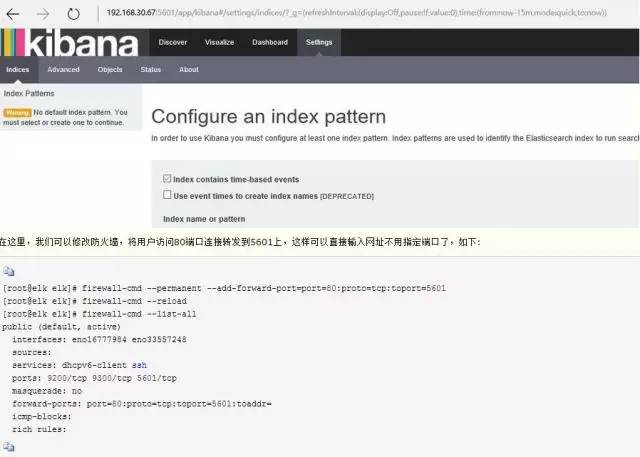
public (default, active)
interfaces: eno16777984 eno33557248
sources:
services: dhcpv6-client ssh
ports: 9200/tcp 9300/tcp 5601/tcp
masquerade: no
forward-ports: port=80:proto=tcp:toport=5601:toaddr=
icmp-blocks:
rich rules:
[root@elk tls]# openssl req -subj '/CN=elk.test.com/' -x509 -days 3650 -batch -nodes -newkey rsa:2048 -keyout private/logstash-forwarder.key -out
certs/logstash-forwarder.crt
Generating a 2048 bit RSA private key
...................................................................+++......................................................+++writing new private key to 'private/logstash-forwarder.key'-----
[root@elk elk]# /sbin/chkconfig logstash on
[root@elk conf.d]# netstat -ntlp
Active Internet connections (only servers)
Proto Recv-Q Send-Q Local Address Foreign Address State PID/Program name
tcp 0 0 0.0.0.0:22 0.0.0.0:* LISTEN 909/sshd
tcp 0 0 127.0.0.1:25 0.0.0.0:* LISTEN 1595/master
tcp 0 0 0.0.0.0:5601 0.0.0.0:* LISTEN 11260/node
tcp 0 0 0.0.0.0:514 0.0.0.0:* LISTEN 618/rsyslogd
tcp6 0 0 :::5000 :::* LISTEN 12819/java
tcp6 0 0 :::3306 :::* LISTEN 1270/mysqld
tcp6 0 0 127.0.0.1:9200 :::* LISTEN 10430/java
tcp6 0 0 ::1:9200 :::* LISTEN 10430/java
tcp6 0 0 127.0.0.1:9300 :::* LISTEN 10430/java
tcp6 0 0 ::1:9300 :::* LISTEN 10430/java
tcp6 0 0 :::22 :::* LISTEN 909/sshd
tcp6 0 0 ::1:25 :::* LISTEN 1595/master
tcp6 0 0 :::514 :::* LISTEN 618/rsyslogd
success
[root@elk ~]# firewall-cmd --reload
success
[root@elk ~]# firewall-cmd --list-all
public (default, active)
interfaces: eno16777984 eno33557248
sources:
services: dhcpv6-client ssh
ports: 9200/tcp 9300/tcp 5000/tcp 5601/tcp
masquerade: no
forward-ports: port=80:proto=tcp:toport=5601:toaddr=
icmp-blocks:
rich rules:
.
├── es-01│ ├── elasticsearch.yml
│ └── logging.yml
└── scripts
----http:
port: 9200network:
host: elk.test.com
node:
name: elk.test.com
path:
data: /etc/elasticsearch/data/es-01
[root@elk elk]# scp filebeat-1.2.3-x86_64.rpm root@nginx.test.com:/root/elk
[root@elk elk]# scp /etc/pki/tls/certs/logstash-forwarder.crt rsyslog.test.com:/root/elk
[root@elk elk]# scp /etc/pki/tls/certs/logstash-forwarder.crt nginx.test.com:/root/elk
#拷贝证书到本机指定目录中
[root@rsyslog elk]# cp logstash-forwarder.crt /etc/pki/tls/certs/.
[root@rsyslog elk]# cd /etc/filebeat/[root@rsyslog filebeat]# tree
.
├── conf.d
│ ├── authlogs.yml
│ └── syslogs.yml
├── filebeat.template.json
└── filebeat.yml1 directory, 4 files
Starting filebeat: [ OK ]
[root@rsyslog filebeat]# chkconfig filebeat on
[root@rsyslog filebeat]# netstat -altp
Active Internet connections (servers and established)
Proto Recv-Q Send-Q Local Address Foreign Address State PID/Program name
tcp 0 0 localhost:25151 *:* LISTEN 6230/python2
tcp 0 0 *:ssh *:* LISTEN 5509/sshd
tcp 0 0 localhost:ipp *:* LISTEN 1053/cupsd
tcp 0 0 localhost:smtp *:* LISTEN 1188/master
tcp 0 0 rsyslog.test.com:51155 elk.test.com:commplex-main ESTABLISHED 7443/filebeat
tcp 0 52 rsyslog.test.com:ssh 192.168.30.65:10580 ESTABLISHED 7164/sshd
tcp 0 0 *:ssh *:* LISTEN 5509/sshd
tcp 0 0 localhost:ipp *:* LISTEN 1053/cupsd
tcp 0 0 localhost:smtp *:* LISTEN 1188/master
[root@nginx elk]# cp logstash-forwarder.crt /etc/pki/tls/certs/.
[root@nginx elk]# cd /etc/filebeat/[root@nginx filebeat]# tree
.
├── conf.d
│ ├── nginx.yml
│ └── syslogs.yml
├── filebeat.template.json
└── filebeat.yml1 directory, 4 files
Starting filebeat: [ OK ]
[root@nginx filebeat]# chkconfig filebeat on
[root@nginx filebeat]# netstat -aulpt
Active Internet connections (servers and established)
Proto Recv-Q Send-Q Local Address Foreign Address State PID/Program name
tcp 0 0 *:ssh *:* LISTEN 1076/sshd
tcp 0 0 localhost:smtp *:* LISTEN 1155/master
tcp 0 0 *:http *:* LISTEN 1446/nginx
tcp 0 52 nginx.test.com:ssh 192.168.30.65:11690 ESTABLISHED 1313/sshd
tcp 0 0 nginx.test.com:49500 elk.test.com:commplex-main ESTABLISHED 1515/filebeat
tcp 0 0 nginx.test.com:ssh 192.168.30.65:6215 ESTABLISHED 1196/sshd
tcp 0 0 nginx.test.com:ssh 192.168.30.65:6216 ESTABLISHED 1200/sshd
tcp 0 0 *:ssh *:* LISTEN 1076/sshd


 加载中
加载中
微信扫一扫
关注该公众号
CentOS 7下安装Logstash ELK Stack 日志管理系统(下)的更多相关文章
- CentOS 7下安装Logstash ELK Stack 日志管理系统(上)
介绍 The Elastic Stack - 它不是一个软件,而是Elasticsearch,Logstash,Kibana 开源软件的集合,对外是作为一个日志管理系统的开源方案.它可以从任何来源,任 ...
- Centos7 之安装Logstash ELK stack 日志管理系统
一.介绍 The Elastic Stack - 它不是一个软件,而是Elasticsearch,Logstash,Kibana 开源软件的集合,对外是作为一个日志管理系统的开源方案.它可以从任何来源 ...
- 170228、Linux操作系统安装ELK stack日志管理系统--(1)Logstash和Filebeat的安装与使用
安装测试环境:Ubuntu 16.04.2 LTS 前言 (1)ELK是Elasticsearch,Logstash,Kibana 开源软件的集合,对外是作为一个日志管理系统的开源方案.它可以从任何来 ...
- 离线部署ELK+kafka日志管理系统【转】
转自 离线部署ELK+kafka日志管理系统 - xiaoxiaozhou - 51CTO技术博客http://xiaoxiaozhou.blog.51cto.com/4681537/1854684 ...
- anaconda环境中---py2.7下安装tf1.0 + py3.5下安装tf1.5
anaconda环境中---py2.7下安装tf1.0 + py3.5下安装tf1.5 @wp20181030 环境:ubuntu18.04, anaconda2, ubuntu系统下事先安装了pyt ...
- centos7下安装docker(18docker日志---docker logs)
在微服务架构中,由于容器的数量众多以及快速变化的特性使得记录日志和监控变得越来越重要,考虑到容器的短暂和不固定周期,当我们需要排查问题的时候容器可能不在了.因此,一套集中式的日志管理系统是生产环境中不 ...
- 微服务下,使用ELK做日志收集及分析
一.使用背景 目前项目中,采用的是微服务框架,对于日志,采用的是logback的配置,每个微服务的日志,都是通过File的方式存储在部署的机器上,但是由于日志比较分散,想要检查各个微服务是否有报错信息 ...
- ELK Stack 日志平台性能优化
转载自: https://mp.weixin.qq.com/s?__biz=MzAwNTM5Njk3Mw==&mid=2247487789&idx=1&sn=def0d8c2e ...
- CentOS 6.5安装在VMWare中Bridge模式下网卡eth0不能自动激活的问题
VMWare 12.5.2 CentOS 6.5 basic VMWare网卡配置选择Bridge方式 问题: 默认情况下ifconfig命令只能看到网络设备lo,看不到eth0,也没有分配合理的IP ...
随机推荐
- SQL分组聚合查询练习(SQL Server和Oracle相似)20190514
先建表 CREATE TABLE [dbo].[orderdt_jimmy]( ,) NOT NULL, [order_nid] [int] NOT NULL, ) NOT NULL, [qty] [ ...
- 暑假集训 || LCA && RMQ
LCA定义为对于一颗树 树上两个点的最近公共祖先 一.Tarjan求LCA(离线方法 https://blog.csdn.net/lw277232240/article/details/7701751 ...
- Microsoft Windows Server
Microsoft Windows Server Microsoft Windows Microsoft Windows 是微软推出的个人版操作系统: Microsoft Windows Server ...
- django 127.0.0.1 将您重定向的次数过多
"GET /?next=/%3Fnext%3D/%253Fnext%253D/ HTTP/1.1" 302 0 solution reference from django.con ...
- 定位 absolute和relative比较
absolute:脱离原来位置定位.是相对于最近的有定位的父级进行定位;如果没有有定位的父级元素,就相对文档进行定位 relative:保留原来位置进行定位,相对于自己原来的位置进行定位 下面举两个例 ...
- Manjaro/Arch linux 安装输入法
输入命令: sudo pacman -Syu fcitx fcitx-googlepinyin fcitx-im fcitx-configtool 编辑 ~/.xprofile:# xfcitxexp ...
- 2019天梯赛练习题(L2专项练习)
7-2 列出连通集 (25 分) 给定一个有N个顶点和E条边的无向图,请用DFS和BFS分别列出其所有的连通集.假设顶点从0到N−1编号.进行搜索时,假设我们总是从编号最小的顶点出发,按编号递增的顺序 ...
- [CF] 948A Protect Sheep
A. Protect Sheep time limit per test1 second memory limit per test256 megabytes inputstandard input ...
- html/css:简单网页
html: <!DOCTYPE html> <html> <head> <meta http-equiv=“content-type” content=“te ...
- php函数之数组
关联数组 isset bool isset( mixed $val [, mix $...]) 变量是否已设置并且非null.多个参数从左到右计算. 判断null $a=null;var_dump(i ...