
elementUI 学习入门之 Button 按钮
基础按钮用法
按钮分为:默认按钮、朴素按钮(plain)、圆角按钮(round)、圆形按钮(circle)。eg:
<el-button plain>朴素按钮</el-button>
通过 type 属性指定 primary、success、info、warning、danger、text 其中的值设置按钮样式,其中若设置值为 text ,则为文字按钮,没有边框和背景颜色
 <el-row>

   <el-button>默认按钮</el-button>

   <el-button type="primary">主要按钮</el-button>

   <el-button type="success">成功按钮</el-button>

   <el-button type="info">信息按钮</el-button>

   <el-button type="warning">警告按钮</el-button>

   <el-button type="danger">危险按钮</el-button>

 </el-row>

 <el-row>

   <el-button plain>朴素按钮</el-button>

   <el-button type="primary" plain>主要按钮</el-button>

   <el-button type="success" plain>成功按钮</el-button>

   <el-button type="info" plain>信息按钮</el-button>

   <el-button type="warning" plain>警告按钮</el-button>

   <el-button type="danger" plain>危险按钮</el-button>

 </el-row>

 <el-row>

   <el-button round>圆角按钮</el-button>

   <el-button type="primary" round>主要按钮</el-button>

   <el-button type="success" round>成功按钮</el-button>

   <el-button type="info" round>信息按钮</el-button>

   <el-button type="warning" round>警告按钮</el-button>

   <el-button type="danger" round>危险按钮</el-button>

 </el-row>

 <el-row>

   <el-button icon="el-icon-search" circle></el-button>

   <el-button type="primary" icon="el-icon-edit" circle></el-button>

   <el-button type="success" icon="el-icon-check" circle></el-button>

   <el-button type="info" icon="el-icon-message" circle></el-button>

   <el-button type="warning" icon="el-icon-star-off" circle></el-button>

   <el-button type="danger" icon="el-icon-delete" circle></el-button>

 </el-row>
按钮样式
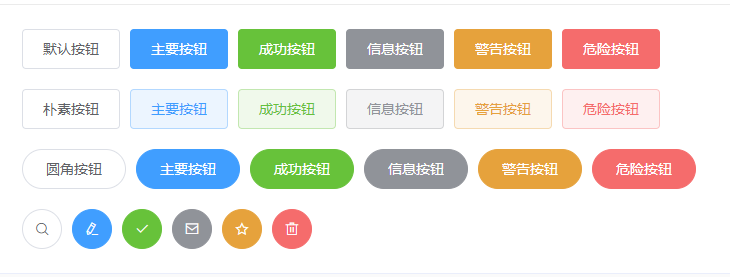
添加 disabled 属性设置按钮禁用;设置 loading 属性值为 true ,在按钮上显示加载状态
图标按钮
设置 icon 属性值即可。eg:
<el-button type="primary" icon="el-icon-search">搜索</el-button>
按钮组
使用 <el-button-group> 标签嵌套标签组。eg:
 <el-button-group>

   <el-button type="primary" icon="el-icon-arrow-left">上一页</el-button>

   <el-button type="primary">下一页<i class="el-icon-arrow-right el-icon--right"></i></el-button>

 </el-button-group>

 <el-button-group>

   <el-button type="primary" icon="el-icon-edit"></el-button>

   <el-button type="primary" icon="el-icon-share"></el-button>

   <el-button type="primary" icon="el-icon-delete"></el-button>

 </el-button-group>
标签组

Button 组件提供了除默认按钮大小以外的 medium、small、mini 三种大小,通过设置 size 属性来配置
elementUI 学习入门之 Button 按钮的更多相关文章
- 【Flutter学习】之button按钮
一,概述 由于Flutter是跨平台的,所以有适用于Android和iOS的两种风格的组件.一套是Google极力推崇的Material,一套是iOS的Cupertino风格的组件.无论哪种风格,都是 ...
- elementUI 学习入门之 inputNumber 计数器
InputNumber 计数器 基础用法 <el-input-number v-model="num2"></el-input-number> v-mode ...
- elementUI 学习入门之 input 输入框
基础用法 <el-input v-model="input1" palcehoder="请输入"></el-input> var Mai ...
- elementUI 学习入门之 checkbox 复选框
CheckBox 复选框 与单选框基本类似.如:按钮样式.带边框.复选框按钮大小. eg: <template> <el-checkbox-group v-model="s ...
- elementUI 学习入门之 Select 选择器
Select 选择器 基础用法 <el-select v-model="val1" placeholder="请输入"> <el-option ...
- elementUI 学习入门之 radio 单选框
Radio 单选框 基础用法 选项默认可见,选项不宜过多,选项过多建议使用 select 选择器 使用 Radio 组件,需要设置 v-model 绑定变量,选中意味着变量的值为相应 Radio l ...
- elementUI 学习入门之 container 布局容器
Container 布局容器 用于布局的容器组件,方便快速搭建页面基本结构 <el-container> : 外层容器.当子元素包含 <el-header> 或 <el- ...
- elementUI 学习入门之 layout 布局
layout 布局 通过基础的 24 分栏,可进行快速布局 基础布局 使用单一分栏创建基础的栅格布局, 通过 span 属性指定每栏的大小 <el-col :span="8" ...
- 无废话ExtJs 入门教程六[按钮:Button]
无废话ExtJs 入门教程六[按钮:Button] extjs技术交流,欢迎加群(201926085) 继上一节内容,我们在表单里加了个两个按钮“提交”与重置.如下所示代码区的第68行位置, butt ...
随机推荐
- python shell
os.system(cmd) 命令执行结果 0或者1 output = os.popen(cmd) print output.read() 通过 os.popen() 返回的是 file read 的 ...
- 题解 P3153 【[CQOI2009]跳舞】
P3153 [CQOI2009]跳舞 题目描述 一次舞会有n个男孩和n个女孩.每首曲子开始时,所有男孩和女孩恰好配成n对跳交谊舞.每个男孩都不会和同一个女孩跳两首(或更多)舞曲.有一些男孩女孩相互喜欢 ...
- JS中的匿名函数自执行、函数声明与函数表达式
先看一段jQuery源码中匿名函数自执行的例子: (function( window, undefined ) { // jquery code })(window); 另外一种常见的写法: +fun ...
- AngularJs编辑器
问题:在使用过程中遇到的问题就是:angularJS绑定不上值.后来找到一种可以用的方式. html页 <div class="all"> <script typ ...
- C11线程管理:线程创建
1.线程的创建 C11创建线程非常简单,只需要提供线程函数就行,标准库提供线程库,并可以指定线程函数的参数. #include <iostream> #include <thread ...
- 修复 Plugin execution not covered by lifecycle configuration: org.codehaus.mojo:build-helper-maven-plugin:1.8:add-source (execution: add-source, phase: generate-sources)
在maven项目中使用add-source时,pom.xml报如下错误: Plugin execution not covered by lifecycle configuration: org.co ...
- 查询PHP版本
查询php版本: phpinfo();
- 【洛谷 P3648】 [APIO2014]序列分割 (斜率优化)
题目链接 假设有\(3\)段\(a,b,c\) 先切\(ab\)和先切\(bc\)的价值分别为 \(a(b+c)+bc=ab+bc+ac\) \((a+b)c+ab=ab+bc+ac\) 归纳一下可以 ...
- 2017ACM暑期多校联合训练 - Team 7 1009 HDU 6128 Inverse of sum (数学计算)
题目链接 Problem Description There are n nonnegative integers a1-n which are less than p. HazelFan wants ...
- zedboard学习记录.2.PS+PL 流水灯与uart
1.建立一个工程. 硬件设计 2.IP integrator -> create block desgin;Run Block Automation. 3.add IP -> AXI GP ...