
springMVC多视图的支持
1、在springmvc.xml中加上
 <!-- 多视图的支持 -->

         <bean class="org.springframework.web.servlet.view.ContentNegotiatingViewResolver">

             <property name="contentNegotiationManager">

                 <bean class="org.springframework.web.accept.ContentNegotiationManagerFactoryBean"/>

             </property>

             <property name="mediaTypes">

                 <map>

                     <entry key="json" value="application/json"/>

                     <entry key="xml" value="application/xml"/>

                 </map>

             </property>

             <property name="defaultViews">

                 <list>

                     <bean class="org.springframework.web.servlet.view.json.MappingJacksonJsonView"/>

                     <bean class="org.springframework.web.servlet.view.xml.MarshallingView">

                         <constructor-arg>

                             <bean class="org.springframework.oxm.jaxb.Jaxb2Marshaller">

                                 <property name="classesToBeBound">

                                     <list>

                                         <value>com.xiaostudy.domain.User</value>

                                     </list>

                                 </property>

                             </bean>

                         </constructor-arg>

                     </bean>

                 </list>

             </property>

         </bean>
2、在支持多视图的类中加上注释@XmlRootElement
 package com.xiaostudy.domain;

 import javax.xml.bind.annotation.XmlRootElement;

 @XmlRootElement

 public class User {

     private int id;

     private String username;

     private String password;

     private int age;

     public int getId() {

         return id;

     }

     public void setId(int id) {

         this.id = id;

     }

     public String getUsername() {

         return username;

     }

     public void setUsername(String username) {

         this.username = username;

     }

     public String getPassword() {

         return password;

     }

     public void setPassword(String password) {

         this.password = password;

     }

     public int getAge() {

         return age;

     }

     public void setAge(int age) {

         this.age = age;

     }

     @Override

     public String toString() {

         return "User [id=" + id + ", username=" + username + ", password=" + password + ", age=" + age + "]";

     }

 }
3、使用
 package com.xiaostudy.controller;

 import org.springframework.stereotype.Controller;

 import org.springframework.web.bind.annotation.RequestMapping;

 import com.xiaostudy.domain.User;

 @Controller//<bean class="com.xiaostudy.controller.MyController"/>

 @RequestMapping(value="/myController")//访问该类的方法时,前面多这样一个路径

 public class MyController {

     @RequestMapping("multiView")

     public User multiView() {

         User user = new User();

         user.setId(2018);

         user.setUsername("xiaostudy");

         user.setPassword("123456");

         user.setAge(23);

         return user;

     }

 }
4、访问
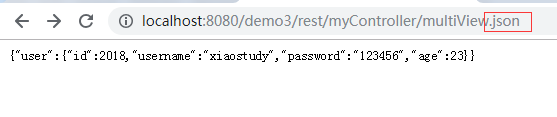
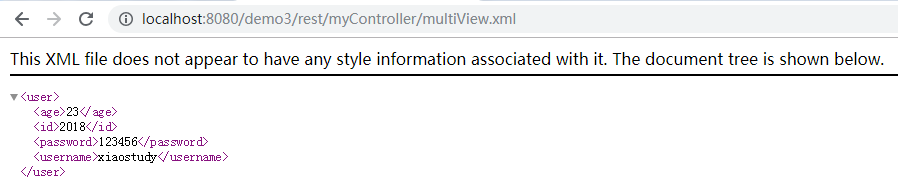
springMVC多视图的支持的更多相关文章
- SpringMVC 多视图解析器配置以及问题
在SpringMVC模式当中可以通过如下配置来支持多视图解析 <!-- jsp jstl --> <bean id="JSPViewResolver" class ...
- springmvc上传图片并显示--支持多图片上传
实现上传图片功能在Springmvc中很好实现.现在我将会展现完整例子. 开始需要在pom.xml加入几个jar,分别是: <dependency> <groupId>comm ...
- Springmvc多视图
Springmvc多视图 多视图是一个方法可以返回json/xml等格式的数据 第一步:导入xml格式支持的jar包 spring-oxm-3.2.0.RC2.jar 第二步:配置支持多视图 < ...
- SpringMVC重定向视图RedirectView小分析
目录 前言 RedirectView介绍 实例讲解 总结 前言 SpringMVC是目前主流的Web MVC框架之一. 如果有同学对它不熟悉,那么请参考它的入门blog:http://www.cnbl ...
- SpringMvc:视图和视图解析器
请求处理方法执行完成后,最终返回一个ModelAndView对象,对于返回String,View或ModelMap等类型的处理方法,SpringMvc也会在内部将它们装配成一个ModelAndView ...
- SpringMVC自定义视图Excel视图和PDF视图
SpringMVC自定义视图 Excel视图和PDF视图 SpringMVC杂记(十一) 使用Excel视图 Spring MVC 视图解析器(ViewResolver ) java实现导出excel ...
- SpringMVC——说说视图解析器
学习SpringMVC——说说视图解析器 各位前排的,后排的,都不要走,咱趁热打铁,就这一股劲我们今天来说说spring mvc的视图解析器(不要抢,都有位子~~~) 相信大家在昨天那篇如何获取请 ...
- SpringMVC源码分析6:SpringMVC的视图解析原理
title: SpringMVC源码分析6:SpringMVC的视图解析原理 date: 2018-06-07 11:03:19 tags: - SpringMVC categories: - 后端 ...
- SpringMVC核心——视图渲染(包含视图解析)问题
一.本来想说的是返回值处理问题,但在 SpringMVC 中,返回值处理问题的核心就是视图渲染.所以这里标题叫视图渲染问题. 本来想在上一篇文章中对视图解析进行说明的,但是通过源码发现,它应该算到视图 ...
随机推荐
- Cookies and Caching Client Identification
w HTTP The Definitive Guide 11.6.9 Cookies and Caching You have to be careful when caching documents ...
- python中lambda使用
一.lambda函数 1.lambda函数基础: lambda函数也叫匿名函数,即,函数没有具体的名称,而用def创建的方法是有名称的.如下: """命名的foo函数&q ...
- var 声明变量的变量提升问题(let/const)
在ES6之前,JavaScript没有块级作用域(一对花括号{}即为一个块级作用域),只有全局作用域和函数作用域.变量提升即将变量声明提升到它所在作用域的最开始的部分.既全局变量. <scrip ...
- js如何打印对象
js调试中经常会碰到输出的内容是对象而无法打印的时候,光靠alert只能打印出object标示,却不能打印出来里面的内容,甚是不方便,于是各方面整理总结了如下一个函数,能够将数组或者对象这类的结果一一 ...
- 理解tomcat之搭建简易http服务器
做过java web的同学都对tomcat非常熟悉.我们在使用tomcat带来的便利的同时,是否想过tomcat是如何工作的呢?tomcat本质是一个http服务器,本篇文章将搭建一个简单的http服 ...
- 理解ASM的Extent
理解ASM的Extent 分类: Oracle 2017-04-14 10:19:44 ASM中分配空间的单位是AU,Extent包含1个或多个AU.在11g之前,1个Extent对应1个AU.而 ...
- [golang note] 匿名组合
匿名组合 golang也提供了继承机制,但采用组合的文法,因此称为匿名组合.与其他语言不同, golang很清晰地展示出类的内存布局是怎样的. • 非指针方式组合 ▶ 基本语法 // 基类 type ...
- Look for this newest GS Jordan 6 Floral
Named 'Bulls Over Broadway' and 'Gym Red', the most recent variation from the New Jordans 2015 is fo ...
- Codeforces Round #425 (Div. 2) B - Petya and Exam
地址:http://codeforces.com/contest/832/problem/B 题目: B. Petya and Exam time limit per test 2 seconds m ...
- 关于ldap的学习
主要从以下网站学习了相关基础知识概念,安装与基本配置. http://www.aikaiyuan.com/8269.htmlhttps://segmentfault.com/a/11900000026 ...