
Cookies and Caching Client Identification
w
HTTP The Definitive Guide
11.6.9 Cookies and Caching
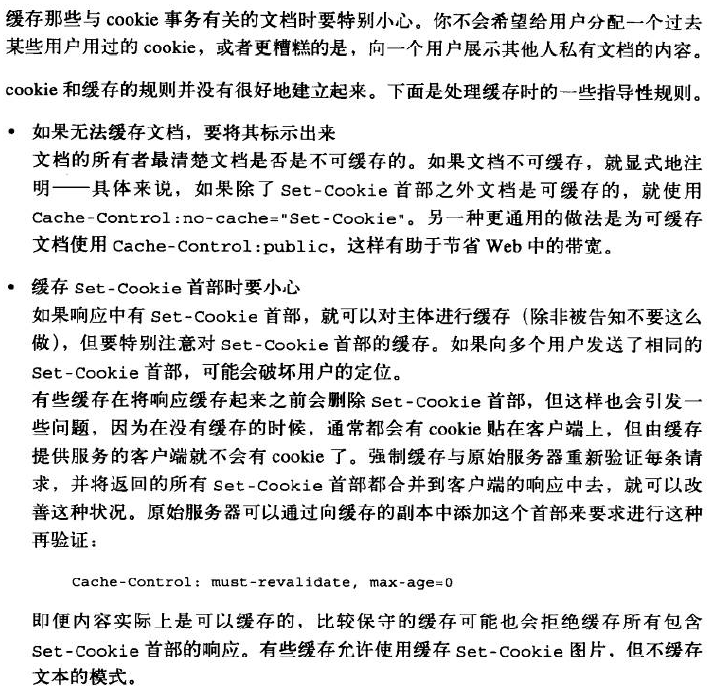
You have to be careful when caching documents that are involved with cookie transactions. You don't
want to assign one user some past user's cookie or, worse, show one user the contents of someone
else's personalized document.
The rules for cookies and caching are not well established. Here are some guiding principles for
dealing with caches:
Mark documents uncacheable if they are
The document owner knows best if a document is uncacheable. Explicitly mark documents
uncacheable if they are—specifically, use Cache-Control: no-cache="Set-Cookie" if the
document is cacheable except for the Set-Cookie header. The other, more general practice of
using Cache-Control: public for documents that are cacheable promotes bandwidth savings in
the Web. Be cautious about caching Set-Cookie headers
If a response has a Set-Cookie header, you can cache the body (unless told otherwise), but
you should be extra cautious about caching the Set-Cookie header. If you send the same Set-
Cookie header to multiple users, you may be defeating user targeting.
Some caches delete the Set-Cookie header before storing a response in the cache, but that also
can cause problems, because clients served from the cache will no longer get cookies slapped
on them that they normally would without the cache. This situation can be improved by
forcing the cache to revalidate every request with the origin server and merging any returned
Set-Cookie headers with the client response. The origin server can dictate such revalidations
by adding this header to the cached copy:
Cache-Control: must-revalidate, max-age=0
More conservative caches may refuse to cache any response that has a Set-Cookie header,
even though the content may actually be cacheable. Some caches allow modes when Set-
Cookied images are cached, but not text.
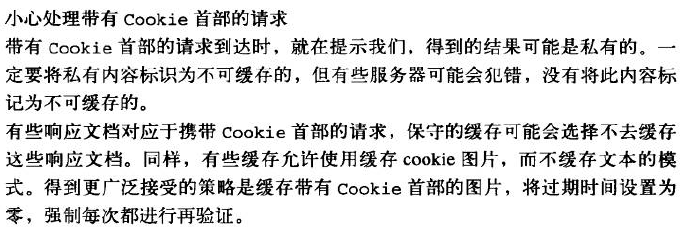
Be cautious about requests with Cookie headers
When a request arrives with a Cookie header, it provides a hint that the resulting content
might be personalized. Personalized content must be flagged uncacheable, but some servers
may erroneously not mark this content as uncacheable.
Conservative caches may choose not to cache any document that comes in response to a
request with a Cookie header. And again, some caches allow modes when Cookied images
are cached, but not text. The more accepted policy is to cache images with Cookie headers,
with the expiration time set to zero, thus forcing a revalidate every time.
Cookies and Caching Client Identification的更多相关文章
- Cookies and Session Tracking Client Identification cookie与会话跟踪 客户端识别
w HTTP The Definitive Guide Cookies can be used to track users as they make multiple transactions to ...
- Technical analysis of client identification mechanisms
http://www.chromium.org/Home/chromium-security/client-identification-mechanisms Chromium > Chro ...
- Cookies Client Identification
HTTP The Definitive Guide Cookies are the best current way to identify users and allow persistent se ...
- Cookies, Security, and Privacy Client Identification
w HTTP The Definitive Guide Cookies themselves are not believed to be a tremendous security risk, be ...
- Fat URLs Client Identification
w在每个URL后面都附加一个用户特有的标识码. HTTP The Definitive Guide Some web sites keep track of user identity by gene ...
- The Personal Touch Client Identification 个性化接触 客户识别
w服务器要知道和谁在交谈. HTTP The Definitive Guide Web servers may talk to thousands of different clients simul ...
- combined with the Referer header, to potentially build an exhaustive data set of user profiles and browsing habits Client Identification
w https://www.zhihu.com/question/35307626 w 0-客户端(附加用户信息)首次请求服务端--->服务端生成session(有唯一性).session_id ...
- Client IP Address Client Identification
HTTP The Definitive Guide Early web pioneers tried using the IP address of the client as a form of i ...
- HTTP Headers Client Identification
用户信息通过HTTP头部承载:不能实现用户唯一性标识. w HTTP The Definitive Guide Table 11-1 shows the seven HTTP request head ...
随机推荐
- Vim-复制选中内容至系统剪贴板,光标移动到指定行的行首和行尾
1.全选并复制到系统剪贴板 ggVG或ggvG 然后 "+y gg 让光标移到首行,在vim才有效,vi中无效 V 是进入Visual(可视)模式 G 光标移到最后一行 "+y 复 ...
- SAP安装前添加虚拟网卡步骤
添加虚拟网卡: 打开控制面版中的设备管理器 点击菜单栏上的[操作(A)] 选择[添加过时硬盘件] 选择[ 安装我手动从列表选择的硬件(高级)(M) ],点击[下一步] 选择[网络适配器],点击[下一步 ...
- A+P+M+W
安装之前先做个目录的安排, D盘根目录建立”Dev”文件夹,在文件夹下建立: Php Apache Mysql 三个文件夹 所需软件: 0. 安装Apache的前必须安装VC11 vcredis ...
- Eclipse “cannot be resolved to a type” error
引言: eclipse新导入的项目经常可以看到"XX cannot be resolved to a type"的报错信息.本文将做以简单总结. 正文: (1)jd ...
- 跟着百度学PHP[12]-文件处理 文件 目录
00x1 文件的属性 文件属性 <?php //-------------------------定义大小转换函数--------------- function changesize_dw($ ...
- oozie客户端常用操作命令
1.提交作业,作业进入PREP状态 oozie job -oozie http://localhost:11000/oozie -config job.properties -submit job: ...
- 001servlet的基本知识
servlet的知识: l 1. servlet概念及相关接口简介 l 2. servet 执行过程 l 3. servlet路径映射 l 4. 缺省servlet --应用 ...
- MySQL Error: PROCEDURE xmdk.query_all_plan can't return a result set in the given context
C++调用存储过程失败!出现如下错误:MySQL Error: PROCEDURE xmdk.query_all_plan can't return a result set in the given ...
- C++引用具体解释
引用是C++中新出现的.有别于C语言的语法元素之中的一个. 关于引用的说明,网络上也有不少.可是总感觉云遮雾绕,让人印象不深刻. 今天我就来深入解释一下引用.并就一些常见的观点进行说明,最后附带代码演 ...
- 经验总结20--C#模拟WEB请求
非常多语言能够使用代码进行WEB请求,获取到须要的数据. 方便调用别人的接口,自己进行处理. HttpWebRequest request = WebRequest.Create(url) as Ht ...