
SecureCRT也能和Xshell一样批量导入主机
在Xshell可以像这样一个文件批量导入主机:
https://blog.netsarang.com/91/importing-csv-formatted-host-information-to-xshell/
在CRT上也可以,格式和Xshell的一样,但前提是需要运行一个自定义脚本:
脚本:https://forums.vandyke.com/showthread.php?p=37089#post37089
操作:https://www.vandyke.com/support/tips/importsessions.html
视频操作:https://youtu.be/f7nMFYhGoiI
简单操作步骤:
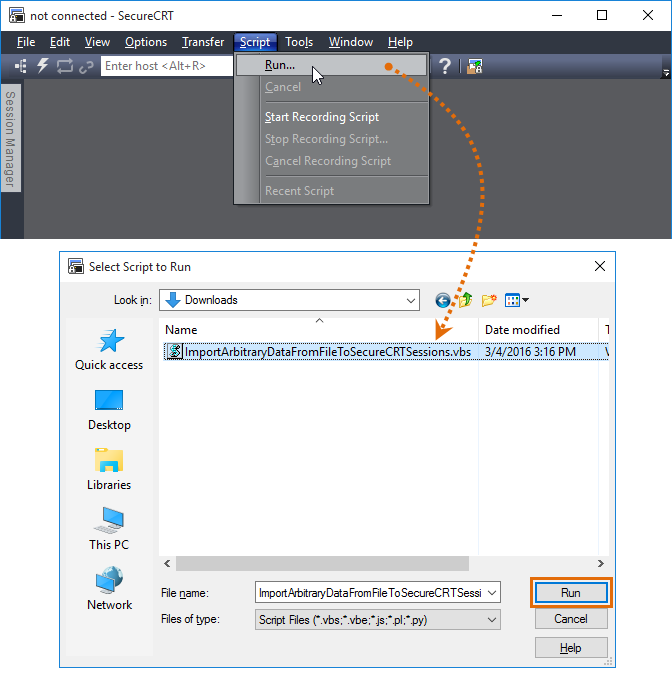
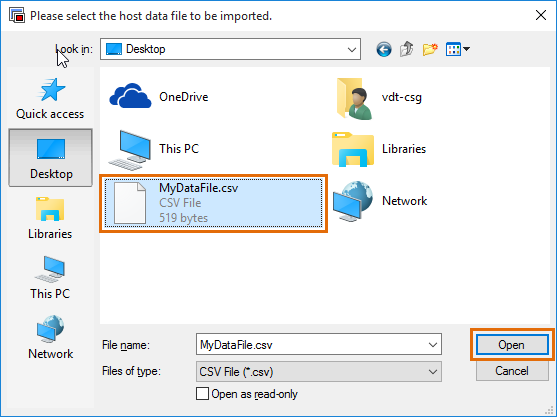
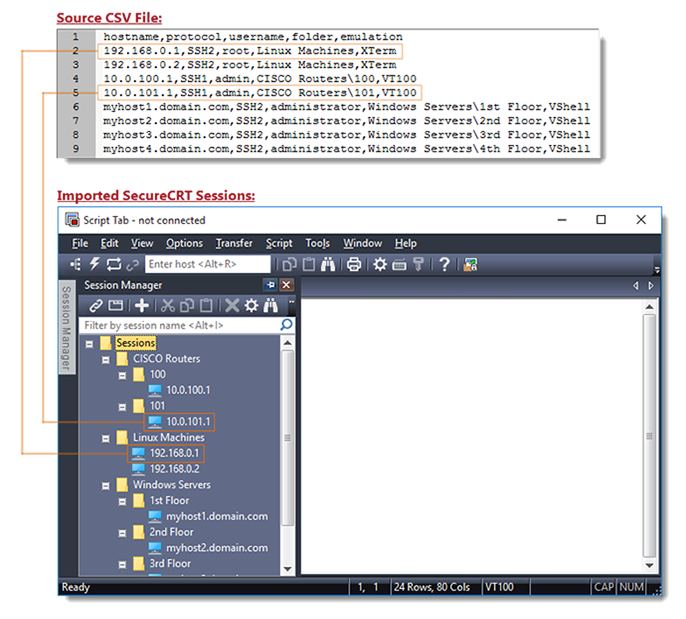
脚本文件内容:
ImportArbitraryDataFromFileToSecureCRTSessions.vbs
# $language = "VBScript"
# $interface = "1.0" ' ImportArbitraryDataFromFileToSecureCRTSessions.txt
' (Designed for use with SecureCRT 7.2 and later)
'
' Last Modified: 23 Feb, 2018
' - Warn user if the configuration folder appears to be read-only.
' - Fall back to secondary locations in which to attempt to write
' the results log file in case the user's Documents, Desktop, or
' configuration folder are all read-only or otherwise un-write-able
' for the user.
'
' Last Modified: 21 Dec, 2017
' - Allow multiple 'description' fields on the same line. All will be
' compounded together with each one ending up on a separate line in
' the Session's Description session option.
' - Allow 'username' field to be defaulted in the header line
' - Allow 'folder' field to be defaulted in the header line
' - Duplicate sessions are now imported with unique time-stamped
' names (for each additional duplicate). Earlier versions of this
' script would overwrite the first duplicate with any subsequent
' duplicates that were found in the data file.
' - When displaying the browse dialog, filter now includes both
' CSV and TXT file types, to make it easier to find the data file
' (less clicking).
' - Allow for protocol field to be defaulted, if not present in the
' header line.
' - Fix error messages relating to invalid header lines so they no
' longer indicate Protocol is a required field. If it's not present
' the Default Session's protocol value will be used.
' - Allow header fields to be case-insensitive so that "Description"
' and "UserName" work just the same as "description" and "username"
'
' Last Modified: 09 Aug, 2017
' - Changed from using CInt to CLng in order to support port
' specifications larger than 32768 (max integer supported in VBScript)
'
' Last Modified: 20 Feb, 2017
' - Added progress info to status bar
' - When a line from the source file has bogus/incomplete data on it,
' the script no longer halts operation, but instead, continues the
' import process for all remaining legitimate lines, skipping any
' lines that don't have sufficient/accurate format.
' - Changed format of summary message shown at end to include header
' line so entries that were skipped can be easily copied into a new
' document to be imported.
' - Toggle the Session Manager automatically so that imported sessions
' are more immediately visible in the Session Manager.
'
' Last Modified: 20 Jan, 2015
' - Combined TAPI protocol handling (which is no longer
' supported for mass import) with Serial protocol
' import errors.
' - Enhanced example .csv file data to show subfolder specification.
'
' Last Modified: 21 Mar, 2012
' - Initial version for public forums
'
' DESCRIPTION
' This sample script is designed to create sessions from a text file (.csv
' format by default, but this can be edited to fit the format you have).
'
' To launch this script, map a button on the button bar to run this script:
' http://www.vandyke.com/support/tips/buttonbar.html
'
' The first line of your data file should contain a comma-separated (or whatever
' you define as the g_strDelimiter below) list of supported "fields" designated
' by the following keywords:
' -----------------------------------------------------------------------------
' session_name: The name that should be used for the session. If this field
' does not exist, the hostname field is used as the session_name.
' folder: Relative path for session as displayed in the Connect dialog.
' hostname: The hostname or IP for the remote server.
' protocol: The protocol (SSH2, SSH1, telnet, rlogin)
' port: The port on which remote server is listening
' username: The username for the account on the remote server
' emulation: The emulation (vt100, xterm, etc.)
' description: The comment/description. Multiple lines are separated with '\r'
' =============================================================================
'
'
' As mentioned above, the first line of the data file instructs this script as
' to the format of the fields in your data file and their meaning. It is not a
' requirement that all the options be used. For example, notice the first line
' of the following file only uses the "hostname", "username", and "protocol"
' fields. Note also that the "protocol" field can be defaulted so that if a
' protocol field is empty it will use the default value.
' -----------------------------------------------------------------------------
' hostname,username,folder,protocol=SSH2
' 192.168.0.1,root,_imported,SSH1
' 192.168.0.2,admin,_imported,SSH2
' 192.168.0.3,root,_imported\folderA,
' 192.168.0.4,root,,
' 192.168.0.5,admin,_imported\folderB,telnet
' ... and so on
' =============================================================================
'
'
' The g_strDefaultProtocol variable will only be defined within the
' ValidateFieldDesignations function if the protocol field has a default value
' (e.g., protocol=SSH2), as read in from the first line of the data file.
Dim g_strDefaultProtocol ' The g_strDefaultFolder variable will only be defined within the
' ValidateFieldDesignations function if the folder field has a default value
' (e.g., folder=Site34), as read in from the first line of the data file.
Dim g_strDefaultFolder ' The g_strDefaultUsername variable will only be defined within the
' ValidateFieldDesignations function if the username field has a default value
' (e.g., username=bensolo), as read in from the first line of the data file.
Dim g_strDefaultUsername ' If your data file uses spaces or a character other than comma as the
' delimiter, you would also need to edit the g_strDelimiter value a few lines
' below to indicate that fields are separated by spaces, rather than by commas.
' For example:
' g_strDelimiter = " " ' Using a ";" might be a good alternative for a file that includes the comma
' character as part of any legitimate session name or folder name, etc.
Dim g_strDelimiter
g_strDelimiter = "," ' comma
' g_strDelimiter = " " ' space
' g_strDelimiter = ";" ' semi-colon
' g_strDelimiter = chr(9) ' tab
' g_strDelimiter = "|||" ' a more unique example of a delimiter. ' The g_strSupportedFields indicates which of all the possible fields, are
' supported in this example script. If a field designation is found in a data
' file that is not listed in this variable, it will not be imported into the
' session configuration.
Dim g_strSupportedFields
g_strSupportedFields = _
"description,emulation,folder,hostname,port,protocol,session_name,username" ' If you wish to overwrite existing sessions, set the
' g_bOverwriteExistingSessions to True; for this example script, we're playing
' it safe and leaving any existing sessions in place :).
Dim g_bOverwriteExistingSessions
g_bOverwriteExistingSessions = False Dim g_fso, g_shell
Set g_fso = CreateObject("Scripting.FileSystemObject")
Set g_shell = CreateObject("WScript.Shell") Const ForReading =
Const ForWriting =
Const ForAppending = Dim g_strHostsFile, g_strExampleHostsFile, g_strMyDocs, g_strMyDesktop
g_strMyDocs = g_shell.SpecialFolders("MyDocuments")
g_strMyDesktop = g_shell.SpecialFolders("Desktop")
g_strHostsFile = g_strMyDocs & "\MyDataFile.csv"
g_strExampleHostsFile = _
vbtab & "hostname,protocol,username,folder,emulation" & vbcrlf & _
vbtab & "192.168.0.1,SSH2,root,Linux Machines,XTerm" & vbcrlf & _
vbtab & "192.168.0.2,SSH2,root,Linux Machines,XTerm" & vbcrlf & _
vbtab & "..." & vbcrlf & _
vbtab & "10.0.100.1,SSH1,admin,CISCO Routers,VT100" & vbcrlf & _
vbtab & "10.0.101.1,SSH1,admin,CISCO Routers,VT100" & vbcrlf & _
vbtab & "..." & vbcrlf & _
vbtab & "myhost.domain.com,SSH2,administrator,Windows Servers,VShell" & _
vbtab & "..." & vbcrlf
g_strExampleHostsFile = Replace(g_strExampleHostsFile, ",", g_strDelimiter) Dim g_strConfigFolder, strFieldDesignations, vFieldsArray, vSessionInfo g_strConfigFolder = GetConfigPath() Dim strSessionName, strHostName, strPort
Dim strUserName, strProtocol, strEmulation
Dim strPathForSessions, strLine, nFieldIndex
Dim strSessionFileName, strFolder, nDescriptionLineCount, strDescription Dim g_strLastError, g_strErrors, g_strSessionsCreated
Dim g_nSessionsCreated, g_nDataLines g_strDateTimeTag = GetDateTimeTag() g_strBogusLinesNotImported = "" Import '~~~~~~~~~~~~~~~~~~~~~~~~~~~~~~~~~~~~~~~~~~~~~~~~~~~~~~~~~~~~~~~~~~~~~~~~~~~~
Sub Import() g_strHostsFile = crt.Dialog.FileOpenDialog( _
"Please select the host data file to be imported.", _
"Open", _
g_strHostsFile, _
"CSV/Text Files (*.txt;*.csv)|*.txt;*.csv|All files (*.*)|*.*") If g_strHostsFile = "" Then
Exit Sub
End If ' Open our data file for reading
Dim objDataFile
Set objDataFile = g_fso.OpenTextFile(g_strHostsFile, ForReading, False) ' Now read the first line of the data file to determine the field
' designations
On Error Resume Next
strFieldDesignations = objDataFile.ReadLine()
nError = Err.Number
strErr = Err.Description
On Error Goto If nError <> Then
If nError = Then
crt.Dialog.MessageBox("Your data file is empty." & vbcrlf & _
"Fill it with import data and try again." & vbcrlf & vbcrlf & _
"ReadLine() Error code: " & nError & vbcrlf & _
"ReadLine() Error text: " & strErr)
Else
crt.Dialog.MessageBox("Unable to read the first line from your data file!" & _
vbcrlf & vbcrlf & _
"ReadLine() Error code: " & nError & vbcrlf & vbcrlf & _
"ReadLine() Error text: " & strErr)
End If
Exit Sub
End If ' Validate the data file
If Not ValidateFieldDesignations(strFieldDesignations) Then
objDataFile.Close
Exit Sub
End If ' Get a timer reading so that we can calculate how long it takes to import.
nStartTime = Timer ' Here we create an array of the items that will be used to create the new
' session, based on the fields separated by the delimiter specified in
' g_strDelimiter
vFieldsArray = Split(strFieldDesignations, g_strDelimiter) ' Loop through reading each line in the data file and creating a session
' based on the information contained on each line.
Do While Not objDataFile.AtEndOfStream
strLine = ""
strLine = objDataFile.ReadLine crt.Session.SetStatusText "Processing line #: " & _
NN(objDataFile.Line - , ) ' This sets v_File Data array elements to each section of strLine,
' separated by the delimiter
vSessionInfo = Split(strLine, g_strDelimiter)
If UBound(vSessionInfo) < UBound(vFieldsArray) Then
If Trim(strLine) <> "" Then
g_strErrors = g_strErrors & vbcrlf & _
"Insufficient data on line #" & _
NN(objDataFile.Line - , ) & ": " & strLine
Else
g_strErrors = g_strErrors & vbcrlf & _
"Insufficient data on line #" & _
NN(objDataFile.Line - , ) & ": [Empty Line]"
End If
ElseIf UBound(vSessionInfo) > UBound(vFieldsArray) Then
g_strErrors = g_strErrors & vbcrlf & _
"==> Number of data fields on line #" & _
NN(objDataFile.Line - , ) & _
"(" & UBound(vSessionInfo) & ") " & _
"does not match the number of fields in the header " & _
"(" & UBound(vFieldsArray) & ")." & vbcrlf & _
" This line will not be imported (Does the session name have a character that " & _
"matches the delimiter you're using? Also check for characters that Windows does not " & _
"allow to be used in filenames: /\:*?""<>|): " & vbcrlf & vbtab & strLine
g_strBogusLinesNotImported = g_strBogusLinesNotImported & _
vbcrlf & strLine
Else ' Variable used to determine if a session file should actually be
' created, or if there was an unrecoverable error (and the session
' should be skipped).
Dim bSaveSession
bSaveSession = True ' Now we will match the items from the new file array to the correct
' variable for the session's ini file
For nFieldIndex = To UBound(vSessionInfo) Select Case LCase(vFieldsArray(nFieldIndex))
Case "session_name"
strSessionName = vSessionInfo(nFieldIndex)
' Check folder name for any invalid characters
Dim re
Set re = New RegExp
re.Pattern = "[\\\|\/\:\*\?\""\<\>]"
If re.Test(strSessionName) Then
bSaveSession = False
If g_strErrors <> "" Then g_strErrors = _
vbcrlf & g_strErrors g_strErrors = _
"Error: " & _
"Invalid characters found in SessionName """ & _
strSessionName & """ specified on line #" & _
NN(objDataFile.Line - , ) & _
": " & strLine & g_strErrors g_strBogusLinesNotImported = g_strBogusLinesNotImported & _
vbcrlf & strLine
End If Case "port"
strPort = Trim(vSessionInfo(nFieldIndex))
If Not IsNumeric(strPort) Then
bSaveSession = False
If g_strErrors <> "" Then g_strErrors = _
vbcrlf & g_strErrors g_strErrors = _
"Error: Invalid port """ & strPort & _
""" specified on line #" & _
NN(objDataFile.Line - , ) & _
": " & strLine & g_strErrors g_strBogusLinesNotImported = g_strBogusLinesNotImported & _
vbcrlf & strLine
End If Case "protocol"
strProtocol = Trim(lcase(vSessionInfo(nFieldIndex))) Select Case strProtocol
Case "ssh2"
strProtocol = "SSH2"
Case "ssh1"
strProtocol = "SSH1"
Case "telnet"
strProtocol = "Telnet"
Case "serial", "tapi"
bSaveSession = False
g_strErrors = g_strErrors & vbcrlf & _
"Error: Unsupported protocol """ & _
vSessionInfo(nFieldIndex) & _
""" specified on line #" & _
NN(objDataFile.Line - , ) & _
": " & strLine
Case "rlogin"
strProtocol = "RLogin"
Case Else
If g_strDefaultProtocol <> "" Then
strProtocol = g_strDefaultProtocol
Else
bSaveSession = False
If g_strErrors <> "" Then g_strErrors = _
vbcrlf & g_strErrors g_strErrors = _
"Error: Invalid protocol """ & _
vSessionInfo(nFieldIndex) & _
""" specified on line #" & _
NN(objDataFile.Line - , ) & _
": " & strLine & g_strErrors g_strBogusLinesNotImported = g_strBogusLinesNotImported & _
vbcrlf & strLine
End If
End Select ' for protocols Case "hostname"
strHostName = Trim(vSessionInfo(nFieldIndex))
If strHostName = "" Then
bSaveSession = False
g_strErrors = g_strErrors & vbcrlf & _
"Warning: 'hostname' field on line #" & _
NN(objDataFile.Line - , ) & _
" is empty: " & strLine g_strBogusLinesNotImported = g_strBogusLinesNotImported & _
vbcrlf & strLine
End If Case "username"
strUserName = Trim(vSessionInfo(nFieldIndex)) Case "emulation"
strEmulation = LCase(Trim(vSessionInfo(nFieldIndex)))
Select Case strEmulation
Case "xterm"
strEmulation = "Xterm"
Case "vt100"
strEmulation = "VT100"
Case "vt102"
strEmulation = "VT102"
Case "vt220"
strEmulation = "VT220"
Case "ansi"
strEmulation = "ANSI"
Case "linux"
strEmulation = "Linux"
Case "scoansi"
strEmulation = "SCOANSI"
Case "vshell"
strEmulation = "VShell"
Case "wyse50"
strEmulation = "WYSE50"
Case "wyse60"
strEmulation = "WYSE60"
Case Else
bSaveSession = False
g_strErrors = g_strErrors & vbcrlf & _
"Warning: Invalid emulation """ & _
strEmulation & """ specified on line #" & _
NN(objDataFile.Line - , ) & _
": " & strLine g_strBogusLinesNotImported = g_strBogusLinesNotImported & _
vbcrlf & strLine
End Select Case "folder"
strFolder = Trim(vSessionInfo(nFieldIndex)) ' Check folder name for any invalid characters
' Note that a folder can have subfolder designations,
' so '/' is a valid character for the folder (path).
Set re = New RegExp
re.Pattern = "[\|\:\*\?\""\<\>]"
If re.Test(strFolder) Then
bSaveSession = False
If g_strErrors <> "" Then g_strErrors = _
vbcrlf & g_strErrors g_strErrors = _
"Error: Invalid characters in folder """ & _
strFolder & """ specified on line #" & _
NN(objDataFile.Line - , ) & _
": " & strLine & g_strErrors g_strBogusLinesNotImported = g_strBogusLinesNotImported & _
vbcrlf & strLine
End If Case "description"
strCurDescription = Trim(vSessionInfo(nFieldIndex))
If strDescription = "" Then
strDescription = strCurDescription
Else
strDescription = strDescription & "\r" & strCurDescription
End If Case Else
' If there is an entry that the script is not set to use
' in strFieldDesignations, stop the script and display a
' message
Dim strMsg1
strMsg1 = "Error: Unknown field designation: " & _
vFieldsArray(nFieldIndex) & vbcrlf & vbcrlf & _
" Supported fields are as follows: " & _
vbcrlf & vbcrlf & vbtab & g_strSupportedFields & _
vbcrlf & _
vbcrlf & " For a description of " & _
"supported fields, please see the comments in " & _
"the sample script file." If Trim(g_strErrors) <> "" Then
strMsg1 = strMsg1 & vbcrlf & vbcrlf & _
"Other errors found so far include: " & _
g_strErrors
End If MsgBox strMsg1, _
vbOkOnly, _
"Import Data To SecureCRT Sessions: Data File Error"
Exit Sub
End Select
Next If bSaveSession Then
' Use hostname if a session_name field wasn't present
If strSessionName = "" Then
strSessionName = strHostName
End If If strFolder = "" Then
strFolder = g_strDefaultFolder
End If ' Canonicalize the path to the session, as needed
strSessionPath = strSessionName
If strFolder <> "" Then
strSessionPath = strFolder & "/" & strSessionName
End If
' Strip any leading '/' characters from the session path
If Left(strSessionPath, ) = "/" Then
strSessionPath = Mid(strSessionPath, )
End If If SessionExists(strSessionPath) Then
If Not g_bOverwriteExistingSessions Then
' Append a unique tag to the session name, if it already exists
strSessionPath = strSessionPath & _
"(import_" & GetDateTimeTag & ")"
End If
End If ' Now: Create the session. ' Copy the default session settings into new session name and set the
' protocol. Setting protocol protocol is essential since some variables
' within a config are only available with certain protocols. For example,
' a telnet configuration will not be allowed to set any port forwarding
' settings since port forwarding settings are specific to SSH.
Set objConfig = crt.OpenSessionConfiguration("Default")
If strProtocol = "" Then
strProtocol = g_strDefaultProtocol
End If
objConfig.SetOption "Protocol Name", strProtocol ' We opened a default session & changed the protocol, now we
' save the config to the new session path:
objConfig.Save strSessionPath ' Now, let's open the new session configuration we've
' saved, and set up the various parameters that were specified
' in the file.
If Not SessionExists(strSessionPath) Then
crt.Dialog.MessageBox("Failed to create a new session '" & _
strSessionPath & "'." & vbcrlf & _
vbcrlf & _
"Does your configuration folder have " & _
"sufficient permissions to allow writing/creating " & _
"files?" & vbcrlf & vbcrlf & _
vbtab & _
"Options > Global Options > Configuration Paths" & _
vbcrlf & vbcrlf & _
"Fix permissions on your configuration folder and " & _
"then try running this script again.")
Exit Sub
End If
Set objConfig = crt.OpenSessionConfiguration(strSessionPath) objConfig.SetOption "Emulation", strEmulation If LCase(strProtocol) <> "serial" Then
If strHostName <> "" Then
objConfig.SetOption "Hostname", strHostName
End If
If strUsername = "" Then
strUsername = g_strDefaultUsername
End If
If strUserName <> "" Then
objConfig.SetOption "Username", strUserName
End If
End If If strDescription <> "" Then
objConfig.SetOption "Description", Split(strDescription, "\r")
End If If UCase(strProtocol) = "SSH2" Then
If strPort = "" Then strPort =
objConfig.SetOption "[SSH2] Port", CLng(strPort)
End If
If UCase(strProtocol) = "SSH1" Then
If strPort = "" Then strPort =
objConfig.SetOption "[SSH1] Port", CLng(strPort)
End If
If UCase(strProtocol) = "TELNET" Then
If strPort = "" Then strPort =
objConfig.SetOption "Port", CLng(strPort)
End If ' If you would like ANSI Color enabled for all imported sessions (regardless
' of value in Default session, remove comment from following line)
' objConfig.SetOption "ANSI Color", True ' Add other "SetOption" calls desired here...
' objConfig.SetOption "Auto Reconnect", True
' objConfig.SetOption "Color Scheme", "Traditional"
' objConfig.SetOption "Color Scheme Overrides Ansi Color", True
' objConfig.SetOption "Copy to clipboard as RTF and plain text", True
' objConfig.SetOption "Description", Array("This session was imported from a script on " & Now)
' objConfig.SetOption "Firewall Name", "YOUR CUSTOM FIREWALL NAME HERE"
' objConfig.SetOption "Line Send Delay", 15
' objConfig.SetOption "Log Filename V2", "${VDS_USER_DATA_PATH}\_ScrtLog(%S)_%Y%M%D_%h%m%s.%t.txt"
' objConfig.SetOption "Rows", 60
' objConfig.SetOption "Cols", 140
' objConfig.SetOption "Start Tftp Server", True
' objConfig.SetOption "Use Word Delimiter Chars", True
' objConfig.SetOption "Word Delimiter Chars", " <>()+=$%!#*"
' objConfig.SetOption "X Position", 100
' objConfig.SetOption "Y Position", 50 objConfig.Save If g_strSessionsCreated <> "" Then
g_strSessionsCreated = g_strSessionsCreated & vbcrlf
End If
g_strSessionsCreated = g_strSessionsCreated & " " & strSessionPath g_nSessionsCreated = g_nSessionsCreated + End If ' Reset all variables in preparation for reading in the next line of
' the hosts info file.
strEmulation = ""
strPort = ""
strHostName = ""
strFolder = ""
strUserName = ""
strSessionName = ""
strDescription = ""
nDescriptionLineCount =
End If Loop g_nDataLines = objDataFile.Line
objDataFile.Close crt.Session.SetStatusText "" Dim strResults
strResults = "Import operation completed in " & _
GetMinutesAndSeconds(Timer - nStartTime) If g_nSessionsCreated > Then
strResults = strResults & _
vbcrlf & _
String(, "-") & vbcrlf & _
"Number of Sessions created: " & g_nSessionsCreated & vbcrlf & _
vbcrlf & _
g_strSessionsCreated
Else
strResults = strResults & vbcrlf & _
String(, "-") & vbcrlf & _
"No sessions were created from " & g_nDataLines & " lines of data."
End If If g_strErrors = "" Then
strResults = "No errors/warnings encountered from the import operation." & vbcrlf & vbcrlf & strResults
Else
strResults = "Errors/warnings from this operation include: " & g_strErrors & vbcrlf & _
String(, "-") & vbcrlf & _
strResults
End If If g_strBogusLinesNotImported <> "" Then
strResults = _
"The following lines from the data file were *not* imported for " & _
"various reasons detailed below:" & vbcrlf & _
String(, "=") & vbcrlf & _
strFieldDesignations & _
g_strBogusLinesNotImported & vbcrlf & _
String(, "-") & vbcrlf & _
"Fix the above lines to resolve the issue and save the fixed lines " & _
"to a new file. You can then run this script again to import these " & _
"skipped sessions." & vbcrlf & vbcrlf & strResults
End If Set cFilenames = CreateObject("Scripting.Dictionary")
cFilenames.Add Replace(g_strMyDocs & "/__SecureCRT-Session-ImportLog-" & g_strDateTimeTag & ".txt", "\", "/"), ""
cFilenames.Add Replace(g_strMyDesktop & "/__SecureCRT-Session-ImportLog-" & g_strDateTimeTag & ".txt", "\", "/"), ""
cFilenames.Add Replace(g_strConfigFolder & "/__SecureCRT-Session-ImportLog-" & g_strDateTimeTag & ".txt", "\", "/"), "" bSuccess = False strResults = strResults & vbcrlf & vbcrlf & _
String(, "-") & vbcrlf For Each strFilename In cFilenames.Keys():
On Error Resume Next
Set objFile = g_fso.OpenTextFile(strFilename, ForWriting, True)
strErr = Err.Description
nError = Err.Number
On Error Goto
If nError = Then
bSuccess = True
Exit For
Else
crt.Session.SetStatusText("Unable to open results file.")
strResults = strResults & vbcrlf & _
"Failed to write summary results to: " & strFilename
End If If Not g_fso.FileExists(strFilename) Then
bSuccess = False
Else
Exit For
End If
Next If Not bSuccess Then
crt.Clipboard.Text = strResults
crt.Dialog.MessageBox( _
"Attempted to write summary results to the file locations below, " & _
"but access was denied." & vbcrlf & vbtab & vbcrlf & vbtab & _
Join(cFilenames.Keys(), vbcrlf & vbtab) & vbcrlf & vbcrlf & _
"Results are in the clipboard. " & _
"Paste this data into your favorite app now to see what occurred.")
Exit Sub
End If objFile.WriteLine strResults
objFile.Close ' Display the log file as an indication that the information has been
' imported.
g_shell.Run chr() & strFilename & chr(), , False
End Sub '~~~~~~~~~~~~~~~~~~~~~~~~~~~~~~~~~~~~~~~~~~~~~~~~~~~~~~~~~~~~~~~~~~~~~~~~~~~~
' Helper Methods and Functions
'~~~~~~~~~~~~~~~~~~~~~~~~~~~~~~~~~~~~~~~~~~~~~~~~~~~~~~~~~~~~~~~~~~~~~~~~~~~~ '~~~~~~~~~~~~~~~~~~~~~~~~~~~~~~~~~~~~~~~~~~~~~~~~~~~~~~~~~~~~~~~~~~~~~~~~~~~~
Function ValidateFieldDesignations(ByRef strFields)
If Instr(strFieldDesignations, g_strDelimiter) = Then
Dim strErrorMsg, strDelimiterDisplay
strErrorMsg = "Invalid header line in data file. " & _
"Delimiter character not found: "
If Len(g_strDelimiter) > Then
strDelimiterDisplay = g_strDelimiter
Else
If Asc(g_strDelimiter) < or Asc(g_strDelimiter) > Then
strDelimiterDisplay = "ASCII[" & Asc(g_strDelimiter) & "]"
Else
strDelimiterDisplay = g_strDelimiter
End If
End If
strErrorMsg = strErrorMsg & strDelimiterDisplay & vbcrlf & vbcrlf & _
"The first line of the data file is a header line " & _
"that must include" & vbcrlf & _
"a '" & strDelimiterDisplay & _
"' separated list of field keywords." & vbcrlf & _
vbcrlf & "'hostname' is a required key word." & _
vbcrlf & vbcrlf & _
"The remainder of the lines in the file should follow the " & _
vbcrlf & _
"pattern established by the header line " & _
"(first line in the file)." & vbcrlf & "For example:" & vbcrlf & _
g_strExampleHostsFile
MsgBox strErrorMsg, _
vbOkOnly, _
"Import Data To SecureCRT Sessions"
Exit Function
End If If Instr(LCase(strFieldDesignations), "hostname") = Then
strErrorMsg = "Invalid header line in data file. " & _
"'hostname' field is required."
If Len(g_strDelimiter) > Then
strDelimiterDisplay = g_strDelimiter
Else
If Asc(g_strDelimiter) < Or Asc(g_strDelimiter) > Then
strDelimiterDisplay = "ASCII[" & Asc(g_strDelimiter) & "]"
Else
strDelimiterDisplay = g_strDelimiter
End If
End If MsgBox strErrorMsg & vbcrlf & _
"The first line of the data file is a header line " & _
"that must include" & vbcrlf & _
"a '" & strDelimiterDisplay & _
"' separated list of field keywords." & vbcrlf & _
vbcrlf & "'hostname' is a required keyword." & _
vbcrlf & vbcrlf & _
"The remainder of the lines in the file should follow the " & _
vbcrlf & _
"pattern established by the header line " & _
"(first line in the file)." & vbcrlf & "For example:" & vbcrlf & _
g_strExampleHostsFile, _
vbOkOnly, _
"Import Data To SecureCRT Sessions"
Exit Function
End If If Instr(LCase(strFieldDesignations), "protocol") = Then
Set objConfig = crt.OpenSessionConfiguration("Default")
g_strDefaultProtocol = objConfig.GetOption("Protocol Name")
Else
' We found "protocol", now look for a default protocol designation
vFields = Split(strFields,g_strDelimiter)
For each strField In vFields
If (InStr(LCase(strField), "protocol") > ) And _
(Instr(LCase(strField), "=") >) Then
g_strDefaultProtocol = UCase(Split(strField, "=")()) ' Fix the protocol field since we know the default protocol
' value
strFields = Replace(strFields, strField, "protocol")
End If
Next
End If vFields = Split(strFields, g_strDelimiter)
For Each strField In vFields
If (Instr(LCase(strField), "folder") > ) And _
(Instr(LCase(strField), "=") > ) Then
g_strDefaultFolder = Split(strField, "=")() ' Fix the folder field since we know the default folder
strFields = Replace(strFields, strField, "folder")
End If If (Instr(LCase(strField), "username") > ) And _
(Instr(LCase(strField), "=") > ) Then
g_strDefaultUsername = Split(strField, "=")() ' Fix the username field since we know the default username
strFields = Replace(strFields, strField, "username")
End If
Next ValidateFieldDesignations = True
End Function '~~~~~~~~~~~~~~~~~~~~~~~~~~~~~~~~~~~~~~~~~~~~~~~~~~~~~~~~~~~~~~~~~~~~~~~~~~~~
Function ReadRegKey(strKeyPath)
On Error Resume Next
Err.Clear
ReadRegKey = g_shell.RegRead(strKeyPath)
If Err.Number <> Then
' Registry key must not have existed.
' ReadRegKey will already be empty, but for the sake of clarity, we'll
' set it to an empty string explicitly.
ReadRegKey = ""
End If
On Error Goto
End Function '~~~~~~~~~~~~~~~~~~~~~~~~~~~~~~~~~~~~~~~~~~~~~~~~~~~~~~~~~~~~~~~~~~~~~~~~~~~~
Function CreateFolderPath(strPath)
' Recursive function
If g_fso.FolderExists(strPath) Then
CreateFolderPath = True
Exit Function
End If ' Check to see if we've reached the drive root
If Right(strPath, ) = ":\" Then
CreateFolderPath = True
Exit Function
End If ' None of the other two cases were successful, so attempt to create the
' folder
On Error Resume Next
g_fso.CreateFolder strPath
nError = Err.Number
strErr = Err.Description
On Error Goto
If nError <> Then
' Error 76 = Path not found, meaning that the full path doesn't exist.
' Call ourselves recursively until all the parent folders have been
' created:
If nError = Then _
CreateFolderPath(g_fso.GetParentFolderName(strPath)) On Error Resume Next
g_fso.CreateFolder strPath
nError = Err.Number
strErr = Err.Description
On Error Goto ' If the Error is not = 76, then we have to bail since we no longer have
' any hope of successfully creating each folder in the tree
If nError <> Then
g_strLastError = strErr
Exit Function
End If
End If CreateFolderPath = True
End Function '~~~~~~~~~~~~~~~~~~~~~~~~~~~~~~~~~~~~~~~~~~~~~~~~~~~~~~~~~~~~~~~~~~~~~~~~~~~~
Function NN(nNumber, nDesiredDigits)
' Normalizes a number to have a number of zeros in front of it so that the
' total length of the number (displayed as a string) is nDesiredDigits.
Dim nIndex, nOffbyDigits, strResult
nOffbyDigits = nDesiredDigits - Len(nNumber) NN = nNumber If nOffByDigits = Then Exit Function If nOffByDigits > Then
' The number provided doesn't have enough digits
strResult = String(nOffbyDigits, "") & nNumber
Else
' The number provided has too many digits. nOffByDigits = Abs(nOffByDigits) ' Only remove leading digits if they're all insignificant ().
If Left(nNumber, nOffByDigits) = String(nOffByDigits, "") Then
strResult = Mid(nNumber, nOffByDigits + )
Else
' If leading digits beyond desired number length aren't , we'll
' return the number as originally passed in.
strResult = nNumber
End If
End If NN = strResult
End Function '~~~~~~~~~~~~~~~~~~~~~~~~~~~~~~~~~~~~~~~~~~~~~~~~~~~~~~~~~~~~~~~~~~~~
Function GetMinutesAndSeconds(nTotalSecondsElapsed)
Dim nMinutesElapsed, nSecondsValue, nSecondsElapsed If nTotalSecondsElapsed = Then
GetMinutesAndSeconds = "less than a second."
Exit Function
End If ' Convert seconds into a fractional minutes value.
nMinutesElapsed = nTotalSecondsElapsed / ' Convert the decimal portion into the number of remaining seconds.
nSecondsValue = nMinutesElapsed - Fix(nMinutesElapsed)
nSecondsElapsed = Fix(nSecondsValue * ) ' Remove the fraction portion of minutes value, keeping only the digits to
' the left of the decimal point.
nMinutesElapsed = Fix(nMinutesElapsed) ' Calculate the number of milliseconds using the four most significant
' digits of only the decimal fraction portion of the number of seconds
' elapsed.
nMSeconds = Fix( * (nTotalSecondsElapsed - Fix(nTotalSecondsElapsed))) ' Form the final string to be returned and set it as the value of our
' function.
GetMinutesAndSeconds = nMinutesElapsed & " minutes, " & _
nSecondsElapsed & " seconds, and " & _
nMSeconds & " ms"
End Function '~~~~~~~~~~~~~~~~~~~~~~~~~~~~~~~~~~~~~~~~~~~~~~~~~~~~~~~~~~~~~~~~~~~~~~~~~~~~~~
Function SessionExists(strSessionPath)
' Returns True if a session specified as value for strSessionPath already
' exists within the SecureCRT configuration.
' Returns False otherwise.
On Error Resume Next
Set objTosserConfig = crt.OpenSessionConfiguration(strSessionPath)
nError = Err.Number
strErr = Err.Description
On Error Goto
' We only used this to detect an error indicating non-existance of session.
' Let's get rid of the reference now since we won't be using it:
Set objTosserConfig = Nothing
' If there wasn't any error opening the session, then it's a 100% indication
' that the session named in strSessionPath already exists
If nError = Then
SessionExists = True
Else
SessionExists = False
End If
End Function '~~~~~~~~~~~~~~~~~~~~~~~~~~~~~~~~~~~~~~~~~~~~~~~~~~~~~~~~~~~~~~~~~~~~~~~~~~~~~~~
Function GetDateTimeTag()
' Use WMI to get at the current time values. This info will be used
' to avoid overwriting existing sessions by naming new sessions with
' the current (unique) timestamp.
Set objWMIService = GetObject("winmgmts:\\.\root\cimv2")
Set colItems = objWMIService.ExecQuery("Select * from Win32_OperatingSystem")
For Each objItem In colItems
strLocalDateTime = objItem.LocalDateTime
Exit For
Next
' strLocalDateTime has the following pattern:
' 20111013093717.418000-360 [ That is, YYYYMMDDHHMMSS.MILLIS(zone) ]
GetDateTimeTag = Left(strLocalDateTime, )
End Function '~~~~~~~~~~~~~~~~~~~~~~~~~~~~~~~~~~~~~~~~~~~~~~~~~~~~~~~~~~~~~~~~~~~~~~~~~~~~~~
Function GetConfigPath():
Set objConfig = crt.OpenSessionConfiguration("Default")
' Try and get at where the configuration folder is located. To achieve
' this goal, we'll use one of SecureCRT's cross-platform path
' directives that means "THE path this instance of SecureCRT
' is using to load/save its configuration": ${VDS_CONFIG_PATH}. ' First, let's use a session setting that we know will do the
' translation between the cross-platform moniker ${VDS_CONFIG_PATH}
' and the actual value... say, "Upload Directory V2"
strOptionName = "Upload Directory V2" ' Stash the original value, so we can restore it later...
strOrigValue = objConfig.GetOption(strOptionName) ' Now set the value to our moniker...
objConfig.SetOption strOptionName, "${VDS_CONFIG_PATH}"
' Make the change, so that the above templated name will get written
' to the config...
objConfig.Save ' Now, load a fresh copy of the config, and pull the option... so
' that SecureCRT will convert from the template path value to the
' actual path value:
Set objConfig = crt.OpenSessionConfiguration("Default")
strConfigPath = objConfig.GetOption(strOptionName) ' Now, let's restore the setting to its original value
objConfig.SetOption strOptionName, strOrigValue
objConfig.Save ' Now return the config path
GetConfigPath = strConfigPath
End Function
SecureCRT也能和Xshell一样批量导入主机的更多相关文章
- zabbix3.4用Python脚本Excel批量导入主机
1.安装xlrd读取Excel文件 1.1. 下载setuptools-38.2.4.zip,上传至zabbix服务器解压安装,下载地址:https://pypi.python.org/package ...
- Xshell批量导入IP地址
我的xshell被覆盖了~~~结果原来的host没了,很郁闷要一个一个添加,网上找了很长时间在Xshell中批量添加IP的文章,结果都不行. 最后找到了https://blog.netsarang.c ...
- Elasticsearch —— bulk批量导入数据
在使用Elasticsearch的时候,一定会遇到这种场景--希望批量的导入数据,而不是一条一条的手动导入.那么此时,就一定会需要bulk命令! 更多内容参考我整理的Elk教程 bulk批量导入 批量 ...
- Shp数据批量导入Postgresql工具的原理和设计
文章版权由作者李晓晖和博客园共有,若转载请于明显处标明出处:http://www.cnblogs.com/naaoveGIS/. 1.背景 在制作整体的开源工具箱产品中,数据入库是一个重要的环节.虽然 ...
- [Django]网页中利用ajax实现批量导入数据功能
url.py代码: url(r'^workimport/$', 'keywork.views.import_keywork', name='import_keywork') view.py代码: fr ...
- [diango]批量导入不重复数据
去年研究导入数据的时候写了一个批量导入数据的脚本,但有个问题,如果导入这批数据在数据库中已经存在,那么我们导入的数据不就重复了么,本文就讨论如何解决这个问题? 程序如下: #coding:utf-8 ...
- [Django]数据批量导入
前言:历经一个月的复习,考试终于结束了.这期间上班的时候有研究了Django网页制作过程中,如何将数据批量导入到数据库中. 这个过程真的是惨不忍睹,犯了很多的低级错误,这会在正文中说到的.再者导入数据 ...
- 报表开发之批量导入导出excel
在日常使用报表过程中,会有这样一种情况,你将Excel表分发给各个员工,员工填完后,统一整理成多个Excel,你需要将这些数据,用报表的填报功能,提交录入到数据库中,这样一来可避免到服务器机房录数据的 ...
- npoi批量导入实现及相关技巧
批量导入功能对于大部分后台系统来说都是不可或缺的一部分,常见的场景-基础数据的录入(部门,用户),用批量导入方便快捷.最近项目需要用到批量导入,决定花点时间写套比较通用的Excel导入功能.经过考虑, ...
随机推荐
- openjudge-NOI 2.6基本算法之动态规划 专题题解目录
1.1759 最长上升子序列 2.1768 最大子矩阵 3.1775 采药 4.1808 公共子序列 5.1944 吃糖果 6.1996 登山 7.2000 最长公共子上升序列 8.2718 移动路线 ...
- Java Web Project Problems
A: 项目红叉 1. 检验 Java Builder Path 2. 检查 Projects Facets 3. 查看 Targets Runtimes B:项目红感叹号 1. 查看问题栏 Prob ...
- leetcode 之Remove Duplicates from Sorted Array(1)
删除数组中的重复元素并返回新数组的个数 思路:保留不同的元素即可. int removeDeplicates(int A[], int n) { ; ; i < n; i++) { if (A[ ...
- vue单文件中scoped样式如何穿透?
在vue文件中的style标签上,有一个特殊的属性:scoped.当一个style标签拥有scoped属性时,它的CSS样式就只能作用于当前的组件,也就是说,该样式只能适用于当前组件元素.通过该属性, ...
- git用法大全
转载自实验楼,之前有更新过两篇git的文章,毕竟内容太少,而git还有很多更丰富的技能,在实验楼上有一系列全的教程,这里做一下备案.需要时查阅. Git 实战教程 目录 一.实验说明 二.git的初始 ...
- Rookey.Frame v1.0快速开发平台-用户登录
上一次介绍的了Rookey.Frame v1.0快速开发平台的整体功能,接下来会对各个功能点进行解析说明,今天给大家介绍下系统登录功能. 用户登录 系统中基本上所有功能页面都是从后台代码拼接后返回的, ...
- 利用nodeJs anywhere搭建本地服务器环境【转载】
首先去nodeJs官网下载最新版nodeJs https://nodejs.org/en/ 安装成功后win+r打开cmd 输入node -help 或者node -v查看是否安装成功 装好后 ...
- 获取对象的key【键】和分别获取数组的key【键】和值
一.先说对象,如何获取key[键]: var obj={ name:"websong", qq:289483936 } 想要获取这个obj对象的键“name”和"qq&q ...
- js获取url链接地址的参数
访问地址为:http://XXX.com?style=green <script language="javascript"> var getArgs = functi ...
- 2017-2018-1 20179202《Linux内核原理与分析》第二周作业
本周着重学习了汇编指令,并通过反汇编C程序了解栈帧变化. 实践 看了孟老师的演示视频后,我重新写了C程序,如下: int main() { int a=1,b=2; return g(a,b); } ...