
Editor.md的安装使用(MarkDown)
1、官网下载:http://pandao.github.io/editor.md/
2、使用例子:
<!DOCTYPE html>

<html lang="zh-cn">

<head>

    <meta charset="utf-8">

    <title>添加编辑广告图</title>

    <link rel="stylesheet" type="text/css" href="../../css/editormd.css">

    <script type="text/javascript" src="../../js/editormd.min.js"></script>

<div class="editormd" id="test-editormd">

                <textarea class="editormd-markdown-textarea" name="test-editormd-markdown-doc"></textarea>

                <!-- 第二个隐藏文本域,用来构造生成的HTML代码,方便表单POST提交,这里的name可以任意取,后台接受时以这个name键为准 -->

                <textarea class="editormd-html-textarea" name="text"></textarea>

            </div>
</body>
</html>
$(function() {

    editormd("test-editormd", {

        width : "90%",

        height : 640,

        syncScrolling : "single",

        //你的lib目录的路径,

        path    : "../../../statics/lib/",

        //这个配置在simple.html中并没有,但是为了能够提交表单,使用这个配置可以让构造出来的HTML代码直接在第二个隐藏的textarea域中,方便post提交表单。

        saveHTMLToTextarea : true,

        imageUpload : true,

        imageFormats : ["jpg", "jpeg", "gif", "png", "bmp", "webp"],

        imageUploadURL : "/upload/image",

    });

});
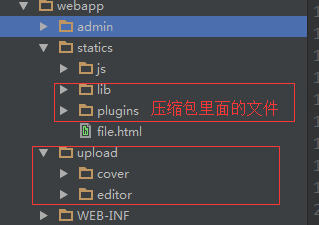
java 上传后台代码:
package com.bbkj.admin.upload.controller;

import org.apache.commons.io.FileUtils;

import org.springframework.stereotype.Controller;

import org.springframework.web.bind.annotation.RequestMapping;

import org.springframework.web.bind.annotation.RequestMethod;

import org.springframework.web.bind.annotation.RequestParam;

import org.springframework.web.multipart.MultipartFile;

import javax.servlet.http.HttpServletRequest;

import javax.servlet.http.HttpServletResponse;

import java.io.File;

import java.io.IOException;

/**

 * Created by Administrator on 2016/12/23.

 */

@Controller

@RequestMapping("/upload")

public class UploadController {

    @RequestMapping(value="/image",method= RequestMethod.POST)

    public void hello(HttpServletRequest request, HttpServletResponse response,

                      @RequestParam(value = "editormd-image-file", required = false) MultipartFile attach) {

        try {

            request.setCharacterEncoding("utf-8");

            response.setHeader("Content-Type", "text/html");

            String rootPath = request.getSession().getServletContext().getRealPath("/upload/editor/");

            /**

             * 文件路径不存在则需要创建文件路径

             */

            File filePath = new File(rootPath);

            if (!filePath.exists()) {

                filePath.mkdirs();

            }

            //最终文件名

            File realFile = new File(rootPath + File.separator + attach.getOriginalFilename());

            FileUtils.copyInputStreamToFile(attach.getInputStream(), realFile);

            //下面response返回的json格式是editor.md所限制的,规范输出就OK

            response.getWriter().write("{\"success\": 1, \"message\":\"上传成功\",\"url\":\"/upload/editor/" + attach.getOriginalFilename() + "\"}");

        } catch (Exception e) {

            try {

                response.getWriter().write("{\"success\":0}");

            } catch (IOException e1) {

                e1.printStackTrace();

            }

        }

    }

}
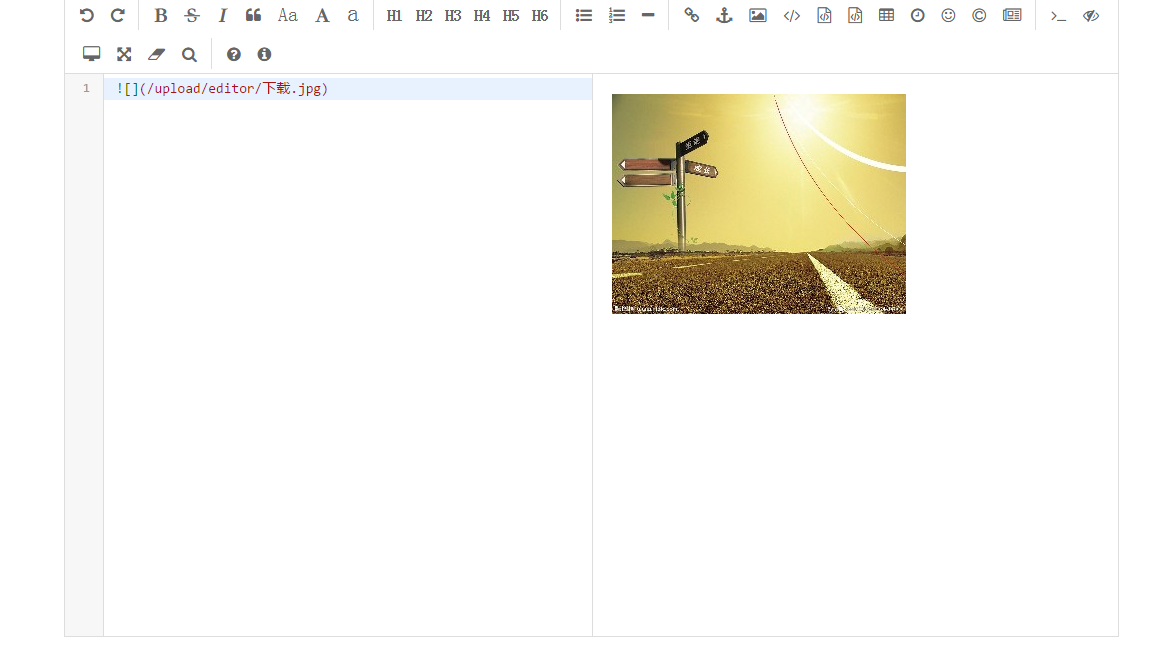
最后效果:
Editor.md的安装使用(MarkDown)的更多相关文章
- editor.md实现Markdown编辑器
editor.md实现Markdown编辑器 Markdown和Editor.md简介 Markdwon编辑器在技术工作者圈子中已经越来越流行,简单的语法,统一的格式,强大的扩展功能,最重要的是:你可 ...
- JAVA WEB项目中使用并改造editor.md实现Markdown编辑器
Markdown和Editor.md简介 Markdwon编辑器在技术工作者圈子中已经越来越流行,简单的语法,统一的格式,强大的扩展功能,最重要的是:你可以用Markdown,设计一篇精彩绝伦的文档而 ...
- Markdown编辑器editor.md的使用---markdown上传图片
http://kindeditor.org/ 确定下有没有查找替换功能 http://pandao.github.io/editor.md/ http://pandao.github.io/edito ...
- Markdown编辑器Editor.md使用方式
摘要: 搭建个人博客时,涉及文章上传,文章展示,这里需要一个Markdown插件,mark一下. Editormd下载地址:http://pandao.github.io/editor.md/ 由于前 ...
- thinkphp5使用Markdown编辑器Editor.md并上传图片
Editor.md官网:https://pandao.github.io/editor.md/index.html 下载后解压放到项目内,和引入ueditor差不多 1.引入项目资源 <!--m ...
- Markdown编辑器editor.md的使用
目录(?)[-] 一Markdown和editormd简介 二editormd的使用 1下载 2简单使用 21在自己的页面上引入相关的css和js代码如下 22在自己的页面中加上DIV 23在同页 ...
- java压缩包上传,解压,预览(利用editor.md和Jstree实现)和下载
java压缩包上传,解压,预览(利用editor.md和Jstree实现)和下载 实现功能:zip文件上传,后台自动解压,Jstree树目录(遍历文件),editor.md预览 采用Spring+Sp ...
- 解决Editor.md通过代码块原样输出Emoji被强制解析问题
Editor.md是一款优秀的开源Markdown 编辑器,在使用中遇到的一些问题和功能改进分享给需要的伙伴. 项目地址 https://github.com/pandao/editor.md 问题 ...
- springboot结合开源editor.md集成markdonw编辑器
今天来实现一个简单的功能,通常blog后台编辑大多使用的是富文本编辑器,比如百度的Ueditor,比较轻巧的wangEditor,那么如何使用开源editor.md的markdown呢? 搭建一个sp ...
随机推荐
- fastjson的deserializer的主要优化算法
JSON最佳实践 | kimmking's blog http://kimmking.github.io/2017/06/06/json-best-practice/ Fastjson内幕 Java综 ...
- Mysql 多主一从数据备份
Mysql 多主一从数据备份 概述 对任何一个数据库的操作都自动应用到另外一个数据库,始终保持两个数据库中的数据一致. 这样做有如下几点好处: 可以做灾备,其中一个坏了可以切换到另一个. 可以做负载均 ...
- windows 下 方便工作的bat文件批处理命令
1.删除目录下 不包含某串字符的文件: @echo offfor /f "delims=" %%a in ('dir /s /a-d/b *.mp3') do ( echo &qu ...
- Win32调试API原理
在Win32中自带了一些API函数,它们提供了相当于一般调试器的大多数功能,这些函数统称为Win32调试API(Win32 Debug API).利用这些API可以做到加载一个程序或捆绑到一个正在运行 ...
- maven 整合 ssm 异常分析
异常一:使用tomcat 7 启动没问题访问(JSP)页面就报错:org.apache.jasper.JasperException: Unable to compile class for JSP ...
- .NET加密方式解析--散列加密
在现代社会中,信息安全对于每一个人都是至关重要的,例如我们的银行账户安全.支付宝和微信账户安全.以及邮箱等等,说到信息安全,那就必须得提到加密技术,至于加密的一些相关概念,在这里就不说了. 这一次将会 ...
- 003-linux基本目录介绍
一.文件系统的类型 LINUX有四种基本文件系统类型:普通文件.目录文件.连接文件和特殊文件,可用file命令来识别. 普通文件:如文本文件.C语言元代码.SHELL脚本.二进制的可执行文件等,可用c ...
- CanvasRenderingContext2D.imageSmoothingEnabled
https://developer.mozilla.org/zh-CN/docs/Web/API/CanvasRenderingContext2D/imageSmoothingEnabled 这是一个 ...
- UVA10100:Longest Match(最长公共子序列)&&HDU1458Common Subsequence ( LCS)
题目链接:http://blog.csdn.net/u014361775/article/details/42873875 题目解析: 给定两行字符串序列,输出它们之间最大公共子单词的个数 对于给的两 ...
- PAT 1130 Infix Expression[难][dfs]
1130 Infix Expression (25 分) Given a syntax tree (binary), you are supposed to output the correspond ...