
前端开发 - JQuery - 中
十四、jquery属性操作 attr prop
<!DOCTYPE html>

<html lang="en">

<head>

    <meta charset="UTF-8">

    <title>jquery属性操作 attr prop</title>

</head>

<body>

    <div id="box">

        <p>路飞学城</p>

    </div>

    <button>获取</button>

    <ul>

        <li class="luffy1">路飞</li>

        <li class="luffy2">路飞</li>

        <li class="luffy2">路飞</li>

        <li class="luffy3">路飞</li>

    </ul>

</body>

    <script src="jquery-3.2.1.js"></script>

    <script type="text/javascript">

        $(function () {

            $('button').click(function () {

                //jquery 属性操作

                // html 属性操作 attr  ---- 对html 操作

                //  attr() 有一个参数 表示获取值

                $('#box p').text($('#box').attr('id'));

                 // attr() 如果有两个值 表示设置属性 不能给类添加 多个属性

                $('#box').attr('class','foo');

                //设置多个值 使用对象存储 , 如果设置多个类名 不能使用 attr

                $('#box').attr({'class':'foo2',name:'alice'});  // class 覆盖

                // $('#box').removeAttr('name');  // 删除一个属性

                $('#box').removeAttr('name class'); // 删除多个

                //Dom属性操作  prop ----对dom操作

                console.log($('li'));

                // 获取第一个元素得class值

                console.log($('li').prop('class'));

                //设置值

                // $('li').first().prop('name','app');

                $('li').first().prop({'name':'app','name2':'app2'});

                console.log($('li').first());

                //删除dom对象得name属性

                $('li').first().removeProp('name');

                console.log($('li').first());

                // console.log($('li').first().prop('name'));

                //

                // console.log($('li').prop('name'));

            });

        })

    </script>

</html>
十五、jquery属性操作 class 值
<!DOCTYPE html>

<html lang="en">

<head>

    <meta charset="UTF-8">

    <title>jquery属性操作class和值操作</title>

    <style type="text/css">

        span.active{

            font-size: 30px;

        }

    </style>

</head>

<body>

    <div id="box">

        <p>路飞学城</p>

    </div>

    <button>获取</button>

    <ul>

        <li class="luffy1">路飞</li>

        <li class="luffy2">路飞</li>

        <li class="luffy2">路飞</li>

        <li class="luffy3">路飞</li>

    </ul>

    <span class="span1">

        路飞吧!

    </span>

    <div id="box2">

        我是哈哈

        <p>我是一个段落</p>

        <a href="">百度一下</a>

        <input type="text" value="我们" name="">

        <button id="btn">get</button>

    </div>

</body>

    <script src="jquery-3.2.1.js"></script>

    <script type="text/javascript">

        $(function () {

            $('button').click(function () {

                // 3.addClass removeClass()  添加类和删除类

                $('span').addClass('span2 span3');

                $('span').removeClass('span2');

                var isBig = true;

                $('span').click(function () {

                    if(isBig){

                         $(this).addClass('active');

                         isBig = false;

                    }else{

                        $(this).removeClass('active');

                        isBig = true;

                    }

                });

                //4.值属性得操作 text() html() val()

                //获取文本

                console.log($('#box2').text());  // 所有得文本都拿到了

                //获取所有 html

                console.log($('#box2').html());

                // 设置值 用得比较频繁

                // $('#box2').text('嘿嘿');

                // $('#box2').text('<a>luffy city</a>');

                // $('#box2').html('<a href="#">luffy city</a>');

                //val()

                console.log($('input').val());  //获取值

                $('input').val('你是个大头鬼');  //设置值

                $('#btn').click(function () {

                    var val = $('input').val();

                    $('#box2').text(val);

                });

                //监听input 有变化时  表单控件使用得一个方法

                $('input').change(function () {

                    console.log($(this).val());

                })

            });

        })

    </script>

</html>
十六、操作input中的value值
<!DOCTYPE html>

<html lang="en">

<head>

    <meta charset="UTF-8">

    <title>操作表单input中得value值</title>

</head>

<body>

    <form action="">

        <input type="radio" name="sex" value="112" />男

        <input type="radio" name="sex" value="11" checked="" />女

        <input type="radio" name="sex" value="113" />gay

        <input type="checkbox" value="a" checked=""/>吃饭

        <input type="checkbox" value="b" checked=""/>睡觉

        <input type="checkbox" value="c" checked=""/>打豆豆

        <select name="timespan" id="timespan" class="Wdate" >

            <option value="1">8:00-8:30</option>

            <option value="2">8:30-9:00</option>

            <option value="3" selected>9:00-9:30</option>

        </select>

        <input type="text" name="" id="" value="111" />

    </form>

</body>

    <script src="jquery-3.2.1.js"></script>

    <script type="text/javascript">

        $(function () {

            console.log($(':radio'));

            console.log($(':checkbox'));

            /*

            input

            *  :button

            *  :submit

            *  :file

            *  :text

            *  :disabled

            *

            * */

            //1.获取单选框中 value 值

            console.log($('input[type=radio]:checked').val());

            //2.获取复选框 value 值  仅仅获取 第一个值

            console.log($('input[type=checkbox]:checked').val());

            //3.下拉列表 被选中得值

            console.log($('#timespan option:selected').val());

            //4.设置单选得值

            $('input[type=radio]').val(['113']); // 里面 得是 数组

            //5.设置复选值

            $('input[type=checkbox]').val(['b','c']); // 里面 得是 数组

            //6.设置下拉列表 这里必须要用 select

            // $('#timespan').val(['2']);

            $('select').val(['2']);  // 后面会覆盖前面得

            // $('select').val(['2','1']);  // 后面会覆盖前面得

            //文本框

            console.log($('input[type=text]').val());

            $('input[type=text]').val(33);

        })

    </script>

</html>
十七、jquery文档操作
<!DOCTYPE html>

<html lang="en">

<head>

    <meta charset="UTF-8">

    <title>jquery文档操作</title>

</head>

<body>

    <span>haha</span>

    <ul>

    </ul>

    <button id="btn">按钮</button>

</body>

    <script src="jquery-3.2.1.js"></script>

    <script type="text/javascript">

        $(function () {

            var oLi = document.createElement('li');

            oLi.innerHTML = '路飞';

            //追加元素

            $('ul').append('<li><a href="#">luffy</a></li>');

            $('ul').append(oLi);

            //如果直接的内容是当前页面中的某些元素,那么这些元素将从原位置上消失。简言之,就是一个移动操作

            $('ul').append($('span'));

            //apendTo()

            $('<a href="#">luffy 2</a>').appendTo($('ul'));

            //prepend()  插入到被选中元素得第一个位置

            $('ul').prepend('<li>我是第一个元素</li>');

            $('<li>我是第0个元素</li>').prependTo($('ul'));

            //after before

            $('ul').before('<h2>我是一个二级标题</h2>');

            //insertBefore

            $('<h1>我是一级标题</h1>').insertBefore($('ul'));

            $('ul').after('<h3>我是一个三级标题</h3>');

            // insertAfter

            $('<h4>我是一个四级标题</h4>').insertAfter($('ul'));

            //复制操作

            $('button').click(function () {

                // 1.clone():克隆匹配的DOM元素并且选中这些克隆的副本。

                // 2.clone(true):元素以及其所有的事件处理并且选中这些克隆的副本(简言之,副本具有与真身一样的事件处理能力)

                // true 完全克隆  默认是false

                $(this).clone(true).insertAfter($(this));

            });

            //替换

            $('h3').replaceWith('<button>替换得按钮</button>');

            // $('<a href="#">替换得超联系</a>').replaceAll('button');

            //删除

            // empty()  只清空了被选得内容

            // $('ul').empty();

            //remove() 被选元素 也被删除了   事件就没了

            $('ul').remove();

            var a = $('button').remove();

            console.log(a[0],a[1]);

            $('ul').append(a[1]);

            //detach() 被选元素 也被删除了 移除匹配得节点元素 删除节点后 事件会保留

            // $('ul').detach();

            // var a = $('button').detach();

            // console.log(a[0],a[1]);

            // $('ul').append(a[1]);

        })

    </script>

</html>
十八、jquery位置操作
<!DOCTYPE html>

<html lang="en">

<head>

    <meta charset="UTF-8">

    <title>jquery位置属性</title>

    <style type="text/css">

        *{padding: 0;margin: 0;}

        #box{position: relative;width: 200px;height: 200px;border: 1px solid red;padding: 10px 5px;}

        p{position: absolute;left:30px;top: 30px}

    </style>

</head>

<body style="height: 2000px; width: 2000px;">

    <div id="box">

        <p>我是一个段落标签</p>

    </div>

    <button id="btn">动画吧</button>

    <div style="width: 200px;height: 200px;margin:  100px auto;border: 1px solid deepskyblue;"></div>

</body>

    <script src="jquery-3.2.1.js"></script>

    <script type="text/javascript">

        $(function () {

            //1.获取匹配元素得相对父元素得偏移  position

            console.log($('p').position().left);  // 30

            console.log($('p').position().top);   //30

            var offsetTop = $('p').position().top+50+'px';

            $('#btn').click(function () {

                $('p').animate({top:offsetTop},1000)

            });

            //2.获取匹配元素 相对滚动条卷起得位置信息  scrollTop scrollLeft

            console.log($(document).scrollTop());

            console.log($(document).scrollLeft());

            //监听文档滚动

            $(document).scroll(function () {

                // console.log($(document).scrollTop());

                // console.log($(document).scrollLeft());

            });

            //offset 获取匹配元素在当前位置 相对偏移 相对于浏览器

            console.log($('#box').offset());

            console.log($('p').offset().top); // 31

            console.log($('p').offset().left);  //31

            console.log($('#btn').offset().top);

            console.log($('#btn').offset().left);

            //获取元素得宽高

            console.log('宽'+$('#box').width()); //200

            console.log('高'+$('#box').height()); //200

            // 设置宽高

            $('#box').width(400);

            $('#box').height(400);

            //innerWidth outerWidth

            //innerWidth = width + 2*padding 不包括边框  获取匹配元素得内部宽度

            console.log($('#box').innerWidth()); //410

            //outerWidth = width + 2*padding + 2*border 获取匹配元素得外部宽度

            console.log($('#box').outerWidth()); //412

        })

    </script>

</html>
十九、仿淘宝导航栏案例

<!DOCTYPE html>

<html lang="en">

<head>

    <meta charset="UTF-8">

    <title>仿淘宝导航栏案例</title>

    <style type="text/css">

        *{padding: 0;margin: 0;}

        div{width: 100%;}

        div img{width: 100%;}

        .nav{display: none;}

    </style>

</head>

<body>

    <div class="top">

        <img src="data:images/top.jpg" alt="" />

    </div>

    <div class="nav">

        <img src="data:images/nav.jpg"/>

    </div>

    <div class= 'taobao'>

        <img src="data:images/taobao1.png"/>

    </div>

</body>

    <script src="jquery-3.2.1.js"></script>

    <script type="text/javascript">

        $(function () {

            var h = $('.top').height();

            $(document).scroll(function () {

                var scrollTop = $(document).scrollTop();

                if(h<scrollTop){

                    $('.nav').css({display:'block',position:'fixed',top:0});

                }else{

                    $('.nav').css({display:'none',position:'static',top:0});

                }

            })

        })

    </script>

</html>
二十、jquery常用筛选方法
<!DOCTYPE html>

<html lang="en">

<head>

    <meta charset="UTF-8">

    <title>jquery常用筛选方法</title>

    <style type="text/css">

        li.active{background-color: gray;}

    </style>

</head>

<body>

    <ul>

        <li class="danger">1</li>

        <li><a href="">22</a></li>

        <li class="danger">3</li>

        <li>4</li>

        <a href="#" id="anchor">百度</a>

        <a href="#">百度1</a>

    </ul>

</body>

    <script type="text/javascript" src="jquery-3.2.1.js"></script>

    <script type="text/javascript">

        $(function () {

            console.log($('li'));

            // jquery 得遍历

            $('ul').children().each(function (index,ele) {

                // console.log(index,ele);

                var isDanger = $(this).hasClass('danger');

                if(isDanger){

                    $(this).css('color','red');

                }else{

                    $(this).css('font-size','28px')

                }

            });

            console.log($('ul').children());

            console.log($('li'));

            console.log($('ul').children('.danger'));

            console.log($('li').parent());

            console.log($('a').parent());

            console.log($('li').last().prev());

            console.log($('li').last().prevAll());

            //siblings  后面加选择器

            console.log($('li').siblings('li'));

            console.log($('#anchor').siblings('li'));

            console.log($('#anchor').siblings('a')); // 同胞兄弟

            $('li').hover(function () {

                $(this).addClass('active').siblings('li').removeClass('active');

            })

        })

    </script>

</html>
二十一、选项卡嵌套
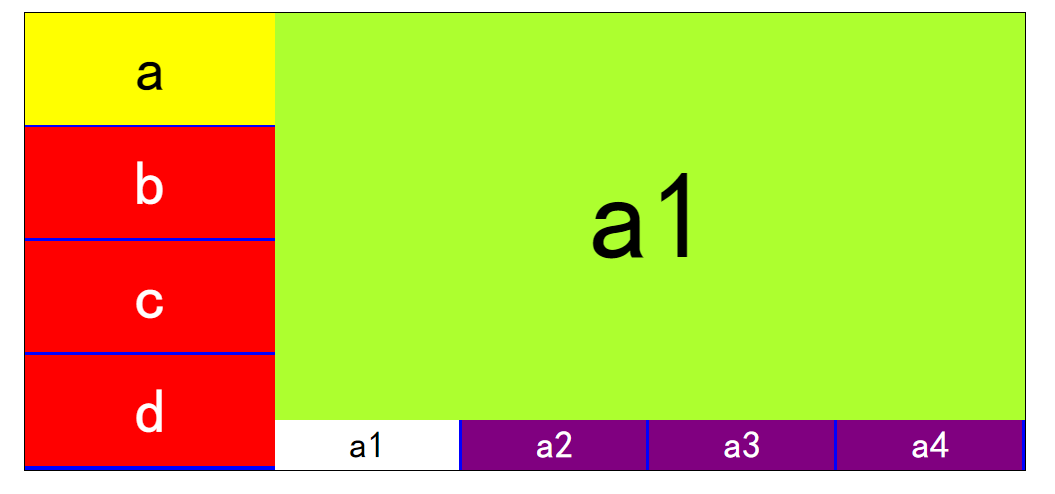
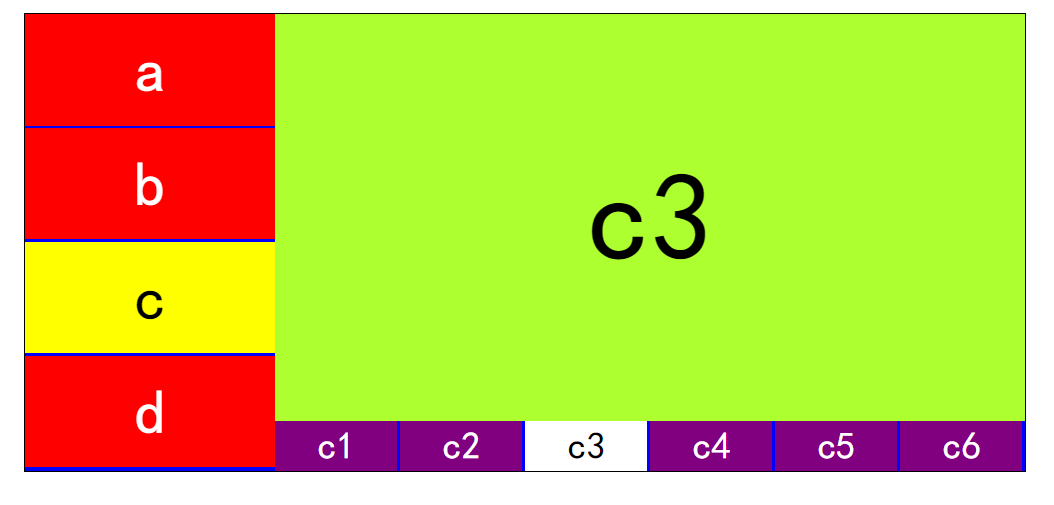
<!DOCTYPE html>

<html lang="en">

<head>

    <meta charset="UTF-8">

    <title>选项卡嵌套</title>

    <style type="text/css">

        *{padding: 0;margin: 0;}

        ul{

            list-style: none;

        }

        /*清除浮动产生的问题*/

        #box:after{

            content: "";

            display: block;

            clear: both;

        }

        #box{width: 800px;border: 1px solid black;margin: 20px auto;background: blue;}

        #leftBox{width: 200px;float: left;}

        #leftBox li{width: 200px;height: 89px;background: red;margin-bottom: 2px;color: white;font: 50px/89px "黑体";  text-align: center;}

        #rightBox div{display: none;float: left; width: 600px;}

        #rightBox p{width:100%;height: 325px;font: 100px/325px "黑体";text-align: center;background: greenyellow }

        /*父元素设置display:table使它成为一个块级表格元素

        * 子元素设置display:table-cell使子元素成为表格单元格,就好比是在表格中一样*/

        #rightBox ul{width: 600px;display: table;}

        #rightBox li{display: table-cell;background: purple;height: 40px;border-right: 2px solid blue;font: 30px/40px "黑体";text-align: center;color: white;}

        #leftBox .active{background: yellow;color: black;}

        #rightBox .active{background: white;color: black;}

    </style>

</head>

<body>

    <div id="box">

        <ul id="leftBox">

            <li>a</li>

            <li>b</li>

            <li>c</li>

            <li>d</li>

        </ul>

        <div id="rightBox">

            <div style="display: block">

                <p>a1</p>

                <ul>

                    <li class="active">a1</li>

                    <li>a2</li>

                    <li>a3</li>

                    <li>a4</li>

                </ul>

            </div>

            <div>

                <p>b1</p>

                <ul>

                    <li class="active">b1</li>

                    <li>b2</li>

                    <li>b3</li>

                    <li>b4</li>

                </ul>

            </div>

            <div>

                <p>c1</p>

                <ul>

                    <li class="active">c1</li>

                    <li>c2</li>

                    <li>c3</li>

                    <li>c4</li>

                    <li>c5</li>

                    <li>c6</li>

                </ul>

            </div>

            <div>

                <p>d1</p>

                <ul>

                    <li class="active">d1</li>

                    <li>d2</li>

                    <li>d3</li>

                    <li>d4</li>

                </ul>

            </div>

        </div>

    </div>

</body>

    <script src="jquery-3.2.1.js"></script>

    <script type="text/javascript">

        //鼠标移入得时候

        $('#leftBox li').mouseover(function () {

            $(this).addClass('active').siblings('li').removeClass('active');

            //修改右边得div

            $('#rightBox div').eq($(this).index()).show().siblings('div').hide();

        });

        $('#rightBox li').click(function () {

            $(this).addClass('active').siblings('li').removeClass('active');

            $(this).parent().prev().html($(this).html());

        })

    </script>

</html>
二十二、小米官网案例

<!DOCTYPE html>

<html lang="en">

<head>

    <meta charset="UTF-8">

    <title>小米官网手风琴</title>

    <style type="text/css">

        *{

            padding: 0;

            margin: 0;

        }

        ul{list-style: none;}

        .wrap{width: 980px;height: 612px;margin: 20px auto;background: #f4f3f4;border: 1px solid gray;}

        ul li{float: left;margin-left: 10px;position: relative;overflow: hidden;width: 233px;height: 300px;}

        ul li p{

            width: 233px;

            height: 100px;

            background: rgba(245,102,51,.7);

            position: absolute;

            bottom: -100px;

            text-align: center;

            color: white;

            line-height: 100px;

        }

    </style>

</head>

<body>

    <div class="wrap">

        <ul>

            <li><a href="#"><img src="data:images/xiaomi_01.png"/></a><p>百度一下,你就知道</p></li>

            <li><a href="#"><img src="data:images/xiaomi_02.png"/></a><p>百度一下,你就知道</p></li>

            <li><a href="#"><img src="data:images/xiaomi_03.png"/></a><p>百度一下,你就知道</p></li>

            <li><a href="#"><img src="data:images/xiaomi_04.png"/></a><p>百度一下,你就知道</p></li>

            <li><a href="#"><img src="data:images/xiaomi_05.png"/></a><p>百度一下,你就知道</p></li>

            <li><a href="#"><img src="data:images/xiaomi_07.png"/></a><p>百度一下,你就知道</p></li>

            <li><a href="#"><img src="data:images/xiaomi_08.png"/></a><p>百度一下,你就知道</p></li>

            <li><a href="#"><img src="data:images/xiaomi_09.png"/></a><p>百度一下,你就知道</p></li>

        </ul>

    </div>

</body>

    <script src="jquery-3.2.1.js"></script>

    <script type="text/javascript">

        //mouserenter 进入  mouseleave 离开

        $('.wrap li').hover(function () {

            $(this).children('p').stop(true).animate({bottom:'0px'},100); // 先停止 在启动动画

        },function () {

            $(this).children('p').stop(true).animate({bottom:'-100px'},100)

        })

    </script>

</html>
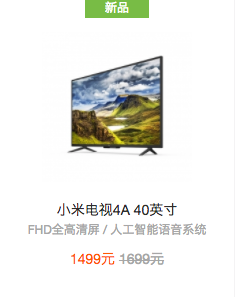
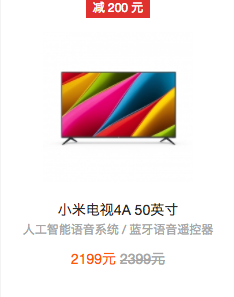
原图:


二十三、焦点轮播图
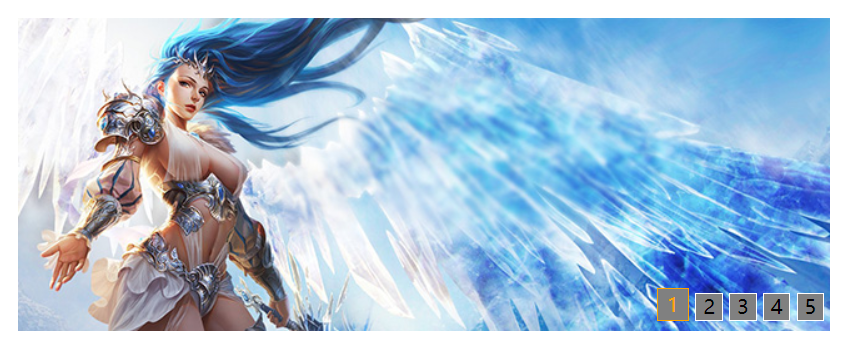
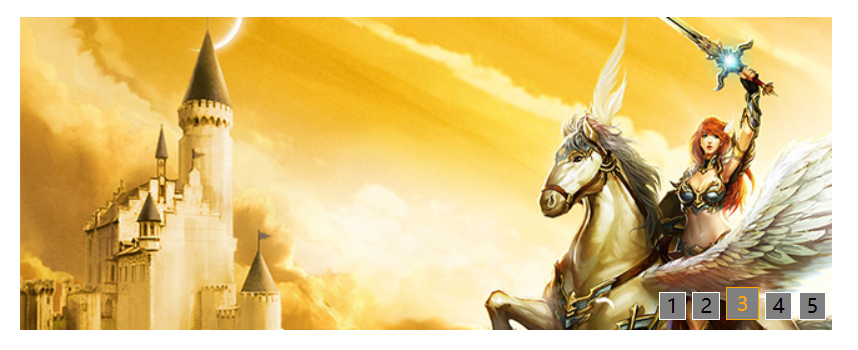
<!DOCTYPE html>

<html lang="en">

<head>

    <meta charset="UTF-8">

    <title>焦点轮播图</title>

    <style type="text/css">

        *{padding: 0;margin: 0;}

        ul,ol{list-style: none;}

        #wrap{width: 650px;height: 250px;margin: 100px auto 0;background: red;overflow: hidden;position: relative;}

        /*#wrap img{display: block;}*/

        #wrap ul{height: 250px;position: relative;z-index: 1;}

        #wrap ol{height: 30px;position: absolute;z-index: 2;bottom: 0;right: 0;}

        #wrap>ul>li{

            position: absolute;

            top:0;

            left: 0;

        }

        #wrap>ol>li{

            float: left;

            width: 20px;

            height: 20px;

            text-align: center;

            line-height: 20px;

            border: 1px solid white;

            background: gray;

            margin-right: 5px;

        }

        #wrap>ol>li:hover{

            /*设置鼠标形状*/

            cursor: pointer;

        }

        #wrap li.active{

            padding: 2px;

            color: orange;

            margin-top: -4px;

            border: 1px solid orange;

        }

    </style>

</head>

<body>

    <div id="wrap">

        <ul>

            <!--设置绝对定位之后 脱离标准流 最后一个盒子层级提升了-->

            <li style="z-index: 1;"><a href="#"><img src="./images/01.jpg"/></a></li>

            <li><a href="#"><img src="./images/02.jpg"/></a></li>

            <li><a href="#"><img src="./images/03.jpg"/></a></li>

            <li><a href="#"><img src="./images/04.jpg"/></a></li>

            <li><a href="#"><img src="./images/05.jpg"/></a></li>

        </ul>

        <ol>

            <li class="active">1</li>

            <li>2</li>

            <li>3</li>

            <li>4</li>

            <li>5</li>

        </ol>

    </div>

</body>

    <script src="jquery-3.2.1.js"></script>

    <script type="text/javascript">

        $(function () {

            //控制层级关系得索引

            var index = 0;

            $('#wrap>ol>li').mouseenter(function () {

                index++;

                //修改下标class

                $(this).addClass('active').siblings('li').removeClass('active');

                //修改图片

                $('#wrap>ul>li').eq($(this).index()).css({'left':'650px','z-index':index}).animate({'left':'0'},1000)

            })

        })

    </script>

</html>
原图:





二十四、动态实现轮播图

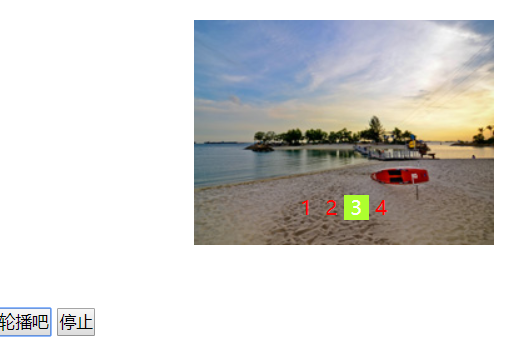
<!DOCTYPE html>

<html lang="en">

<head>

    <meta charset="UTF-8">

    <title>实现轮播图</title>

    <style type="text/css">

        *{padding: 0;margin: 0;}

        ul{list-style: none;}

        #box{width: 240px; height: 180px; position: relative; margin: 50px auto; overflow: hidden;}

        ul{width: 960px;position: absolute;}

        ul li{float: left;}

        p{position: absolute;left: 80px;bottom: 20px;}

        p span{color: red;display: inline-block;width: 20px;height: 20px;line-height: 20px;

            text-align: center;cursor: pointer;}

        p span.active{color: white;background-color: greenyellow;}

    </style>

</head>

<body>

    <div id="box">

        <ul>

            <!--显示轮播图-->

        </ul>

        <p>

            <!--显示索引-->

        </p>

    </div>

    <button id="play">轮播吧</button>

    <button id="stop">停止</button>

</body>

    <script src="jquery-3.2.1.js"></script>

    <script type="text/javascript">

        $(function () {

            //生成图片

             var imgArr = ['./images/1.jpg','./images/2.jpg','./images/3.jpg','./images/4.jpg'];

             for(var i = 0; i< imgArr.length; i++){

                 $('ul').append('<li><img src="'+imgArr[i]+'" alt=""></li>');

             }

            //生成索引

             var str = '';

             $('li').each(function (i,ele) {

                 str += '<span>'+(i+1)+'</span>'

             });

            $('p').html(str);

            $('span:first').addClass('active');

            //点击索引

            var index = 0;

            $('span').click(function () {

                $(this).addClass('active').siblings('span').removeClass('active');

                index = $(this).index();

                $('ul').css('left',-240*index+'px');

                // $('ul').animate({left:-240*index+'px'},1000)

            });

            //开启定时器

            var timer = null;

            $('#play').click(function () {

                timer = setInterval(next,1000);

                function next() {

                    if(index === $('li').length-1){

                        index = 0;

                        $('p span').eq(index).addClass('active').siblings('span').removeClass('active');

                        $('ul').css('left','0');

                    }else{

                        index++;

                        $('p span').eq(index).addClass('active').siblings('span').removeClass('active');

                        $('ul').css('left',-240*index+'px');

                    }

                }

            });

            //关闭定时器

            $('#stop').click(function () {

                clearInterval(timer);

            })

        });

    </script>

</html>
原图:




前端开发 - JQuery - 中的更多相关文章
- 前端基础-jQuery中的如何操作标签
阅读目录 样式操作 文本操作 属性操作 文档操作 一.样式操作 1.样式类 addClass();// 添加指定的CSS类名. removeClass();// 移除指定的CSS类名. hasClas ...
- 前端开发 CSS中你所不知道的伪类与伪元素的区别--摘抄
做过前端开发的人都熟悉伪类与伪元素,而真正能够彻底了解这二者的区别的人并不多.伪类与伪元素确实很容易混淆. 伪元素主要是用来创建一些不存在原有dom结构树种的元素,例如:用::before和::aft ...
- 前端开发 - jQuery
本节内容 一.jQuery概述 二.选择器 三.操作DOM 四.修改DOM结构 五.事件 六.动画 七.AJAX(待续) 八.扩展(待续) 一.jQuery概述 jQuery 是一个 JavaScri ...
- 前端开发—jQuery
jquery简介 jQuery是一个轻量级的.兼容多浏览器的JavaScript库. jQuery使用户能够更方便地处理HTML Document.Events.实现动画效果.方便地进行Ajax交互, ...
- 1+x证书web前端开发jquery专项练习测试题
javascript程序设计-题库 1.下面哪一种不属于Jquery的选择器? A. 基本选择器 B. 层次选择器 C. 表单选择器 D. 节点选择器 答案: D 2.如果需要匹配包含文本的元素,用下 ...
- Web前端开发JQuery框架
JQuery 是一个兼容多浏览器支持的JavaScript库,其核心理念是write less,do more(写得更少,做得更多),它是轻量级的js库,兼容CSS3还兼容各种浏览器,需要注意的是后续 ...
- 第十一章 前端开发-jQuery
11.4.0 jQuery 11.4.1 基本知识 定义: jQuery是一个快速,小巧,功能丰富的JavaScript库 作用:它通过易于使用的API在大量浏览器中运行,使得HTML文档遍历和操作, ...
- 前端开发 - JQuery&Bootstrap - 总结
一.JavaScript和Jquery的区别 1.javascript的缺点: 1.书写繁琐,代码量大 2.代码复杂 3.动画效果,很难实现.使用定时器 各种操作和处理 2.定义: 1.Javascr ...
- 前端开发 - JQuery - 上
一.js的缺点 <!DOCTYPE html> <html lang="en"> <head> <meta charset="U ...
随机推荐
- python模块之XlsxWriter 详解
Xlsx是python用来构造xlsx文件的模块,可以向excel2007+中写text,numbers,formulas 公式以及hyperlinks超链接. 可以完成xlsx文件的自动化构造,包括 ...
- spark读取本地文件
/** * Read a text file from HDFS, a local file system (available on all nodes), or any * Hadoop-supp ...
- 用分立元件实现串口通讯TTL/RS232电平转换
1.计算机串口通信的RS-232电平:用正负电压来表示逻辑状态.逻辑1= = -3V--15V,逻辑0=+3-+15V. 2.单片机串口通信的TTL电平:输出高电平>2.4V,输出低电平< ...
- Android——onCreate( )方法详解(转)
android开发之onCreate( )方法详解 onCreate( )方法是android应用程序中最常见的方法之一,那么,我们在使用onCreate()方法的时候应该注意哪些问题呢? 先看看Go ...
- Netty中的那些坑
Netty中的那些坑(上篇) 最近开发了一个纯异步的redis客户端,算是比较深入的使用了一把netty.在使用过程中一边优化,一边解决各种坑.儿这些坑大部分基本上是Netty4对Netty3的改进部 ...
- /proc/interrupts 和 /proc/stat 查看中断的情况
在/proc文件系统下,又两个文件提供了中断的信息. /proc/interrupts 文件中列出当前系统使用的中断的情况,所以某个中断处理没有安装,是不会显示的.哪怕之前安装过,被卸载了. 从左到右 ...
- php5共存php7
PHP7与PHP5共存于CentOS7 原文参考 原理 思路很简单:PHP5是通过yum安装的在/usr/,套接字在/var/run/php-fpm.socket,PHP7自己编译装在/usr/loc ...
- C语言错误: CRT detected that the application wrote to memory after end of heap buffer
CRT detected that the application wrote to memory after end of heap buffer 多是中间对其进行了一些操作,在程序结束处,释放内存 ...
- 如何创建Cookie? (选择1项)
如何创建Cookie? (选择1项) A. 使用new Cookie语句 B. 调用response.addCookie方法 C. 使用Cookie的setMaxAge方法 D. setCookie方 ...
- 【BZOJ】2179: FFT快速傅立叶(fft)
http://www.lydsy.com/JudgeOnline/problem.php?id=2179 fft裸题.... 为嘛我的那么慢....1000多ms.. #include <cst ...