
[iOS微博项目 - 3.4] - 获取用户信息


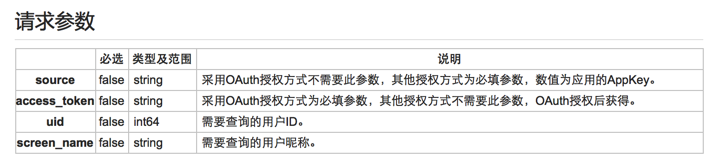

 //  HVWHomeViewController.m

 /** 获取用户信息 */

 - (void) setupUserInfo {

     // 设置参数

     NSMutableDictionary *param = [NSMutableDictionary dictionary];

     // 访问令牌

     HVWAccountInfo *accountInfo = [HVWAccountInfoTool accountInfo];

     param[@"access_token"] = accountInfo.access_token;

     // 用户uid

     param[@"uid"] = accountInfo.uid;

     // 发送请求

     [HVWNetworkTool get:@"https://api.weibo.com/2/users/show.json" parameters:param success:^(id responseObject) {

         // 获取用户信息

         HVWUser *user = [HVWUser objectWithKeyValues:responseObject];

         HVWAccountInfo *accountInfo = [HVWAccountInfoTool accountInfo];

         accountInfo.screen_name = user.screen_name;

         [HVWAccountInfoTool saveAccountInfo:accountInfo];

         // 设置导航栏标题

         [self.titleButton setTitle:accountInfo.screen_name forState:UIControlStateNormal];

     } failure:^(NSError *error) {

         HVWLog(@"获取用户信息失败!error:%@", error);

     }];

 }
 //  HVWAccountInfoTool.m

 /** 从文件获取accountInfo */

 + (HVWAccountInfo *) accountInfo {

     HVWAccountInfo *accountInfo = [NSKeyedUnarchiver unarchiveObjectWithData:[NSData dataWithContentsOfFile:accountInfoPath]];

     // 需要判断是否过期

     NSDate *now = [NSDate date];

     if ([now compare:accountInfo.expires_time] != NSOrderedAscending) { // now->expires_data 非升序, 已经过期

         accountInfo = nil;

     }

     return accountInfo;

 }

 /** 存储accountInfo到文件 */

 + (void) saveAccountInfo:(HVWAccountInfo *) accountInfo {

     [NSKeyedArchiver archiveRootObject:accountInfo toFile:accountInfoPath];

 }
 //  HVWAccountInfo.m

 #pragma mark - NSCoding

 /** 从文件解析对象调用 */

 - (id)initWithCoder:(NSCoder *)aDecoder {

     if (self = [super init]) {

         self.access_token = [aDecoder decodeObjectForKey:@"access_token"];

         self.expires_in = [aDecoder decodeObjectForKey:@"expires_in"];

         self.expires_time = [aDecoder decodeObjectForKey:@"expires_time"];

         self.uid = [aDecoder decodeObjectForKey:@"uid"];

         self.screen_name = [aDecoder decodeObjectForKey:@"screen_name"];

     }

     return self;

 }

 /** 把对象写入文件调用 */

 - (void)encodeWithCoder:(NSCoder *)aCoder {

     [aCoder encodeObject:self.access_token forKey:@"access_token"];

     [aCoder encodeObject:self.expires_in forKey:@"expires_in"];

     [aCoder encodeObject:self.expires_time forKey:@"expires_time"];

     [aCoder encodeObject:self.uid forKey:@"uid"];

     [aCoder encodeObject:self.screen_name forKey:@"screen_name"];

 }
 //  HVWNavigationBarTitleButton.m

 /** 重写setTitle,根据文本改变宽度 */

 - (void)setTitle:(NSString *)title forState:(UIControlState)state {

     [super setTitle:title forState:state];

     NSDictionary *param = @{NSFontAttributeName: self.titleLabel.font};

     CGFloat titleWidth = [title boundingRectWithSize:CGSizeMake(MAXFLOAT, self.height) options:NSStringDrawingUsesLineFragmentOrigin attributes:param context:nil].size.width;

     self.width = titleWidth + self.height + ;

 }
 //  HVWHomeViewController.m

 /** 设置导航栏 */

 - (void) setupNavigationBar {

     // 添加导航控制器按钮

     // 左边按钮

     self.navigationItem.leftBarButtonItem = [UIBarButtonItem itemWithImage:@"navigationbar_friendsearch" hightlightedImage:@"navigationbar_friendsearch_highlighted" target:self selector:@selector(searchFriend)];

     // 右边按钮

     self.navigationItem.rightBarButtonItem = [UIBarButtonItem itemWithImage:@"navigationbar_pop" hightlightedImage:@"navigationbar_pop_highlighted" target:self selector:@selector(pop)];

     // 设置标题按钮

     HVWNavigationBarTitleButton *titleButton = [[HVWNavigationBarTitleButton alloc] init];

     titleButton.height = ;

     // 保存到成员属性

     self.titleButton = titleButton;

     // 设置导航栏标题

     HVWAccountInfo *accountInfo = [HVWAccountInfoTool accountInfo];

     NSString *navTitle = @"首页";

     if (accountInfo.screen_name) {

         navTitle = accountInfo.screen_name;

     }

     [titleButton setTitle:navTitle forState:UIControlStateNormal];

     [titleButton setImage:[UIImage imageWithNamed:@"navigationbar_arrow_down"] forState:UIControlStateNormal];

     // 设置背景图片

     [titleButton setBackgroundImage:[UIImage resizedImage:@"navigationbar_filter_background_highlighted"] forState:UIControlStateHighlighted];

     // 监听按钮点击事件,替换图标

     [titleButton addTarget:self action:@selector(titleButtonClickd:) forControlEvents:UIControlEventTouchUpInside];

     self.navigationItem.titleView = titleButton;

 }
[iOS微博项目 - 3.4] - 获取用户信息的更多相关文章
- [iOS微博项目 - 2.6] - 获取微博数据
github: https://github.com/hellovoidworld/HVWWeibo A.新浪获取微博API 1.读取微博API 2.“statuses/home_time ...
- [iOS微博项目 - 3.6] - 获取未读消息
github: https://github.com/hellovoidworld/HVWWeibo A.获取登陆用户未读消息 1.需求 获取所有未读消息,包括新微博.私信.@.转发.关注等 把未 ...
- Android之QQ授权登录获取用户信息
有时候我们开发的app须要方便用户简单登录.能够让用户使用自己的qq.微信.微博登录到我们自己开发的app. 今天就在这里总结一下怎样在自己的app中集成QQ授权登录获取用户信息的功能. 首先我们打开 ...
- 微信第三方登陆,无需注册一键登录,获取用户信息,PHP实现方法
今天讲讲利用微信oauth2实现第三方登陆的实现方法. 先说说前提吧! 首先你得是服务号,并且是经过认证的.这样微信会给你很多第三方接口的权限,如果是订阅号或者没有认证的服务号那就不用想了! 一开始你 ...
- 菜鸟-手把手教你把Acegi应用到实际项目中(7)-缓存用户信息
首先讲讲EhCache.在默认情况下,即在用户未提供自身配置文件ehcache.xml或ehcache-failsafe.xml时,EhCache会依据其自身Jar存档包含的ehcache-fails ...
- Laravel OAuth2 (一) ---简单获取用户信息
前言 本来要求是使用微信进行第三方登陆,所以想着先用 github 测试成功再用微信测试,可是最近拖了好久都还没申请好微信开放平台的 AppID ,所以就只写 github 的第三方登陆吧,估计微信的 ...
- mpvue小程序开发之 wx.getUserInfo获取用户信息授权
一.背景 在使用美团的mpvue2.0框架搭建起小程序项目后,做获取用户信息时遇到一些问题:微信小程序更新api后,获取用户信息只能通过button上的绑定方法 来获取用户信息,vue上方法绑定不能直 ...
- PHP 微信公众号开发 - 获取用户信息
项目微信公众号开发,记录获取用户微信号信息,和用户openid 1,登录微信公众平台 点击登录微信公众平台 2,获取公众号开发信息 登陆之后在 开发->基本配置 3,设置IP白名单 在这里添加服 ...
- [iOS微博项目 - 4.3] - 设置每条微博边框样式
github: https://github.com/hellovoidworld/HVWWeibo A.设置每条微博边框样式 1.需求 不需要分割线 每个微博之间留有一定的间隙 2.思路 直接设 ...
随机推荐
- 《Qt 实战一二三》
简介 "我们来自Qt分享&&交流,我们来自Qt Quick分享&&交流",不管你是笑了,还是笑了,反正我们是认真的.我们就是要找寻一种Hold不住的 ...
- Qt之国际化
简介 Qt国际化属于Qt高级中的一部分,本想着放到后面来说,上节刚好介绍了Qt Linguist,趁热打铁就一起了解下. 对于绝大多数的应用程序,在刚启动时,需要加载默认的语言(或最后一次设置的语言) ...
- 引用问题rayshop.common总是提醒重复引用问题
引用问题rayshop.common总是提醒重复引用问题 解决办法:在插件组里的所有项目引用,使用不能复制属性
- Object-C 内存管理及对象
关于OC 的内存管理是使用 引用计数的方式 进行管理的引用计数可以使用 办公室的开关灯 来说明 如下图与 OC对象 对应如下
- ubuntu 12.04上安装OpenERP 7的一次记录
登陆ssh, 先更新系统: sudo apt-get update && sudo apt-get dist-upgrade 接着再为openerp运行创建一个系统用户,用户名就叫op ...
- MySQL的性能调优工具:比mysqlreport更方便的tuning-primer.sh
年初的时候收藏过一篇关于mysqlreport的报表解读,和内置的show status,和show variables相比mysqlreport输出一个可读性更好的报表:但Sundry MySQL提 ...
- 20160123.CCPP详解体系(0002天)
程序片段(01):字符.c 内容概要: 转义字符 #define _CRT_SECURE_NO_WARNINGS #include <stdlib.h> #include <stdi ...
- 射手网字幕打包下载(73.16G)
射手网陪着我度过15年了. 我所希望射手网所具有的价值,就是能令更多人跨越国家的樊篱,了解世界上不同的文化. 如果这个网站有帮到人,我就已经很满足了. 但是,需要射手网的时代已经走开了. 因此,今天, ...
- xcode的ios工程目录结构
目录结构: a.supporting files: main.m和资源文件 xxx-info.plist:包含应用程序相关属性列表,如版本,程序名等 .pch文件:预编译头文件,相当于MFC里的std ...
- MySQL基础之第17章 MySQL日志
17.1.日志简介 二进制日志错误日志通用查询日志慢查询日志 17.2.二进制日志 二进制日志也叫作变更日志(update log),主要用于记录数据库的变化情况.通过二进制日志可以查询MySQL数据 ...