
[iOS微博项目 - 3.6] - 获取未读消息
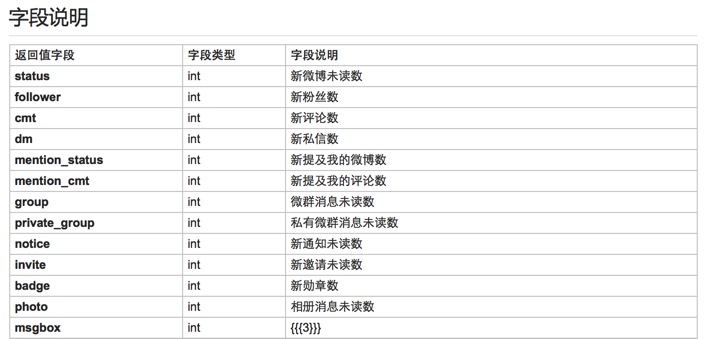
- 获取所有未读消息,包括新微博、私信、@、转发、关注等
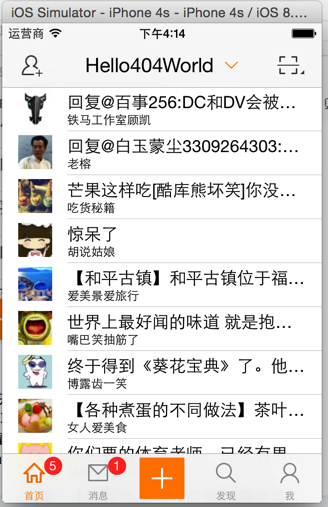
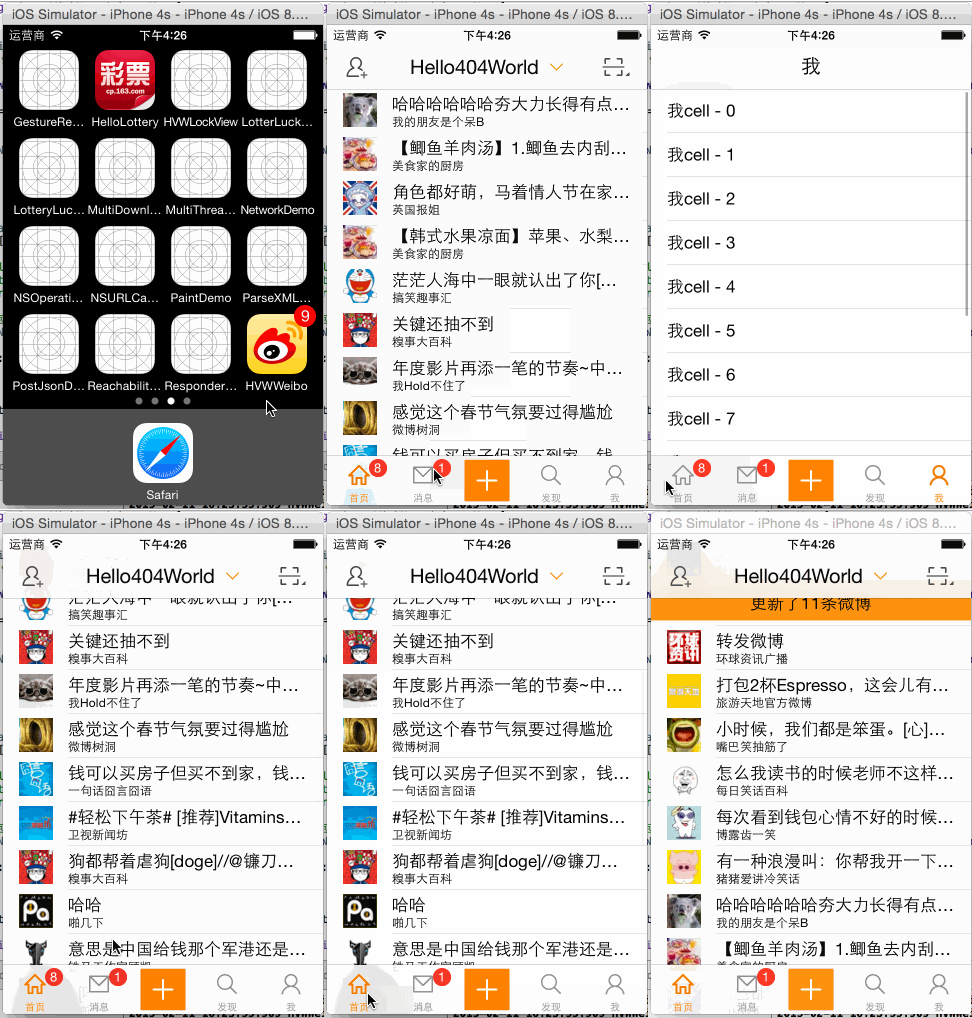
- 把未读消息数显示在相应的tabItem上
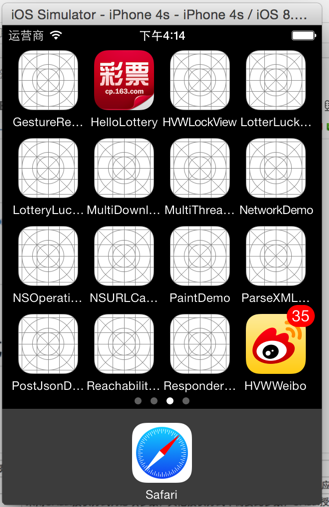
- 把总的未读消息数显示在app图标上
- 当app进入后台,仍然需要刷新未读消息数量数据
- 读取了未读消息之后清空计数
- 监听tabBarItem的点击,刷新数据(例如重复点击“首页”要刷新微博)
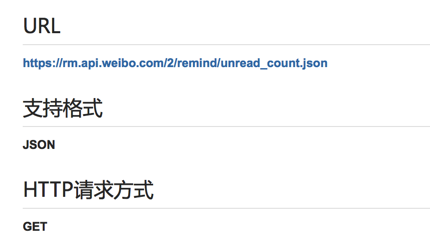
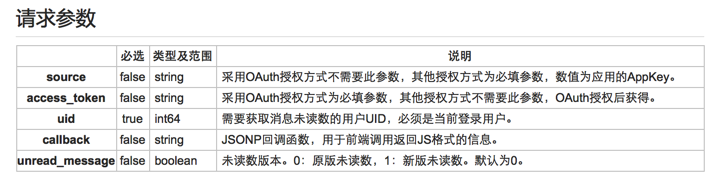
- 使用微博提醒API获取未读消息
- 使用定时器定时获取
- 在AppDelegate设置app进入后台时仍然工作
- 使用tabBarDelegate方法监听tabBarItem的点击

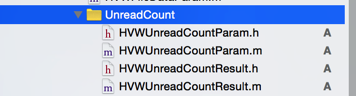
 1 //

 2 //  HVWUnreadCountParam.h

 3 //  HVWWeibo

 4 //

 5 //  Created by hellovoidworld on 15/2/11.

 6 //  Copyright (c) 2015年 hellovoidworld. All rights reserved.

 7 //

 8

 9 #import "HVWBaseParam.h"

10

11 @interface HVWUnreadCountParam : HVWBaseParam

12

13 /** uid true int64 需要获取消息未读数的用户UID,必须是当前登录用户。*/

14 @property(nonatomic, assign) int uid;

15

16 /** false boolean 未读数版本。0:原版未读数,1:新版未读数。默认为0。 */

17 @property(nonatomic, assign) BOOL unread_message;

18

19 @end
 1 //

 2 //  HVWUnreadCountResult.h

 3 //  HVWWeibo

 4 //

 5 //  Created by hellovoidworld on 15/2/11.

 6 //  Copyright (c) 2015年 hellovoidworld. All rights reserved.

 7 //

 8

 9 #import <Foundation/Foundation.h>

10

11 @interface HVWUnreadCountResult : NSObject

12

13 /** int 新微博未读数 */

14 @property(nonatomic, assign) int status;

15

16 /** int 新粉丝数 */

17 @property(nonatomic, assign) int follower;

18

19 /** int 新评论数 */

20 @property(nonatomic, assign) int cmt;

21

22 /** int 新私信数 */

23 @property(nonatomic, assign) int dm;

24

25 /** int 新提及我的微博数 */

26 @property(nonatomic, assign) int mention_status;

27

28 /** int 新提及我的评论数 */

29 @property(nonatomic, assign) int mention_cmt;

30

31 /** int 微群消息未读数 */

32 @property(nonatomic, assign) int group;

33

34 /** int 私有微群消息未读数 */

35 @property(nonatomic, assign) int private_group;

36

37 /** int 新通知未读数 */

38 @property(nonatomic, assign) int notice;

39

40 /** int 新邀请未读数 */

41 @property(nonatomic, assign) int invite;

42

43 /** int 新勋章数 */

44 @property(nonatomic, assign) int badge;

45

46 /** int 相册消息未读数 */

47 @property(nonatomic, assign) int photo;

48

49 /** 聊天未读数 */

50 @property(nonatomic, assign) int msgbox;

51

52 /** 获取“消息”未读数 */

53 - (int) messageUnreadCount;

54

55

56 /** 获取“发现”未读数 */

57 - (int) discoverUnreadCount;

58

59 /** 获取“我”未读数 */

60 - (int) profileUnreadCount;

61

62 /** 总未读数 */

63 - (int) totalUnreadCount;

64

65 @end

66
 1 //

 2 //  HVWUnreadCountResult.m

 3 //  HVWWeibo

 4 //

 5 //  Created by hellovoidworld on 15/2/11.

 6 //  Copyright (c) 2015年 hellovoidworld. All rights reserved.

 7 //

 8

 9 #import "HVWUnreadCountResult.h"

10

11 @implementation HVWUnreadCountResult

12

13 /** 获取“消息”未读数 */

14 - (int) messageUnreadCount {

15     return self.cmt + self.dm + self.mention_status + self.cmt + self.group + self.private_group + self.notice + self.invite;

16 }

17

18 /** 获取“发现”未读数 */

19 - (int) discoverUnreadCount {

20     return 0;

21 }

22

23 /** 获取“我”未读数 */

24 - (int) profileUnreadCount {

25     return self.follower + self.photo + self.badge + self.msgbox;

26 }

27

28 /** 总未读数 */

29 - (int) totalUnreadCount {

30     return self.status + [self messageUnreadCount] + [self discoverUnreadCount] + [self profileUnreadCount];

31 }

32

33 @end
 1 //

 2 //  HVWUnreadCountTool.h

 3 //  HVWWeibo

 4 //

 5 //  Created by hellovoidworld on 15/2/11.

 6 //  Copyright (c) 2015年 hellovoidworld. All rights reserved.

 7 //

 8

 9 #import "HVWBaseTool.h"

10 #import "HVWUnreadCountParam.h"

11 #import "HVWUnreadCountResult.h"

12

13 @interface HVWUnreadCountTool : HVWBaseTool

14

15 /** 获取未读消息数 */

16 + (void) unreadCountWithParameters:(HVWUnreadCountParam *)parameters success:(void (^)(HVWUnreadCountResult *result))success failure:(void (^)(NSError *error))failure;

17

18 @end
 1 //

 2 //  HVWUnreadCountTool.m

 3 //  HVWWeibo

 4 //

 5 //  Created by hellovoidworld on 15/2/11.

 6 //  Copyright (c) 2015年 hellovoidworld. All rights reserved.

 7 //

 8

 9 #import "HVWUnreadCountTool.h"

10

11 @implementation HVWUnreadCountTool

12

13 /** 获取未读消息数 */

14 + (void) unreadCountWithParameters:(HVWUnreadCountParam *)parameters success:(void (^)(HVWUnreadCountResult *result))success failure:(void (^)(NSError *error))failure {

15     [self getWithUrl:@"https://rm.api.weibo.com/2/remind/unread_count.json" parameters:parameters resultClass:[HVWUnreadCountResult class] success:success failure:failure];

16 }

17

18 @end
  1 //

  2 //  HVWTabBarViewController.m

  3 //  HVWWeibo

  4 //

  5 //  Created by hellovoidworld on 15/1/31.

  6 //  Copyright (c) 2015年 hellovoidworld. All rights reserved.

  7 //

  8

  9 #import "HVWTabBarViewController.h"

 10 #import "HVWHomeViewController.h"

 11 #import "HVWMessageViewController.h"

 12 #import "HVWDiscoverViewController.h"

 13 #import "HVWProfileViewController.h"

 14 #import "HVWNavigationViewController.h"

 15 #import "HVWTabBar.h"

 16 #import "HVWComposeViewController.h"

 17 #import "HVWUnreadCountTool.h"

 18 #import "HVWUnreadCountParam.h"

 19 #import "HVWAccountInfoTool.h"

 20 #import "HVWAccountInfo.h"

 21

 22 @interface HVWTabBarViewController () <HVWTabBarDelegate>

 23

 24 /** 首页控制器 */

 25 @property(nonatomic, strong) HVWHomeViewController *homeVC;

 26

 27 /** 消息控制器 */

 28 @property(nonatomic, strong) HVWMessageViewController *messageVC;

 29

 30 /** 发现控制器 */

 31 @property(nonatomic, strong) HVWDiscoverViewController *discoverVC;

 32

 33 /** 我控制器 */

 34 @property(nonatomic, strong) HVWProfileViewController *profileVC;

 35

 36 /** 上一次选择的tabBarItem */

 37 @property(nonatomic, strong) UITabBarItem *lastSelectedTabBarItem;

 38

 39 @end

 40

 41 @implementation HVWTabBarViewController

 42

 43 - (void)viewDidLoad {

 44     [super viewDidLoad];

 45     // Do any additional setup after loading the view.

 46

 47     // 使用自定义的TabBar

 48     HVWTabBar *hvwTabBar = [[HVWTabBar alloc] init];

 49     hvwTabBar.hvwTabBarDelegate = self;

 50     // 重设tabBar,由于tabBar是只读成员,使用KVC相当于直接修改_tabBar

 51     [self setValue:hvwTabBar forKey:@"tabBar"];

 52

 53     // 添加子控制器

 54     [self addAllChildViewControllers];

 55

 56     // 设置未读消息获取

 57     [self setupUnreadCount];

 58 }

 59

 60 /** 添加所有子控制器 */

 61 - (void) addAllChildViewControllers {

 62     // 首页

 63     HVWHomeViewController *homeVC = [[HVWHomeViewController alloc] init];

 64     [self addChildViewController:homeVC WithTitle:@"首页" image:@"tabbar_home" seletectedImage:@"tabbar_home_selected"];

 65     self.homeVC = homeVC;

 66

 67     // 打开app,设置首页为上一次选择的tabBarItem

 68     self.lastSelectedTabBarItem = homeVC.tabBarItem;

 69

 70     // 消息

 71     HVWMessageViewController *messageVC = [[HVWMessageViewController alloc] init];

 72     [self addChildViewController:messageVC WithTitle:@"消息" image:@"tabbar_message_center" seletectedImage:@"tabbar_message_center_selected"];

 73     self.messageVC = messageVC;

 74

 75     // 发现

 76     HVWDiscoverViewController *discoverVC = [[HVWDiscoverViewController alloc] init];

 77     [self addChildViewController:discoverVC WithTitle:@"发现" image:@"tabbar_discover" seletectedImage:@"tabbar_discover_selected"];

 78     self.discoverVC = discoverVC;

 79

 80     // 我

 81     HVWProfileViewController *profileVC = [[HVWProfileViewController alloc] init];

 82     [self addChildViewController:profileVC WithTitle:@"我" image:@"tabbar_profile" seletectedImage:@"tabbar_profile_selected"];

 83     self.profileVC = profileVC;

 84 }

 85

 86 /** 添加tab子控制器 */

 87 - (void) addChildViewController:(UIViewController *) viewController WithTitle:(NSString *) title image:(NSString *) imageName seletectedImage:(NSString *) selectedImageName {

 88

 89     // 设置随机背景色

 90 //    viewController.view.backgroundColor = RandomColor;

 91

 92     // 设置标题,直接设置title可以同时设置tabBarItem和navigationItem的title

 93 //    viewController.tabBarItem.title = title;

 94 //    viewController.navigationItem.title = title;

 95     viewController.title = title;

 96

 97     // 设置图标

 98     viewController.tabBarItem.image = [UIImage imageWithNamed:imageName];

 99

100     // 被选中时图标

101     UIImage *selectedImage = [UIImage imageWithNamed:selectedImageName];

102     // 如果是iOS7,不要渲染被选中的tab图标(iOS7中会自动渲染成为蓝色)

103     if (iOS7) {

104         selectedImage = [selectedImage imageWithRenderingMode:UIImageRenderingModeAlwaysOriginal];

105     }

106     viewController.tabBarItem.selectedImage = selectedImage;

107

108     // 添加子控制器

109     HVWNavigationViewController *nav = [[HVWNavigationViewController alloc] initWithRootViewController:viewController];

110     [self addChildViewController:nav];

111 }

112

113 #pragma mark - HVWTabBarDelegate

114 /** “+”按钮点击代理方法 */

115 - (void)tabBarDidComposeButtonClick:(HVWTabBar *)tabBar {

116     HVWComposeViewController *composeView = [[HVWComposeViewController alloc] init];

117

118     // tabBarController不是由navigationController弹出来的,没有navigationController

119 //    [self.navigationController pushViewController:vc animated:YES];

120 //    HVWLog(@"%@", self.navigationController); // null

121

122     // 为了使用导航栏,使用NavigationController包装一下

123     HVWNavigationViewController *nav = [[HVWNavigationViewController alloc] initWithRootViewController:composeView];

124     // 使用modal方式弹出

125     [self presentViewController:nav animated:YES completion:nil];

126 }

127

128 /** 选中了某个tabBarItem */

129 - (void)tabBar:(UITabBar *)tabBar didSelectItem:(UITabBarItem *)item {

130     // 如果是首页

131     UINavigationController *nav = (UINavigationController *)self.selectedViewController;

132

133     if ([[nav.viewControllers firstObject] isKindOfClass:[HVWHomeViewController class]]) { // 如果是“首页”item被点击

134         if (self.lastSelectedTabBarItem == item) { // 重复点击

135             [self.homeVC refreshStatusFromAnother:NO];

136         } else { // 跳转点击

137             [self.homeVC refreshStatusFromAnother:YES];

138         }

139     } else {

140 //        item.badgeValue = nil;

141     }

142

143 }

144

145 #pragma mark - unread count

146 /** 设置未读消息获取 */

147 - (void) setupUnreadCount {

148     // 第一次要先获取一次

149     [self fetchUnreadCount];

150

151     // 设置定时器,每隔一段时间获取一次

152     NSTimer *unreadTimer =  [NSTimer scheduledTimerWithTimeInterval:60.0 target:self selector:@selector(fetchUnreadCount) userInfo:nil repeats:YES];

153

154     // 要设置系统分配资源,不然用户操作的时候会阻塞

155     [[NSRunLoop mainRunLoop] addTimer:unreadTimer forMode:NSRunLoopCommonModes];

156 }

157

158 /** 设置刷新未读消息定时任务 */

159 - (void) fetchUnreadCount {

160     // 设置参数

161     HVWUnreadCountParam *param = [[HVWUnreadCountParam alloc] init];

162     param.uid = [HVWAccountInfoTool accountInfo].uid.intValue;

163

164

165     // 发送请求

166     [HVWUnreadCountTool unreadCountWithParameters:param success:^(HVWUnreadCountResult *result) {

167         HVWLog(@"现在有%d未读消息", [result totalUnreadCount]);

168         // 未读"微博"数

169         if (result.status) {

170             self.homeVC.tabBarItem.badgeValue = [NSString stringWithFormat:@"%d", result.status];

171         } else {

172             self.homeVC.tabBarItem.badgeValue = nil;

173         }

174

175         // 未读"消息"数

176         if ([result messageUnreadCount]) {

177             self.messageVC.tabBarItem.badgeValue = [NSString stringWithFormat:@"%d", [result messageUnreadCount]];

178         } else {

179             self.messageVC.tabBarItem.badgeValue = nil;

180         }

181

182         // 未读"发现"数

183         if ([result discoverUnreadCount]) {

184             self.discoverVC.tabBarItem.badgeValue = [NSString stringWithFormat:@"%d", [result discoverUnreadCount]];

185         } else {

186             self.discoverVC.tabBarItem.badgeValue = nil;

187         }

188

189         // 未读“我”数

190         if ([result profileUnreadCount]) {

191             self.profileVC.tabBarItem.badgeValue = [NSString stringWithFormat:@"%d", [result profileUnreadCount]];

192         } else {

193             self.profileVC.tabBarItem.badgeValue = nil;

194         }

195

196         // 设置app图标,(iOS8或以上要先获得授权,在AppDelegate里面做了)

197         [UIApplication sharedApplication].applicationIconBadgeNumber = [result totalUnreadCount];

198     } failure:^(NSError *error) {

199         HVWLog(@"获取未读消息数失败,error:%@", error);

200     }];

201 }

202

203 @end
 1 //

 2 //  AppDelegate.m

 3 //  UIWebViewdDemo

 4 //

 5 //  Created by hellovoidworld on 15/1/30.

 6 //  Copyright (c) 2015年 hellovoidworld. All rights reserved.

 7 //

 8

 9 #import "AppDelegate.h"

10 #import "HVWControllerTool.h"

11 #import "SDImageCache.h"

12 #import "SDWebImageManager.h"

13

14 @interface AppDelegate ()

15

16 @end

17

18 @implementation AppDelegate

19

20

21 - (BOOL)application:(UIApplication *)application didFinishLaunchingWithOptions:(NSDictionary *)launchOptions {

22     // Override point for customization after application launch.

23

24     // 启动后显示状态栏

25     UIApplication *app = [UIApplication sharedApplication];

26     app.statusBarHidden = NO;

27

28     // 设置window

29     self.window = [[UIWindow alloc] init];

30     self.window.frame = [UIScreen mainScreen].bounds;

31     [self.window makeKeyAndVisible];

32

33     // 设置根控制器

34     [HVWControllerTool chooseRootViewController];

35

36     // 允许修改app图标角标

37     if (iOS8) {

38         UIUserNotificationSettings *settings = [UIUserNotificationSettings settingsForTypes:UIUserNotificationTypeBadge categories:nil];

39         [[UIApplication sharedApplication] registerUserNotificationSettings:settings];

40     }

41

42     return YES;

43 }

44

45 - (void)applicationWillResignActive:(UIApplication *)application {

46     // Sent when the application is about to move from active to inactive state. This can occur for certain types of temporary interruptions (such as an incoming phone call or SMS message) or when the user quits the application and it begins the transition to the background state.

47     // Use this method to pause ongoing tasks, disable timers, and throttle down OpenGL ES frame rates. Games should use this method to pause the game.

48 }

49

50 - (void)applicationDidEnterBackground:(UIApplication *)application {

51     // 设置让app在后台也能运行

52     UIBackgroundTaskIdentifier taskID = [application beginBackgroundTaskWithExpirationHandler:^{

53         [application endBackgroundTask:taskID];

54     }];

55 }

56

57 - (void)applicationWillEnterForeground:(UIApplication *)application {

58     // Called as part of the transition from the background to the inactive state; here you can undo many of the changes made on entering the background.

59 }

60

61 - (void)applicationDidBecomeActive:(UIApplication *)application {

62     // Restart any tasks that were paused (or not yet started) while the application was inactive. If the application was previously in the background, optionally refresh the user interface.

63 }

64

65 - (void)applicationWillTerminate:(UIApplication *)application {

66     // Called when the application is about to terminate. Save data if appropriate. See also applicationDidEnterBackground:.

67 }

68

69 - (void)applicationDidReceiveMemoryWarning:(UIApplication *)application {

70     // 清除缓存

71     [[SDImageCache sharedImageCache] clearMemory];

72

73     // 停止下载

74     [[SDWebImageManager sharedManager] cancelAll];

75 }

76

77

78 @end

79
 1 //  HVWHomeViewController.m

 2 /** 刷新数据 */

 3 - (void) refreshStatusFromAnother:(BOOL)isFromAnother {

 4     if (!isFromAnother) { // 重复点击首页item

 5         // 滚动到顶部

 6         NSIndexPath *indexPath = [NSIndexPath indexPathForRow:0 inSection:0];

 7         [self.tableView scrollToRowAtIndexPath:indexPath atScrollPosition:UITableViewScrollPositionTop animated:YES];

 8

 9         if (self.tabBarItem.badgeValue.intValue) { // 有新消息

10             // 刷新数据

11             [self refreshLatestWeibo:self.refreshControl];

12         }

13     } else {

14

15     }

16 }
[iOS微博项目 - 3.6] - 获取未读消息的更多相关文章
- [iOS微博项目 - 3.4] - 获取用户信息
github: https://github.com/hellovoidworld/HVWWeibo A.获取用户信息 1.需求 获取用户信息并储存 把用户昵称显示在“首页”界面导航栏的标题上 ...
- [iOS微博项目 - 2.6] - 获取微博数据
github: https://github.com/hellovoidworld/HVWWeibo A.新浪获取微博API 1.读取微博API 2.“statuses/home_time ...
- iOS TabBarItem设置红点(未读消息)
实现原理: 其实是自定义一个view,将view添加到UITabBar上面,也可以是一个按钮,设置背景图片,和label.废话少说直接上代码搞一个UITabBar的分类 #import <UIK ...
- iOS 未读消息角标 仿QQ拖拽 简单灵活 支持xib(源码)
一.效果 二.简单用法 超级简单,2行代码集成:xib可0代码集成,只需拖一个view关联LFBadge类即可 //一般view上加角标 _badge1 = [[LFBadge alloc] init ...
- wing带你玩转自定义view系列(2) 简单模仿qq未读消息去除效果
上一篇介绍了贝塞尔曲线的简单应用 仿360内存清理效果 这一篇带来一个 两条贝塞尔曲线的应用 : 仿qq未读消息去除效果. 转载请注明出处:http://blog.csdn.net/wingicho ...
- 桌面图标未读消息(小米,sony,三星手机)
新消息来了,在桌面的Laucher图标上显示新消息数 /** * 应用桌面图标未读消息显示工具类 * 只支持 小米,三星和索尼 */ public class BadgeUtil { final st ...
- Android BGABadgeView:新消息/未接来电/未读消息/新通知圆球红点提示(1)
Android BGABadgeView:新消息/未接来电/未读消息/新通知圆球红点提示(1) 现在很多的APP会有新消息/未接来电/未读消息/新通知圆球红点提示,典型的以微信.QQ新消息提示为 ...
- Android 高仿QQ滑动弹出菜单标记已读、未读消息
在上一篇博客<Android 高仿微信(QQ)滑动弹出编辑.删除菜单效果,增加下拉刷新功能>里,已经带着大家学习如何使用SwipeMenuListView这一开源库实现滑动列表弹出菜单,接 ...
- Android系统 小米/三星/索尼 应用启动图标未读消息数(BadgeNumber)动态提醒
http://www.51itong.net/android-badgenumber-9789.html Android系统 小米/三星/索尼 应用启动图标未读消息数(BadgeNumber)动态提醒 ...
随机推荐
- Java线程中断理解(interrupte)
Java线程之中,一个线程的生命周期分为:初始.就绪.运行.阻塞以及结束.当然,其中也可以有四种状态,初始.就绪.运行以及结束. 一般而言,可能有三种原因引起阻塞:等待阻塞.同步阻塞以及其他阻塞(睡眠 ...
- swift 继承和构造器
继承 class Vehicle { var numberOfWheels: Int var maxPassengers: Int func description() -> String { ...
- Flashtext 使用文档 大规模数据清洗的利器-实现文本结构化
1.1 安装 pip install flashtext 1.2 使用例子 1.2.1 关键字提取 >>> from flashtext import KeywordProcesso ...
- boost准模板库内存管理中pool和object_pool的使用
首先,在敲代码之前,必须改动一个问题.要不然,无法链接: boost安装文件夹:D:\boost. 找到D:\boost\boost_1_55_0\include\boost-1_55\b ...
- linux 串口 特殊字符
近日在写一个linux的串口程序,发现大多数情况下数据接收没问题,但是有时却有问题.主要是接收的字符串中包含有0x03这个字符,会造成与它相邻的字符同时也接收不到,搞了好久才发现这个错误.查找资料后发 ...
- IOS让返回按钮显示自定义标题而不是上个ViewController的title
在开发IOS的时候发现当从一个ViewController跳转到另一个ViewController时,被跳转到的那个ViewController的返回按钮总是显示的是上个ViewController的 ...
- ComBoFuzzySearch.js
/** * combobox和combotree模糊查询 */(function () { //combobox可编辑,自定义模糊查询 $.fn.combobox.defaults.editable ...
- 第二百六十七节,Tornado框架-分页封装模块
Tornado框架-分页封装模块 框架引擎 #!/usr/bin/env python #coding:utf-8 import tornado.ioloop import tornado.web # ...
- List接口的实现类与ArrayList相似,区别是Vector是重量级的组件,使用使消耗的资源比较多
List接口的实现类(Vector)(与ArrayList相似,区别是Vector是重量级的组件,使用使消耗的资源比较多.) 结论:在考虑并发的情况下用Vector(保证线程的安全). 在不考虑并发的 ...
- Java中arraylist和linkedlist源代码分析与性能比較
Java中arraylist和linkedlist源代码分析与性能比較 1,简单介绍 在java开发中比較经常使用的数据结构是arraylist和linkedlist,本文主要从源代码角度分析arra ...