
MySQL主从数据库的安装
安装环境
操作系统 :CentOS 6.5

数据库版本:MySQL 5.6.27

主机A:192.168.1.1 (Master)

主机B:192.168.1.2 (Slave)- 1
- 2
- 3
- 4
这里强调的数据库的版本,是因为MySQL在5.6之前和之后的安装方式是不一样的。
本人在进行配置的时候,也遇到了这个坑,这里提前说明,希望大家不要采坑。
注:这里有一篇CentOS安装MySQL的文章,在这里引出,过程亲测,希望对大家有帮助:http://blog.csdn.net/xlgen157387/article/details/49964557
基本环境配置
首先,要保证防火墙对3306端口的开启,(开启方式,请参考:[http://blog.csdn.net/xlgen157387/article/details/49964557]),如果只是为了学习数据库的主从配置,可以使用service iptables stop 命令直接关闭防火墙。
然后可以在两台机子之间进行 ping操作,确保两台机器之间能够相同。
Master的配置
在Linux环境下MySQL的配置文件的位置是在 /etc/my.cnf ,在该文件下指定Master的配置如下:
log-bin=mysql-bin

server-id=2

binlog-ignore-db=information_schema

binlog-ignore-db=cluster

binlog-ignore-db=mysql

binlog-do-db=ufind_db - 1
- 2
- 3
- 4
- 5
- 6
这里的server-id用于标识唯一的数据库,这里设置为2,在设置从库的时候就需要设置为其他值。
binlog-ignore-db:表示同步的时候ignore的数据库
binlog-do-db:指定需要同步的数据库
完整配置截图如下:
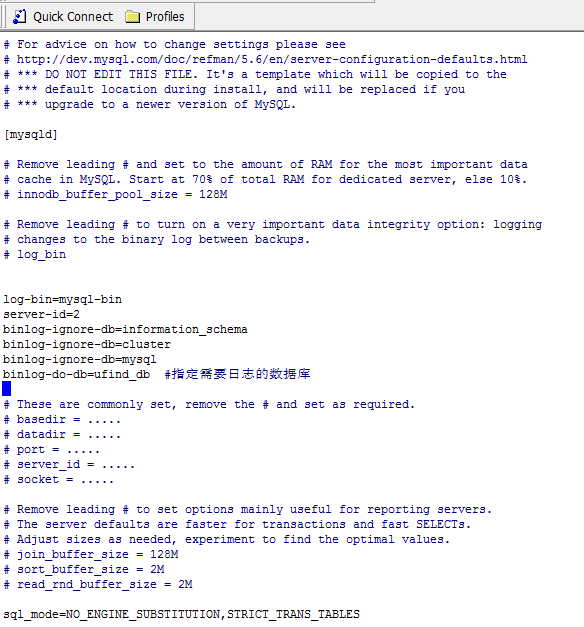
1、然后重启mysql:service mysqld restart
2、进入mysql:[root@VM_221_4_centos ~]# mysql -u root -p 回车,输入mysql密码进入。
3、 赋予从库权限帐号,允许用户在主库上读取日志,赋予192.168.1.2也就是Slave机器有File权限,只赋予Slave机器有File权限还不行,还要给它REPLICATION SLAVE的权限才可以。
在Master数据库命令行中输入:
 >GRANT FILE ON *.* TO 'root'@'192.168.1.2' IDENTIFIED BY 'mysql password';

 >GRANT REPLICATION SLAVE ON *.* TO 'root'@'192.168.1.2' IDENTIFIED BY 'mysql password';

>FLUSH PRIVILEGES- 1
- 2
- 3
- 4
这里使用的仍是 root 用户作为同步的时候使用到的用户,可以自己设定。
4、重启mysql,登录mysql,显示主库信息
mysql> show master status;- 1
mysql> show master status;

+------------------+----------+--------------+----------------------------------+-------------------+

| File             | Position | Binlog_Do_DB | Binlog_Ignore_DB                 | Executed_Gtid_Set |

+------------------+----------+--------------+----------------------------------+-------------------+

| mysql-bin.000004 |    28125 | ufind_db     | information_schema,cluster,mysql |                   |

+------------------+----------+--------------+----------------------------------+-------------------+

1 row in set (0.00 sec)

mysql> - 1
- 2
- 3
- 4
- 5
- 6
- 7
- 8
- 9

这里的 File 、Position 是在配置Salve的时候要使用到的,Binlog_Do_DB表示要同步的数据库,Binlog_Ignore_DB 表示Ignore的数据库,这些都是在配置的时候进行指定的。
另外:如果执行这个步骤始终为Empty set(0.00 sec),那说明前面的my.cnf没配置对。
Slave的配置
1、从库的配置,首先也是修改配置文件:/etc/my.cnf 如下:
log-bin=mysql-bin

server-id=3

binlog-ignore-db=information_schema

binlog-ignore-db=cluster

binlog-ignore-db=mysql

replicate-do-db=ufind_db

replicate-ignore-db=mysql

log-slave-updates

slave-skip-errors=all

slave-net-timeout=60- 1
- 2
- 3
- 4
- 5
- 6
- 7
- 8
- 9
- 10
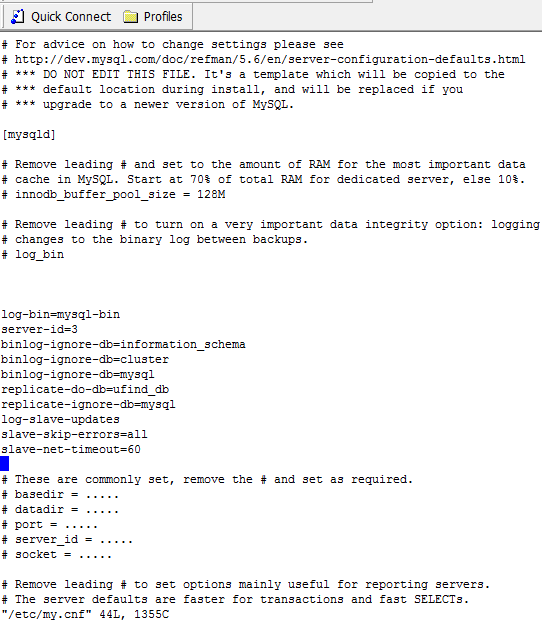
2、这里可以看到,在MySQL5.6之后的版本中没有指定:
master-host=192.168.1.1 #Master的主机IP

master-user=root

master-password=mysql password #Master的MySQL密码- 1
- 2
- 3
3、这也是在网上很多搜索的配置过程,他们也都指定了数据库的版本,但是并没有说出来新版本的配置这种方式是不适用的。
4、如果,你在MySQL5.6和之后的版本中配置从库的时候,设置到了上边的内容,即指定了master-host、master-user等信息的话,重启MySQL的时候就回报错,错误信息如下:
[root@VM_128_194_centos bin]# service mysqld restart

Shutting down MySQL... SUCCESS!

Starting MySQL... ERROR! The server quit without updating PID file (/data/mysqldb/VM_128_194_centos.pid).

[root@VM_128_194_centos bin]# - 1
- 2
- 3
- 4
此时,查看数据库的报错信息(数据库的目录, /data/mysqldb/VM_128_194_centos.err ),可以看到:
2016-05-06 13:12:04 13345 [Note] InnoDB: Waiting for purge to start

2016-05-06 13:12:04 13345 [Note] InnoDB: 5.6.27 started; log sequence number 2850211

2016-05-06 13:12:04 13345 [ERROR] /data/home/server/mysql-5.6.27/bin/mysqld: unknown variable 'master-host=192.168.1.1'

2016-05-06 13:12:04 13345 [ERROR] Aborting
- 1
- 2
- 3
- 4
- 5
可以看出master-host 被检测数是一个未知的变量,因此会出现错误。
5、在5.6以及后续版本的配置如下:
修改完/etc/my.cnf 文件之后,重启一下MySQL(service mysqld restart)
进入Slave mysql控制台,执行:

mysql> stop slave;  #关闭Slave

mysql> change master to master_host='192.168.1.1',master_user='root',master_password='123456',master_log_file='mysql-bin.000004', master_log_pos=28125;

mysql> start slave; #开启Slave- 1
- 2
- 3
- 4
- 5
在这里指定Master的信息,master_log_file是在配置Master的时候的File选项, master_log_pos是在配置Master的Position 选项,这里要进行对应。
然后可以通过mysql> show slave status; 查看配置的信息:
mysql> show slave status \G;

*************************** 1. row ***************************

               Slave_IO_State: Waiting for master to send event

                  Master_Host: 192.167.1.1

                  Master_User: root

                  Master_Port: 3306

                Connect_Retry: 60

              Master_Log_File: mysql-bin.000004

          Read_Master_Log_Pos: 28125

               Relay_Log_File: VM_128_194_centos-relay-bin.000004

                Relay_Log_Pos: 26111

        Relay_Master_Log_File: mysql-bin.000004

             Slave_IO_Running: Yes

            Slave_SQL_Running: Yes

              Replicate_Do_DB: ufind_db

          Replicate_Ignore_DB: mysql

           Replicate_Do_Table:

       Replicate_Ignore_Table:

      Replicate_Wild_Do_Table:

  Replicate_Wild_Ignore_Table:

                   Last_Errno: 0

                   Last_Error:

                 Skip_Counter: 0

          Exec_Master_Log_Pos: 28125

              Relay_Log_Space: 26296

              Until_Condition: None

               Until_Log_File:

                Until_Log_Pos: 0

           Master_SSL_Allowed: No

           Master_SSL_CA_File:

           Master_SSL_CA_Path:

              Master_SSL_Cert:

            Master_SSL_Cipher:

               Master_SSL_Key:

        Seconds_Behind_Master: 0

Master_SSL_Verify_Server_Cert: No

                Last_IO_Errno: 0

                Last_IO_Error:

               Last_SQL_Errno: 0

               Last_SQL_Error:

  Replicate_Ignore_Server_Ids:

             Master_Server_Id: 2

                  Master_UUID: 8ac3066a-9680-11e5-a2ec-5254007529fd

             Master_Info_File: /data/mysqldb/master.info

                    SQL_Delay: 0

          SQL_Remaining_Delay: NULL

      Slave_SQL_Running_State: Slave has read all relay log; waiting for the slave I/O thread to update it

           Master_Retry_Count: 86400

                  Master_Bind:

      Last_IO_Error_Timestamp:

     Last_SQL_Error_Timestamp:

               Master_SSL_Crl:

           Master_SSL_Crlpath:

           Retrieved_Gtid_Set:

            Executed_Gtid_Set:

                Auto_Position: 0

1 row in set (0.00 sec)

ERROR:

No query specified

mysql>
- 1
- 2
- 3
- 4
- 5
- 6
- 7
- 8
- 9
- 10
- 11
- 12
- 13
- 14
- 15
- 16
- 17
- 18
- 19
- 20
- 21
- 22
- 23
- 24
- 25
- 26
- 27
- 28
- 29
- 30
- 31
- 32
- 33
- 34
- 35
- 36
- 37
- 38
- 39
- 40
- 41
- 42
- 43
- 44
- 45
- 46
- 47
- 48
- 49
- 50
- 51
- 52
- 53
- 54
- 55
- 56
- 57
- 58
- 59
- 60
- 61
- 62
- 63
可以看到,已经配置成功。
添加需要同步的从库Slave
由于种种原因,测试的时候使用test库,这里我按照上述的方式,修改Master的my.cnf的配置文件,新增同步的数据库test,重启MySQL,执行Master的:show master status如下:

相应的,要修改Slave从库的信息在my.cnf 增加 replicate-do-db=test,重启Mysql,根据上述的show master status,在Slave从库中执行下边的内容:
>stop slave

>change master to master_host='192.168.1.1',master_user='root',master_password='123456',master_log_file='mysql-bin.000005', master_log_pos=120;

>start slave- 1
- 2
- 3
- 4
然后使用:show slave status;
mysql> show slave status\G;

*************************** 1. row ***************************

               Slave_IO_State: Waiting for master to send event

                  Master_Host: 192.168.1.1

                  Master_User: root

                  Master_Port: 3306

                Connect_Retry: 60

              Master_Log_File: mysql-bin.000005

          Read_Master_Log_Pos: 1422

               Relay_Log_File: VM_128_194_centos-relay-bin.000004

                Relay_Log_Pos: 283

        Relay_Master_Log_File: mysql-bin.000005

             Slave_IO_Running: Yes

            Slave_SQL_Running: Yes

              Replicate_Do_DB: ufind_db,test

          Replicate_Ignore_DB: mysql

           Replicate_Do_Table:

       Replicate_Ignore_Table:

      Replicate_Wild_Do_Table:

  Replicate_Wild_Ignore_Table:

                   Last_Errno: 0

                   Last_Error:

                 Skip_Counter: 0

          Exec_Master_Log_Pos: 1422

              Relay_Log_Space: 468

              Until_Condition: None

               Until_Log_File:

                Until_Log_Pos: 0

           Master_SSL_Allowed: No

           Master_SSL_CA_File:

           Master_SSL_CA_Path:

              Master_SSL_Cert:

            Master_SSL_Cipher:

               Master_SSL_Key:

        Seconds_Behind_Master: 0

Master_SSL_Verify_Server_Cert: No

                Last_IO_Errno: 0

                Last_IO_Error:

               Last_SQL_Errno: 0

               Last_SQL_Error:

  Replicate_Ignore_Server_Ids:

             Master_Server_Id: 2

                  Master_UUID: 8ac3066a-9680-11e5-a2ec-5254007529fd

             Master_Info_File: /data/mysqldb/master.info

                    SQL_Delay: 0

          SQL_Remaining_Delay: NULL

      Slave_SQL_Running_State: Slave has read all relay log; waiting for the slave I/O thread to update it

           Master_Retry_Count: 86400

                  Master_Bind:

      Last_IO_Error_Timestamp:

     Last_SQL_Error_Timestamp:

               Master_SSL_Crl:

           Master_SSL_Crlpath:

           Retrieved_Gtid_Set:

            Executed_Gtid_Set:

                Auto_Position: 0

1 row in set (0.00 sec)

ERROR:

No query specified

mysql>
- 1
- 2
- 3
- 4
- 5
- 6
- 7
- 8
- 9
- 10
- 11
- 12
- 13
- 14
- 15
- 16
- 17
- 18
- 19
- 20
- 21
- 22
- 23
- 24
- 25
- 26
- 27
- 28
- 29
- 30
- 31
- 32
- 33
- 34
- 35
- 36
- 37
- 38
- 39
- 40
- 41
- 42
- 43
- 44
- 45
- 46
- 47
- 48
- 49
- 50
- 51
- 52
- 53
- 54
- 55
- 56
- 57
- 58
- 59
- 60
- 61
- 62
- 63
已经新增加了test。
真正的测试
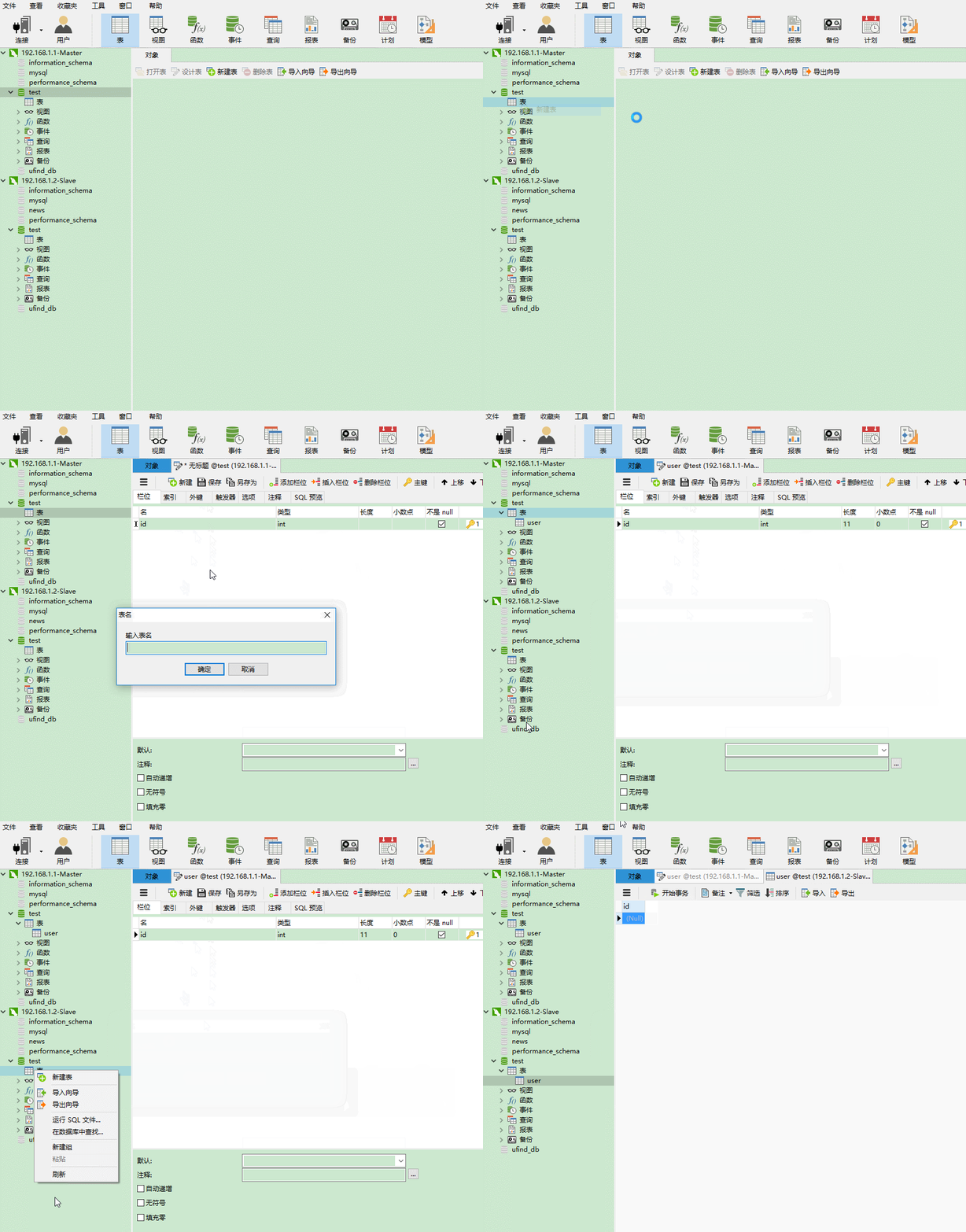
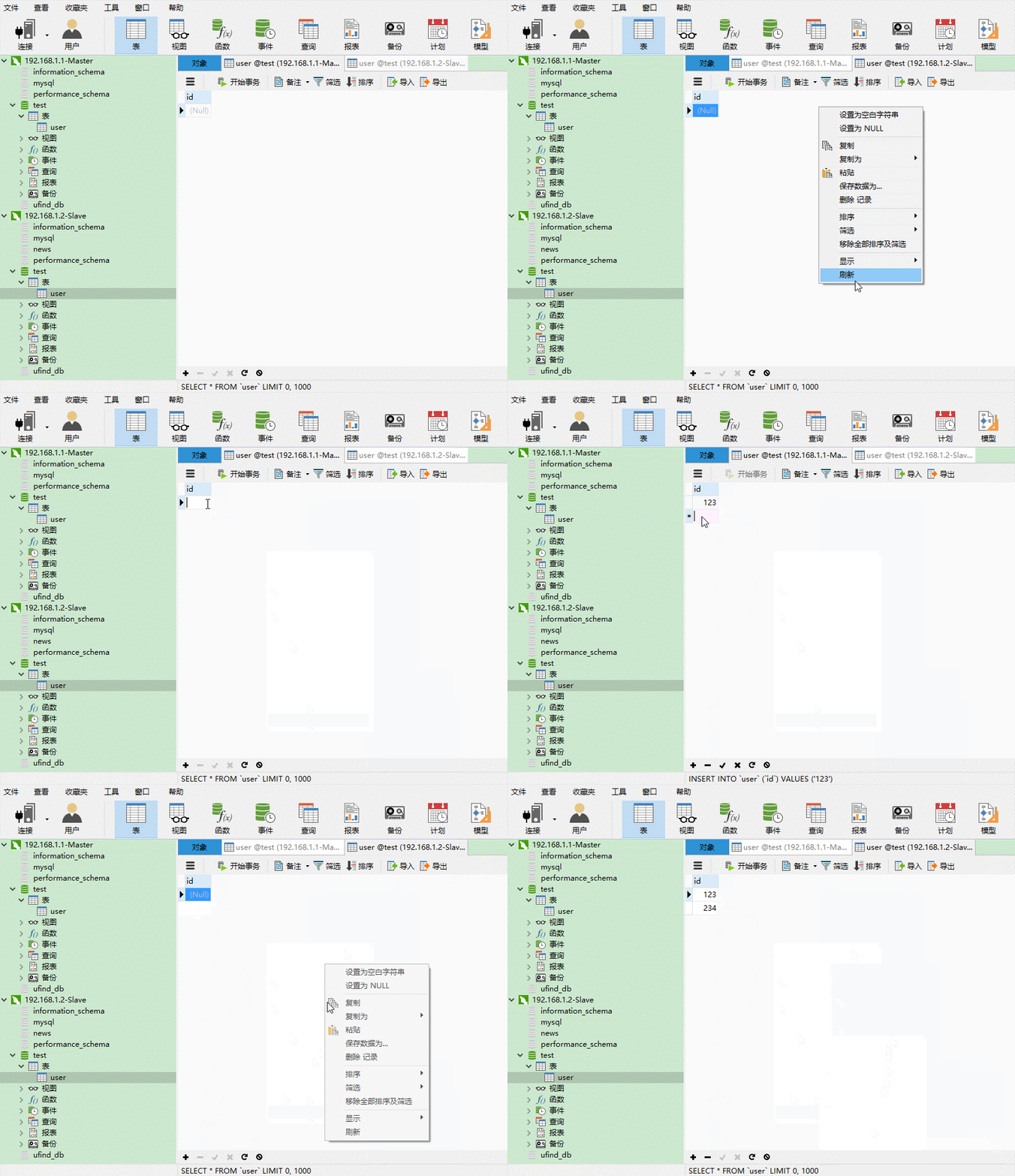
在主库中新增数据库表,user,观察从库变化如下:
创建数据库的时候:
新增数据的时候:
删除Master数据库表的时候:
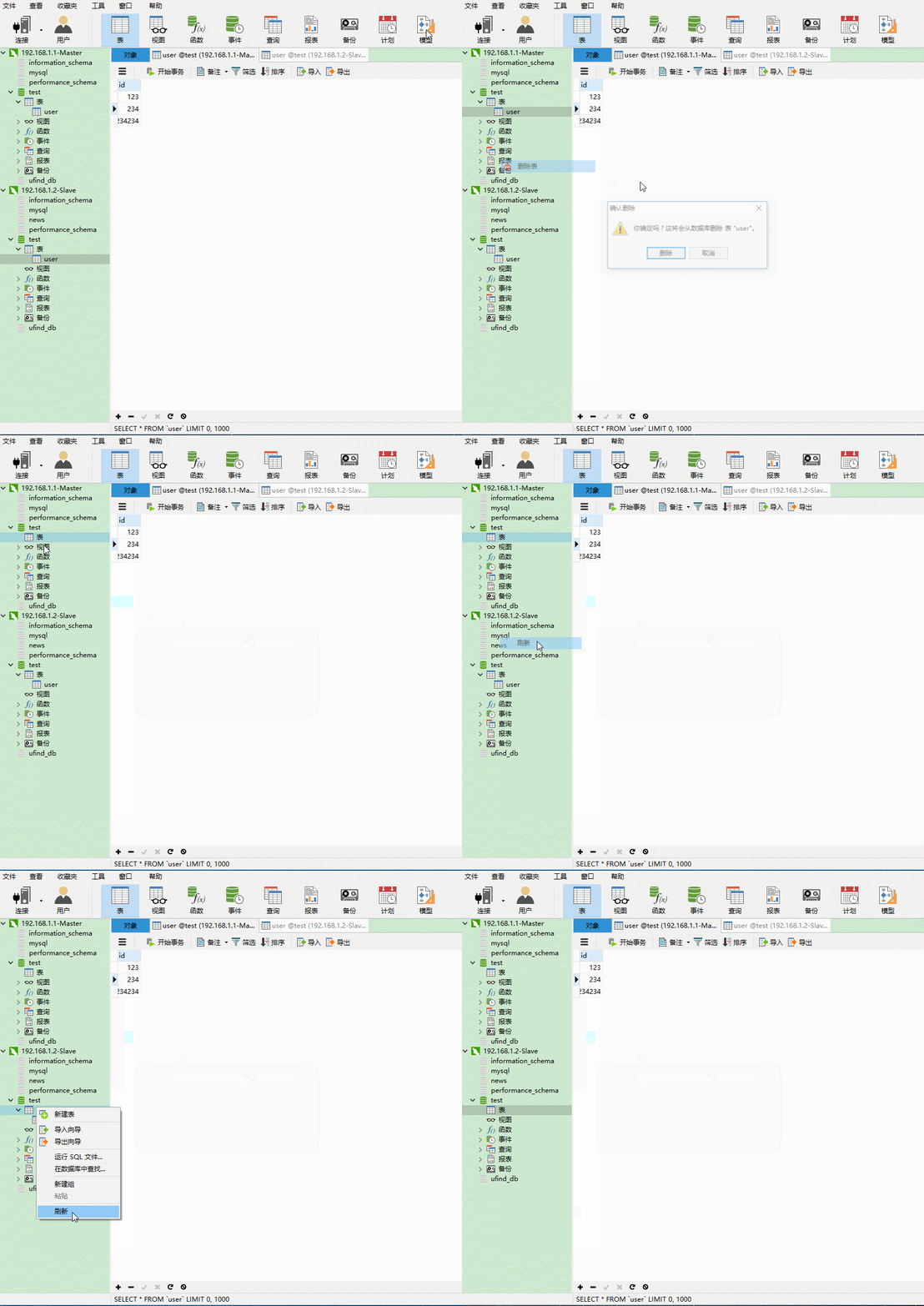
配置过程,到此为止,希望能够帮助大家,如有疑问 欢迎留言。
MySQL主从数据库的安装的更多相关文章
- MySQL主从数据库同步延迟问题解决(转)
最近在做MySQL主从数据库同步测试,发现了一些问题,其中主从同步延迟问题是其中之一,下面内容是从网上找到的一些讲解,记录下来以便自己学习: MySQL的主从同步是一个很成熟的架构,优点为:①在从服务 ...
- Windows系统环境下创建mysql主从数据库方法(双向主从复制)
创建mysql主从数据库方法(双向主从复制) (一)Windows系统下的MySQL主从复制(单向复制) (1)环境说明: 1,Mysql版本:mysql5.7.20(主从机mysql版本必须一致) ...
- Mysql 主从数据库
MYSQL主从数据库同步备份配置 一.准备 用两台服务器做测试: Master Server: 172.16.0.180/Linux/MYSQL 5.1.41 Slave Server: 172.16 ...
- Mysql主从数据库架构的复制原理及配置详解
1 复制概述 Mysql内建的复制功能是构建大型,高性能应用程序的基础.将Mysql的数据分布到多个系统上去,这种分布的机制,是通过将Mysql的某一台主机的数据复制到其它主机(slaves)上,并重 ...
- MySQL 主从数据库设置
1.复制的介绍 MySQL 支持单向.异步复制,复制过程中一个服务器充当主服务器,而一个或多个其它服务器充当从服务器.主服务器将更新写入二进制日志文件,并维护文件的一个索引 以跟踪日志循环.这些日志可 ...
- 数据字符集mysql主从数据库,分库分表等笔记
文章结束给大家来个程序员笑话:[M] 1.mysql的目录:在rpm或者yum安装时:/var/lib/mysql 在编译安装时默许目录:/usr/local/mysql 2.用rpm包安装的MyS ...
- mysql主从数据库
Mysql主从配置,实现读写分离 大型网站为了软解大量的并发访问,除了在网站实现分布式负载均衡,远远不够.到了数据业务层.数据访问层,如果还是传统的数据结构,或者只是单单靠一台服务器扛,如此多的数据库 ...
- 配置mysql主从数据库
来源地址:https://www.cnblogs.com/alvin_xp/p/4162249.html Mysql主从配置,实现读写分离 大型网站为了软解大量的并发访问,除了在网站实现分布式负载均衡 ...
- 【linux】【mysql】mysql主从数据库
系统环境:Centos7 主:192.168.8.162 从:192.168.8.127 前提条件 a.关闭防火墙 systemctl stop firewalld 关闭防火墙开机自启 system ...
随机推荐
- Js 模式匹配
模式匹配: 什么是模式匹配:可以设置查找或替换的规则! 何时使用模式匹配:要查找的关键字可能发生有规律的变化. 如何使用模式匹配: 1.先定义模式:/关键字/模式 比如:var reg=/no/i; ...
- 更改MySQL数据库的编码为utf8mb4
原文:http://blog.csdn.net/woslx/article/details/49685111 utf-8编码可能2个字节.3个字节.4个字节的字符,但是MySQL的utf8编码只支持3 ...
- 设置 sideload Outlook Add-ins
上期,我们讲到了用前端技术去建立一个outlook add-ins 我们今天来讲解一下怎样测试一个sideload outlook add-ins. 1. 我们需要登录Outlook在Office 3 ...
- 自建mail服务器之二:hmailserver
具体参考: http://blog.xuite.net/sendohshih/blog/41958216-3%E5%88%86%E9%90%98%E8%BC%95%E9%AC%86%E6%93%81% ...
- SQL Server数据库有三种恢复模式:简单恢复模式、完整恢复模式和大容量日志恢复模式
SQL Server数据库有三种恢复模式:简单恢复模式.完整恢复模式和大容量日志恢复模式: 1.Simple 简单恢复模式, Simple模式的旧称叫”Checkpoint with truncate ...
- TypeScript 之 基础类型、高级类型
基础类型:https://m.runoob.com/manual/gitbook/TypeScript/_book/doc/handbook/Basic%20Types.html 高级类型:https ...
- Jmeter中Websocket协议支持包的使用
Jmeter中Websocket协议支持包的使用(转) 参考的来源是国外一篇文章,已经整理成pdf格式(http://yunpan.cn/cFzwiyeQDKdh3 (提取码:9bcf)) 转自:ht ...
- JDK官网下载教程
进入官网网址 https://www.oracle.com/index.html 登录成功后,即可进行下载! PS:新版谷歌浏览器可能会出现无法下载的问题,使用IE浏览器即可.
- CentOS6.5_64位系统下安装配置postfix邮件系统 启用并配置SMTP虚拟账户
http://blog.jjonline.cn/linux/185.html http://www.cnblogs.com/apexchu/p/4271264.html 用户新增和删除 http:// ...
- mysql 性能
https://blog.csdn.net/zengxuewen2045/article/category/6388631 #sda 磁盘信息dstat -D sda 3 5 #找出系统瓶颈dstat ...