
在LaTeX中使用颜色 Using colours in LaTeX
Using colours in LaTeX
There are several elements in LATEX whose colour can be changed to improve the appearance of the document. Colours can be manually defined to a desired tone using several models, this article explains how.
Contents |
Introduction
The simplest manner to use colours in your LATEX document is by importing the package color or xcolor. Both packages provide a common set of commands for colour manipulation, but the latter is more flexible and supports a larger number of colour models. Below an example:
\documentclass{article}

\usepackage[utf8]{inputenc}

\usepackage[english]{babel}


\usepackage{color}


\begin{document}


This example shows different examples on how to use the \texttt{color} package

to change the colour of elements in \LaTeX.


\begin{itemize}

\color{blue}

\item First item

\item Second item

\end{itemize}


\noindent

{\color{red} \rule{\linewidth}{0.5mm} }


\end{document}
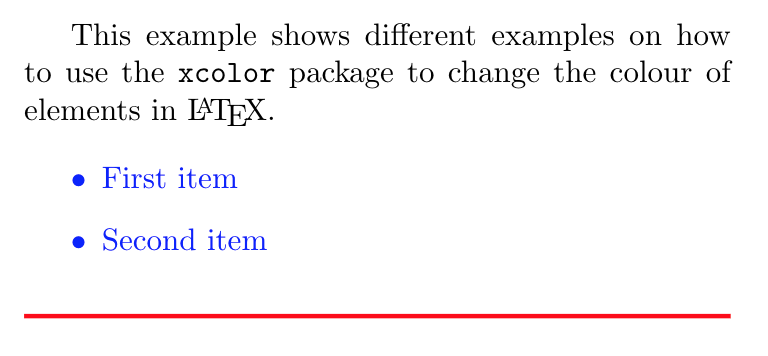
Note: In all the examples the package xcolor can be used instead of color
In this example, the package color is imported with
\usepackage{color}
then the command \color{blue} sets the blue colour for the current block of text. In this case for theitemize environment.
The colour of a second block of text, delimited by { and }, is set to red with the command \color{red}, then a 0.5mm-thick horizontal ruler is inserted by \rule{\linewidth}{0.5mm}.
The amount of available colour names depends on the driver, usually the next colours can be used with any driver: white, black, yellow, green, blue, purple cyan and magenta.
See the reference guide for more colours supported by other drivers.
Open an example of the color package in ShareLaTeX
Basic usage
The colour system provided by the packages color and xcolor is built around the idea of colour models, the colour mode and the colour names supported by a driver vary.
The model based on colour names is very intuitive, even though the list of available names is limited, usually provides enough options. Below an example:
\documentclass{article}

\usepackage[utf8]{inputenc}

\usepackage[english]{babel}


\usepackage[usenames, dvipsnames]{color}


\begin{document}


This example shows different examples on how to use the \texttt{color} package

to change the colour of elements in \LaTeX.


\begin{itemize}

\color{ForestGreen}

\item First item

\item Second item

\end{itemize}


\noindent

{\color{RubineRed} \rule{\linewidth}{0.5mm} }


The background colour of some text can also be \textcolor{red}{easily} set. For

instance, you can change to orange the background of \colorbox{BurntOrange}{this

text} and then continue typing.


\end{document}
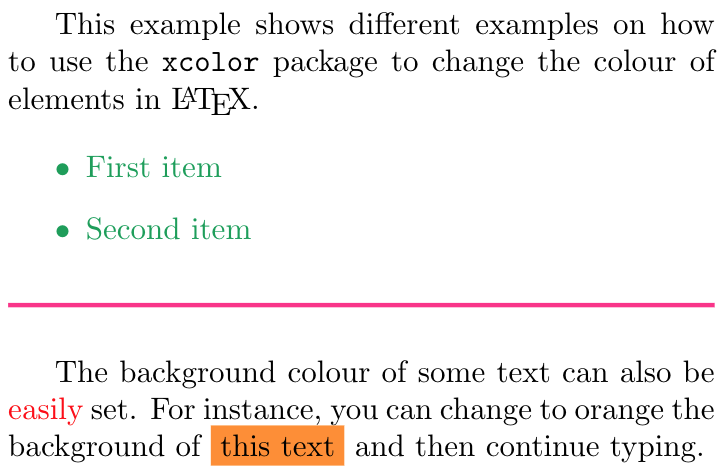
There are a few changes in this example compared to the one presented in the introduction. First, the command to import the color package has two additional parameters:
usenamesMakes the names in the corresponding driver name model available. This option can be omitted in xcolor.dvipsnamesMakes the colour names for the driver dvips available, if the package color is imported, this option must be used in conjunction withusenames. From this new set of colour names, the example uses: ForestGreen, RubineRed and BurntOrange. See the reference guide for a complete list of possible colours.
Other possible drivers are: xdvi, dvipdf, pdftex, dvipsone, dviwin, emtex, truetex and xtex.
Two new commands are also presented in the example:
\textcolor{red}{easily}- Changes the colour of inline text. Takes two parameters, the colour to use and the text whose colour is changed. In the example the word
easilyis printed inred
\colorbox{BurntOrange}{this text}- Changes the background colour of the text passed as second parameter. In the example the words
this textare printed inBurntOrange.
Open an example of the color package in ShareLaTeX
Creating your own colours
It is possible to define your own colours, the manner in which the colour is defined depends on the preferred model. Below an example using the 4 colour models typically supported by any driver.
\documentclass{article}

\usepackage[utf8]{inputenc}

\usepackage[english]{babel}


\usepackage[usenames, dvipsnames]{color}


\definecolor{mypink1}{rgb}{0.858, 0.188, 0.478}

\definecolor{mypink2}{RGB}{219, 48, 122}

\definecolor{mypink3}{cmyk}{0, 0.7808, 0.4429, 0.1412}

\definecolor{mygray}{gray}{0.6}


\begin{document}

User-defined colours with different colour models:


\begin{enumerate}

\item \textcolor{mypink1}{Pink with rgb}

\item \textcolor{mypink2}{Pink with RGB}

\item \textcolor{mypink3}{Pink with cmyk}

\item \textcolor{mygray}{Gray with gray}

\end{enumerate}


\end{document}
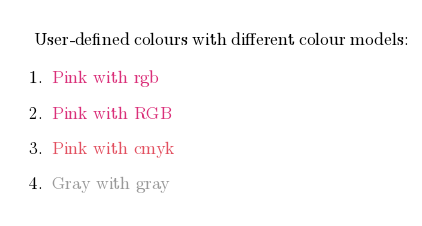
The command \definecolor takes three parameters: the name of the new colour, the model, and the colour definition. Roughly speaking, each number represent how much of each colour you add to the mix that makes up the final colour.
- rgb: Red, Green, Blue. Three comma-separated values between 0 and 1 define the components of the colour.
- RGB: The same as rgb, but the numbers are integers between 0 and 255.
- cmyk: Cyan, Magenta, Yellow and blacK. Comma-separated list of four numbers between 0 and 1 that determine the colour according to the additive model used in most printers.
- gray: Grey scale. A single number between 0 and 1.
In the example, mypink1, mypink2 and mypink3 define the same colour but for different models. You can actually see that the one defined by cmyk is slightly different.
Colours defined by either model can later be used within your document not only to set the colour of the text, but for any other element that takes a colour as parameter, for instance tables (you must add the parameter table to the preamble), graphic elements created with TikZ, plots, vertical rulers in multicolumn documents and code listings.
Open an example of the color package in ShareLaTeX
xcolor-only colour models
There are some additional commands that are only available with the package xcolor, these enable support for more colour models and friendly colour mixing.
\documentclass{article}

\usepackage[utf8]{inputenc}

\usepackage[english]{babel}


\usepackage[dvipsnames]{xcolor}

\colorlet{LightRubineRed}{RubineRed!70!}

\colorlet{Mycolor1}{green!10!orange!90!}

\definecolor{Mycolor2}{HTML}{00F9DE}


\begin{document}


This document present several examples on how to use the \texttt{color} package

to change the colour of elements in \LaTeX.


\begin{itemize}

\item \textcolor{Mycolor1}{First item}

\item \textcolor{Mycolor2}{Second item}

\end{itemize}


\noindent

{\color{LightRubineRed} \rule{\linewidth}{1mm} }


\noindent

{\color{RubineRed} \rule{\linewidth}{1mm} }
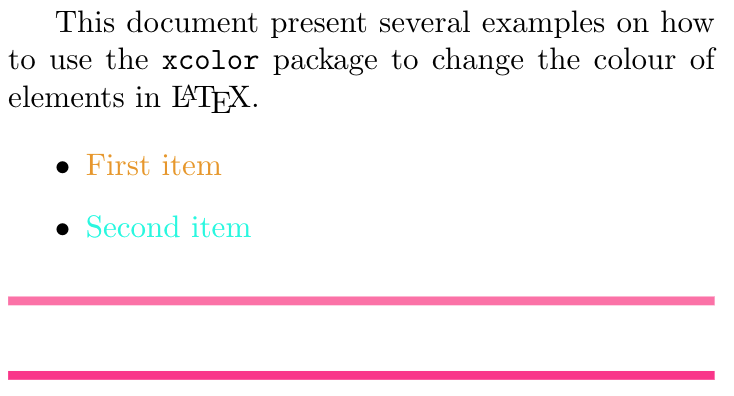
Three new colours are defined in this example, each one in a different manner.
\colorlet{LightRubineRed}{RubineRed!70!}- A new colour named LightRubineRed is created, this colour has 70% the intensity of the original RubineRedcolour. You can think of it as a mixture of 70% RubineRed and 30% white. Defining colours in this way is great to obtain different tones of a main colour, common practice in corporate brands. In the example, you can see the original RubineRed and the new LightRubineRed used in two consecutive horizontal rulers.
\colorlet{Mycolor1}{green!10!orange!90!}- A colour named Mycolor1 is created with 10% green and 90%orange. You can use any number of colours to create new ones with this syntax.
\definecolor{Mycolor2}{HTML}{00F9DE}- The colour Mycolor2 is created using the
HTMLmodel. Colours in this model must be created with 6 hexadecimal digits, the characters A,B,C,D,E and F must be upper-case.
The colour models that only xcolor support are:
- cmy cyan, magenta, yellow
- hsb hue, saturation, brightness
- HTML RRGGBB
- Gray Grey scale, a number between 1 and 15.
- wave Wave length. Between 363 and 814.
Open an example of the xcolor package in ShareLaTeX
Setting the page background colour
The background colour of the entire page can be easily changed with \pagecolor. See the next example:
\pagecolor{black}

\color{white}
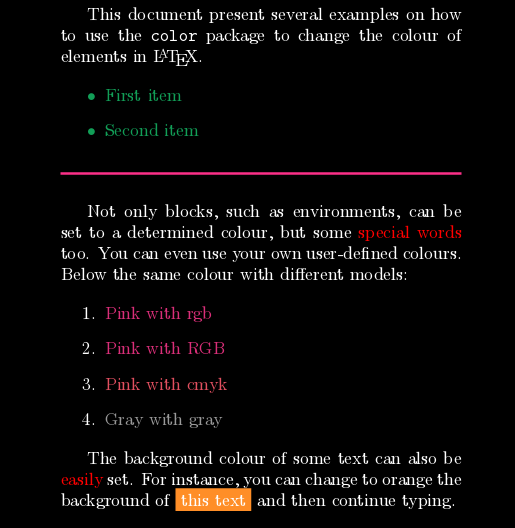
The command \pagecolor{black} set the page colour to black. This is a switch command, meaning it will take effect in the entire document unless another switch command is used to revert it. \nopagecolor will change the background back to normal.
Open an example of the color package in ShareLaTeX
Reference guide
Basic colour names available in LATEX
white, black, red, green, blue, cyan, magenta, yellow

Colour names available with the dvipsnames option
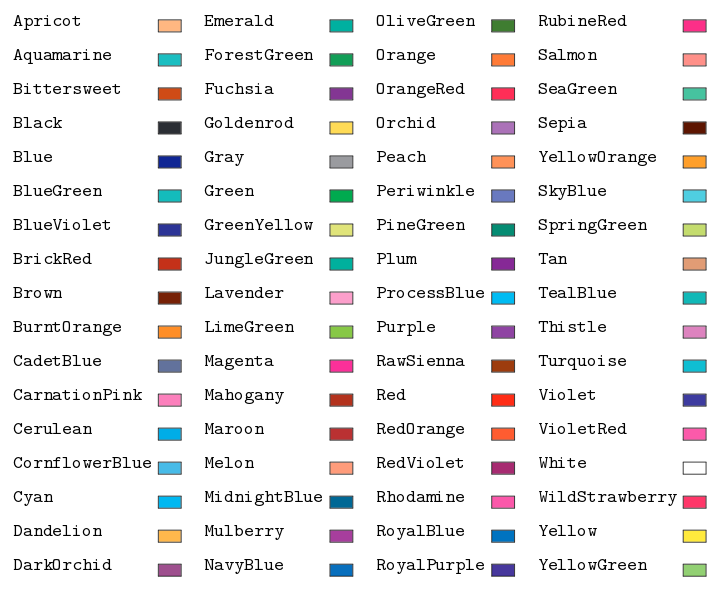
Other drivers have more colour names available, links to documentations in the further reading section.
Open an example of the xcolor package in ShareLaTeX
from: https://www.sharelatex.com/learn/Using_colours_in_LaTeX
在LaTeX中使用颜色 Using colours in LaTeX的更多相关文章
- Latex中如何设置字体颜色(3种方式)
Latex中如何设置字体颜色(三种方式) 1.直接使用定义好的颜色 \usepackage{color} \textcolor{red/blue/green/black/white/cyan/ma ...
- Latex中画出函数文件的调用关系拓扑图
流程图,思维导图,拓扑图通常能把我们遇到的一些复杂的关系结构用图形的方式展现出来.在Latex中要想画这样的拓扑图,有一个很好用的绘图工具包 pgf/tikz . 1.pgf/tikz的安装:pgf/ ...
- LaTeX中Python代码的语法高亮
LaTeX中Python代码的语法高亮 本文中,"{}"中的字母为LaTeX或Python的包名,只有"Pygments"是Python的包,其他都是LaTeX ...
- 如何在latex 中插入EPS格式图片
如何在latex 中插入EPS格式图片 第一步:生成.eps格式的图片 1.利用visio画图,另存为pdf格式的图片 利用Adobe Acrobat裁边,使图片大小合适 另存为.eps格式,如下图所 ...
- Latex中插入C语言代码
Latex是一个文本排版的语言,能排版出各种我们想要的效果.而且用代码排版的优点是易于修改板式,因此在文本内容的排版时,Latex应用十分广泛. 当我们需要在Latex中插入代码时,就需要用到 \us ...
- 计算机中的颜色XIV——快速变换颜色的V分量
基本知识回顾: 计算机中的颜色Color,用RGB模式存储(用R.G.B三个分量表示颜色,每个分量的范围是0—255). 而计算机中的颜色除了用RGB模式表示以外,常见的还有HSV模式(或者是HSB. ...
- paper 48: Latex中如何制作参考文献
文章写到现在,最后一步就要大功告成了!reference,let's go! 一.用Google来做Latex的bib文件 1. 打开scholar.google.com 2. 定制 Schola ...
- Latex中关于参考文献的一些经验
又到了继春节后的又一个投稿高峰,在Latex中写参考文献时经常会出现这样那样的问题,而且出版社不同比如IEEE与Elaver,需要引入的包也有不同.在search解决方案时,发现一篇有用的博文,转载一 ...
- The usage method of reference with bibtex in Latex【latex中参考文献的使用方法】
如何在latex中以Bibtex文件方式引用参考文献? 以IEEEtran模板为例: 1.制作bibtex参考文献库.方法如下: ①建立myreference.bib文件: ②在Google scho ...
随机推荐
- spark streaming限制吞吐
使用spark.streaming.receiver.maxRate这个属性限制每秒的最大吞吐.官方文档如下: Maximum rate (number of records per second) ...
- LCIS hdu3308 (线段树 区间合并)
题意: 有两种操作 一种是单点改为b 一种是给出区间ab 区间ab的最大上升子序列个数.. 线段树目前学了三种 第一种单点操作很简单 第二种区域操作加上懒惰标记即可 现在这种 为区间合并. ...
- Android SDK platforms build-tools等镜像下载
Android SDK platforms build-tools等镜像下载 下载地址:http://mirrors.neusoft.edu.cn/android/repository/ 这 ...
- JAVA死锁的写法
在java开发中,避免不了要加锁控制程序逻辑,但加锁有可能导致死锁,造成线程永远卡死在等待释放锁,后面的代码得不到执行: 在java里,一般是通过synchronized关键字加锁,在jdk1.5版本 ...
- EF框架搭建小总结--CodeFirst代码优先
前言:之前在下总结编写了一篇 EF框架搭建小总结--ModelFirst模型优先 博文,看到一段时间内该博文的访问量蹭.蹭蹭.蹭蹭蹭...往上涨(实际也不是很多,嘿嘿),但是还是按捺不住内心的喜悦(蛮 ...
- 前后端分离之JWT用户认证(转)
在前后端分离开发时为什么需要用户认证呢?原因是由于HTTP协定是不储存状态的(stateless),这意味着当我们透过帐号密码验证一个使用者时,当下一个request请求时它就把刚刚的资料忘了.于是我 ...
- 命令:install
简介 从命令的名字上来看,会让人误以为这是一个和安装相关的命令. 其实不然,install命令用于复制文件(cp)或创建空目录(mkdir)并设置相关的属性(chown.chmod). 这里的属性包含 ...
- queue模块回顾
queue queue是python中的标准库,俗称队列. 在python中,多个线程之间的数据是共享的,多个线程进行数据交换的时候,不能够保证数据的安全性和一致性,所以当多个线程需要进行数据交换的时 ...
- Codeforces Round #272 (Div. 2) D. Dreamoon and Sets 构造
D. Dreamoon and Sets 题目连接: http://www.codeforces.com/contest/476/problem/D Description Dreamoon like ...
- 使用 IntraWeb (3) - 页面切换
新建 StandAlone Application 工程后, 再通过 File > New > Other.. > IntraWeb > New Form 添加两个窗体. 然后 ...