
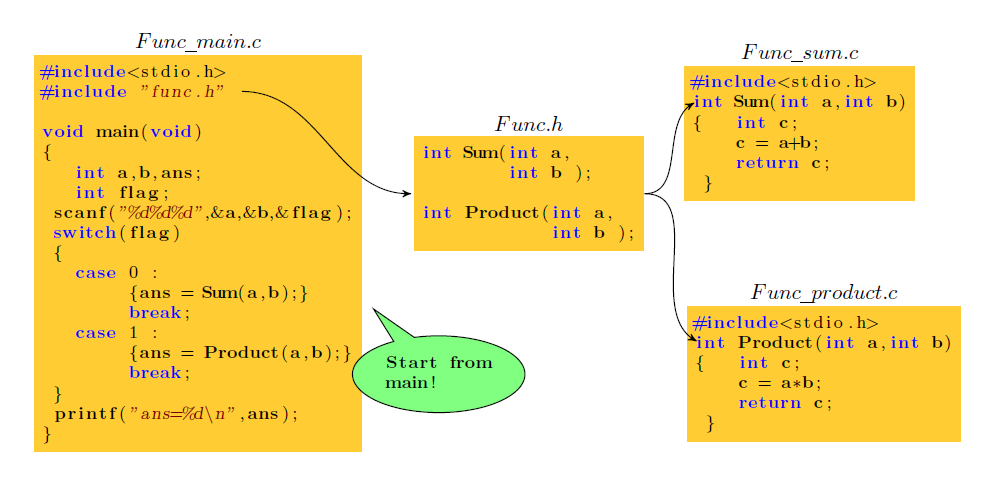
Latex中画出函数文件的调用关系拓扑图
流程图,思维导图,拓扑图通常能把我们遇到的一些复杂的关系结构用图形的方式展现出来。在Latex中要想画这样的拓扑图,有一个很好用的绘图工具包 pgf/tikz 。
1.pgf/tikz的安装:pgf/tikz 绘图工具用到的宏是 \usepackage{tikz} 。如果你的Latex并不带有这个宏包,那就需要参考[1]中进行安装。也可以直接下载使用带有这个宏包的新版本 CTeX_2.9.2.164_Full。
2.pgf/tikz的使用:参考[2]pgf/tikz使用说明,这里详细介绍了pgf/tikz的各种用法。
利用Latex绘制函数关系的图
\documentclass{report}

\usepackage{pgf}

\usepackage{tikz}

\usepackage{listings}

\usepackage{xcolor}

\usepackage{graphicx}

\usetikzlibrary{shapes.callouts}

\usetikzlibrary{arrows,decorations.pathmorphing, backgrounds, positioning, fit, petri, automata}

\definecolor{yellow1}{rgb}{1,0.8,0.2}

\lstset{

    basicstyle=\footnotesize,

    framexleftmargin=1.5mm,

    keywordstyle=\color{blue}\bfseries,

    identifierstyle=\bf,

    commentstyle=\it\color[RGB]{96,96,96},

    stringstyle=\rmfamily\slshape\color[RGB]{128,0,0},

    showstringspaces=false

}

\begin{document}

\begin{tikzpicture}

[remember picture, note/.style={ellipse callout, fill=#1},

->,>=stealth',shorten >=1pt,auto,node distance=2.8cm,semithick]

\tikzstyle{every state}=[rectangle,fill=yellow1,draw=none,text=black]

%创建对象:\node(对象属性)   (对象名称)  at (对象坐标) {对象内容};

\node[state]         (fun_main) at (-32, 16)        {

\begin{lstlisting}[language={C}]

#include<stdio.h>

#include "func.h"

void main(void)

{

   int a,b,ans;

   int flag;

 scanf("%d%d%d",&a,&b,&flag);

 switch(flag)

 {

   case 0 :

        {ans = Sum(a,b);}

        break;

   case 1 :

        {ans = Product(a,b);}

        break;

 }

 printf("ans=%d\n",ans);

}

\end{lstlisting}

};

\node[state,fill=none]         (filename_main) at ([yshift=0.2cm]fun_main.north)        {$Func\underline{\hspace{0.5em}}main.c$};

\node[state]         (fun0) at (-26.5, 17)        {

\begin{lstlisting}[language={C}]

int Sum(int a,

        int b );

int Product(int a,

            int b );

\end{lstlisting}

};

\node[state,fill=none]         (file0) at ([yshift=0.2cm]fun0.north)        {$Func.h$};

\node[state]         (fun1) at (-22, 18)        {

\begin{lstlisting}[language={C}]

#include<stdio.h>

int Sum(int a,int b)

{   int c;

    c = a+b;

    return c;

 }

\end{lstlisting}

};

\node[state,fill=none]         (file1) at ([yshift=0.2cm]fun1.north)        {$Func\underline{\hspace{0.5em}}sum.c$};

\node[state]         (fun2) at (-21.6, 14)        {

\begin{lstlisting}[language={C}]

#include<stdio.h>

int Product(int a,int b)

{   int c;

    c = a*b;

    return c;

 }

\end{lstlisting}

};

\node[state,fill=none]         (file2) at ([yshift=0.2cm]fun2.north)        {$Func\underline{\hspace{0.5em}}product.c$};

%\node[标注填充颜色,相对标注对象坐标,边框] (标注对象名称) at (标注对象的坐标) {内容};

\node[note=green!50, callout relative pointer={(-0.5,0.5)}, draw] (note_name)at (-28,14) {

\begin{lstlisting}[language={C}]

Start from

main!

\end{lstlisting}

};

%箭头:([横平移,纵平移]箭头端点相对对象1的位置) (out:箭头出射角度,int:箭头入射角度) ([横平移,纵平移]箭头端点相对对象2的位置);

\draw[->] ([xshift=-2.0cm,yshift=-0.6cm]fun_main.north east) to[out=0,in=180]  ([xshift=0cm,yshift=0cm]fun0.west);

\draw[->] (fun0.east) to[out=0,in=210]  ([xshift=0.2cm,yshift=-0.6cm]fun1.north west);

\draw[->] (fun0.east) to[out=0,in=150]  ([xshift=0.2cm,yshift=-0.6cm]fun2.north west);

\end{tikzpicture}

\end{document}
排版出来的效果如下
参考:
[1] http://blog.csdn.net/mathsoperator/article/details/6747170
[2] http://mirror.lzu.edu.cn/CTAN/graphics/pgf/base/doc/pgfmanual.pdf
[3] Latex论坛,http://tex.stackexchange.com/
Latex中画出函数文件的调用关系拓扑图的更多相关文章
- Latex中cls和sty文件有何区别?
Latex中cls和sty文件有何区别? 资源 本文对 LaTeX 中 .cls 和 .sty 文件进行介绍,主要参考了 What are .cls and .sty files?How are th ...
- python—networkx:在一张图中画出多个子图
通过plt.subplot能够在一张图中画出多个子图 #coding: utf-8 #!/usr/bin/env python """ Draw a graph with ...
- Linux 编程中的API函数和系统调用的关系【转】
转自:http://blog.chinaunix.net/uid-25968088-id-3426027.html 原文地址:Linux 编程中的API函数和系统调用的关系 作者:up哥小号 API: ...
- haploview画出所有SNP的LD关系图
有时候我们想画出所有SNP的LD关系图,则需要在命令行添加“-skipcheck”命令行,如下所示: java -jar Haploview.jar -skipcheck -n -pedfile 80 ...
- shell从函数文件里调用函数
碰到一个shell中函数调用的小问题,记录一下. shell中函数有三种调用方式,一种是在文件前面定义函数,然后在以下直接调用:一种是通过加载shell,在shell中直接调用:第三种是将函数写入文件 ...
- wpf 在不同DPI下如何在DrawingVisual中画出清晰的图形
环境Win10 VS2017 .Net Framework4.7.1 本文仅讨论在DrawingVisual中进行的画图. WPF单位,系统DPI,显示器DPI三者的定义及关系 WPF单位:一 ...
- 如何在canvas中画出一个太极图
先放一个效果图: 代码如下 <!DOCTYPE html> <html> <head> <meta charset="utf-8" /&g ...
- android中画弧函数canvas.drawArc()之理解
在学习android中图形图像处理技术这部分内容时,对绘制圆弧函数canvas.drawArc()的用法.参数含义及画图原理很是不理解,在网上搜索了一些,加上自己的理解,在此做个小总结,作为学习过程中 ...
- Mysql获取字符串中的数字函数方法和调用
)) ) BEGIN ; ) default ''; set v_length=CHAR_LENGTH(Varstring); DO )) )) ) THEN )); END IF; ; END WH ...
随机推荐
- 【BZOJ 4582】【Usaco2016 Open】Diamond Collector
http://www.lydsy.com/JudgeOnline/problem.php?id=4582 排好序后用两个指针直接\(O(n)\)扫,貌似这个东西学名"two pointers ...
- jquery option
转--jquery动态添加option示例 http://www.jb51.net/article/45031.htm //js动态添加option var sel= document.getElem ...
- C#-WebForm-Session、Cookie-登录验证(未登录跳至登录界面)、隐藏地址栏传值
Post 传值(看不见的传值) Get 传值(看得见的传值) Session - 全局变量组 存放位置:服务端 作用:只要里面有内容,那么这个网站中所有的C#端都能访问到这个变量 -- object类 ...
- ORacle修改表列长度
alter table 表名 modify column_name varchar2(32) alter table 表名 modify (column_name1 varchar(20) defau ...
- Python Numpy,Pandas基础笔记
Numpy Numpy是python的一个库.支持维度数组与矩阵计算并提供大量的数学函数库. arr = np.array([[1.2,1.3,1.4],[1.5,1.6,1.7]])#创建ndarr ...
- sass接触
第一句话就是棒棒的,我爱上了. 看了真阿当的文章:<2016年前端技术观察> http://weibo.com/ttarticle/p/show?id=230940405256054051 ...
- BZOJ2730: [HNOI2012]矿场搭建
传送门 图的连通性相关的必和割点割边之类的有关. 题目要求对于一个无向图,任意一点被删除后,所有点都和某些指定点是联通的. 这道题比较简单的做法就是求出来所有的块.对于一个块,如果块里有两个及两个以上 ...
- js 闭包
this.color = "blue"; (function(_this) { setInterval(function() { if (_this.color !== " ...
- 百度地图api调用
<script type="text/javascript" src="http://api.map.baidu.com/api?key=&v=1.1&am ...
- oracle 12c 加入系统服务
1修改oratab文件 vi /etc/oratab #把后台一行的N改为Y db01:/usr/oracle/app/product/11.2.0/dbhome_1:Y 2如果安装时.bash_pr ...