
js formData图片上传(单图上传、多图上传)后台java
单图上传
<div class="imgUp">
<label>头像单图</label>
<input type="file" name='photo' class="mui-input-clear" id='upimg' style="opacity: 0;" >
<img src="data:images/up.png" alt="" id='imgContent'>
</div>
js
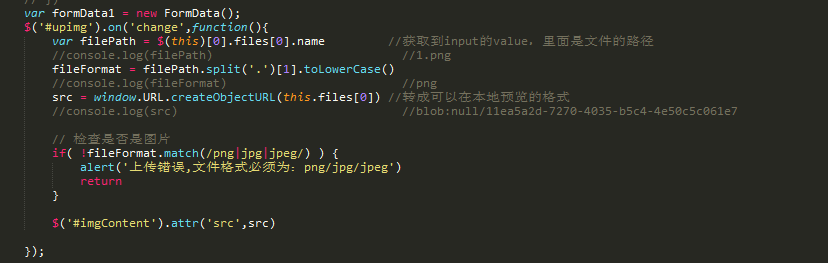
$('#upimg').on('change',function(){ //选中图片后展示在页面
var filePath = $(this)[0].files[0].name //获取到input的value,里面是文件的路径
//console.log(filePath) //1.png
fileFormat = filePath.split('.')[1].toLowerCase()
//console.log(fileFormat) //png
src = window.URL.createObjectURL(this.files[0]) //转成可以在本地预览的格式
//console.log(src) //blob:null/11ea5a2d-7270-4035-b5c4-4e50c5c061e7
// 检查是否是图片
if( !fileFormat.match(/png|jpg|jpeg/) ) {
alert('上传错误,文件格式必须为:png/jpg/jpeg')
return
}
$('#imgContent').attr('src',src)
})
多图上传
<div class="imgUp1">
<label>详情页多图</label>
<input type="file" class="mui-input-clear" id="upimg1" multiple style="opacity: 0;">
<img src="data:images/up.png" alt="" id='imgContent1'><br>
<div id="previewImg">
</div>
</div>
js
var fileall = [] //存放图片的容器
$('#upimg1').on('change', function(){
var imgFiles = $(this)[0].files
for (i=0;i<imgFiles.length;i++){
filePath = imgFiles[i].name
fileFormat = filePath.split('.')[1].toLowerCase()
src = window.URL.createObjectURL(imgFiles[i])
if( !fileFormat.match(/png|jpg|jpeg/) ) {
alert('上传错误,文件格式必须为:png/jpg/jpeg')
return
}
var preview = document.getElementById("previewImg")
var img = document.createElement('img')
img.width = 120
img.src = src
preview.prepend(img)
fileall.push($("#upimg1")[0].files[0])
console.log(fileall)
})
点击提交或者上传时
var formData1 = new FormData();
$("#submit").click(function(){
for(var i = 0;i<fileall.length;i++){
formData1.append("img",fileall[i]);
}
formData1.append("photo", $("#upimg")[0].files[0]);
$.ajax({
url: comPageUrl+'/applyVote',
type: 'POST',
async:true,
xhrFields:{
withCredentials:true
},
contentType:false,
processData:false, //这个很有必要,不然不行
dataType:"json",
mimeType:"multipart/form-data",
data: formData1,
success: function(res){
console.log(res)
if(res.status==200){
alert("上传成功")
}
},
error: function(){
alert('服务器发生错误!');
}
})
})



js formData图片上传(单图上传、多图上传)后台java的更多相关文章
- 怎么样通过php使用html5实现多文件上传?(php多图上传)
<!DOCTYPE html><html lang="zh-cn"> <head> <meta charset="utf-8&q ...
- js文件/图片从电脑里面拖拽到浏览器上传文件/图片
1.效果展示 2.html 代码: 1 2 3 4 5 6 7 8 9 10 11 12 13 14 15 16 17 18 <!DOCTYPE html> <html lang=& ...
- CAD控件:梦想CAD控件功能更新 清除图上的所有高亮实体
1,修正得组里面的实体,把删除实体也返回的错误 2,修正代理实体改不了颜色问题. 3,修正捕捉块插入点,有时会跑到很远的位置问题. 4.MxDrawChange类增加ToBlockRefe ...
- ASP.NET MVC中使用Dropzone.js实现图片的批量拖拽上传
说在前面 最近在做一个MVC相册的网站(这里),需要批量上传照片功能,所以就在网上搜相关的插件,偶然机会发现Dropzone.js,试用了一下完全符合我的要求,而且样式挺满意的,于是就在我的项目中使用 ...
- js实现图片上传预览及进度条
原文js实现图片上传预览及进度条 最近在做图片上传的时候,由于产品设计的比较fashion,上网找了比较久还没有现成的,因此自己做了一个,实现的功能如下: 1:去除浏览器<input type= ...
- html + js 实现图片上传,压缩,预览及图片压缩后得到Blob对象继续上传问题
先上效果 上传图片后(设置了最多上传3张图片,三张后上传按钮消失) 点击图片放大,可以使用删除和旋转按钮 (旋转功能主要是因为ios手机拍照后上传会有写图片被自动旋转,通过旋转功能可以调正) html ...
- thinkphp 多图片上传 单图片上传
不管是单图片上传还是多图片上传都必须要引用这两个js 下载地址 链接:http://pan.baidu.com/s/1eStkUt0 密码:asvo <script src="Publ ...
- js实现图片粘贴上传到服务器并展示
最近看了一些有关于js实现图片粘贴上传的demo,实现如下: (这里只能检测到截图粘贴和图片右键复制之后粘贴) demo1: document.addEventListener('paste', fu ...
- 原生js实现图片预览并上传
最近主导的PC客户端网站重构工程告一段落,下一阶段开始给公司APP开发H5页面,技术栈是react.最近碰到一个需求:需要在H5页面上添加身份证照片,预览并上传.因为要兼容安卓4.4以下版本的手机,所 ...
随机推荐
- activemq在一台服务器上启动多个Broker
步骤如下: 1.把整个conf文件夹复制一份,比如叫conf2 2.修改里面的activemq.xml文件 ①brokerName不能和原来的重复 ②数据存放的文件名称不能重复,比如<kahaD ...
- Synchronzied(内置锁)
原文地址:深入JVM锁机制1-synchronized 1. 线程的状态与转换 当多个线程同时请求某个对象监视器时,对象监视器会设置几种状态用来区分请求的线程: Contention List:所有请 ...
- 微信小程序实现给循环列表点击添加类(单项和多项)
在微信小程序里面没有DOM对象, 不能操作DOM. 所有的操作通过数据来实现,下面主要实现了给循环列表点击添加类的操作 一.单项 目标需求:实现下图,给点击的view增加类,每次只能选择一个. 主要思 ...
- canvars 画花
index.html <!DOCTYPE html><html><head> <title>旋转的花</title> <meta ch ...
- Spark集群之Spark history server额外配置
Note: driver在SparkContext使用stop()方法后才将完整的信息提交到指定的目录,如果不使用stop()方法,即使在指定目录中产生该应用程序的目录,history server ...
- VScode中支持Python虚拟环境
要在VScode中使用Python的virtualenv虚拟环境,首先在设置同添加虚拟环境所在目录和虚拟环境的识别规则: { ... "python.venvPath": &quo ...
- nginx配置client_body_temp_path
http://wiki.nginx.org/HttpCoreModule 中写道: 这里的client_body_temp_path是制定post上传的$_FILES上传的文件地址 后面的level1 ...
- c++中堆、栈、自由存储区和常量存储区(转)
代码段 --text(code segment/text segment)text段在内存中被映射为只读,但.data和.bss是可写的.text段是程序代码段,在AT91库中是表示程序段的大小,它是 ...
- php -- 格式化字符串
----- 003-output.php ----- <!DOCTYPE html> <html> <head> <meta http-equiv=" ...
- salesforce 零基础学习(六十三)Comparable实现Object列表数据的自定义排序
项目中通常有些需求为需要将某个sObject的数据列表按照某种规则排序显示到前台页面上,但是list上面的sort远远满足不了复杂的功能,此种情况需要自定义比较两个object大小的方法,所以需要创建 ...