
angular 组件通信
单页面应用组件通信有以下几种,这篇文章主要讲 Angular 通信
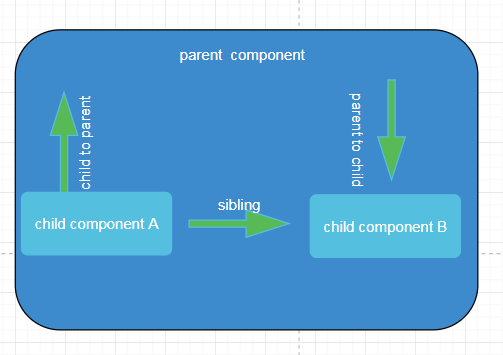
- 父组件 => 子组件
- 子组件 => 父组件
- 组件A = > 组件B
| 父组件 => 子组件 | 子组件 => 父组件 | sibling => sibling |
|---|---|---|
| @input | @output | |
| setters (本质上还是@input) | 注入父组件 | |
| ngOnChanges() (不推荐使用) | ||
| 局部变量 | ||
| @ViewChild() | ||
| service | service | service |
| Rxjs的Observalbe | Rxjs的Observalbe | Rxjs的Observalbe |
| localStorage,sessionStorage | localStorage,sessionStorage | localStorage,sessionStorage |
上面图表总结了能用到通信方案,期中最后3种,是通用的,angular的组件之间都可以使用这3种,其中Rxjs是最最牛逼的用法,甩redux,promise,这些同样基于函数式的状态管理几条街,下面一一说来
父组件 => 子组件
@input,最常用的一种方式
@Component({

  selector: 'app-parent',

template: '<div>childText:<app-child  [textContent] = "varString"></app-child></div>',

  styleUrls: ['./parent.component.css']

})

export class ParentComponent implements OnInit {

  varString: string;

  constructor() { }

  ngOnInit() {

    this.varString = '从父组件传过来的' ;

  }

}
import { Component, OnInit, Input } from '@angular/core';
@Component({
selector: 'app-child',
template: '<h1>{{textContent}}</h1>',
styleUrls: ['./child.component.css']
})
export class ChildComponent implements OnInit {
@Input() public textContent: string ;
constructor() { }
ngOnInit() {
}
}setter
setter 是拦截@input 属性,因为我们在组件通信的时候,常常需要对输入的属性处理下,就需要setter了,setter和getter常配套使用,稍微修改下上面的child.component.ts
child.component.ts
import { Component, OnInit, Input } from '@angular/core';

@Component({

  selector: 'app-child',

  template: '<h1>{{textContent}}</h1>',

  styleUrls: ['./child.component.css']

})

export class ChildComponent implements OnInit {

_textContent:string;

  @Input()

  set textContent(text: string){

   this._textContent = !text: "啥都没有给我" ? text ;

  } ;

  get textContent(){

  return this._textContent;

  }

  constructor() { }

  ngOnInit() {

  }

}
onChange
这个是通过angular生命周期钩子来检测,不推荐使用,要使用的话可以参angular文档
@ViewChild()
@ViewChild() 一般用在调用子组件非私有的方法
           import {Component, OnInit, ViewChild} from '@angular/core';

       import {ViewChildChildComponent} from "../view-child-child/view-child-child.component";

    @Component({

      selector: 'app-parent',

      templateUrl: './parent.component.html',

      styleUrls: ['./parent.component.css']

    })

    export class ParentComponent implements OnInit {

      varString: string;

      @ViewChild(ViewChildChildComponent)

      viewChildChildComponent: ViewChildChildComponent;

      constructor() { }

      ngOnInit() {

        this.varString = '从父组件传过来的' ;

      }

      clickEvent(clickEvent: any) {

        console.log(clickEvent);

        this.viewChildChildComponent.myName(clickEvent.value);

      }

    }
import { Component, OnInit } from '@angular/core';
@Component({
selector: 'app-view-child-child',
templateUrl: './view-child-child.component.html',
styleUrls: ['./view-child-child.component.css']
})
export class ViewChildChildComponent implements OnInit {
constructor() { }
name: string;
myName(name: string) {
console.log(name);
this.name = name ;
}
ngOnInit() {
}
}局部变量
局部变量和viewChild类似,只能用在html模板里,修改parent.component.html,通过#viewChild这个变量来表示子组件,就能调用子组件的方法了.
<div class="panel-body">

    <input class="form-control" type="text" #viewChildInputName >

    <button class=" btn btn-primary" (click)="viewChild.myName(viewChildInputName.value)">局部变量传值</button>

    <app-view-child-child #viewChild></app-view-child-child>

            </div>
child 组件如下
@Component({

  selector: 'app-view-child-child',

  templateUrl: './view-child-child.component.html',

  styleUrls: ['./view-child-child.component.css']

})

export class ViewChildChildComponent implements OnInit {

  constructor() { }

  name: string;

  myName(name: string) {

      console.log(name);

      this.name = name ;

  }

  ngOnInit() {

  }

}
子组件 => 父组件
@output()
output这种常见的通信,本质是给子组件传入一个function,在子组件里执行完某些方法后,再执行传入的这个回调function,将值传给父组件
parent.component.ts

@Component({

  selector: 'app-child-to-parent',

  templateUrl: './parent.component.html',

  styleUrls: ['./parent.component.css']

})

export class ChildToParentComponent implements OnInit {

  childName: string;

  childNameForInject: string;

  constructor( ) { }

  ngOnInit() {

  }

  showChildName(name: string) {

    this.childName = name;

  }

}
parent.component.html
<div class="panel-body">

  <p>output方式 childText:{{childName}}</p>

  <br>

  <app-output-child (childNameEventEmitter)="showChildName($event)"></app-output-child>

</div>
child.component.ts
export class OutputChildComponent implements OnInit {
// 传入的回调事件
@Output() public childNameEventEmitter: EventEmitter<any> = new EventEmitter();
constructor() { }
ngOnInit() {
}
showMyName(value) {
//这里就执行,父组件传入的函数
this.childNameEventEmitter.emit(value);
}
}注入父组件
这个原理的原因是父,子组件本质生命周期是一样的
export class OutputChildComponent implements OnInit {

  // 注入父组件

  constructor(private childToParentComponent: ChildToParentComponent) { }

  ngOnInit() {

  }

  showMyName(value) {

    this.childToParentComponent.childNameForInject = value;

  }

}
sibling组件 => sibling组件
service
Rxjs
通过service通信
angular中service是单例的,所以三种通信类型都可以通过service,很多前端对单例理解的不是很清楚,本质就是
,你在某个module中注入service,所有这个modul的component都可以拿到这个service的属性,方法,是共享的,所以常在app.moudule.ts注入日志service,http拦截service,在子module注入的service,只能这个子module能共享,在component注入的service,就只能子的component的能拿到service,下面以注入到app.module.ts,的service来演示
user.service.ts

@Injectable()

export class UserService {

  age: number;

  userName: string;

  constructor() { }

}

app.module.ts

@NgModule({

  declarations: [

    AppComponent,

    SiblingAComponent,

    SiblingBComponent

  ],

  imports: [

    BrowserModule

  ],

  providers: [UserService],

  bootstrap: [AppComponent]

})

export class AppModule { }

SiblingBComponent.ts

@Component({

  selector: 'app-sibling-b',

  templateUrl: './sibling-b.component.html',

  styleUrls: ['./sibling-b.component.css']

})

export class SiblingBComponent implements OnInit {

  constructor(private userService: UserService) {

    this.userService.userName = "王二";

  }

  ngOnInit() {

  }

}

SiblingAComponent.ts

@Component({

  selector: 'app-sibling-a',

  templateUrl: './sibling-a.component.html',

  styleUrls: ['./sibling-a.component.css']

})

export class SiblingAComponent implements OnInit {

  userName: string;

  constructor(private userService: UserService) {

  }

  ngOnInit() {

    this.userName = this.userService.userName;

  }

}
通过Rx.js通信
这个是最牛逼的,基于订阅发布的这种流文件处理,一旦订阅,发布的源头发生改变,订阅者就能拿到这个变化;这样说不是很好理解,简单解释就是,b.js,c.js,d.js订阅了a.js里某个值变化,b.js,c.js,d.js立马获取到这个变化的,但是a.js并没有主动调用b.js,c.js,d.js这些里面的方法,举个简单的例子,每个页面在处理ajax请求的时候,都有一弹出的提示信息,一般我会在
组件的template中中放一个提示框的组件,这样很繁琐每个组件都要来一次,如果基于Rx.js,就可以在app.component.ts中放这个提示组件,然后app.component.ts订阅公共的service,就比较省事了,代码如下
首先搞一个alset.service.ts
import {Injectable} from "@angular/core";

import {Subject} from "rxjs/Subject";

@Injectable()

export class AlertService {

  private messageSu = new Subject<string>();  //

  messageObserve = this.messageSu.asObservable();

  private  setMessage(message: string) {

    this.messageSu.next(message);

  }

  public success(message: string, callback?: Function) {

    this.setMessage(message);

    callback();

  }

}
sibling-a.component.ts
@Component({

  selector: 'app-sibling-a',

  templateUrl: './sibling-a.component.html',

  styleUrls: ['./sibling-a.component.css']

})

export class SiblingAComponent implements OnInit {

  userName: string;

  constructor(private userService: UserService, private alertService: AlertService) {

  }

  ngOnInit() {

    this.userName = this.userService.userName;

    // 改变alertService的信息源

    this.alertService.success("初始化成功");

  }

}
app.component.ts
@Component({

  selector: 'app-root',

  templateUrl: './app.component.html',

  styleUrls: ['./app.component.css']

})

export class AppComponent {

  title = 'app';

  message: string;

  constructor(private alertService: AlertService) {

    //订阅alertServcie的message服务

     this.alertService.messageObserve.subscribe((res: any) => {

      this.message = res;

    });

  }

}
这样订阅者就能动态的跟着发布源变化
总结: 以上就是常用的的通信方式,各种场景可以采取不同的方法
angular 组件通信的更多相关文章
- Angular 组件通信的三种方式
我们可以通过以下三种方式来实现: 传递一个组件的引用给另一个组件 通过子组件发送EventEmitter和父组件通信 通过serive通信 1. 传递一个组件的引用给另一个组件 Demo1 模板引用变 ...
- Angular组件通信
一. 组件间通信(组件间不能互相调用,公共方法放在服务中) (目前项目采用将公共方法直接写在ts文件中没使用服务) ng g service services/服务名 App.module.ts{ 引 ...
- angular6组件通信
此文章是用markdown书写,赋值全部到vscode打开即可. # Angular组件通信 ## .父组件传递数据到子组件 - `@Input`:属性绑定,父组件向子组件传递数据 ```js // ...
- angular组件间的通信(父子、不同组件的数据、方法的传递和调用)
angular组件间的通信(父子.不同组件的数据.方法的传递和调用) 一.不同组件的传值(使用服务解决) 1.创建服务组件 不同组件相互传递,使用服务组件,比较方便,简单,容易.先将公共组件写在服务的 ...
- 三大前端框架(react、vue、angular2+)父子组件通信总结
公司业务需要,react.vue.angular都有接触[\无奈脸].虽然说可以拓展知识广度,但是在深度上很让人头疼.最近没事的时候回忆各框架父子组件通信,发现很模糊,于是乎稍微做了一下功课,记录于此 ...
- angular5 组件通信(一)
用了两年angular1,对1的组件通信比较熟练,最直接的就是直接使用scope的父子节点scope就可以实现,且基本都是基于作用域实现的通信:还有就是emit,broadcast,on这几个东西了. ...
- 关于React的父子组件通信等等
//==================================================此处为父子组件通信 1.子组件调用父组件: 父组件将子组件需要调用方法存入props属性内,子组 ...
- Angular2 组件通信
1. 组件通信 我们知道Angular2应用程序实际上是有很多父子组价组成的组件树,因此,了解组件之间如何通信,特别是父子组件之间,对编写Angular2应用程序具有十分重要的意义,通常来讲,组件之间 ...
- vue.js入门(3)——组件通信
5.2 组件通信 尽管子组件可以用this.$parent访问它的父组件及其父链上任意的实例,不过子组件应当避免直接依赖父组件的数据,尽量显式地使用 props 传递数据.另外,在子组件中修改父组件的 ...
随机推荐
- php strlen()函数 语法
php strlen()函数 语法 作用:返回字符串的长度.大理石平台价格 语法:strlen(string) 参数: 参数 描述 string 必需.规定要检查的字符串. 说明:返回字符串的 ...
- HTML基础入门学习准备篇
在学习前端的开始,让我们一起来了解什么是HTML5时代的大前端开发和全栈开发的定义 传统的前端:切图-标签和样式-实现效果 H5时代的前端: 一.需要各端的兼容开发 二.可以用于APP开发和移动站点的 ...
- [CSP-S模拟测试]:Market(背包DP)
题目描述 在比特镇一共有$n$家商店,编号依次为$1$到$n$.每家商店只会卖一种物品,其中第$i$家商店的物品单价为$c_i$,价值为$v_i$,且该商店开张的时间为$t_i$. $Byteasar ...
- python保存selenium的cookies写入和读出
def write_cookie(self, cookie): try: with open("cookies%s" % self.uid, "wb+") as ...
- poj3744 (概率DP+矩阵快速幂)
http://poj.org/problem?id=3744 题意:在一条铺满地雷的路上,你现在的起点在1处.在N个点处布有地雷,1<=N<=10.地雷点的坐标范围:[1,10000000 ...
- git错误处理
1.今天 当我 执行 git add somefile 的时候,出现 如下 错误: If no other git process is currently running, this prob ...
- day03—JavaScript中DOM的Event事件方法
转行学开发,代码100天——2018-03-19 1.Event 对象 Event 对象代表事件的状态,比如事件在其中发生的元素.键盘按键的状态.鼠标的位置.鼠标按钮的状态. 事件通常与函数结合使用, ...
- 本站页脚HTML回顶部代码
<style type="text/css">.top { width: 50px; height: 50px; background-color: #F0F0F0; ...
- oracle中not in 和 in的代替用法
-- not in 的替代写法select col from table1 where col not in(select col from table2); select col,table2.co ...
- 20190815 On Java8 第五章 控制流
第五章 控制流 迭代语句 逗号操作符 在 Java 中逗号运算符(这里并非指我们平常用于分隔定义和方法参数的逗号分隔符)仅有一种用法:在 for 循环的初始化和步进控制中定义多个变量.我们可以使用逗号 ...