
使用Hystrix实现断路器处理
在之前的架构的基础上我们会发现,一旦级别低的服务宕了,会导致调用它的服务也挂掉,这样容易产生级联效应(雪崩效应),为了防止这种情况的出现,我引入了Hystrix来处理,先介绍ribbon使用Hystrix
首先引入以来pom.xml:
<!-- Hystrix -->

        <dependency>

            <groupId>org.springframework.cloud</groupId>

            <artifactId>spring-cloud-starter-hystrix</artifactId>

        </dependency>

        <dependency>

            <groupId>com.netflix.hystrix</groupId>

            <artifactId>hystrix-javanica</artifactId>

        </dependency>

        <!-- spring boot低版本使用上面的,高版本使用下面注释的内容,因为最新的hystrix隶属于netfix下 -->

<!--         <dependency> -->

<!--             <groupId>org.springframework.cloud</groupId> -->

<!--             <artifactId>spring-cloud-starter-netflix-hystrix</artifactId> -->

<!--         </dependency> -->

<!--         <dependency> -->

<!--             <groupId>org.springframework.cloud</groupId> -->

<!--             <artifactId>spring-cloud-starter-netflix-hystrix-dashboard</artifactId> -->

<!--         </dependency> -->
接着在启动类的上面加入Hystrix的注解@EnableCircuitBreaker
最后在MovieController中加入如下代码
@HystrixCommand(fallbackMethod = "fallbackfindUserByNameEn") //ribbon使用Hystrix
@ApiOperation(value = "查询用户ByName", notes = "查询用户By中文名")//方法说明
@ApiResponses(value = {@ApiResponse(code = 200, message = "成功", response = Movie.class)})//响应数据说明,可以有多个
@ApiImplicitParam(name = "name", value = "用户名", paramType = "path", required = true, dataType = "String")
@GetMapping(value = "/findUserByName/{name}",produces = { "application/json;charset=UTF-8" })
public User findUserByName(@PathVariable String name) {
return this.restTemplate.getForObject("http://xing-user/user/findByName/"+name, User.class);
}
这里解释一下@HystrixCommand(fallbackMethod = "fallbackfindUserByNameEn")是调用服务异常那就去执行fallbackfindUserByNameEn方法,当然你可能在别的博客里看到有如下的写法:
@HystrixCommand(fallbackMethod = "fallbackfindUserByNameEn",commandProperties = {@HystrixProperty(name="execution.isolation.strategy", value="SEMAPHORE")}),但是官方文档里面推荐写成我上面的代码中的格式,不要写commandProperties属性,
commandProperties这段属性的意思是调用fallbackfindUserByNameEn方法和执行findUserByNameEn方法在同一个线程中执行,官方不推荐添加这一段,官方文档推荐出现运行时找不到上下文异常的时候再加上这段代码,下面是官方文档的截图

记录一个异常,今天启动movie1的时候出现
org.springframework.beans.factory.BeanCreationNotAllowedException: Error creating bean with name 'org.springframework.cloud.netflix.eureka.EurekaDiscoveryClientConfiguration': Singleton bean creation not allowed while the singletons of this factory are in destruction (Do not request a bean from a BeanFactory in a destroy method implementation!)的异常,找了很久才发现是我开了IDEA,IDEA中我启动了一个项目,导致了端口占用,关闭IDEA中的项目就行。
下面我们介绍Feign中使用Hystrix
参照之前博客中的movie服务中的UserInterface(使用Feign调用user服务的接口类),在这个类的注解中加入标红的代码@FeignClient(name = "xing-user" ,fallback = UserInterfaceFallback.class)//服务名,之后在UserInterface这个java类的下面加一个类
@Component

class UserInterfaceFallback implements UserInterface {

    @Override

    public User findByNameEn(String nameEn) {

        User user = new User();

        user.setName("");

        user.setNameEn("");

        user.setId(0);

        return user;

    }
当然UserInterfaceFallback这个类也可以是单独写成一个java文件,没有非要写在UserInterface类同一个java文件中。测试成功可以实现断路功能。如果想在Feign中禁用Hystrix可以在yml中加入这个配置即可feign.hystrix.enabled=false
注意:这里提醒一点一定要加@Component这个注解,我看官方文档里面好像没有加,不加的话会有如下异常:

Caused by: org.springframework.beans.factory.BeanCreationException: Error creating bean with name 'com.xing.movie.FeignInteface.UserInterface':
FactoryBean threw exception on object creation; nested exception is java.lang.IllegalStateException: No fallback instance of type class com.xing.movie.FeignInteface.UserInterfaceFallback found for feign client xing-user

使用Hystrix Dashboard
Hystrix Dashboard,它主要用来实时监控Hystrix的各项指标信息。通过Hystrix Dashboard反馈的实时信息,可以帮助我们快速发现系统中存在的问题,下面我把它引入到我的项目中,使用很简单只要两步就行
第一步: 在pom.xml文件中加入Dashboard的依赖
<!-- Hystrxi dashboard的依赖,实时监控Hystrix的各项指标反馈实时信息 -->

            <dependency>

                <groupId>org.springframework.cloud</groupId>

                <artifactId>spring-cloud-starter-hystrix-dashboard</artifactId>

            </dependency>
第二步: 在启动类中加入@EnableHystrixDashboard注解就行了,之后启动你的项目,访问http://127.0.0.1:8081/hystrix/会看到下面这个界面

通过Hystrix Dashboard主页面的文字介绍,我们可以知道,Hystrix Dashboard共支持三种不同的监控方式
默认的集群监控:通过URL:http://turbine-hostname:port/turbine.stream开启,实现对默认集群的监控。
指定的集群监控:通过URL:http://turbine-hostname:port/turbine.stream?cluster=[clusterName]开启,实现对clusterName集群的监控。
单体应用的监控:通过URL:http://hystrix-app:port/hystrix.stream开启,实现对具体某个服务实例的监控。(我这里输入的是我的服务实例)
Delay:控制服务器上轮询监控信息的延迟时间,默认为2000毫秒,可以通过配置该属性来降低客户端的网络和CPU消耗。
Title:该参数可以展示合适的标题。
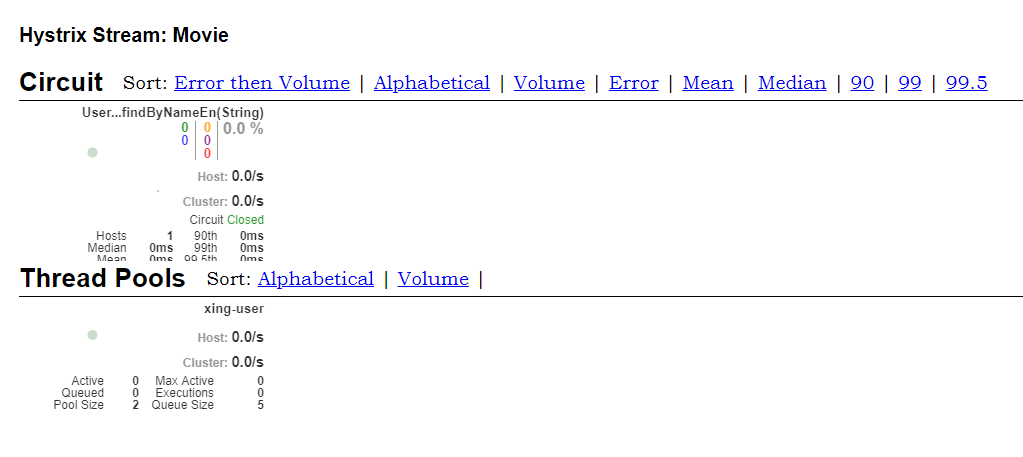
这个界面就可以看到你我的服务调用的成功和失败的情况了
源码地址:https://github.com/OnlyXingxing/SpringCloud
使用Hystrix实现断路器处理的更多相关文章
- spring cloud 入门系列四:使用Hystrix 实现断路器进行服务容错保护
在微服务中,我们将系统拆分为很多个服务单元,各单元之间通过服务注册和订阅消费的方式进行相互依赖.但是如果有一些服务出现问题了会怎么样? 比如说有三个服务(ABC),A调用B,B调用C.由于网络延迟或C ...
- SpringCloud学习系列之三----- 断路器(Hystrix)和断路器监控(Dashboard)
前言 本篇主要介绍的是SpringCloud中的断路器(Hystrix)和断路器指标看板(Dashboard)的相关使用知识. SpringCloud Hystrix Hystrix 介绍 Netfl ...
- spring cloud 2.x版本 Hystrix Dashboard断路器教程
前言 本文采用Spring cloud本文为2.1.8RELEASE,version=Greenwich.SR3 本文基于前两篇文章eureka-server.eureka-client.eureka ...
- SpringCould-------使用Hystrix 实现断路器进行服务容错保护
消费: <project xmlns="http://maven.apache.org/POM/4.0.0" xmlns:xsi="http://www.w3.or ...
- springcloud的Hystrix turbine断路器聚合监控实现(基于springboot2.02版本)
本文基于方志朋先生的博客实现:https://blog.csdn.net/forezp/article/details/70233227 一.准本工作 1.工具:Idea,JDK1.8,Maven3. ...
- SpringCloud2.0 Hystrix Dashboard 断路器指标看板
原文:https://www.cnblogs.com/songlu/p/9973856.html 1.启动基础工程 1.1.启动[服务中心]集群,工程名称:springcloud-eureka-ser ...
- SpringCloud2.0 Hystrix Dashboard 断路器指标看板 基础教程(八)
1.启动基础工程 1.1.启动[服务中心]集群,工程名称:springcloud-eureka-server 参考 SpringCloud2.0 Eureka Server 服务中心 基础教程(二) ...
- Spring Cloud学习 之 Spring Cloud Hystrix(断路器原理)
断路器定义: public interface HystrixCircuitBreaker { // 每个Hystrix都通过它判断是否被执行 public boolean allowRequest( ...
- Eureka+Hystrix(断路器、熔断器)
红圈是断路器的三种状态: 关闭:1.当consumer访问provider时,在网络超时访问内,访问成功: 2.有时互相调用会出现网络涌动,(比如北京访问广东的服务器要经过很多次路由才能达到并相应), ...
随机推荐
- go语言从例子开始之Example5.for循环
for 是 Go 中唯一的循环结构.这里有 for 循环的三个基本使用方式. package main import "fmt" func main() { 最常用的方式,带单个循 ...
- Vue的路有拦截与axios的封装
一丶首先我们先创建api与utils两个文件夹 二丶api文件夹里面新建文件api.js import request from "../utils/http" import qs ...
- WaitForSingleObject的作用[转]
在多线程的情况下,有时候我们会希望等待某一线程完成了再继续做其他事情(比如主线程等待子线程结束完之后,自己再结束),要实现这个目的,可以使用Windows API函数WaitForSingleObje ...
- Bootstrap 过渡效果
<!DOCTYPE html> <html <!DOCTYPE html> <html lang="en"> <head> & ...
- @HttpEntity参数(怪异)
1).在Controller中写 与@RequestBody请求体对应 @HttpEntity更强大,不光有请求体,还能获取请求头 @RequestMapping("/test02" ...
- 服务器中卸载JDK
- shell cut从一个文件中提取列
cut 语法 cut -d 分隔符 -f 列索引 file.txt #将文件file.txt以分隔符.进行分割,并取出第2列.cut -d '.' -f 3- file.txt #将文件file.tx ...
- 初识localstorage用法
最近在做一个类似填报信息的页面,一共有8页,当点击切换到下一页的时候要求把上一页的数据存到本地,以便下次切换到这个页面的时候自动把值填上去,并且在最后一页提交数据的时候直接用localstorage里 ...
- hdu 3060 Area2 (计算几何模板)
Problem Description 小白最近又被空军特招为飞行员,参与一项实战演习.演习的内容还是轰炸某个岛屿(这次的岛屿很大,很大很大很大,大到炸弹怎么扔都能完全在岛屿上引爆),看来小白确实是飞 ...
- angularjs的select使用2
https://cnodejs.org/topic/549007b44823a0234c9e1716 myAppModule.controller('FrmController', ['$scope' ...