
SpringCloud2.0 Hystrix Dashboard 断路器指标看板 基础教程(八)
1、启动基础工程
1.1、启动【服务中心】集群,工程名称:springcloud-eureka-server
1.2、启动【服务提供者】集群,工程名称:springcloud-eureka-client
1.3、启动【服务消费者】,工程名称:springcloud-eureka-ribbon
1.4、启动【服务消费者】,工程名称:springcloud-eureka-feign
2、创建【断路器指标看板】,即 Hystrix Dashboard
2.1、新建 Spring Boot 工程,工程名称:springcloud-eureka-hystrix-dashboard
2.2、工程 pom.xml 文件添加如下依赖:
<dependency>

    <groupId>org.springframework.boot</groupId>

    <artifactId>spring-boot-starter-actuator</artifactId>

</dependency>

<dependency>

    <groupId>org.springframework.boot</groupId>

    <artifactId>spring-boot-starter-web</artifactId>

</dependency>

<dependency>

    <groupId>org.springframework.cloud</groupId>

    <artifactId>spring-cloud-starter-netflix-eureka-client</artifactId>

</dependency>

<dependency>

    <groupId>org.springframework.cloud</groupId>

    <artifactId>spring-cloud-starter-netflix-hystrix-dashboard</artifactId>

</dependency>
2.3、在工程启动类中,添加注解 @EnableDiscoveryClient,@EnableHystrixDashboard
package com.miniooc.eurekahystrixdashboard;

import org.springframework.boot.SpringApplication;

import org.springframework.boot.autoconfigure.SpringBootApplication;

import org.springframework.cloud.client.discovery.EnableDiscoveryClient;

import org.springframework.cloud.netflix.hystrix.dashboard.EnableHystrixDashboard;

/**

 * EurekaHystrixDashboardApplication

 *

 * @author 宋陆

 * @version 1.0.0

 */

@EnableHystrixDashboard // 启用 HystrixDashboard 断路器看板 相关配置

@EnableDiscoveryClient // 启用 Eureka 服务发现 相关配置

@SpringBootApplication

public class EurekaHystrixDashboardApplication {

    public static void main(String[] args) {

        SpringApplication.run(EurekaHystrixDashboardApplication.class, args);

    }

}
2.4、新建工程配置文件 application.yml ,配置内容:
server:

  port: 52630

spring:

  application:

    name: eureka-hystrix-dashboard

eureka:

  instance:

    hostname: localhost

    # 表示eureka client间隔多久去拉取服务注册信息,默认为30秒,如果要迅速获取服务注册状态,可以缩小该值

    lease-renewal-interval-in-seconds: 5

    # 表示eureka server至上一次收到client的心跳之后,等待下一次心跳的超时时间,在这个时间内若没收到下一次心跳,则将移除该instance。

    # 默认为90秒

    # 如果该值太大,则很可能将流量转发过去的时候,该instance已经不存活了。

    # 如果该值设置太小了,则instance则很可能因为临时的网络抖动而被摘除掉。

    # 该值至少应该大于 leaseRenewalIntervalInSeconds

    lease-expiration-duration-in-seconds: 10

  client:

    serviceUrl:

      defaultZone: http://localhost:9527/eureka/,http://localhost:9528/eureka/,http://localhost:9529/eureka/
2.5、启动【断路器指标看板】工程
2.6、打开浏览器,访问 http://localhost:52630/hystrix
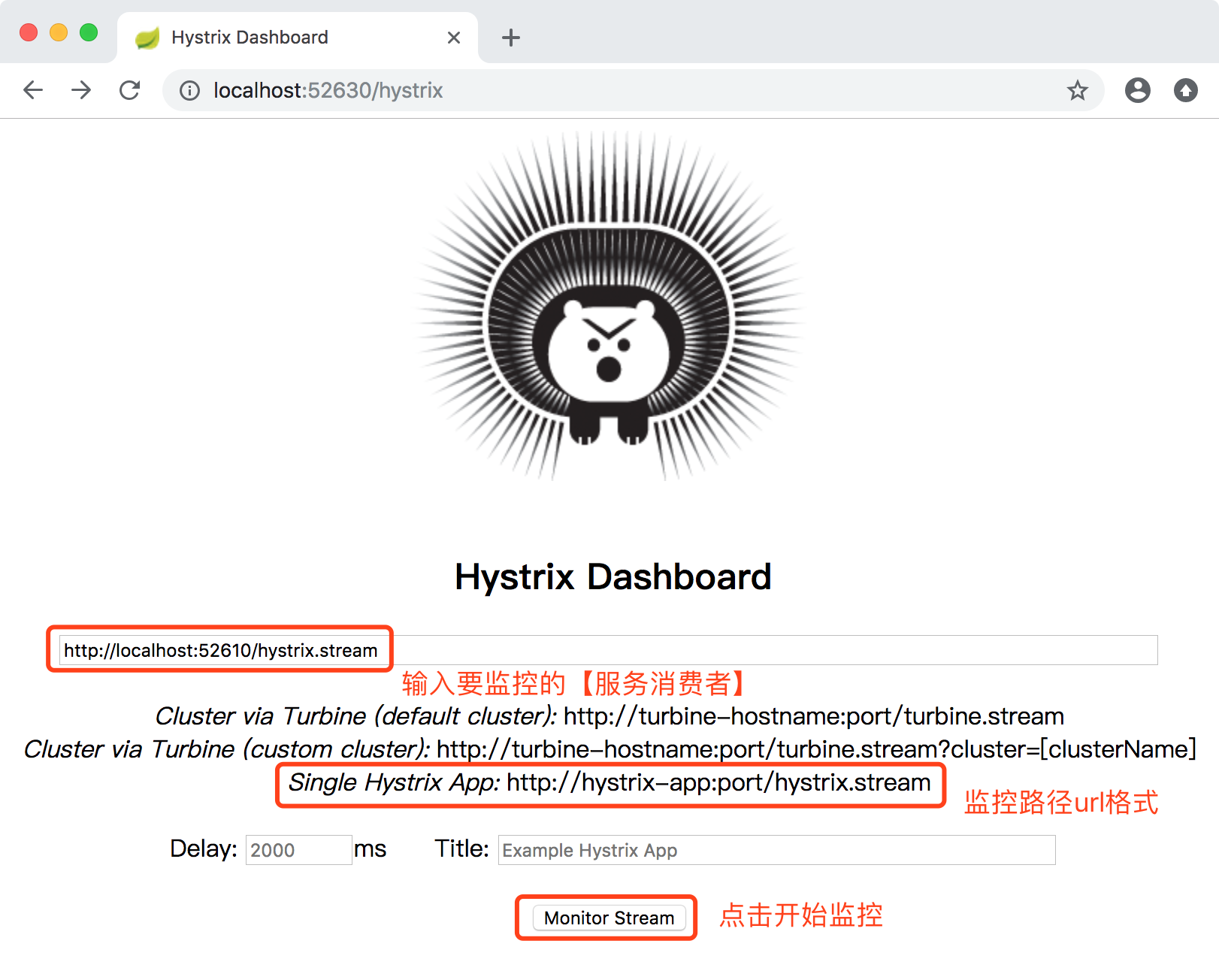
2.7、监控地址输入 http://localhost:52610/hystrix.stream 来监控 springcloud-eureka-ribbon 服务,点击【Monitor Stream】按钮,开启断路器指标看板
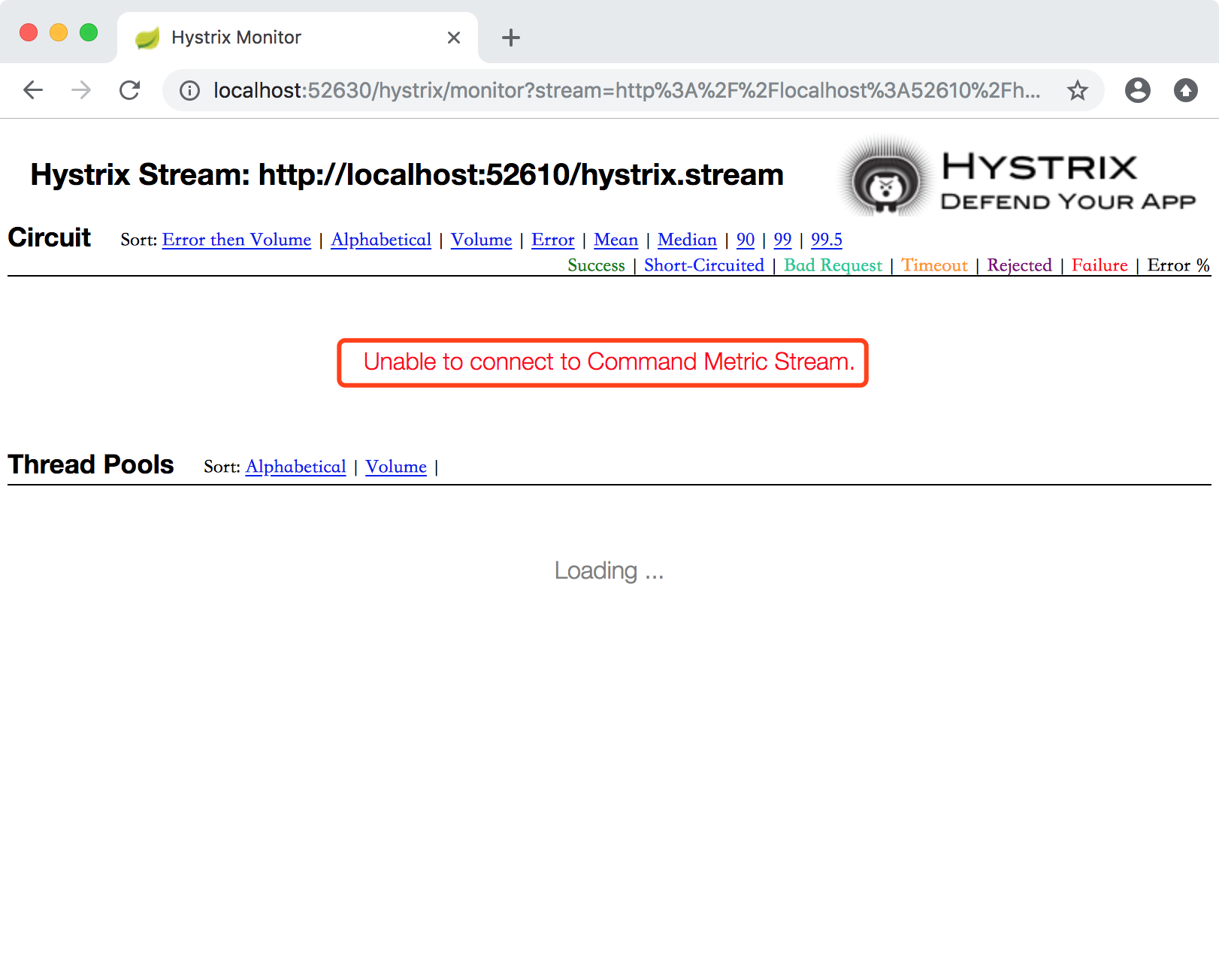
报了一个红色提示,Unable to connect to Command Metric Stream.这是因为我们开启监控的断路器流 Hystrix Stream: http://localhost:52610/hystrix.stream。这个路径,不是springboot工程默认路径,也不是hystrix默认路径。
解决方案:修改【服务消费者】工程,注册断路器指标流Servlet
2.8、修改【服务消费者】工程,工程名称:springcloud-eureka-ribbon,修改EurekaRibbonConfig类,注册断路器指标流Servlet
package com.miniooc.eurekaribbon.config;

import com.netflix.hystrix.contrib.metrics.eventstream.HystrixMetricsStreamServlet;

import org.springframework.boot.web.servlet.ServletRegistrationBean;

import org.springframework.cloud.client.loadbalancer.LoadBalanced;

import org.springframework.context.annotation.Bean;

import org.springframework.context.annotation.Configuration;

import org.springframework.web.client.RestTemplate;

/**

 * EurekaRibbonConfig

 * 应用配置类,初始化 Bean和配置信息

 *

 * @author 宋陆

 * @version 1.0.0

 */

@Configuration

public class EurekaRibbonConfig {

    @Bean // 初始化 Bean

    @LoadBalanced // 实现负载均衡

    public RestTemplate restTemplate() {

        return new RestTemplate();

    }

    @Bean

    public ServletRegistrationBean getServlet() {

        HystrixMetricsStreamServlet streamServlet = new HystrixMetricsStreamServlet();

        ServletRegistrationBean registrationBean = new ServletRegistrationBean(streamServlet);

        registrationBean.setLoadOnStartup(1);

        registrationBean.addUrlMappings("/hystrix.stream");

        registrationBean.setName("HystrixMetricsStreamServlet");

        return registrationBean;

    }

}
2.9、重启【服务消费者】springcloud-eureka-ribbon 服务。刷新【断路器指标看板】页面
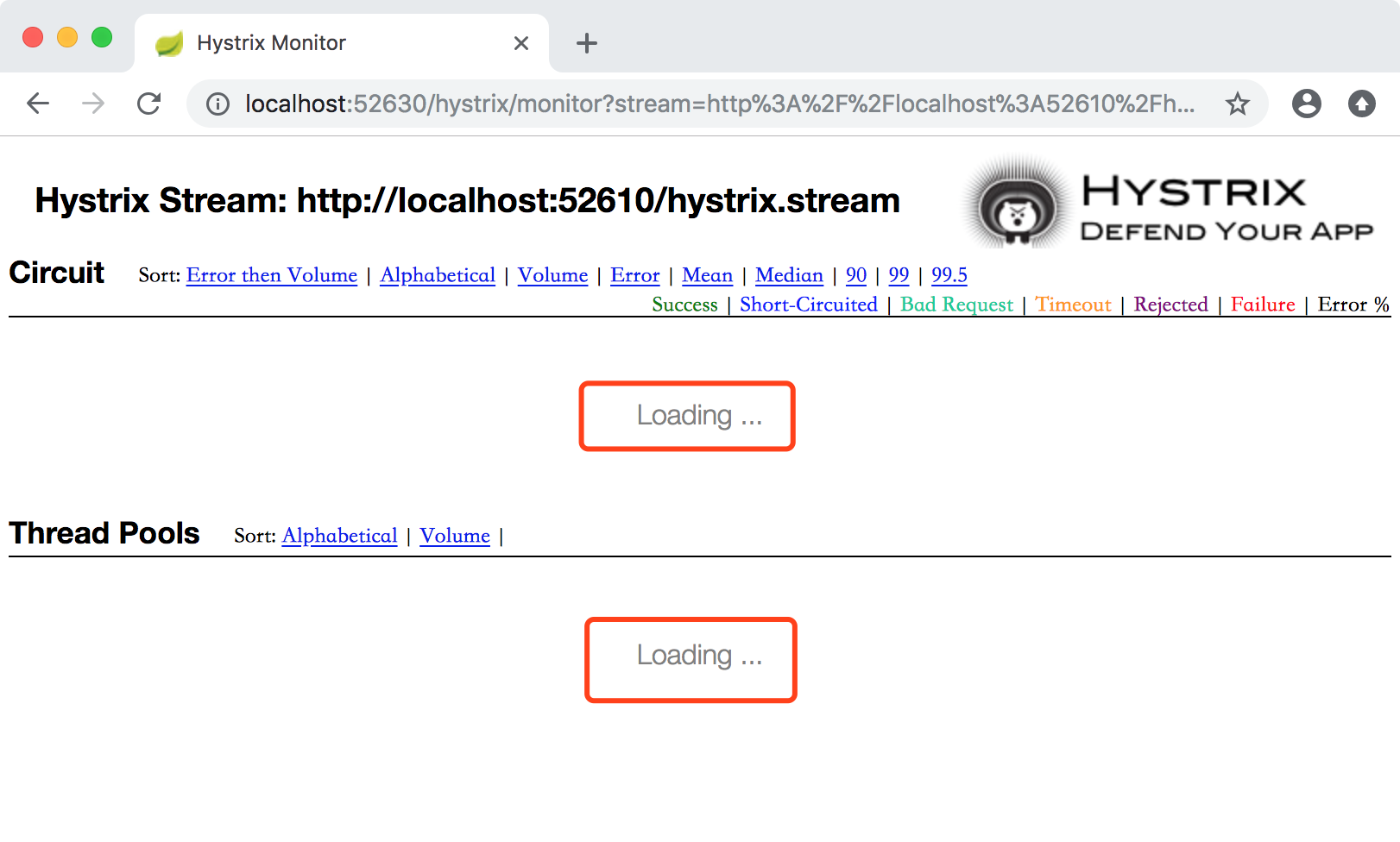
红框处 Loading... 状态,是因为重启【服务消费者】后,没有任何请求,所以,也就没有任何数据流产生。监控页面就处于加载中。只要我们请求一下 http://localhost:52610/ribbonInfo,就可以看到数据指标了。
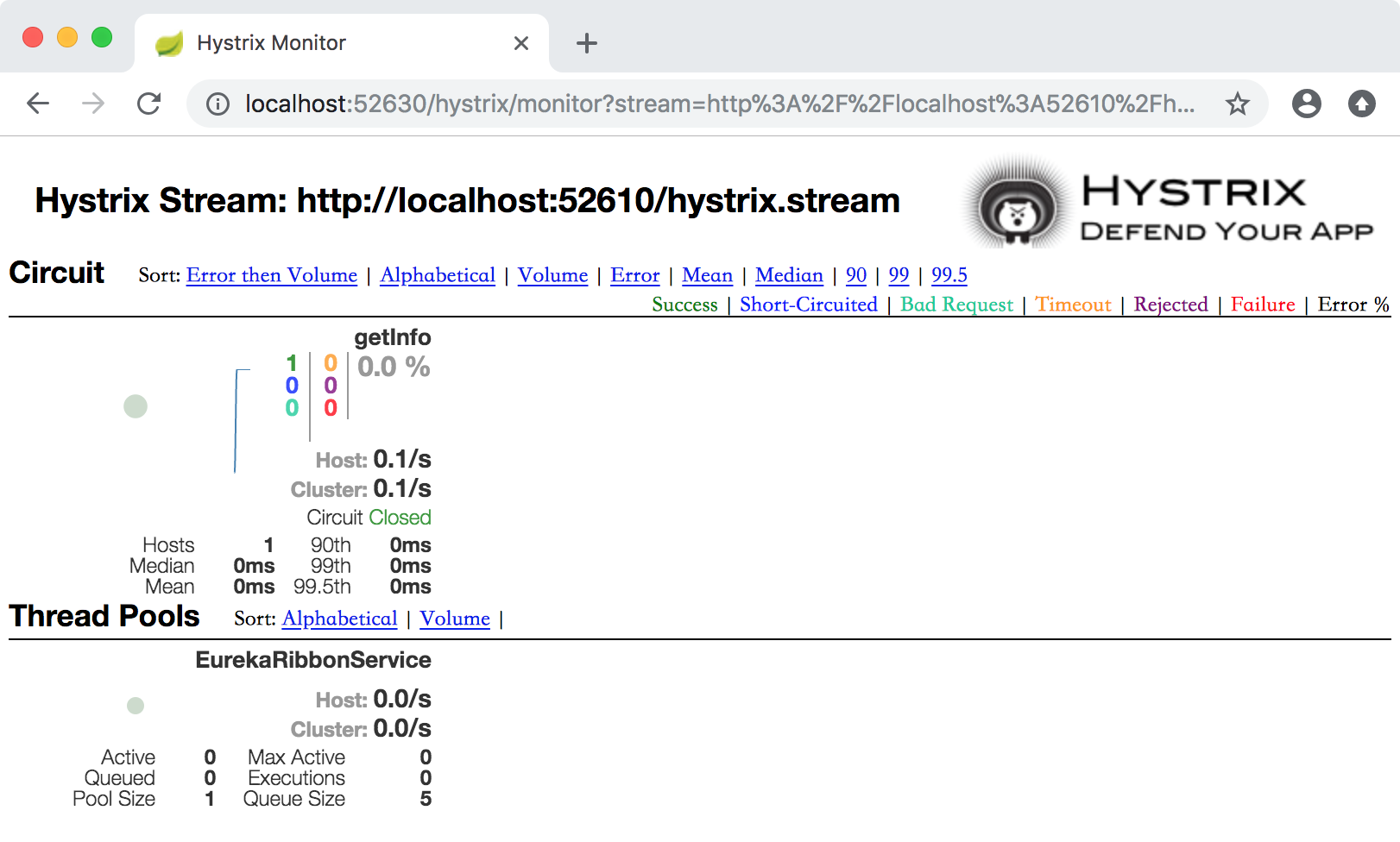
2.10、新开浏览器窗口,访问 http://localhost:52630/hystrix
2.11、监控地址输入 http://localhost:52620/hystrix.stream 来监控 springcloud-eureka-feign 服务,点击【Monitor Stream】按钮,开启断路器指标看板
依旧是同样的问题,Unable to connect to Command Metric Stream。
解决方案:修改【服务消费者】工程,注册断路器指标流Servlet
2.12、修改【服务消费者】工程,工程名称:springcloud-eureka-feign,新增EurekaFeignConfig类,注册断路器指标流Servlet
package com.miniooc.eurekafeign.config;

import com.netflix.hystrix.contrib.metrics.eventstream.HystrixMetricsStreamServlet;

import org.springframework.boot.web.servlet.ServletRegistrationBean;

import org.springframework.cloud.client.loadbalancer.LoadBalanced;

import org.springframework.context.annotation.Bean;

import org.springframework.context.annotation.Configuration;

import org.springframework.web.client.RestTemplate;

/**

 * EurekaFeignConfig

 * 应用配置类,初始化 Bean和配置信息

 *

 * @author 宋陆

 * @version 1.0.0

 */

@Configuration

public class EurekaFeignConfig {

    @Bean

    public ServletRegistrationBean getServlet() {

        HystrixMetricsStreamServlet streamServlet = new HystrixMetricsStreamServlet();

        ServletRegistrationBean registrationBean = new ServletRegistrationBean(streamServlet);

        registrationBean.setLoadOnStartup(1);

        registrationBean.addUrlMappings("/hystrix.stream");

        registrationBean.setName("HystrixMetricsStreamServlet");

        return registrationBean;

    }

}
2.13、重启【服务消费者】springcloud-eureka-feign 服务。刷新【断路器指标看板】页面
依旧是 Loading... 问题,只要我们请求一下 http://localhost:52610/feignInfo,就可以看到数据指标了。

SpringCloud2.0 Hystrix Dashboard 断路器指标看板 基础教程(八)的更多相关文章
- SpringCloud2.0 Hystrix Dashboard 断路器指标看板
原文:https://www.cnblogs.com/songlu/p/9973856.html 1.启动基础工程 1.1.启动[服务中心]集群,工程名称:springcloud-eureka-ser ...
- spring cloud 2.x版本 Hystrix Dashboard断路器教程
前言 本文采用Spring cloud本文为2.1.8RELEASE,version=Greenwich.SR3 本文基于前两篇文章eureka-server.eureka-client.eureka ...
- SpringCloud2.0 Hystrix Feign 基于Feign实现断路器 基础教程(七)
1.启动[服务中心]集群,工程名:springcloud-eureka-server 参考 SpringCloud2.0 Eureka Server 服务中心 基础教程(二) 2.启动[服务提供者]集 ...
- SpringCloud2.0 Hystrix Ribbon 基于Ribbon实现断路器 基础教程(六)
1.启动[服务中心]集群,工程名:springcloud-eureka-server 参考 SpringCloud2.0 Eureka Server 服务中心 基础教程(二) 2.启动[服务提供者]集 ...
- SpringCloud2.0 Hystrix Feign 基于Feign实现断路器
原文:https://www.cnblogs.com/songlu/p/9968953.html 1.启动[服务中心]集群,工程名:springcloud-eureka-server 参考 Sprin ...
- SpringCloud2.0 Hystrix Ribbon 基于Ribbon实现断路器
原文:https://www.cnblogs.com/songlu/p/9949203.html 1.启动[服务中心]集群,工程名:springcloud-eureka-server 参考 Sprin ...
- git基础教程(八)
8. gitlab相关介绍 8.1 gitlab优势 社区版本,自己可以在公司搭建环境 维护人员多,版本更新块 易用性强,上手快 集成CI(持续集成) 集成CD(持续发布) 8.2 持续集成 8.2. ...
- SpringCloud2.0 Turbine 断路器集群监控 基础教程(九)
1.启动基础工程 1.1.启动[服务中心]集群,工程名称:springcloud-eureka-server 参考 SpringCloud2.0 Eureka Server 服务中心 基础教程(二) ...
- SpringCloud学习系列之三----- 断路器(Hystrix)和断路器监控(Dashboard)
前言 本篇主要介绍的是SpringCloud中的断路器(Hystrix)和断路器指标看板(Dashboard)的相关使用知识. SpringCloud Hystrix Hystrix 介绍 Netfl ...
随机推荐
- qtableview 鼠标划过单元格弹出标签显示单元格内容
QStandardItem *item = new QStandardItem(show_content); infoTableModel->setItem(1, 1, item); item- ...
- [Docker] 六步运行一个 sentry 实例
# 6步, https://hub.docker.com/_/sentry/ # 依赖Redisdocker run -d --name sentry-redis redis:3.2.12 # 依赖p ...
- JS系列:编程语言
1.编程语言 html+css标记语言 js:轻量级的交互语言->全栈编程语言 - 面向对象: + C++ + JAVA + PHP + C# (.net doc) + JS - 面向过程 + ...
- 006 SpringCloud 学习笔记2-----SpringCloud基础入门
1.SpringCloud概述 微服务是一种架构方式,最终肯定需要技术架构去实施. 微服务的实现方式很多,但是最火的莫过于Spring Cloud了.SpringCloud优点: - 后台硬:作为Sp ...
- 第3课,python使用for循环
前言: 学习了python的while循环后感觉循环是挺强大的.下面学习一个更智能,更强大的循环-- for循环. 课程内容: 1.由while循环,到for循环,格式和注意项 2.for循环来报数 ...
- DS AVL树详解
先说说二叉搜索树: 是有序的二叉树,根值>左节点值,右节点值>根值. 如果要查找某个值,二叉搜索树和二分查找一样,每进行一次值比较,就会减少一半的遍历区间. 但是,如果树插入的值一直递增/ ...
- SSM整合学习 四
事务管理 一:初步理解 理解事务之前,先讲一个你日常生活中最常干的事:取钱. 比如你去ATM机取1000块钱,大体有两个步骤:首先输入密码金额,银行卡扣掉1000元钱:然后ATM出1000元钱.这两个 ...
- robotframework_百度登陆
** Settings *** Library Selenium2Library *** Test Cases *** login Open Browser https://www.baidu.com ...
- matplotlib 中文乱码问题
matplotlib是Python著名的绘图库,默认并不支持中文显示,因此在不经过修改的情况下,无法正确显示中文. 本文将介绍解决这一问题的方法. 不修改文件,加两行代码即可: matplotlib. ...
- Linux中使用MegaCli工具查看、管理Raid卡信息
MegaCli是一款管理维护硬件RAID软件,可以通过它来了解当前raid卡的所有信息,包括 raid卡的型号,raid的阵列类型,raid 上各磁盘状态,等等.通常,我们对硬盘当前的状态不太好确定, ...