
一、模型验证CoreWebApi 管道方式(非过滤器处理)
一、新建.Net Core的MVC项目添加WebApi控制器的方式
using System;

using System.Collections.Generic;

using System.Linq;

using System.Threading.Tasks;

using Microsoft.AspNetCore.Http;

using Microsoft.AspNetCore.Mvc;

namespace TempTest.Controllers

{

    [Route("api/[controller]")]

    [ApiController]

    public class VerifController : ControllerBase

    {

        [HttpGet]

        public IEnumerable<string> Get()

        {

            return new string[] { "value1", "value2" };

        }

    }

}
http://localhost:60748/api/Verif/Get 访问不通 http://localhost:60748/api/Verif 才可以
我新建core的空的webapi为

我们更改
 [Route("api/[controller]/[action]")]

 [ApiController]

 public class HomeController : ControllerBase
即:
using System;

using System.Collections.Generic;

using System.Linq;

using System.Threading.Tasks;

using Microsoft.AspNetCore.Http;

using Microsoft.AspNetCore.Mvc;

namespace TempTest.Controllers

{

    [Route("api/[controller]/[action]")]

    [ApiController]

    public class VerifController : ControllerBase

    {

        [HttpPost]

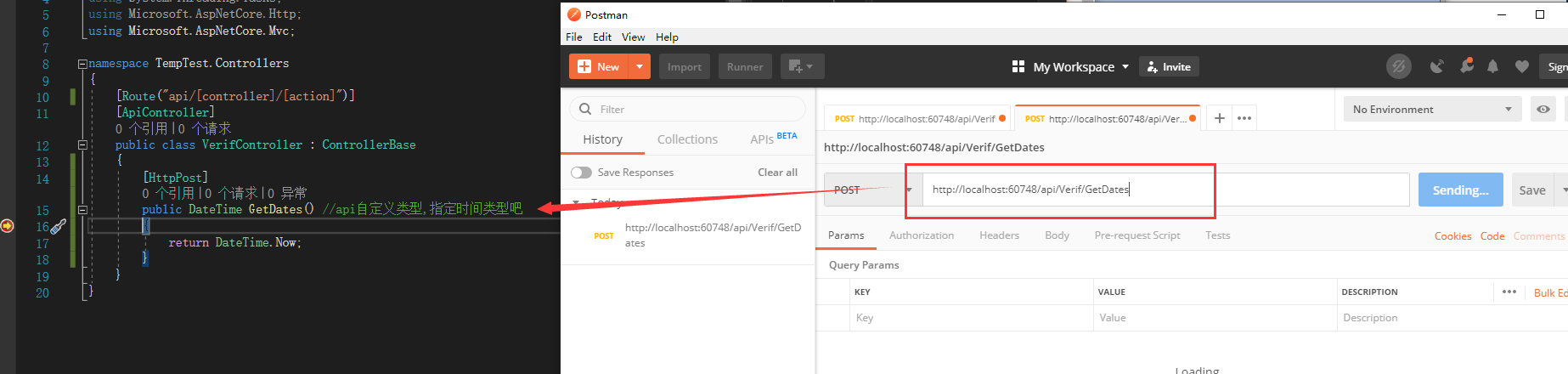
        public DateTime GetDates() //api自定义类型,指定时间类型吧

        {

            return DateTime.Now;

        }

    }

}
//
http://localhost:60748/api/Verif/GetDates
//
区别:不想iFramework mvc 那样创建webapi 需要配置 api路由,(而且创建空的WebApi控制器并不友好,不指定具体的action,还需要我主动添加)
二、添加到管道
Startup.cs
        public void ConfigureServices(IServiceCollection services)

        {

            services.Configure<CookiePolicyOptions>(options =>

            {

                // This lambda determines whether user consent for non-essential cookies is needed for a given request.

                options.CheckConsentNeeded = context => true;

                options.MinimumSameSitePolicy = SameSiteMode.None;

            });

            services.AddMvc().SetCompatibilityVersion(CompatibilityVersion.Version_2_1);

            //模型绑定 特性验证,自定义返回格式

            //->必须放在 services.AddMvc().SetCompatibilityVersion(CompatibilityVersion.Version_2_1);后面,

            //因为走过路由控制器,才可以知道控制器里面对参数格式的验证

            services.Configure<ApiBehaviorOptions>(options =>

            {

                options.InvalidModelStateResponseFactory = actionContext =>

                {

                    //获取验证失败的模型字段

                    var errors = actionContext.ModelState

                    .Where(e => e.Value.Errors.Count > )

                    .Select(e => e.Value.Errors.First().ErrorMessage)

                    .ToList();

                    var str = string.Join("|", errors);

                    //设置返回内容

                    var result = new

                    {

                        code = ,

                        body = false,

                        msg = str

                    };

                    return new BadRequestObjectResult(result);

                };

            });

        }
Model验证实体
using System;

using System.Collections.Generic;

using System.Linq;

using System.Web;

using System.ComponentModel.DataAnnotations;

namespace WebApi.Models

{

    public class Personnel

    {

        [Required(ErrorMessage = "Name参数不能为空")]//Required 验证这个参数不能为空 ErrorMessage:为空时自定义错误信息

        public string Name { get; set; }

        [Required(ErrorMessage = "Age参数不能为空")]

        [Range(, , ErrorMessage = "Age参数只能是大于1,小于100")]//Range 验证值只能在某些范围内,只适用于Int类型的字段

        public int Age { get; set; }

        [Required(ErrorMessage = "电话号不能为空")]

        [RegularExpression("^[1]+[3,4,5,7,8]+\\d{9}", ErrorMessage = "PhoneNum不合法的电话号码格式")]//RegularExpression 用正则验证字段的合法性,多用于身份证、电话号码、邮箱、等等...

        public string PhoneNum { get; set; }

    }

}
控制器
using System;

using System.Collections.Generic;

using System.Linq;

using System.Threading.Tasks;

using Microsoft.AspNetCore.Http;

using Microsoft.AspNetCore.Mvc;

using TempTest.Models;

namespace TempTest.Controllers

{

    [Route("api/[controller]/[action]")]

    [ApiController]

    public class VerifController : ControllerBase

    {

        [HttpPost]

        public DateTime GetDates(Personnel personnel) //api自定义类型,指定时间类型吧

        {

            return DateTime.Now;

        }

    }

}
必须Raw方式提交,且数据格式为Json
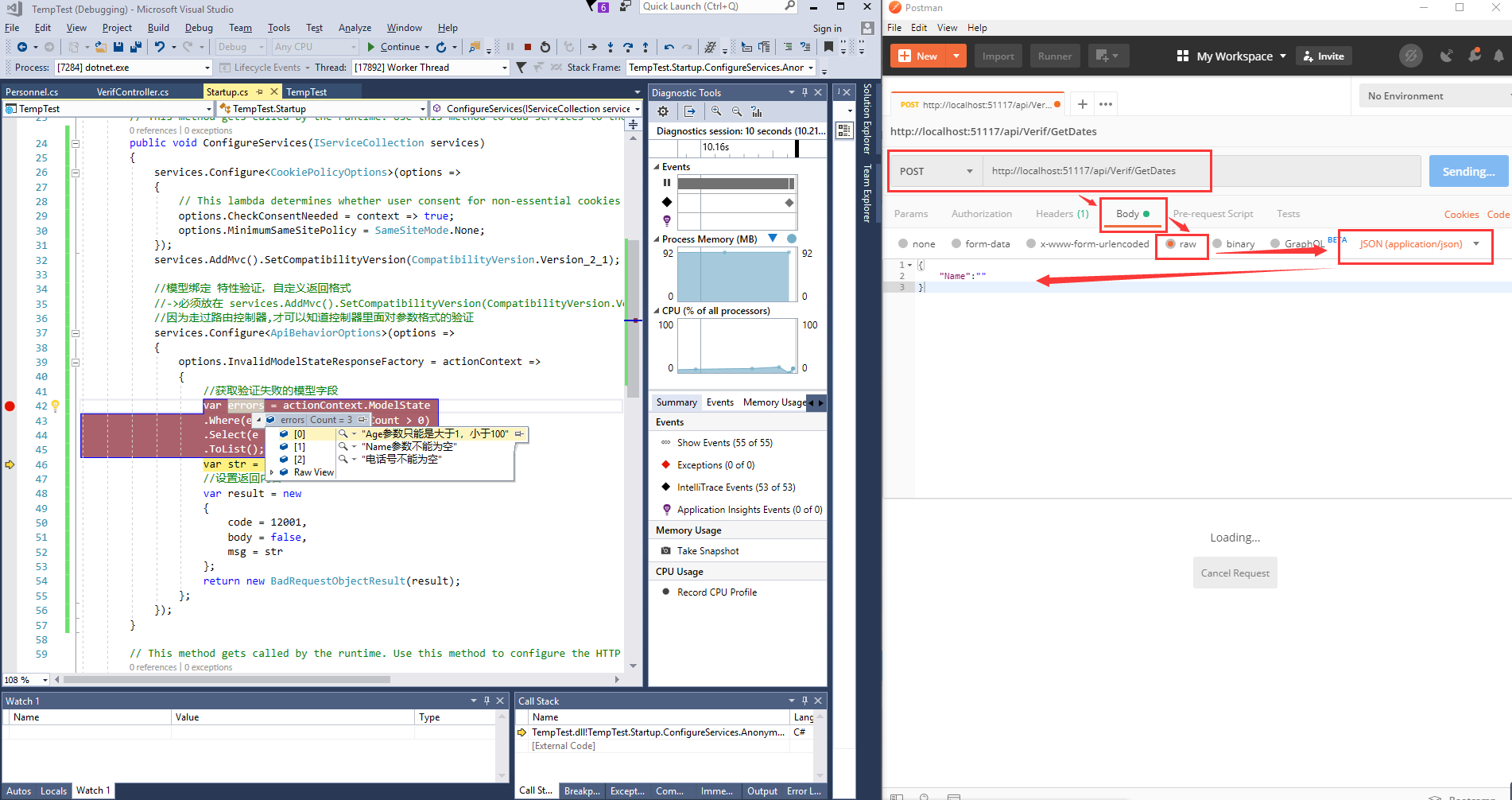
最终效果:
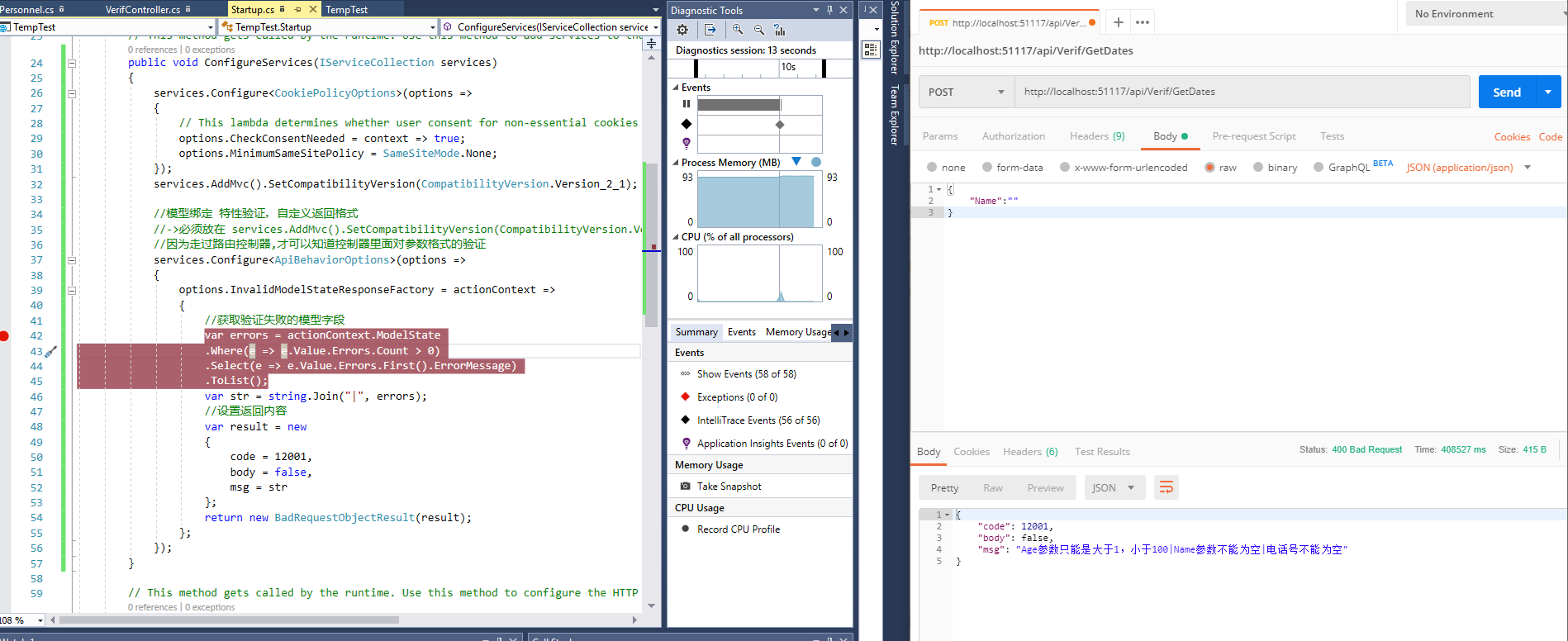
Ajax测试就不支持Post提交的Row方式
换种方式实现:
1、model
using System;

using System.Collections.Generic;

using System.ComponentModel.DataAnnotations;

using System.Linq;

using System.Threading.Tasks;

namespace TempTest.Models

{

    public class UserModel

    {

        [Required(ErrorMessage = "名字不能为空")]

        public string Name { get; set; }

        [Range(, , ErrorMessage = "年龄不合理")]

        public int age { get; set; }

        [EmailAddress(ErrorMessage = "请填写正确的Email地址")]

        public string Email { get; set; }

    }

}
2、
using System;

using System.Collections.Generic;

using System.Linq;

using System.Threading.Tasks;

using Microsoft.AspNetCore.Http;

using Microsoft.AspNetCore.Mvc;

using TempTest.Models;

namespace TempTest.Controllers

{

    [Route("api/[controller]/[action]")]

    [ApiController]

    public class VerifController : ControllerBase

    {

        [HttpPost]

        public DateTime GetDates([FromBody]UserModel model) //api自定义类型,指定时间类型吧

        {

            return DateTime.Now;

        }

    }

}
中间配置
        public void ConfigureServices(IServiceCollection services)

        {

            services.AddMvc().SetCompatibilityVersion(CompatibilityVersion.Version_2_1);

            //模型绑定 特性验证,自定义返回格式

            services.Configure<ApiBehaviorOptions>(options =>

            {

                options.InvalidModelStateResponseFactory = actionContext =>

                {

                    //获取验证失败的模型字段

                    var errors = actionContext.ModelState

                    .Where(e => e.Value.Errors.Count > )

                    .Select(e => e.Value.Errors.First().ErrorMessage)

                    .ToList();

                    var str = string.Join("|", errors);

                    //设置返回内容

                    var result = new

                    {

                        code = ,

                        body = false,

                        msg = str

                    };

                    return new BadRequestObjectResult(result);

                };

            });

        }
ajax的示例
<!DOCTYPE html>

<html>

<head>

    <title></title>

</head>

<script src="https://cdn.bootcss.com/jquery/3.4.1/jquery.js"></script>

<body>

</body>

    <script type="text/javascript">

    $(function(){

        $.ajax({

             url:"http://localhost:51117/api/Verif/GetDates",

             type:"post",

             data:{Name:""},

             async:true,

             dataType: "json",

             success:function (data) {

                 console.log(data);

             },

             error:function (data) {

                 console.log(data.status);

             }

         })

    })

    </script>

</html>
也是因为Startup.cs起始代码庞大,故封装注入即可。
其他使用方式:
一、模型验证CoreWebApi 管道方式(非过滤器处理)的更多相关文章
- 一、模型验证CoreWebApi 管道方式(非过滤器处理)2(IApplicationBuilder扩展方法的另一种写法)
一. 自定义中间件类的方式用一个单独类文件进行验证处理 Configure下添加配置 //app.AddAuthorize(); AddAuthorize因为参数(this IApplicationB ...
- ASP.NET Web API模型验证以及异常处理方式
ASP.NET Web API的模型验证与ASP.NET MVC一样,都使用System.ComponentModel.DataAnnotations. 具体来说,比如有:[Required(Erro ...
- 一、WebApi模型验证实践项目使用
一.启语 前面我们说到,模型验证的原理(包含1.项目创建,2.模型创建,3.走通测试模型验证,4.在过滤器中处理返回json格式(非控制器内))-完全是新手理解使用的,新番理解 通常情况下,对于那些经 ...
- ASP.NET Core 2.2 WebApi 系列【八】统一返回格式(返回值、模型验证、异常)
现阶段,基本上都是前后端分离项目,这样一来,就需要前后端配合,没有统一返回格式,那么对接起来会很麻烦,浪费时间.我们需要把所有接口及异常错误信息都返回一定的Json格式,有利于前端处理,从而提高了工作 ...
- 一、WebApi模型验证
一.新建项目 选择空的项目webapi 查看启动端口 创建控制器 添加方法 public class VerifController : ApiController { public IHttpAct ...
- Web API中的模型验证
一.模型验证的作用 在ASP.NET Web API中,我们可以使用 System.ComponentModel.DataAnnotations 命名空间中的属性为模型上的属性设置验证规则. 一个模型 ...
- Web API中的模型验证Model Validation
数据注释 在ASP.NET Web API中,您可以使用System.ComponentModel.DataAnnotations命名空间中的属性为模型上的属性设置验证规则. using System ...
- asp.net mvc 模型验证-最舒服的验证方式
在院子里发现 http://www.cnblogs.com/yangecnu/p/3759784.html 模型验证方法 1. 一般方法 繁琐, 无数的if else, 在炎炎夏天,我见过一个验证方法 ...
- webapi - 模型验证
本次要和大家分享的是webapi的模型验证,讲解的内容可能不单单是做验证,但都是围绕模型来说明的:首先来吐槽下,今天下午老板为自己买了套新办公家具,看起来挺好说明老板有钱,不好的是我们干技术的又成了搬 ...
随机推荐
- 【Java】Java实现二维码的生成与解析
pom依赖 <dependency> <groupId>com.google.zxing</groupId> <artifactId>core</ ...
- Parse error: syntax error, unexpected 'class' (T_CLASS)
电脑坏了重新下载代码. 结果报错 Parse error: syntax error, unexpected 'class' (T_CLASS), expecting identifier (T_ST ...
- Java实体类之间的映射(一对一关系)
如下描述:一个人有有一个身份证 一个身份证只能属于某一个人 /** 一个人有有一个身份证 一个身份证只能属于某一个人 */ class Person{ //人 private String name; ...
- customizable route planning 工业界地图产品的路径规划
https://www.microsoft.com/en-us/research/publication/customizable-route-planning/?from=http%3A%2F%2F ...
- 安装U盘启动ferdora-22-fce笔记
如何格式化为fat? windows图形界面格式化, 选项中没有fat, 只有fat32和exfat两种upan格式 Fat就是 传统的FAT16 要格式化为fat, 需要使用cmd的format命令 ...
- CopyOnWriteArrayList 源码分析
CopyOnWriteArrayList CopyOnWriteArrayList 能解决什么问题?什么时候使用 CopyOnWriteArrayList? 1)CopyOnWriteArrayLis ...
- 【转】最全的 pip 使用指南,50% 你可能没用过
[转]最全的 pip 使用指南,50% 你可能没用过 所有的 Python 开发者都清楚,Python 之所以如此受欢迎,能够在众多高级语言中,脱颖而出,除了语法简单,上手容易之外,更多还要归功于 P ...
- JS 引擎
最早的 JS 引擎是纯解释器,现代 JS 引擎已经使用 JIT(Just-in-time compilation:结合预编译(ahead-of-time compilation AOT)和解释器的优点 ...
- RFC、EMCA-262、TC-39等名词
请求意见稿(英语:Request For Comments,缩写:RFC)是一系列备忘录. The RFC series contains technical and organizational d ...
- unittest自动化测试举例:自动读取ymal用例&调用接口并生成报告
用unittest框架写的接口自动化实现过程: 1.编写ymal格式用例: 2.导入ddt模块,该模块的主要功能是帮你读取ymal用例文件,自动获取内容并循环调用函数,具体见代码. 3.导入Beaut ...