
一、模型验证CoreWebApi 管道方式(非过滤器处理)
一、新建.Net Core的MVC项目添加WebApi控制器的方式
using System;

using System.Collections.Generic;

using System.Linq;

using System.Threading.Tasks;

using Microsoft.AspNetCore.Http;

using Microsoft.AspNetCore.Mvc;

namespace TempTest.Controllers

{

    [Route("api/[controller]")]

    [ApiController]

    public class VerifController : ControllerBase

    {

        [HttpGet]

        public IEnumerable<string> Get()

        {

            return new string[] { "value1", "value2" };

        }

    }

}
http://localhost:60748/api/Verif/Get 访问不通 http://localhost:60748/api/Verif 才可以
我新建core的空的webapi为

我们更改
 [Route("api/[controller]/[action]")]

 [ApiController]

 public class HomeController : ControllerBase
即:
using System;

using System.Collections.Generic;

using System.Linq;

using System.Threading.Tasks;

using Microsoft.AspNetCore.Http;

using Microsoft.AspNetCore.Mvc;

namespace TempTest.Controllers

{

    [Route("api/[controller]/[action]")]

    [ApiController]

    public class VerifController : ControllerBase

    {

        [HttpPost]

        public DateTime GetDates() //api自定义类型,指定时间类型吧

        {

            return DateTime.Now;

        }

    }

}
//
http://localhost:60748/api/Verif/GetDates
//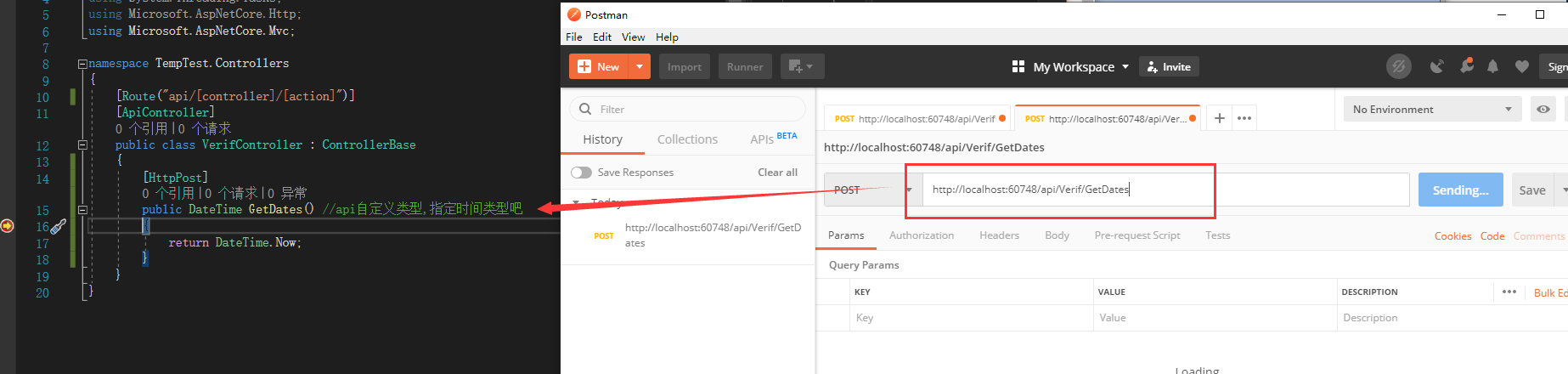
区别:不想iFramework mvc 那样创建webapi 需要配置 api路由,(而且创建空的WebApi控制器并不友好,不指定具体的action,还需要我主动添加)
二、添加到管道
Startup.cs
        public void ConfigureServices(IServiceCollection services)

        {

            services.Configure<CookiePolicyOptions>(options =>

            {

                // This lambda determines whether user consent for non-essential cookies is needed for a given request.

                options.CheckConsentNeeded = context => true;

                options.MinimumSameSitePolicy = SameSiteMode.None;

            });

            services.AddMvc().SetCompatibilityVersion(CompatibilityVersion.Version_2_1);

            //模型绑定 特性验证,自定义返回格式

            //->必须放在 services.AddMvc().SetCompatibilityVersion(CompatibilityVersion.Version_2_1);后面,

            //因为走过路由控制器,才可以知道控制器里面对参数格式的验证

            services.Configure<ApiBehaviorOptions>(options =>

            {

                options.InvalidModelStateResponseFactory = actionContext =>

                {

                    //获取验证失败的模型字段

                    var errors = actionContext.ModelState

                    .Where(e => e.Value.Errors.Count > )

                    .Select(e => e.Value.Errors.First().ErrorMessage)

                    .ToList();

                    var str = string.Join("|", errors);

                    //设置返回内容

                    var result = new

                    {

                        code = ,

                        body = false,

                        msg = str

                    };

                    return new BadRequestObjectResult(result);

                };

            });

        }
Model验证实体
using System;

using System.Collections.Generic;

using System.Linq;

using System.Web;

using System.ComponentModel.DataAnnotations;

namespace WebApi.Models

{

    public class Personnel

    {

        [Required(ErrorMessage = "Name参数不能为空")]//Required 验证这个参数不能为空 ErrorMessage:为空时自定义错误信息

        public string Name { get; set; }

        [Required(ErrorMessage = "Age参数不能为空")]

        [Range(, , ErrorMessage = "Age参数只能是大于1,小于100")]//Range 验证值只能在某些范围内,只适用于Int类型的字段

        public int Age { get; set; }

        [Required(ErrorMessage = "电话号不能为空")]

        [RegularExpression("^[1]+[3,4,5,7,8]+\\d{9}", ErrorMessage = "PhoneNum不合法的电话号码格式")]//RegularExpression 用正则验证字段的合法性,多用于身份证、电话号码、邮箱、等等...

        public string PhoneNum { get; set; }

    }

}
控制器
using System;

using System.Collections.Generic;

using System.Linq;

using System.Threading.Tasks;

using Microsoft.AspNetCore.Http;

using Microsoft.AspNetCore.Mvc;

using TempTest.Models;

namespace TempTest.Controllers

{

    [Route("api/[controller]/[action]")]

    [ApiController]

    public class VerifController : ControllerBase

    {

        [HttpPost]

        public DateTime GetDates(Personnel personnel) //api自定义类型,指定时间类型吧

        {

            return DateTime.Now;

        }

    }

}
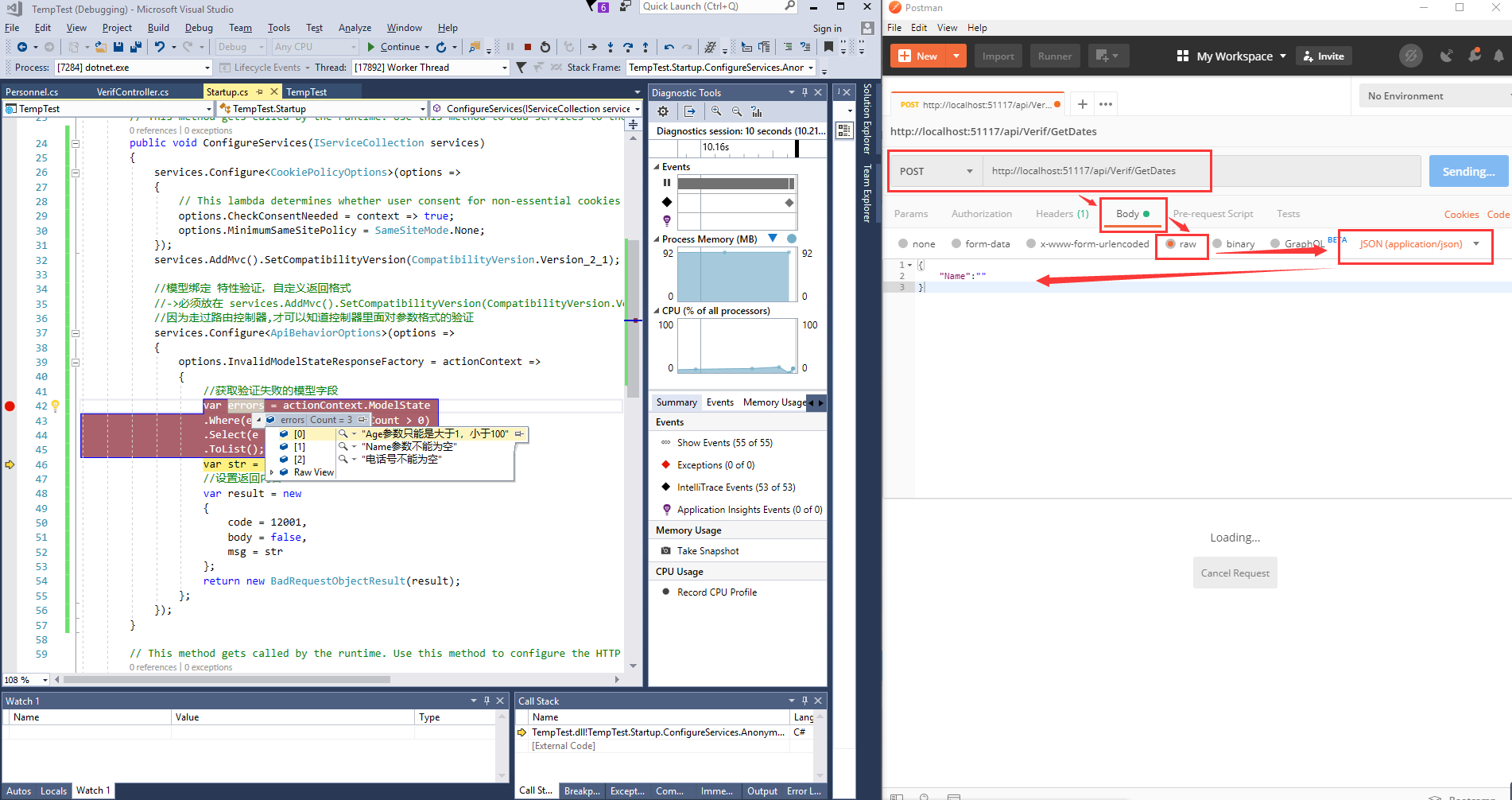
必须Raw方式提交,且数据格式为Json
最终效果:
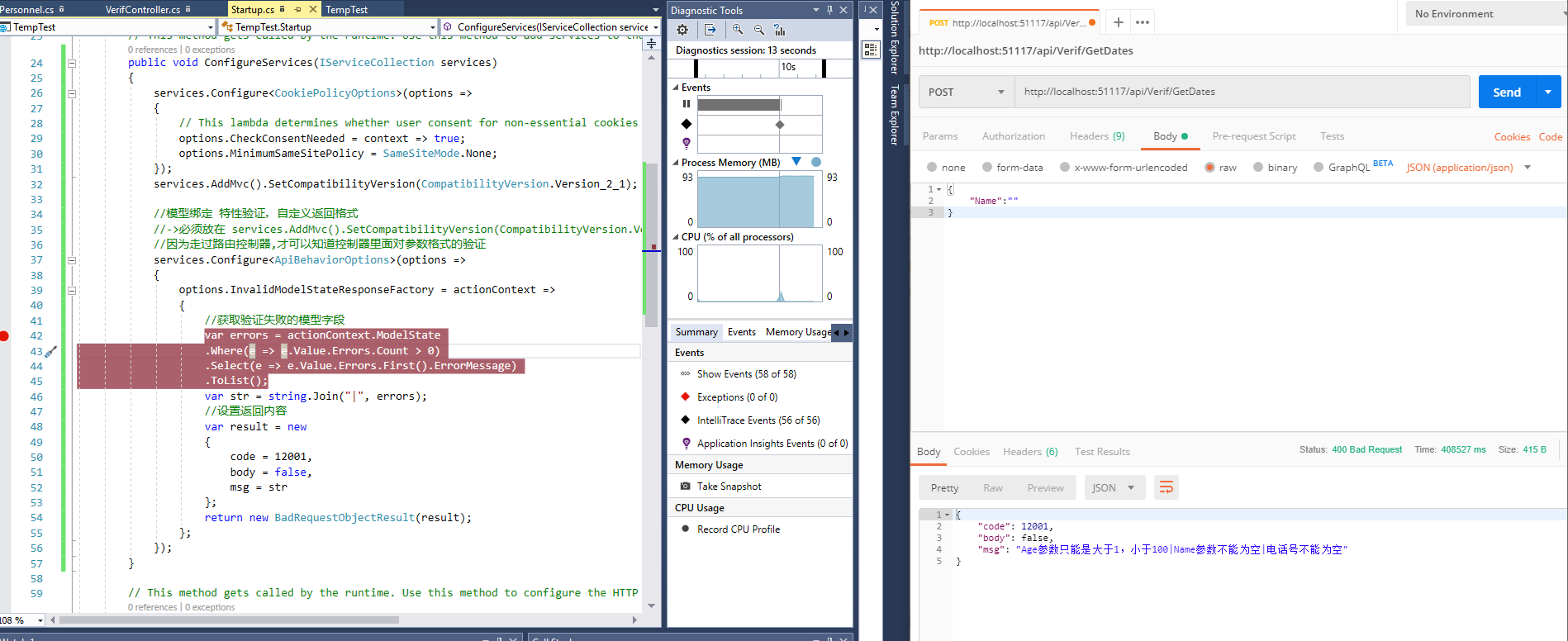
Ajax测试就不支持Post提交的Row方式
换种方式实现:
1、model
using System;

using System.Collections.Generic;

using System.ComponentModel.DataAnnotations;

using System.Linq;

using System.Threading.Tasks;

namespace TempTest.Models

{

    public class UserModel

    {

        [Required(ErrorMessage = "名字不能为空")]

        public string Name { get; set; }

        [Range(, , ErrorMessage = "年龄不合理")]

        public int age { get; set; }

        [EmailAddress(ErrorMessage = "请填写正确的Email地址")]

        public string Email { get; set; }

    }

}
2、
using System;

using System.Collections.Generic;

using System.Linq;

using System.Threading.Tasks;

using Microsoft.AspNetCore.Http;

using Microsoft.AspNetCore.Mvc;

using TempTest.Models;

namespace TempTest.Controllers

{

    [Route("api/[controller]/[action]")]

    [ApiController]

    public class VerifController : ControllerBase

    {

        [HttpPost]

        public DateTime GetDates([FromBody]UserModel model) //api自定义类型,指定时间类型吧

        {

            return DateTime.Now;

        }

    }

}
中间配置
        public void ConfigureServices(IServiceCollection services)

        {

            services.AddMvc().SetCompatibilityVersion(CompatibilityVersion.Version_2_1);

            //模型绑定 特性验证,自定义返回格式

            services.Configure<ApiBehaviorOptions>(options =>

            {

                options.InvalidModelStateResponseFactory = actionContext =>

                {

                    //获取验证失败的模型字段

                    var errors = actionContext.ModelState

                    .Where(e => e.Value.Errors.Count > )

                    .Select(e => e.Value.Errors.First().ErrorMessage)

                    .ToList();

                    var str = string.Join("|", errors);

                    //设置返回内容

                    var result = new

                    {

                        code = ,

                        body = false,

                        msg = str

                    };

                    return new BadRequestObjectResult(result);

                };

            });

        }
ajax的示例
<!DOCTYPE html>

<html>

<head>

    <title></title>

</head>

<script src="https://cdn.bootcss.com/jquery/3.4.1/jquery.js"></script>

<body>

</body>

    <script type="text/javascript">

    $(function(){

        $.ajax({

             url:"http://localhost:51117/api/Verif/GetDates",

             type:"post",

             data:{Name:""},

             async:true,

             dataType: "json",

             success:function (data) {

                 console.log(data);

             },

             error:function (data) {

                 console.log(data.status);

             }

         })

    })

    </script>

</html>
也是因为Startup.cs起始代码庞大,故封装注入即可。
其他使用方式:
一、模型验证CoreWebApi 管道方式(非过滤器处理)的更多相关文章
- 一、模型验证CoreWebApi 管道方式(非过滤器处理)2(IApplicationBuilder扩展方法的另一种写法)
一. 自定义中间件类的方式用一个单独类文件进行验证处理 Configure下添加配置 //app.AddAuthorize(); AddAuthorize因为参数(this IApplicationB ...
- ASP.NET Web API模型验证以及异常处理方式
ASP.NET Web API的模型验证与ASP.NET MVC一样,都使用System.ComponentModel.DataAnnotations. 具体来说,比如有:[Required(Erro ...
- 一、WebApi模型验证实践项目使用
一.启语 前面我们说到,模型验证的原理(包含1.项目创建,2.模型创建,3.走通测试模型验证,4.在过滤器中处理返回json格式(非控制器内))-完全是新手理解使用的,新番理解 通常情况下,对于那些经 ...
- ASP.NET Core 2.2 WebApi 系列【八】统一返回格式(返回值、模型验证、异常)
现阶段,基本上都是前后端分离项目,这样一来,就需要前后端配合,没有统一返回格式,那么对接起来会很麻烦,浪费时间.我们需要把所有接口及异常错误信息都返回一定的Json格式,有利于前端处理,从而提高了工作 ...
- 一、WebApi模型验证
一.新建项目 选择空的项目webapi 查看启动端口 创建控制器 添加方法 public class VerifController : ApiController { public IHttpAct ...
- Web API中的模型验证
一.模型验证的作用 在ASP.NET Web API中,我们可以使用 System.ComponentModel.DataAnnotations 命名空间中的属性为模型上的属性设置验证规则. 一个模型 ...
- Web API中的模型验证Model Validation
数据注释 在ASP.NET Web API中,您可以使用System.ComponentModel.DataAnnotations命名空间中的属性为模型上的属性设置验证规则. using System ...
- asp.net mvc 模型验证-最舒服的验证方式
在院子里发现 http://www.cnblogs.com/yangecnu/p/3759784.html 模型验证方法 1. 一般方法 繁琐, 无数的if else, 在炎炎夏天,我见过一个验证方法 ...
- webapi - 模型验证
本次要和大家分享的是webapi的模型验证,讲解的内容可能不单单是做验证,但都是围绕模型来说明的:首先来吐槽下,今天下午老板为自己买了套新办公家具,看起来挺好说明老板有钱,不好的是我们干技术的又成了搬 ...
随机推荐
- [洛谷2257]ZAP-Queries 题解
前言 这道题还是比较简单的 解法 首先将题目转化为数学语言. 题目要我们求的是: \[\sum_{i=1}^a\sum_{j=1}^b[gcd(i,j)=d]\] 按照套路1,我们将其同时除以d转换为 ...
- 【PowerOJ1753&网络流24题】分配问题(KM)
题意: 思路:费用流可做 最好的算法是KM板子 #include<bits/stdc++.h> using namespace std; typedef long long ll; typ ...
- CF 480 B Long Jumps (map标记)
题目链接:http://codeforces.com/contest/480/problem/B 题目描述: Long Jumps Valery is a PE teacher at a ...
- bat语法
注释 :: 注释无回显 rem 注释有回显 关闭和开启回显 :: 关闭回显 @echo off echo abc :: 开启回显 echo on echo 查看命令帮助说明 rd /? 目录操作 创建 ...
- Apache2.4+PHP7.2环境搭建
Editplus生成码:http://www.jb51.net/tools/editplus/ 阿帕奇下载地址:https://www.apachehaus.com/cgi-bin/download. ...
- spring自动注入的三种方式
所谓spring自动注入,是指容器中的一个组件中需要用到另一个组件(例如聚合关系)时,依靠spring容器创建对象,而不是手动创建,主要有三种方式: 1. @Autowired注解——由spring提 ...
- 阶段1 语言基础+高级_1-3-Java语言高级_02-继承与多态_第4节 多态_15_多态的概述
不是多种状态,而是有多种形态 继承是多态的前提 子类就是一个父类.学生就是一个人 多态性说的是这个对象.
- 阶段1 语言基础+高级_1-3-Java语言高级_06-File类与IO流_04 IO字节流_2_一切皆为字节
这里的视频就是字节的形式,为了看着方便转换成了MB.一个字节就是8个二进制 包括文本,都是以字节的形式存储的
- 函数介绍——MulDiv
http://blog.sina.com.cn/s/blog_579ebc11010008ql.html 函数介绍——MulDiv (2007-03-27 10:05:30) 转载▼ 分类: 编程 ...
- dvorak键盘布局调整
一站直达: http://www.kaufmann.no/roland/dvorak/