
ssd_mobilenet_demo
操作系统:windows 10 64位
内存:8G
GPU:Nvidia MX 150
Tensorflow: 1.4
1、安装python
Anaconda3-5.0.1 ,默认python版本(3.6.3)
2、安装tensorflow
pip install --upgrade tensorflow
conda install pip #更新pip
pip install --upgrade tensorflow-gpu
CUDA® Toolkit 8.0, 需要注意最新版9.1不支持tensorflow 1.4版本;
cuDNN v6.0,7.0不支持tensorflow 1.4版本,现在cuDNN需要先注册成为NVIDIA开发者,下载后将cuDNN中对应文件夹下的.dll文件分别复制到CUDA安装目录对应文件夹下;
对应的显卡驱动,如果驱动较新,在安装CUDA的时候会有提示可能不兼容,可以无视。
3、测试gpu版安装好了没有
improt tensorflow as tf

hello = tf.constant('hello')

sess = tf.Session()

print(sess.run(hello))

当输出hello则装好tensorflow

from tensorflow.python.client import device_lib

print(device_lib.list_local_devices())

当输出:

Sample Output

[name: "/cpu:0" device_type: "CPU" memory_limit:

name: "/gpu:0" device_type: "GPU" .............GeForce GTX 1070
4、下载api
https://github.com/tensorflow/models
5、protobuf配置
https://github.com/google/protobuf/releases 网站中选择windows 版本(最下面),解压后将bin文件夹中的【protoc.exe】放到C:\Windows
在models\research\目录下打开命令行窗口,输入:
# From tensorflow/models/

protoc object_detection/protos/*.proto --python_out=.
在这一步有时候会出错,可以尝试把/*.proto 这部分改成文件夹下具体的文件名,一个一个试,每运行一个,文件夹下应该出现对应的.py结尾的文件。不报错即可。
6、环境变量
models/research/ 及 models/research/slim 添加进环境变量
7、测试环境
python object_detection/builders/model_builder_test.py
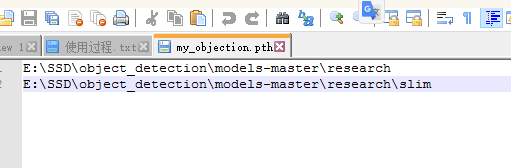
注意 :如果出现no model name object_api这个东东,就在D:\anaconda\anaconda3.4.2.0\Lib\site-packages目录下面新建一个my_objection.pth文件,文件内容就是这两个路径,如下图:
8、object_detection_tutorial.ipynb
代码简化了一些。
# coding: utf-8

import numpy as np

import os

import six.moves.urllib as urllib

import sys

import tarfile

import tensorflow as tf

import zipfile

from collections import defaultdict

from io import StringIO

from matplotlib import pyplot as plt

from PIL import Image

if tf.__version__ < '1.4.0':

  raise ImportError('Please upgrade your tensorflow installation to v1.4.* or later!')

# This is needed to display the images.

get_ipython().magic('matplotlib inline')

# This is needed since the notebook is stored in the object_detection folder.

sys.path.append("..")

from utils import label_map_util

from utils import visualization_utils as vis_util

# 下载模型名,设置对应的参数

MODEL_NAME = 'ssd_mobilenet_v1_coco_2017_11_17'

MODEL_FILE = MODEL_NAME + '.tar.gz'

DOWNLOAD_BASE = 'http://download.tensorflow.org/models/object_detection/'

# 训练好的模型,用来检测

PATH_TO_CKPT = MODEL_NAME + '/frozen_inference_graph.pb'

# 标签文件,记录了哪些标签需要识别

PATH_TO_LABELS = os.path.join('data', 'mscoco_label_map.pbtxt')

# 类别数目,根据实际修改

NUM_CLASSES = 90

# ## 下载上面说的模型(不用改)

opener = urllib.request.URLopener()

opener.retrieve(DOWNLOAD_BASE + MODEL_FILE, MODEL_FILE)

tar_file = tarfile.open(MODEL_FILE)

for file in tar_file.getmembers():

  file_name = os.path.basename(file.name)

  if 'frozen_inference_graph.pb' in file_name:

    tar_file.extract(file, os.getcwd())

#将训练完的载入内存(不用改)

detection_graph = tf.Graph()

with detection_graph.as_default():

  od_graph_def = tf.GraphDef()

  with tf.gfile.GFile(PATH_TO_CKPT, 'rb') as fid:

    serialized_graph = fid.read()

    od_graph_def.ParseFromString(serialized_graph)

    tf.import_graph_def(od_graph_def, name='')

# ## 载入标签map(不用改)

# Label maps map indices to category names, so that when our convolution network predicts `5`,

we know that this corresponds to `airplane`.

Here we use internal utility functions, but anything that returns a dictionary mapping integers to appropriate string labels would be fine

label_map = label_map_util.load_labelmap(PATH_TO_LABELS)

categories = label_map_util.convert_label_map_to_categories(label_map, max_num_classes=NUM_CLASSES, use_display_name=True)

category_index = label_map_util.create_category_index(categories)

def load_image_into_numpy_array(image):

  (im_width, im_height) = image.size

  return np.array(image.getdata()).reshape(

      (im_height, im_width, 3)).astype(np.uint8)

"""

检测部分

"""

# 目标文件夹名

PATH_TO_TEST_IMAGES_DIR = 'test_images'

# 源码中test_images文件夹下就两张image,名字分别为image1.jpg和image2.jpg

# 如果想用自己的image,有5张图片,分别为hello1.jpg.....hello5.jpg可以改成:

# TEST_IMAGE_PATHS = [ os.path.join(PATH_TO_TEST_IMAGES_DIR, 'hello{}.jpg'.format(i)) for i in range(1, 6) ]

TEST_IMAGE_PATHS = [ os.path.join(PATH_TO_TEST_IMAGES_DIR, 'image{}.jpg'.format(i)) for i in range(1, 3) ]

# 设置输出图像的英尺

IMAGE_SIZE = (12, 8)

#运行,进行检测

with detection_graph.as_default():

  with tf.Session(graph=detection_graph) as sess:

    # Definite input and output Tensors for detection_graph

    image_tensor = detection_graph.get_tensor_by_name('image_tensor:0')

    # Each box represents a part of the image where a particular object was detected.

    detection_boxes = detection_graph.get_tensor_by_name('detection_boxes:0')

    # Each score represent how level of confidence for each of the objects.

    # Score is shown on the result image, together with the class label.

    detection_scores = detection_graph.get_tensor_by_name('detection_scores:0')

    detection_classes = detection_graph.get_tensor_by_name('detection_classes:0')

    num_detections = detection_graph.get_tensor_by_name('num_detections:0')

    for image_path in TEST_IMAGE_PATHS:

      image = Image.open(image_path)

      # the array based representation of the image will be used later in order to prepare the

      # result image with boxes and labels on it.

      image_np = load_image_into_numpy_array(image)

      # Expand dimensions since the model expects images to have shape: [1, None, None, 3]

      image_np_expanded = np.expand_dims(image_np, axis=0)

      # Actual detection.

      (boxes, scores, classes, num) = sess.run(

          [detection_boxes, detection_scores, detection_classes, num_detections],

          feed_dict={image_tensor: image_np_expanded})

      # Visualization of the results of a detection.

      vis_util.visualize_boxes_and_labels_on_image_array(

          image_np,

          np.squeeze(boxes),

          np.squeeze(classes).astype(np.int32),

          np.squeeze(scores),

          category_index,

          use_normalized_coordinates=True,

          line_thickness=8)

      plt.figure(figsize=IMAGE_SIZE)

      plt.imshow(image_np)
ssd_mobilenet_demo的更多相关文章
随机推荐
- import * as 用法
- 测开之路九十二:css之背景色和背景
引用css 设置背景色: 背景图片 整个页面的背景图片 图片当局部背景图 也可以简写 css /* css基本样式 */ /* 设置p标签的文字前景色.背景色 */p{ /*字体颜色为蓝色*/ col ...
- Python写一个自动点餐程序
Python写一个自动点餐程序 为什么要写这个 公司现在用meican作为点餐渠道,每天规定的时间是早7:00-9:40点餐,有时候我经常容易忘记,或者是在地铁/公交上没办法点餐,所以总是没饭吃,只有 ...
- mysql5.7密码登录的那些坑
mysql5.7密码策略及修改技巧 繁著 关注 2017.08.18 22:41* 字数 522 阅读 10184评论 0喜欢 4 mysql升级5.7版本以后,安全性大幅度上升. MySQL5.7为 ...
- C++食物链【NOI2001】 并查集+建虚点
B. 食物链[NOI2001] 内存限制:256 MiB 时间限制:1000 ms 标准输入输出 题目类型:传统 评测方式:文本比较 题目描述 动物王国中有三类动物A,B,C,这三类动物的食物链构成了 ...
- JavaSE编码试题强化练习5
1.不使用函数实现字符串的翻转 /** * 1.不使用函数实现字符串的翻转 */ public class TestStringReverse { public static void main(St ...
- D Makoto and a Blackboard
Makoto and a Blackboard time limit per test 2 seconds memory limit per test 256 megabytes input stan ...
- P2876 [USACO07JAN]解决问题Problem Solving
传送门 显然的 $dp$,设 $f[i][j]$ 表示做完第 $i$ 题,此月做的题的区间为 $[j,i]$ 需要的最少月数 每个月记得分成还钱并写新题,和只还钱分类讨论,不要搞成每个月强制做一题 那 ...
- P5443 [APIO2019]桥梁
传送门 子任务 $4$ 告诉我们可以离线搞带权并查集 从大到小枚举询问,从大到小连边 如果没有修改操作就可以过了 但是有修改,考虑最暴力的暴力,搞可撤销并查集 同样先离线,从大到小处理询问时,按原边权 ...
- asp.net core2.1认证和授权解密
来源:https://www.cnblogs.com/pangjianxin/p/9372562.html asp.net core2.1认证和授权解密 本篇文章翻译自:https://digital ...