
kubernetes实现用户自定义扩缩容
本文章主要参考walkthrough,aggregation和auth。涉及custom metric API的注册认证以及API server aggregation的相关知识。walkthrough中主要实现了Prometheus adapter的功能,Prometheus adapter主要从Prometheus以一定间隔收集可用的metrics,然后以特定的格式暴露该metrics。
强烈建议阅读官方文档:setup an extension API server
HorizontalPodAutoscaler控制器可以通过两种方式获取metrics:通过Heapster接入方式和REST client接入方式。其中REST client方式即获取custom metrics的方式(参见:Horizontal Pod Autoscaler)
walkthrough中的主要步骤如下:
- 使能aggregation
API server的flag中启用如下内容:
--requestheader-client-ca-file=<path to aggregator CA cert>
--requestheader-allowed-names=aggregator
--requestheader-extra-headers-prefix=X-Remote-Extra-
--requestheader-group-headers=X-Remote-Group
--requestheader-username-headers=X-Remote-User
--proxy-client-cert-file=<path to aggregator proxy cert>
--proxy-client-key-file=<path to aggregator proxy key>
--runtime-config=api/all=true
kube-controller-manager的flag中启用如下内容:
--horizontal-pod-autoscaler-use-rest-clients=true
--horizontal-pod-autoscaler-sync-period=10s //default 30s
--master=<apiserver-address>:<port> //port should be 8080
- 下载prometheus和prometheus adapter镜像
- 在prom命名空间下部署prometheus和prometheus adapter,创建名称为prometheus的configmap,包含prometheus的配置,后续mount到prometheus容器中;prom命名空间中创建service,名称为prom-cm-adapter,该serviceaccount用在prometheus和prometheus adapter的deploment中。最终输出prom-adapter.deployment.yaml文件。注意还需要在该文件中添加adapter容器描述(文章第二段有)
- 创建rolebing prom-ext-auth-reader使得prom:prom-cm-adapter service有权限获取extension-apiserver-authentication的configmap;同时创建一个名为serving-cm-adapter的tls secret,用于https通信(adapter需要与apiserver通信);创建名为cm-adapter-resource-lister的clusterrolebinding,使得prom:prom-cm-adapter有权限列出集群的资源信息
- 创建Prometheus和adapter的deploment,并创建名为prometheus的clusterip service,暴露端口为--tcp=443:443,该端口为访问apiserver的端口
- 创建APIServer,注册API到custom.metrics.k8s.io/v1beta1(1.10中为custom.metrics.k8s.io/v1),该操作对应的yaml文件中的caBundle为aggregator用于认证serving证书的ca(--tls-cert-file和--tls-private-key-file指定的),使用命令导出: base64 --w 0 < /tmp/ca.crt,最后创建该apiservice,metadata.name中包含了后面定义的version和group
- 使用命令检查:kubectl get --raw /apis/custom.metrics.k8s.io/v1beta1
- 创建一个产生custom metrics的APP service,可以使用文章中描述的,也可以自己实现annotations的配置需要与prometheus中获取kubernetes的配置一致,如下
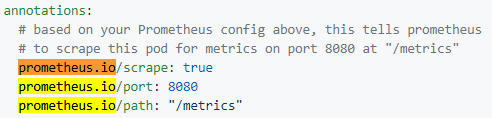
# * `prometheus.io/scrape`: Only scrape pods that have a value of `true`
# * `prometheus.io/path`: If the metrics path is not `/metrics` override this.
# * `prometheus.io/port`: Scrape the pod on the indicated port instead of the
- 创建HPA,HPA的yaml文件中需要用于产生custom metrics的app名称
注:根据官方文档setup an extension API server,需要给serviceaccount绑定ClusterRole system:auth-delegator,该ClusterRole是为了插件API server向main API server请求认证和授权检查,认证方式为Webhook Token Authentication。绑定方式参考custom-metrics.yaml
上述流程中主要涉及的难点有:Prometheus和adapter的原理,证书的生成,extension-apiserver-authentication-role和aggregation
- Prometheus和adapter的原理
prometheus获取用户metrics使用的是service-discovery机制,参见kubernetes_sd_config(The service role discovers a target for each service port for each service. This is generally useful for blackbox monitoring of a service. The address will be set to the Kubernetes DNS name of the service and respective service port)
Prometheus adapter的原理类似heapster,请求收集各prometheus的数据,并通过REST发送给HPA controller。prometheus的数据可以由prometheus client产生
- 相关证书主要是两个,serving CA和RequestHeader client CA,证书描述参见kubernete的证书总结。文章中所说的Serving Certificates可以使用kube-apiserver配置中--tls-cert-file --tls-private-key-file指定的值,也可以使用不同的CA,用于https通信认证。注意:serving证书的hosts字段需要包含<service>.<namespace>.svc,其中service和namespace为APIService注册时指定的service和namespace,生成参见aggregation
同时还有--proxy-client-cert-file 和--proxy-client-key-file指定的代理证书。更多描述参见Configure the aggregation layer (There are a few setup requirements for getting the aggregation layer working in your environment to support mutual TLS auth between the proxy and extension apiservers. Kubernetes and the kube-apiserver have multiple CAs, so make sure that the proxy is signed by the aggregation layer CA and not by something else, like the master CA),也可以在插件的API server flag中传入--authentication-skip-lookup,但这样会同时关闭client认证,可以通过手动传入--client-ca-file启用client认证
- extension-apiserver-authentication-role
关于extension-apiserver-authentication-role的表述参见Serving Certificates, Authentication, and Authorization,该role用于插件API server在默认条件下获取kube-system命名空间中的extension-apiserver-authentication ConfigMap,extension-apiserver-authentication ConfigMap中包含了main api server使用--client-ca-file指定的client CA和--requestheader-client-ca-file指定的RequestHeader client CA 。这种方式下,相同的client证书既可以用于k8s的认证,也可以用于插件API server的认证。
- aggregation
用于注册custom API,作为代理使用。参见aggregation
总结:
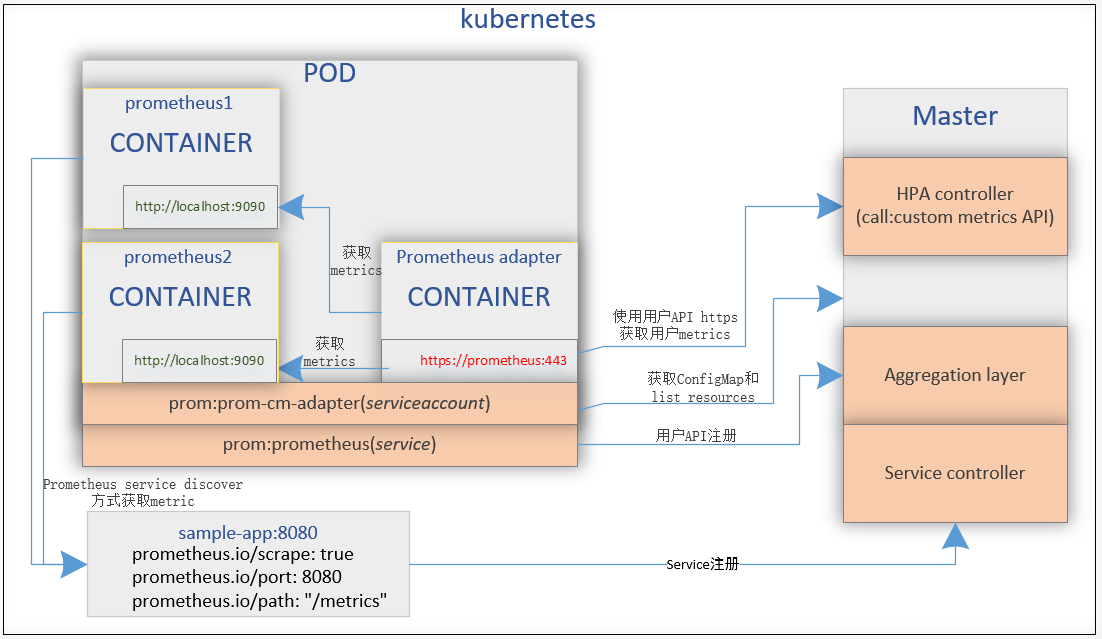
产生custom metrics的app模板中的annotations字段定义了暴露给prometheus的metrics的端口和路径;prometheus的配置中的scrape_configs字段通过标签定义了需要抓取的内容,与app中的annotations字段相呼应;custom metric API注册模板中指定了API的组和版本,以及该API对应的prometheus和prometheus adapter的service;
这样整个流程可以描述为:app产生custom metrics;prometheus抓取app产生的custom metrics;prometheus adapter请求并缓存更新prometheus的metrics,后续上报给kubernetes。从配置中可以看到prometheus并没有配置认证,而prometheus adapter则配置了与kubernetes交互的认证信息
流程图如下,aggregator通过service名称连接到APIService中指定的服务获取metric
参考:
How to build a Kubernetes Horizontal Pod Autoscaler using custom metrics
Configure Kubernetes Autoscaling With Custom Metrics
Monitoring Kubernetes performance metrics
https://github.com/slok/prometheus-python/tree/master/examples
https://www.slideshare.net/brianbrazil/python-ireland-monitoring-your-python-with-prometheus
https://godoc.org/github.com/prometheus/client_golang/prometheus
https://www.cnblogs.com/gaorong/p/7881203.html
kubernetes实现用户自定义扩缩容的更多相关文章
- Airbnb的动态kubernetes集群扩缩容
Airbnb的动态kubernetes集群扩缩容 本文介绍了Airbnb的集群扩缩容的演化历史,以及当前是如何通过Cluster Autoscaler 实现自定义扩展器的.最重要的经验就是Airbnb ...
- 从零入门 Serverless | Serverless Kubernetes 应用部署及扩缩容
作者 | 邓青琳(轻零) 阿里云技术专家 导读:本文分为三个部分,首先给大家演示 Serverless Kubernetes 集群的创建和业务应用的部署,其次介绍 Serverless Kuberne ...
- Kubernetes 监控:Prometheus Adpater =》自定义指标扩缩容
使用 Kubernetes 进行容器编排的主要优点之一是,它可以非常轻松地对我们的应用程序进行水平扩展.Pod 水平自动缩放(HPA)可以根据 CPU 和内存使用量来扩展应用,前面讲解的 HPA 章节 ...
- 三十三、HPA实现自动扩缩容
通过HPA实现业务应用的动态扩缩容 HPA控制器介绍 当系统资源过高的时候,我们可以使用如下命令来实现 Pod 的扩缩容功能 $ kubectl -n luffy scale deployment m ...
- 如何根据不同业务场景调节 HPA 扩缩容灵敏度
背景 在 K8s 1.18 之前,HPA 扩容是无法调整灵敏度的: 对于缩容,由 kube-controller-manager 的 --horizontal-pod-autoscaler-downs ...
- Docker Swarm(七)Scale 扩(缩)容服务
扩(缩)容服务 扩容服务 Service还提供了复制(类似kubernetes里的副本)功能.可以通过 docker service scale 命令来设置服务中容器的副本数: docker serv ...
- 【kubevirt】VirtualMachineInstanceReplicaSet(vmis)-扩缩容-弹性伸缩
@ 目录 概述/理解 使用场景 创建vmis 扩缩容 弹性伸缩 方法1 方法2 概述/理解 VirtualMachineInstanceReplicaSet(vmis)确保指定数量的 VirtualM ...
- 构建Docker平台【第四篇】创建服务及扩缩容等操作
第一步:创建服务 1. 配置 nginx 的 yaml 文件 apiVersion: extensions/v1beta1 kind: Deployment metadata: name: my-ng ...
- Docker Kubernetes 容器扩容与缩容
Docker Kubernetes 容器扩容与缩容 环境: 系统:Centos 7.4 x64 Docker版本:18.09.0 Kubernetes版本:v1.8 管理节点:192.168.1.79 ...
随机推荐
- MyCat 枚举分片设计思考,查询命中条件
Mycat多租户实现的两种方式 MyCat,各种分片规则,仅保证插入的时候分片.表关联,join,查询怎么命中分片条件,还是需要设计. 今天稍微测了一下. ER 分片,此方式,插入的时候能分片,但是查 ...
- scrapy的学习总结(1)
1.xpath和css的节点的共同结合使用是一个挺好的使用过程,还有就是配合正则表达式的使用,这个也是很重要的.解决任何一个问题都会有不同方法.学会思考的解决问题. 2.item的数据抽取,pipel ...
- postman模拟HttpPost请求的方法
开始想装postman的Google浏览器插件的,但是发现应用商店无法搜索,下载的拖进扩展也装不上... 于是找到了这个绿色版的Postman桌面程序!有需要的可以下载,点击下载:http://dow ...
- 各大HotFix热补丁方案分析和比较
最近开源界涌现了很多热补丁项目,但从方案上来说,主要包括Dexposed.AndFix.ClassLoader(来源是原QZone,现淘宝的工程师陈钟,在15年年初就已经开始实现)三种.前两个都是阿里 ...
- 为Hi3531添加4串口支持
修改文件为 linux-3.0.y\arch\arm\mach-godnet\core.c linux-3.0.y\arch\arm\mach-godnet\include\mach\irqs.h 修 ...
- OkHttp使用教程——网络操作之OkHttp, Volley以及Gson
写这篇文章的动机 在安卓项目中有一个问题可能无法避免:网络.不管你是加载图片,请求API数据还是从因特网上获得一个字节,你都是在使用网络. 鉴于网络在安卓中的重要性与基础性,当今安卓开发者面临的问题之 ...
- HI3531编译helloworld,执行错误
若在嵌入式系统中执行某文件出现如下错误: -/bin/sh: XXX: not found 一般是因为缺少库文件,解决方法有2: 1,文件系统的busybox编译时使用动态编译方式 2,或编译该文件的 ...
- linux内核initrd文件自定义方法
linux内核initrd文件自定义方法 重新编译内核后,可能加入了自定义的模块,就有可能需要修改init文件,而init文件就在initrd中,这里记录下操作步骤,以防遗忘. 1. cp /bo ...
- Java之List排序出错
Java之List排序出错 Bound mismatch: The generic method sort(List<T>) of type Collections is not appl ...
- Windows 7下阻止系统关机
从Vista开始,想阻止系统关机就开始变麻烦了,不能只拦截WM_QUERYENDSESSION了,操作系统只给一个应用程序两秒钟的时间去保存自己的东西,两秒钟之后,不管做完了没有,Game Over! ...