
NRPE介绍
一、简介
1、NRPE介绍
NRPE是Nagios的一个功能扩展,它可在远程Linux/Unix主机上执行插件程序。通过在远程服务器上安装NRPE插件及Nagios插件程序来向Nagios监控平台提供该服务器的本地情况,如CPU负载,内存使用,磁盘使用等。这里将Nagios监控端称为Nagios服务器端,而将远程被监控的主机称为Nagios客户端。
Nagios监控远程主机的方法有多种,其方式包括SNMP,NRPE,SSH,NCSA等。这里介绍其通过NRPE监控远程Linux主机的方式。
NRPE(Nagios Remote Plugin Executor)是用于在远端服务器上运行监测命令的守护进程,它用于让Nagios监控端基于安装的方式触发远端主机上的检测命令,并将检测结果返回给监控端。而其执行的开销远低于基于SSH的检测方式,而且检测过程不需要远程主机上的系统账号信息,其安全性也高于SSH的检测方式。
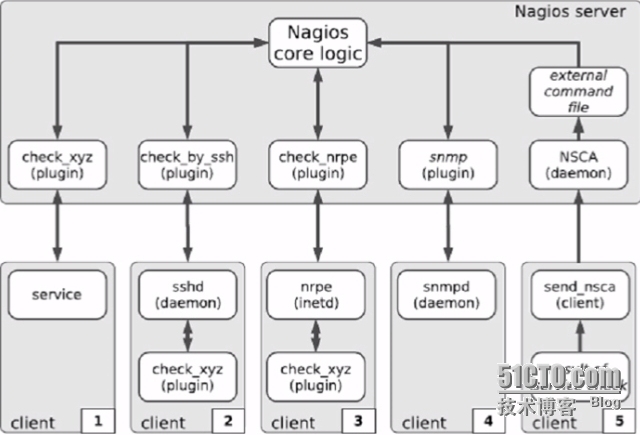
2、NRPE的工作原理
NRPE有两部分组成
check_nrpe插件:位于监控主机上
nrpe daemon:运行在远程主机上,通常是被监控端agent
注意:nrpe daemon需要Nagios-plugins插件的支持,否则daemon不能做任何监控
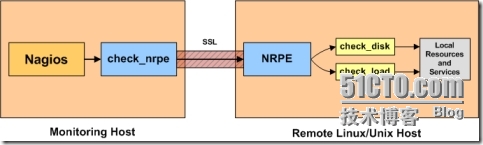
详细的介绍NRPE的工作原理
当Nagios需要监控某个远程Linux主机的服务或者资源情况时:
首先:Nagios会运行check_nrpe这个插件,告诉它要检查什么;
其次:check_nrpe插件会连接到远程的NRPE daemon,所用的方式是SSL;
然后:NRPE daemon 会运行相应的Nagios插件来执行检查;
最后:NRPE daemon 将检查的结果返回给check_nrpe 插件,插件将其递交给nagios做处理。
二、被监控端安装Nagios-plugins插件和NRPE
1、添加nagios用户
- [root@ClientNrpe ~]# useradd -s /sbin/nologin nagios
2、安装nagios-plugins,因为NRPE依赖此插件
- [root@ClientNrpe ~]# yum -y install gcc gcc-c++ make openssl openssl-devel
- [root@ClientNrpe ~]# tar xf nagios-plugins-2.0.3.tar.gz
- [root@ClientNrpe ~]# cd nagios-plugins-2.0.3
- [root@ClientNrpe nagios-plugins-2.0.3]# ./configure --with-nagios-user=nagios --with-nagios-group=nagios
- [root@ClientNrpe nagios-plugins-2.0.3]# make && make install
- #注意:如何要监控mysql 需要添加 --with-mysql
3、安装NRPE
- [root@ClientNrpe ~]# tar xf nrpe-2.15.tar.gz
- [root@ClientNrpe ~]# cd nrpe-2.15
- [root@ClientNrpe nrpe-2.15]# ./configure --with-nrpe-user=nagios \
- > --with-nrpe-group=nagios \
- > --with-nagios-user=nagios \
- > --with-nagios-group=nagios \
- > --enable-command-args \
- > --enable-ssl
- [root@ClientNrpe nrpe-2.15]# make all
- [root@ClientNrpe nrpe-2.15]# make install-plugin
- [root@ClientNrpe nrpe-2.15]# make install-daemon
- [root@ClientNrpe nrpe-2.15]# make install-daemon-config
4、配置NRPE
- [root@ClientNrpe ~]# grep -v '^#' /usr/local/nagios/etc/nrpe.cfg |sed '/^$/d'
- log_facility=daemon
- pid_file=/var/run/nrpe.pid
- server_port=5666 #监听的端口
- nrpe_user=nagios
- nrpe_group=nagios
- allowed_hosts=192.168.0.105 #允许的地址通常是Nagios服务器端
- dont_blame_nrpe=0
- allow_bash_command_substitution=0
- debug=0
- command_timeout=60
- connection_timeout=300
- command[check_users]=/usr/local/nagios/libexec/check_users -w 5 -c 10
- command[check_load]=/usr/local/nagios/libexec/check_load -w 15,10,5 -c 30,25,20
- command[check_hda1]=/usr/local/nagios/libexec/check_disk -w 20% -c 10% -p /dev/hda1
- command[check_zombie_procs]=/usr/local/nagios/libexec/check_procs -w 5 -c 10 -s Z
- command[check_total_procs]=/usr/local/nagios/libexec/check_procs -w 150 -c 200
5、启动NRPE
- #以守护进程的方式启动
- [root@ClientNrpe ~]# /usr/local/nagios/bin/nrpe -c /usr/local/nagios/etc/nrpe.cfg -d
- [root@ClientNrpe ~]# netstat -tulpn | grep nrpe
- tcp 0 0 0.0.0.0:5666 0.0.0.0:* LISTEN 22597/nrpe
- tcp 0 0 :::5666 :::* LISTEN 22597/nrpe
有两种方式用于管理nrpe服务,nrpe有两种运行模式:
- -i # Run as a service under inetd or xinetd
- -d # Run as a standalone daemon
可以为nrpe编写启动脚本,使得nrpe以standard alone方式运行:
- [root@ClientNrpe ~]# cat /etc/init.d/nrped
- #!/bin/bash
- # chkconfig: 2345 88 12
- # description: NRPE DAEMON
- NRPE=/usr/local/nagios/bin/nrpe
- NRPECONF=/usr/local/nagios/etc/nrpe.cfg
- case "$1" in
- start)
- echo -n "Starting NRPE daemon..."
- $NRPE -c $NRPECONF -d
- echo " done."
- ;;
- stop)
- echo -n "Stopping NRPE daemon..."
- pkill -u nagios nrpe
- echo " done."
- ;;
- restart)
- $0 stop
- sleep 2
- $0 start
- ;;
- *)
- echo "Usage: $0 start|stop|restart"
- ;;
- esac
- exit 0
- [root@ClientNrpe ~]# chmod +x /etc/init.d/nrped
- [root@ClientNrpe ~]# chkconfig --add nrped
- [root@ClientNrpe ~]# chkconfig nrped on
- [root@ClientNrpe ~]# service nrped start
- Starting NRPE daemon... done.
- [root@ClientNrpe ~]# netstat -tnlp
- Active Internet connections (only servers)
- Proto Recv-Q Send-Q Local Address Foreign Address State PID/Program name
- tcp 0 0 0.0.0.0:22 0.0.0.0:* LISTEN 1031/sshd
- tcp 0 0 127.0.0.1:25 0.0.0.0:* LISTEN 1108/master
- tcp 0 0 0.0.0.0:5666 0.0.0.0:* LISTEN 22597/nrpe
- tcp 0 0 :::22 :::* LISTEN 1031/sshd
- tcp 0 0 ::1:25 :::* LISTEN 1108/master
- tcp 0 0 :::5666 :::* LISTEN 22597/nrpe
三、监控端安装NRPE
1、安装NRPE
- [root@Nagios ~]# tar xf nrpe-2.15.tar.gz
- [root@Nagios ~]# cd nrpe-2.15
- [root@Nagios nrpe-2.15]# ./configure
- > --with-nrpe-user=nagios \
- > --with-nrpe-group=nagios \
- > --with-nagios-user=nagios \
- > --with-nagios-group=nagios \
- > --enable-command-args \
- > --enable-ssl
- [root@Nagios nrpe-2.15]# make all
- [root@Nagios nrpe-2.15]# make install-plugin
- #安装完成后,会在Nagios安装目录的libexec下生成check_nrpe的插件
- [root@Nagios ~]# cd /usr/local/nagios/libexec/
- [root@Nagios libexec]# ll -d check_nrpe
- -rwxrwxr-x. 1 nagios nagios 76769 9月 28 08:07 check_nrpe
2、check_nrpe的用法
- [root@Nagios libexec]# ./check_nrpe -h
- NRPE Plugin for Nagios
- Copyright (c) 1999-2008 Ethan Galstad (nagios@nagios.org)
- Version: 2.15
- Last Modified: 09-06-2013
- License: GPL v2 with exemptions (-l for more info)
- SSL/TLS Available: Anonymous DH Mode, OpenSSL 0.9.6 or higher required
- Usage: check_nrpe -H <host> [ -b <bindaddr> ] [-4] [-6] [-n] [-u] [-p <port>] [-t <timeout>] [-c <command>] [-a <arglist...>]
- Options:
- -n = Do no use SSL
- -u = Make socket timeouts return an UNKNOWN state instead of CRITICAL
- <host> = The address of the host running the NRPE daemon
- <bindaddr> = bind to local address
- -4 = user ipv4 only
- -6 = user ipv6 only
- [port] = The port on which the daemon is running (default=5666)
- [timeout] = Number of seconds before connection times out (default=10)
- [command] = The name of the command that the remote daemon should run
- [arglist] = Optional arguments that should be passed to the command. Multiple
- arguments should be separated by a space. If provided, this must be
- the last option supplied on the command line.
- Note:
- This plugin requires that you have the NRPE daemon running on the remote host.
- You must also have configured the daemon to associate a specific plugin command
- with the [command] option you are specifying here. Upon receipt of the
- [command] argument, the NRPE daemon will run the appropriate plugin command and
- send the plugin output and return code back to *this* plugin. This allows you
- to execute plugins on remote hosts and 'fake' the results to make Nagios think
- the plugin is being run locally.
- check_nrpe -H <host> [-n] [-u] [-p <port>] [-t <timeout>] [-c <command>] [-a <arglist...>]
- [root@Nagios libexec]# ./check_nrpe -H 192.168.0.81
- NRPE v2.15
3、定义命令
- [root@Nagios ~]# cd /usr/local/nagios/etc/objects/
- [root@Nagios objects]# vim commands.cfg
- #增加到末尾行
- define command{
- command_name check_nrpe
- command_line $USER1$/check_nrpe -H "$HOSTADDRESS$" -c "$ARG1$"
- }
4、定义服务
- [root@Nagios objects]# cp windows.cfg linhost.cfg
- [root@Nagios objects]# grep -v '^#' linhost.cfg |sed '/^$/d'
- define host{
- use linux-server
- host_name linhost
- alias My Linux Server
- address 192.168.0.81
- }
- define service{
- use generic-service
- host_name linhost
- service_description CHECK USER
- check_command check_nrpe!check_users
- }
- define service{
- use generic-service
- host_name linhost
- service_description Load
- check_command check_nrpe!check_load
- }
- define service{
- use generic-service
- host_name linhost
- service_description SDA1
- check_command check_nrpe!check_hda1
- }
- define service{
- use generic-service
- host_name linhost
- service_description Zombie
- check_command check_nrpe!check_zombie_procs
- }
- define service{
- use generic-service
- host_name linhost
- service_description Total procs
- check_command check_nrpe!check_total_procs
- }
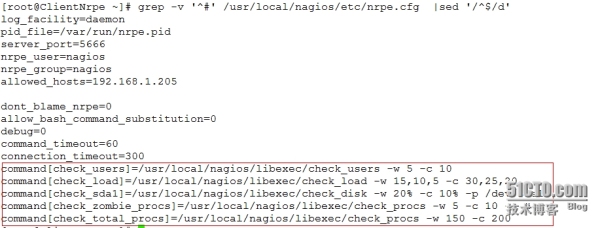
这里重点说下,Nagios服务端定义服务的命令完全是根据被监控端NRPE中内置的监控命令,如下图所示
5、启动所定义的命令和服务
- [root@Nagios ~]# vim /usr/local/nagios/etc/nagios.cfg
- #增加一行
- cfg_file=/usr/local/nagios/etc/objects/linhost.cfg
6、配置文件语法检查
- [root@Nagios ~]# service nagios configtest
- Nagios Core 4.0.7
- Copyright (c) 2009-present Nagios Core Development Team and Community Contributors
- Copyright (c) 1999-2009 Ethan Galstad
- Last Modified: 06-03-2014
- License: GPL
- Website: http://www.nagios.org
- Reading configuration data...
- Read main config file okay...
- Read object config files okay...
- Running pre-flight check on configuration data...
- Checking objects...
- Checked 20 services.
- Checked 3 hosts.
- Checked 2 host groups.
- Checked 0 service groups.
- Checked 1 contacts.
- Checked 1 contact groups.
- Checked 26 commands.
- Checked 5 time periods.
- Checked 0 host escalations.
- Checked 0 service escalations.
- Checking for circular paths...
- Checked 3 hosts
- Checked 0 service dependencies
- Checked 0 host dependencies
- Checked 5 timeperiods
- Checking global event handlers...
- Checking obsessive compulsive processor commands...
- Checking misc settings...
- Total Warnings: 0
- Total Errors: 0
- Things look okay - No serious problems were detected during the pre-flight check
- Object precache file created:
- /usr/local/nagios/var/objects.precache
7、重新启动nagios服务
- [root@Nagios ~]# service nagios restart
- Running configuration check...
- Stopping nagios: done.
- Starting nagios: done.
8、打开Nagios web监控页面
1)首先点击【Hosts】查看监控主机状态是否为UP

2)其次点击【Services】查看各监控服务的状态是否为OK
注意:在监控新添加的主机linhost;出现状态为CRITICAL,提示没有那个文件或目录。下面是解决办法
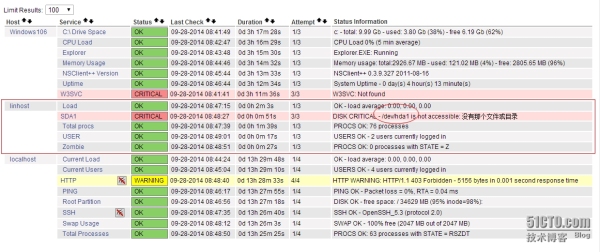
在监控Linhost主机时出现一个CRITICAL的警告,查找解决办法

- ###被监控端修改NRPE配置文件并重启NRPE服务
- [root@ClientNrpe etc]# vim nrpe.cfg
- command[check_sda1]=/usr/local/nagios/libexec/check_disk -w 20% -c 10% -p /dev/sda1
- [root@ClientNrpe etc]# service nrped restart
- ###监控端修改linhost.cfg配置文件并重启nagios和httpd服务
- [root@Nagios objects]# vim linhost.cfg
- #注释:原来这里是hda1,现在修改成sda1
- define service{
- use generic-service
- host_name linhost
- service_description SDA1
- check_command check_nrpe!check_sda1
- }
- [root@Nagios ~]# service nagios restart
- Running configuration check...
- Stopping nagios: done.
- Starting nagios: done.
- [root@Nagios ~]# service httpd restart
- 停止 httpd: [确定]
- 正在启动 httpd: [确定]
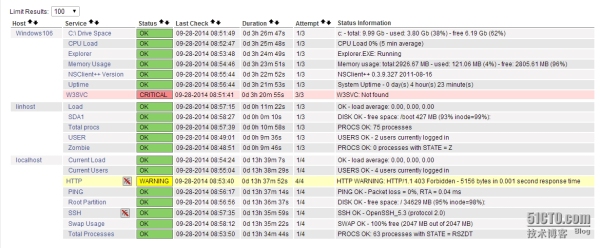
再次点击【services】即为刷新页面,查看如下图所示:
NRPE介绍的更多相关文章
- 烂泥:学习Nagios(三): NRPE安装及配置
本文由秀依林枫提供友情赞助,首发于烂泥行天下 在前两篇文章中,我们介绍了有关nagios的安装与配置,文章为<烂泥:学习Nagios(一):Nagios安装>.<烂泥:学习Nagio ...
- Nagios学习笔记四:基于NRPE监控远程Linux主机
1.NRPE简介 Nagios监控远程主机的方法有多种,其方式包括SNMP.NRPE.SSH和NCSA等.这里介绍其通过NRPE监控远程Linux主机的方式. NRPE(Nagios Remote P ...
- Nagios页面介绍(四)
四.nagios页面介绍 Nagios 4.0.8版本登录后图片
- Nagios配置和命令介绍(二 )
Nagios配置 Nagios 主要用于监控一台或者多台本地主机及远程的各种信息,包括本机资源及对外的服务等.默认的Nagios 配置没有任何监控内容,仅是一些模板文件.若要让Nagios 提供服务, ...
- Nagios安装部署和介绍(一)
一.软件版本下载 Nagios版本下载地址: http://prdownloads.sourceforge.net/sourceforge/nagios/ http://sourceforge.net ...
- 【硬件】DELLserver硬件监控及DELL系统管理工具OMSA介绍
1.1.1. DELLserver硬件监控及DELL系统管理工具OMSA介绍 本文介绍採用使用Nagios和OMSA监控DELLserver的硬件健康状态,Nagios监控的方式是NRPE模式,须要配 ...
- 【硬件】DELLserver硬件监控和DELL系统管理工具OMSA介绍
1.1.1. DELLserver硬件监控和DELL系统管理工具OMSA介绍 本文介绍了利用使用Nagios和OMSA显示器DELLserver硬件健康状况,Nagios监控的方式是NRPE模式,须要 ...
- Nagios介绍
Nagios介绍 Nagios是一款功能强大.优秀的开源监控系统,它能够让你发现和解决IT架构中存在的问题,避免这些问题影响到关键业务流程. Nagios最早于1999年发布,它在开源社区的影响力是相 ...
- 关于Nagios通过NRPE监控客户端的安装与配置
环境介绍>>>>>>>>>>>>>>>>>>>>>>>> ...
随机推荐
- 报表软件公司高价悬赏BUG,100块1个我真是醉了
一直在用帆软的报表软件FineReport来做项目,也一直关注着这个公司的发展. 看到<提BUG,拿奖金>的这个活动,有些疑问和思考. 一般FineReport新版本在正式发布前,都会经过 ...
- Android NFC开发(二)——Android世界里的NFC所具备的条件以及使用方法
Android NFC开发(二)--Android世界里的NFC所具备的条件以及使用方法 NFC的应用比较广泛,而且知识面也是比较广的,所以就多啰嗦了几句,我还还是得跟着官方文档:http://dev ...
- 数据结构---队列C语言实现
#include <stdio.h> #include <stdlib.h> //队列大小 #define SIZE 1024 static int queue[SIZE] = ...
- SharePoint 开发TimerJob 介绍
项目需要写TimerJob,以前也大概知道原理,不过,开发过程中,还是遇到一些问题,网上看了好多博客,也有写的灰常好的,不过,自己还是想再写一下,也算是给自己一个总结,也算给大家多一个参考吧. Tim ...
- ruby创建某些“关键字”方法别名的语法
begin和end是ruby的关键字,但是Range中也有名称为begin和end的实例方法.现在问题来了:怎么创建它们的别名方法? 如果用class Range;alias begin_x begi ...
- 简单的Java逻辑小代码(打擂台,冒泡排序,水仙花数,回文数,递归)
1.打擂台 简单的小代码,打擂台.纪念下过去,祝福下新人. public static void main(String[] args){ int[] ld = {1,4,2,10,8,9,5}; i ...
- Python_PyMySQL数据库操作
连接数据库: conn=pymysql.connect(host=,user=',charset='utf8') 建立游标: cur = conn.cursor() 创建一个名字叫 lj 的数据库: ...
- List,Set,Map三种接口的区别
set --其中的值不允许重复,无序的数据结构 list --其中的值允许重复,因为其为有序的数据结构 map--成对的数据结构,健值必须具有唯一性(键不能同,否则值替换) List按对象进 ...
- java死锁小例子
package cn.com.io.threadDemo.ThreadSyn; /** * 通过两个属性值创建死锁 * 本程序通过两个线程各自锁定一个属性值,这样两个线程都无法结束,造成死锁 * @a ...
- 对ManualResetEvent和AutoResetEvent的巩固练习
在多线程编程中,最常用到的就是线程同步问题,前段时间开发地址采集服务器,需要携带经纬度到MapAbc中采集后,返回地址,才可以进行下一条经纬度的采集,因为队列处理和解析不是同一个线程,并且是解析经纬度 ...