
Xtrareport 多栏报表
首先看下布局designer
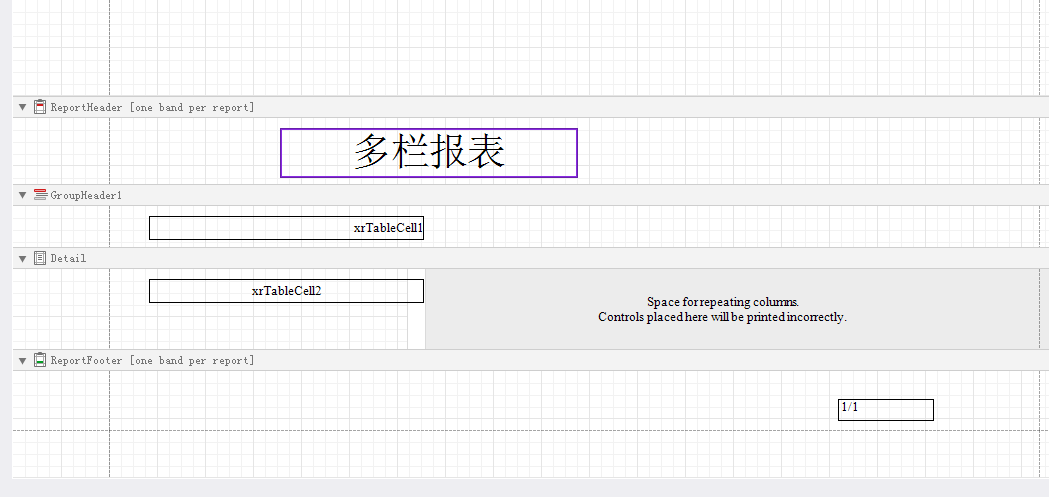
细节:
分组一定要用到GroupHeather
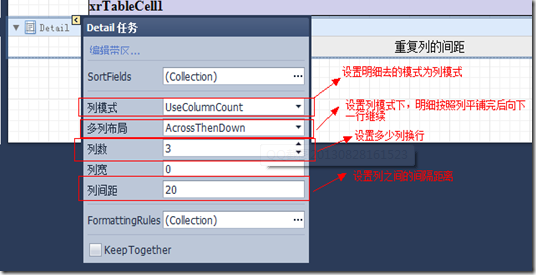
设置好有 右边会出现

接下来是代码部分
Form1中代码
using DevExpress.XtraReports.UI;

  private DataSet getds()

        {

            DataSet ds = new DataSet();

            string constr = "server=192.168.100.222;user=sa;pwd=p@ssw1rd;database=pwd1";

            SqlConnection mycon = new SqlConnection(constr);

            try

            {

                mycon.Open();

                SqlCommand mycom = new SqlCommand("select * from mulittb", mycon);

                SqlDataAdapter dpt = new SqlDataAdapter(mycom);

                dpt.Fill(ds, "mulittb");

                mycon.Close();

            }

            catch (Exception ex)

            {

                MessageBox.Show(ex.Message);

            }

            return ds;

        }

        //显示

        private void simpleButton1_Click(object sender, EventArgs e)

        {

            DataSet ds = getds();

            XtraReport1 report = new XtraReport1(ds);

            report.Landscape = true;

            documentViewer1.DocumentSource = report;

            report.CreateDocument();

        }

        //预览

        private void simpleButton2_Click(object sender, EventArgs e)

        {

            DataSet ds = getds();

            XtraReport1 report = new XtraReport1(ds);

            report.Landscape = true;

            report.ShowPreviewDialog();

        }
Xtrareport代码
   public XtraReport1(DataSet ds)

        {

            InitializeComponent();

            this.DataSource = ds;

            this.DataMember = "mulittb";

            xrTableCell1.DataBindings.Add("Text",ds,"type");

            //设置groupHeader分组字段 (type  ,报表列 排序类型.上升asc) 可以不写

            GroupField fz = new GroupField("type",XRColumnSortOrder.Ascending);

            //把分组字段添加进GroupHeader1

            ((GroupHeaderBand)(this.FindControl("GroupHeader1", true))).GroupFields.Add(fz);

            //绑定显示多列的字段

            this.xrTableCell2.DataBindings.Add("Text",ds,"name");

        }
Xtrareport 多栏报表的更多相关文章
- [原创]Devexpress XtraReports 系列 4 创建多栏报表
昨天我们完成了 [原创]Devexpress XtraReports 系列 3 创建主从报表 今天我们继续学习新的一种报表模式:多栏报表.(Demo源码,数据库最后附上) 或许很多人会问什么是多栏报表 ...
- Devexpress Xtrareports 创建多栏报表
根据官方回答:多列或多行(取决于当前的多栏设置)呈现数据的报表 这种报表是有用的,例如,当每个明细区都只显示少量数据.并且需要在一列的右侧打印下一个明细区时,这样就能充分利用整个页面的宽度,此外,当创 ...
- ActiveReports 报表应用教程 (4)---分栏报表
在 ActiveReports 中可以实现分栏报表布局样式,可以设置横向分栏.纵向分栏,同时进行分栏和分组设置,统计分栏分组的小计.合计等.在商业报表系统中常见的分栏报表有商品标签.员工工卡.条码打印 ...
- FastReport.Net使用:[9]多栏报表(多列报表)
方法一:使用页的列属性(Page Columns) 1.绘制报表标题 2.设置页的列数量为3,其他默认不变.报表设计界面便如下呈现. 3.报表拷贝前面[分组]报表的内容. 4.就这么简单,一张多栏报表 ...
- Devexpress Xtrareport 创建主从报表
效果 xtrareport 布局 From 代码 private DataSet Getdata() { DataSet ds = new DataSet(); //config配置字符串 strin ...
- Xtrareport 报表的一些属性及控件
基本概念: XtraReports 中的每个报表都由 XtraRepot 类的一个实例表示,或者由该类的子类来表示(这种情况更常见). 因此,每个报表都作为带区的容器使用,而每个带区中都包含报表控件. ...
- 关于devexpress报表XtraReport,动态修改报表样式(.repx格式),动态添加数据并使用的理解
一.基本概念: XtraReports 中的每个报表都由 XtraRepot 类的一个实例表示,或者由该类的子类来表示(这种情况更常见). 因此,每个报表都作为带区的容器使用,而每个带区中都包含报表控 ...
- [原创]Devexpress XtraReports 系列 5 创建交叉报表
昨天我们已经介绍了如何创建多栏报表,详见:[原创]Devexpress XtraReports 系列 4 创建多栏报表 今天我们继续我们的XtraReports系列.Demo和数据库文件最后会附上. ...
- Devexpress XtraReports 交叉报表
[原创]Devexpress XtraReports 系列 5 创建交叉报表 昨天我们已经介绍了如何创建多栏报表,详见:[原创]Devexpress XtraReports 系列 4 创建多栏报表 ...
随机推荐
- ubuntu - 如何搜索文件?
1.whereis 文件名 特点:快速,但是是模糊查找,例如 找 #whereis mysql 它会把mysql,mysql.ini,mysql.*所在的目录都找出来.我一般的查找都用这条命令. 2. ...
- 微信小程序小结(5) -- 常用语法
在 pages 字段的第一个页面就是这个小程序的首页(打开小程序看到的第一个页面). Page生命周期 属性 类型 描述 onLoad Function 生命周期函数--监听页面加载.一个页面只会调用 ...
- xshell学习笔记
$0:当前Shell程序的文件名dirname $0,获取当前Shell程序的路径cd `dirname $0`,进入当前Shell程序的目录 echo "hvkjvk" > ...
- java插入图片到数据库(可以批量)
package sundun.zfpt.gg.web; import java.io.File; import java.io.FileInputStream; import java.sql.Con ...
- Linux安装步骤
1.查看Linux系统是32位还是64位 #查看系统位数 getconf LONG_BIT #或者 uname -m #或者 arch #或者 file /sbin/init 2.IP配置 网络选择桥 ...
- P3272 [SCOI2011]地板
\(\color{#0066ff}{ 题目描述 }\) lxhgww的小名叫"小L",这是因为他总是很喜欢L型的东西.小L家的客厅是一个R*C的矩形,现在他想用L型的地板来铺满整个 ...
- C#WinForm POST方式提交给网页(与网页交互) (转)
提交(POST): 需要导入命名空间: using System.Net;using System.IO; string postData = "username=" + Logi ...
- ubuntu开机自启动服务管理
安装sysv-rc-conf sudo apt-get install sysv-rc-conf 执行下面,查看服务情况 sudo sysv-rc-conf 启动服务有以下两种方式 update-rc ...
- 使用Mybatis-plus发生org.apache.ibatis.binding.BindingException: Invalid bound statement (not found):
容我慢慢说来,之前是使用springboot+mybatis.我一直采用xml配置文件写sql. 后来采用了mybatis-plus之后,在本地上面测试没有一点问题.一放到服务器就发生这种情况 在本地 ...
- N - 嘤嘤嘤 (并查集+枚举)
Our lovely KK has a difficult Social problem. A big earthquake happened in his area. N(2≤N≤2000)N(2≤ ...