
Devexpress Xtrareport 创建主从报表
效果
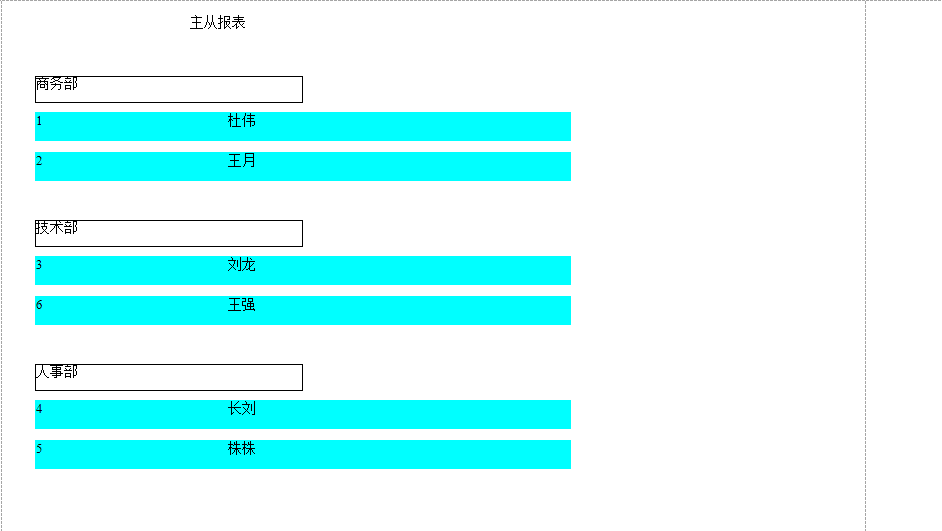
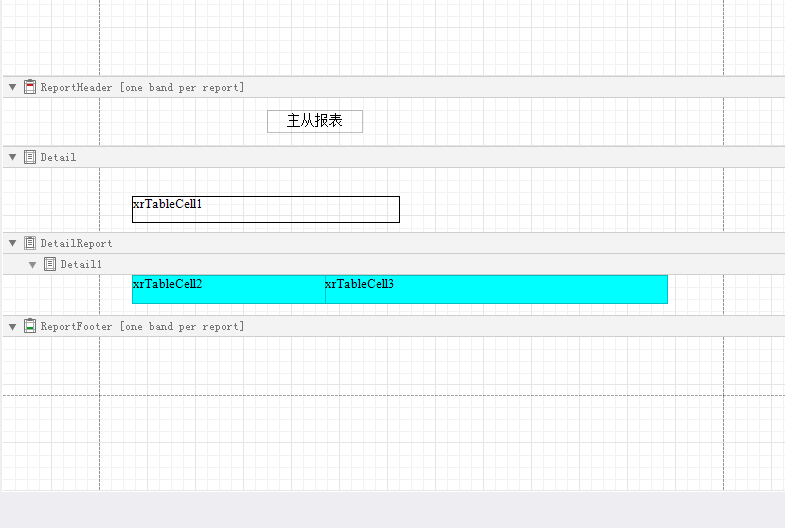
xtrareport 布局
From 代码
    private DataSet Getdata()

        {

            DataSet ds = new DataSet();

            //config配置字符串

            string constr=ConfigurationManager.ConnectionStrings["constr"].ToString();

            SqlConnection mycon = new SqlConnection(constr);

            try

            {

                mycon.Open();

                //表1

                SqlCommand mycom = new SqlCommand("select * from dp ", mycon);

                SqlDataAdapter dpt = new SqlDataAdapter(mycom);

                dpt.Fill(ds, "dp");

                //表2

                SqlCommand mycom2 = new SqlCommand("select * from duser ", mycon);

                dpt = new SqlDataAdapter(mycom2);

                dpt.Fill(ds, "duser");

                mycon.Close();

                //创建主外键

                DataColumn parent = ds.Tables["dp"].Columns["dpid"];

                DataColumn child = ds.Tables["duser"].Columns["dpid"];

                //添加关系并指定为RelationColumn

                DataRelation rel = new DataRelation("RelationColumn", parent, child);

                ds.Relations.Add(rel);

            }

            catch (Exception ex)

            {

                MessageBox.Show(ex.Message);

            }

            return ds;

        }

        private void simpleButton1_Click(object sender, EventArgs e)

        {

            DataSet ds=Getdata();

            XtraReport1 report = new XtraReport1(ds);

            report.Landscape = true;

            documentViewer1.DocumentSource = report;

            report.CreateDocument();

        }

    }
Xtrareport 代码
      public XtraReport1(DataSet ds)

        {

            InitializeComponent();

            //绑定主表

            this.DataSource = ds;

            this.DataMember = "dp";

            this.xrTableCell1.DataBindings.Add("Text", ds, "dp.dpname");

            //指定从表成员

            DetailReport.DataMember = "RelationColumn";

            //绑定从表

            DetailReport.DataSource = ds;

            this.xrTableCell2.DataBindings.Add("Text", ds, "RelationColumn.userid");

            this.xrTableCell3.DataBindings.Add("Text", ds, "RelationColumn.username");

        }
注意事项
dataset数据集中绑定了两个表,一定要看清楚有没有填充进去,没有填充的话,从表不会显示数据的
Devexpress Xtrareport 创建主从报表的更多相关文章
- [原创]Devexpress XtraReports 系列 3 创建主从报表
昨天写了系列的第二篇Devexpress XtraReports 系列 2 创建表格报表 . 今天我们来继续系列 3 创建主从报表 首先我们来看看最后实现的效果.Demo最后附上. 开始吧. 第一步, ...
- [原创]Devexpress XtraReports 系列 5 创建交叉报表
昨天我们已经介绍了如何创建多栏报表,详见:[原创]Devexpress XtraReports 系列 4 创建多栏报表 今天我们继续我们的XtraReports系列.Demo和数据库文件最后会附上. ...
- [原创]Devexpress XtraReports 系列 6 创建并排报表
昨天我们已经介绍了如何创建交叉报表,详见:[原创]Devexpress XtraReports 系列 5 创建交叉报表 今天我们继续我们的XtraReports系列.Demo和数据库文件最后会附上. ...
- DevExpress XtraReports 入门四 创建 Web 报表
原文:DevExpress XtraReports 入门四 创建 Web 报表 本文只是为了帮助初次接触或是需要DevExpress XtraReports报表的人群使用的,为了帮助更多的人不会像我这 ...
- Devexpress Xtrareport 并排报表
什么是并排报表呢? 按照我个人理解:并排报表是把两张或者两张以上的报表,放在一个报表页面. 注:为了方便,本示例使用同一个数据源,但是您可以使用相同的方法,而在一个报表文档中显示两个完全不同的 (使用 ...
- Devexpress Xtrareports 创建多栏报表
根据官方回答:多列或多行(取决于当前的多栏设置)呈现数据的报表 这种报表是有用的,例如,当每个明细区都只显示少量数据.并且需要在一列的右侧打印下一个明细区时,这样就能充分利用整个页面的宽度,此外,当创 ...
- [原创]Devexpress XtraReports 系列 2 创建表格报表
昨天发表了Devexpress XtraReports系列开篇,今天我们继续. 今天的主题是创建表格报表. 首先我们来看看最后实现的效果.Demo最后附上. 接下来开始讲解如何一步一步做出这个报表: ...
- [原创]Devexpress XtraReports 系列 8 创建Drill-Through报表
哎,今天公司工作忙了一天,一直没有时间写写东西.所以只能昨天晚上加班写咯.苦逼啊...... 昨天发表了Devexpress XtraReports系列第七篇[原创]Devexpress XtraRe ...
- [原创]Devexpress XtraReports 系列 10 创建标签报表
今天这篇是Dx Reports 基础初级系列的最后一篇了.以后如果有什么高级的应用,应该另开一个中级使用系列. 昨天发表了Devexpress XtraReports系列第九篇[原创]Devexpre ...
随机推荐
- Kali Linux介绍篇
Kali Linux 官网:https://www.kali.org/ Kali Linux 前身是著名渗透测试系统BackTrack ,是一个基于 Debian 的 Linux 发行版,包含很多安全 ...
- 利用python下载视频
我们知道,有些网页上的视频,没有下载的按钮,并且有些视频需要付费下载,很多同学因此很苦恼.不怕,有问题找我,我试试用程序员的方式通俗易懂教会大家. 1.你先下载一个Python,不会下载的同学可以看这 ...
- docker常用命令行集锦
对工作中用到的docker命令行进行一个汇总,方便以后的命令行查询,同时也为了加强记忆,会把工作中用到的命令,持续更新上 1.查看私有仓库都有哪些镜像 curl -X GET http://10.27 ...
- ubuntu17.04安装flash
因为用不了软件商店(别问我为什么) 所以手动安装 1 下载文件 在firefox下下载 *****.tar.gz 压缩包 ,并解压(一般目录在 /home 当前用户下的 下载目录下) adobe官网 ...
- 【51nod1847】奇怪的数学题(Min_25筛+杜教筛)
题面 传送门 题解 这题有毒--不知为啥的错误调了半天-- 令\(f(i)={sgcd(i)}\),那么容易看出\(f(i)\)就是\(i\)的次大质因子,用\(i\)除以它的最小质因子即可计算 于是 ...
- v$sqlarea,v$sql,v$sqltext这三个视图提供的sql语句有什么区别?
v$sqltext存储的是完整的SQL,SQL被分割 SQL> desc v$sqltextName Null? ...
- Jmeter解决乱码问题
一.设置编码方式utf-8并勾选编码 适用场景:参数中含有中文或乱码 二.增加beanshell脚本 添加BeanShell PostProcessor或者BeanShell Sampler,输入代码 ...
- ipad中icon与launchimage的size
图标(AppIcon)与启动图(LaunchImage)是开发iOS应用程序必不可少的内容,但是在网络上对于这部分的内容讲解的并不详细,所以花些时间写了这篇文章,希望有需要的朋友可以随时查看 想知道A ...
- Bridge Across Islands POJ - 3608 旋转卡壳求凸包最近距离
\(\color{#0066ff}{题目描述}\) 几千年前,有一个小王国位于太平洋的中部.王国的领土由两个分离的岛屿组成.由于洋流的冲击,两个岛屿的形状都变成了凸多边形.王国的国王想建立一座桥来连接 ...
- Nginx多域名负载均衡配置
Nginx负载均衡设置 环境: 负载均衡:192.168.188.128:80 Web1:192.168.188.128:81 Web2:192.168.188.129:80 正式环境中,需要解析域名 ...