
spring batch 读取多个文件数据导入数据库
项目的目录结构

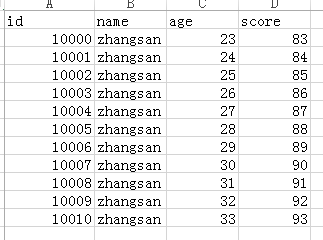
需要读取文件的的数据格式
applicatonContext.xml的配置
<?xml version="1.0" encoding="UTF-8"?>

<beans xmlns="http://www.springframework.org/schema/beans"

    xmlns:xsi="http://www.w3.org/2001/XMLSchema-instance" xmlns:p="http://www.springframework.org/schema/p"

    xmlns:tx="http://www.springframework.org/schema/tx" xmlns:aop="http://www.springframework.org/schema/aop"

    xmlns:context="http://www.springframework.org/schema/context"

    xsi:schemaLocation="http://www.springframework.org/schema/beans

    http://www.springframework.org/schema/beans/spring-beans-3.0.xsd

    http://www.springframework.org/schema/tx

    http://www.springframework.org/schema/tx/spring-tx-3.0.xsd

    http://www.springframework.org/schema/aop

    http://www.springframework.org/schema/aop/spring-aop-3.0.xsd

    http://www.springframework.org/schema/context

    http://www.springframework.org/schema/context/spring-context-3.0.xsd"

    default-autowire="byName">

    <context:component-scan base-package="com.aliyun.springbatch" />

    <bean id="jobLauncher" class="org.springframework.batch.core.launch.support.SimpleJobLauncher">

        <property name="jobRepository" ref="jobRepository"/>

    </bean>

    <bean id="jobRepository" class="org.springframework.batch.core.repository.support.MapJobRepositoryFactoryBean">

        <property name="transactionManager" ref="transactionManager"></property>

    </bean>

    <bean id="transactionManager"

        class="org.springframework.batch.support.transaction.ResourcelessTransactionManager">

    </bean>

     <bean id="jdbcTemplate" class="org.springframework.jdbc.core.JdbcTemplate">

         <property name="dataSource" ref="dataSource"></property>

     </bean>

      <!-- 引入外部数据源配置信息 -->

    <bean class="org.springframework.beans.factory.config.PropertyPlaceholderConfigurer">

        <property name="locations">

            <value>classpath:com/aliyun/springbatch/sample/db/jdbc.properties</value>

        </property>

    </bean>

     <!-- 配置数据源 -->

    <bean id="dataSource" class="org.springframework.jdbc.datasource.DriverManagerDataSource">

        <property name="driverClassName" value="${jdbc.driver}"></property>

        <property name="url" value="${jdbc.url}"></property>

        <property name="username" value="${jdbc.username}"></property>

        <property name="password" value="${jdbc.password}"></property>

    </bean>

</beans>
batch.xml的配置
<?xml version="1.0" encoding="UTF-8"?>

<bean:beans xmlns="http://www.springframework.org/schema/batch"

    xmlns:bean="http://www.springframework.org/schema/beans" xmlns:xsi="http://www.w3.org/2001/XMLSchema-instance"

    xmlns:p="http://www.springframework.org/schema/p" xmlns:tx="http://www.springframework.org/schema/tx"

    xmlns:aop="http://www.springframework.org/schema/aop" xmlns:context="http://www.springframework.org/schema/context"

    xmlns:util="http://www.springframework.org/schema/util"

    xsi:schemaLocation="http://www.springframework.org/schema/beans

http://www.springframework.org/schema/beans/spring-beans-3.0.xsd

http://www.springframework.org/schema/tx

http://www.springframework.org/schema/tx/spring-tx-3.0.xsd

http://www.springframework.org/schema/aop

http://www.springframework.org/schema/aop/spring-aop-3.0.xsd

http://www.springframework.org/schema/context

http://www.springframework.org/schema/context/spring-context-3.0.xsd

http://www.springframework.org/schema/batch

http://www.springframework.org/schema/batch/spring-batch-3.0.xsd

http://www.springframework.org/schema/util http://www.springframework.org/schema/util/spring-util.xsd">

    <!-- <bean:import resource="dataSource.xml" /> -->

    <bean:import resource="applicationContext.xml" />

    <!-- Job的配置信息 -->

    <!-- commit-interval="1" 表示每处理完1条数据提交一次事务 -->

    <job id="dbJob">

        <step id="dbReadAndWriterStep" >

            <tasklet>

                <chunk reader="userReader" writer="jdbcItemWriter"

                    commit-interval="1">

                </chunk>

            </tasklet>

        </step>

    </job>

    <!-- <bean:bean id="jdbcItemReader" class="org.springframework.batch.item.database.JdbcCursorItemReader"

        scope="step"> <bean:property name="dataSource" ref="dataSource" /> <bean:property

        name="sql" value="select id,name,age,score from t_user" /> <bean:property

        name="rowMapper"> <bean:bean class="org.springframework.jdbc.core.BeanPropertyRowMapper">

        <bean:property name="mappedClass" value="com.aliyun.springbatch.sample.db.User"

        /> </bean:bean> </bean:property> </bean:bean> -->

    <!-- 读文件 多文件上传-->

    <bean:bean id="userReader" class="org.springframework.batch.item.file.MultiResourceItemReader"

        scope="step">

<!-- 单个文件读取 -->

        <!-- <property name="resource" value="file:./sample.csv" /> -->

<!-- 多个文件读取  读取文件的位置 -->

        <bean:property name="resources" value="file:#{jobParameters['inputFile']}" />

    <!-- 引入单个文件的读取对象 -->

        <bean:property name="delegate" ref="flatFileItemReader" />

    </bean:bean>

    <!-- 单个文件的读取对象 -->

    <bean:bean id="flatFileItemReader"

        class="org.springframework.batch.item.file.FlatFileItemReader">

    <!-- 跳过读取文件的第一行 因为第一行是列名-->

    <bean:property name="linesToSkip" value="1"/>

    <!-- 文件的行映射 -->

    <bean:property name="lineMapper">

      <bean:bean class="org.springframework.batch.item.file.mapping.DefaultLineMapper">

        <!-- 行的字段映射 -->

        <bean:property name="lineTokenizer">

            <!-- 映射的字段以下面names属性,以,隔开 -->

            <bean:bean

                    class="org.springframework.batch.item.file.transform.DelimitedLineTokenizer">

                <bean:property name="names" value="id,name,age,score" />

            </bean:bean>

        </bean:property>

        <!-- 设置 读取的字段映射给实体对象 -->

        <bean:property name="fieldSetMapper">

            <bean:bean

            class="org.springframework.batch.item.file.mapping.BeanWrapperFieldSetMapper">

                <bean:property name="prototypeBeanName" value="user" />

            </bean:bean>

        </bean:property>

      </bean:bean>

    </bean:property>

  </bean:bean>

  <bean:bean id="user" class="com.aliyun.springbatch.sample.db.User"></bean:bean>

    <!-- db数据的写 -->

    <!-- <bean:bean id="jdbcItemWriter"

        class="org.springframework.batch.item.database.JdbcBatchItemWriter">

        <bean:property name="dataSource" ref="dataSource" />

        <bean:property name="sql"

            value="insert into T_DESTUSER (ID,USERID,USERNAME,PASSWORD,UPDATETIME,UPDATEUSER)

                   values

                  (:id,:userId,:userName,:password,:updateDate,:updateUser)" />

        <bean:property name="itemSqlParameterSourceProvider">

            <bean:bean

                class="org.springframework.batch.item.database.BeanPropertyItemSqlParameterSourceProvider" />

        </bean:property>

    </bean:bean> -->

    <!-- 这是自定义的实现ItemWriter接口的ItemWriter的实现类 -->

<bean:bean id="jdbcItemWriter" class="com.aliyun.springbatch.sample.db.JdbcItemWriter">

</bean:bean>

</bean:beans>
jdbc.properties mysql数据源配置文件
#Oracle

#hibernate.dialect=org.hibernate.dialect.OracleDialect

#validationQuery.sqlserver=SELECT 1 FROM DUAL

#jdbc.driver=oracle.jdbc.driver.OracleDriver

#jdbc.url=jdbc:oracle:thin:@localhost:1521:orcl

#jdbc.username=activitproject

#jdbc.password=activitproject

#Mysql

jdbc.driver=com.mysql.jdbc.Driver

jdbc.url=jdbc:mysql://127.0.0.1:3306/spring_batch_demo

jdbc.username=root

jdbc.password=root
封装数据的实体类就自己写吧
测试主方法:
 public static void main(String[] args) {

        ApplicationContext context = new ClassPathXmlApplicationContext(

                "com/aliyun/springbatch/sample/db/batch.xml");

        JobLauncher launcher = (JobLauncher) context.getBean("jobLauncher");

        Job job = (Job) context.getBean("dbJob");

        try {

            // JOB执行,设置参数添加读取文件的路径

            JobExecution result = launcher.run(

                    job,

                    //添加job参数时,将读取的文件目录加入到job的参数中

                    new JobParametersBuilder()

                            .addString("inputFile",

                                    "src/main/java/com/aliyun/springbatch/sample/db/inputFile*.csv")

                            .toJobParameters());

            // 运行结果输出

            System.out.println(result.toString());

        } catch (Exception e) {

            e.printStackTrace();

        }

    }
over::
spring batch 读取多个文件数据导入数据库的更多相关文章
- larave5.6 将Excel文件数据导入数据库代码实例
<?php namespace App\Admin\Controllers; use App\AdminUser; use Illuminate\Http\Request; use Excel; ...
- 小数据量csv文件数据导入数据库(思路)
大致写写思路,因为sqlserver提供了可以直接导入的图形界面. 1.private static string GetConnectionString(string folderPath) // ...
- 读取Execl表数据 导入数据库
不知不觉博客园园林都两年多了,我是今年毕业的应届生,最近公司项目需要改动,很多的数据需要导入,很多的实体类需要些.考虑到这些问题自己写了两个winform版的小工具,一个是读取Execl数据导入数据库 ...
- MsSqlServer bak文件数据导入
MsSqlServer bak文件数据导入 第一步首先在你的数据库中建立一个空数据库 选中新建的数据库 鼠标右键 任务 还原 数据库 这个时候会弹出这种一个框 之后选择原设备 会弹出 点击加入 找到 ...
- springMVC(5)---导入excel文件数据到数据库
springMVC(5)---导入excel文件数据到数据库 上一篇文章写了从数据库导出数据到excel文件,这篇文章悄悄相反,写的是导入excel文件数据到数据库.上一篇链接:springMVC(4 ...
- C#选择多个文件并读取多个文件数据
原文:C#选择多个文件并读取多个文件数据 版权声明:本文为博主原创文章,转载请附上链接地址. https://blog.csdn.net/ld15102891672/article/details/8 ...
- 将Excel中数据导入数据库(一)
在工作中经常要将Excel中数据导入数据库,这里介绍一种方法. 假如Excel中的数据如下: 数据库建表如下: 其中Id为自增字段: Excel中数据导入数据库帮助类如下: using System; ...
- 使用python将excel数据导入数据库
使用python将excel数据导入数据库 因为需要对数据处理,将excel数据导入到数据库,记录一下过程. 使用到的库:xlrd 和 pymysql (如果需要写到excel可以使用xlwt) 直接 ...
- 使用openpyxl模块将Excel中的数据导入数据库
这里将不介绍openpyxl模块的详细操作. 主要就是记录一个使用openpyxl模块将Excel表格的数据导入数据库中的实例. from openpyxl import load_workbook ...
随机推荐
- shell script-判断式
test判断式 看下面: test -e /opt/a.txt && echo "exist" || echo "not exist" 判断 / ...
- R: 导入 csv 文件,导出到csv文件,;绘图后导出为图片、pdf等
################################################### 问题:导入 csv 文件 如何从csv文件中导入数据,?参数怎么设置?常用参数模板是啥? 解决方 ...
- ie浏览器float兼容性
在最近的项目中,遇到label.input.和button显示同一行,需求如下 实现代码,框架为react.js <label class="formGrid__label requi ...
- Entity Framework Code-First(14):From Existing DB
Code-First from an Existing Database: Here, you will learn how to generate code-first context and en ...
- BOX (UVA-1587) 比较代码书写上的差距
对比一下代码的书写差距: 我的代码: #include<iostream> using namespace std; ]; ]; ]; //访问标记 bool judge(int i, i ...
- Java中Method.invoke方法,反射?
正常来说,我们调用对象的方法是通过dot运算符来进行的,这里我们介绍另一种方法,有以下几个步骤:1,获取该类的Class Type:2,通过getMethod方法获取Method对象:3,通过调用in ...
- vue -- 异常处理集合
1.npm run dev 运行出错,报错如下: > webpack-dev-server --inline --progress --config build/webpack.dev.conf ...
- PAT L3-010【完全二叉树】
静态建树判一下1-n是不是为空就好了,如果有空的 就说明不是complete binary tree (和线段树建树差不多啊)Left=2*root:Right=2*root+1 #include ...
- 洛谷P5048 [Ynoi2019模拟赛]Yuno loves sqrt technology III(分块)
传送门 众所周知lxl是个毒瘤,Ynoi道道都是神仙题 用蒲公英那个分块的方法做结果两天没卡过去→_→ 首先我们分块,预处理块与块之间的答案,然后每次询问的时候拆成整块和两边剩下的元素 整块的答案很简 ...
- 帝都Day7——解放篇
昨天晚上的problems: songfen 坠大子段和,要把[l,r]其中一个数变成P,我们要把最小的数变成p. 当L,R没有取满整个区间,P可以在[L,R]外面!!!!!!!这种情况真是令人绝望. ...